
Neo STM-MOP
Neo 10-in-1 1500W Steam Mop
Model: STM-MOP
1. મહત્વપૂર્ણ સલામતી સૂચનાઓ
Please read all instructions carefully before using the Neo 10-in-1 Steam Mop. Failure to follow these instructions may result in electric shock, fire, or serious personal injury.
- Always disconnect the appliance from the power supply before filling with water, cleaning, or performing maintenance.
- જ્યારે પ્લગ ઇન હોય ત્યારે સ્ટીમ મોપને અડ્યા વિના છોડશો નહીં.
- Do not direct steam at people, animals, or electrical outlets. Steam is very hot and can cause burns.
- ખનિજોના સંચયને રોકવા અને ઉપકરણનું આયુષ્ય વધારવા માટે પાણીની ટાંકીમાં ફક્ત નિસ્યંદિત અથવા ખનિજ રહિત પાણીનો ઉપયોગ કરો.
- ઉપકરણને બાળકો અને પાલતુ પ્રાણીઓની પહોંચથી દૂર રાખો.
- સ્ટીમ મોપને પાણી કે અન્ય કોઈપણ પ્રવાહીમાં બોળશો નહીં.
- Ensure the power cord is not damaged. Do not operate the appliance with a damaged cord or plug.
- આ ઉપકરણ ફક્ત ઘરેલું ઉપયોગ માટે છે. ઘરની બહાર અથવા વ્યવસાયિક હેતુઓ માટે ઉપયોગ કરશો નહીં.
2. ઉત્પાદન ઓવરview
The Neo 10-in-1 Steam Mop is a versatile cleaning appliance designed for various surfaces. It features a powerful 1500W heating element, a 400ml water tank, and a comprehensive 10-piece accessory kit.

Image: The Neo 10-in-1 Steam Mop shown with its full range of included accessories, highlighting its versatility.
મુખ્ય લક્ષણો:
- 1500W પાવર: Ensures quick heating and powerful steam output.
- ઝડપી હીટ-અપ: લગભગ 30 સેકન્ડમાં ઉપયોગ માટે તૈયાર.
- પાણીની મોટી ટાંકી: 400ml capacity for extended cleaning sessions (up to 30 minutes of steam per tank).
- વેરિયેબલ સ્ટીમ કંટ્રોલ: Adjust steam intensity for different cleaning tasks and surfaces.
- 2-ઇન-1 ડિઝાઇન: Functions as both a steam mop for floors and a detachable handheld steamer for various surfaces.
- 10-પીસ એસેસરી કીટ: Includes various nozzles, brushes, and tools for comprehensive cleaning.
- લાંબી પાવર કેબલ: Equipped with a 5-meter cable for extended reach.
- અર્ગનોમિક હેન્ડલ: આરામદાયક પકડ અને ઉપયોગમાં સરળતા માટે રચાયેલ છે.
- Swivel Head: 180-degree swivel head for easy maneuverability around furniture.

Image: The steam mop demonstrating its dual functionality as an upright mop and a detachable handheld unit, alongside icons for ergonomic handle, 5m cable, and 180-degree swivel head.
સમાવિષ્ટ એસેસરીઝ:

છબી: વિગતવાર view of the 10-piece accessory set, including various nozzles, brushes, a measuring cup, and mop pads.
- માપન કપ
- જેટ નોઝલ
- નાના રાઉન્ડ બ્રશ
- મોટા રાઉન્ડ બ્રશ
- ગ્રાઉટ ટૂલ
- સ્ક્રેપિંગ ટૂલ
- Fabric Tool with Microfiber Pad
- Window/Glass Cleaning Tool
- કાર્પેટ ગ્લાઇડર
- Microfiber Mop Pads (2 included)
3. સેટઅપ
વિધાનસભા:
- હેન્ડલ જોડો: સ્ટીમ મોપના મુખ્ય ભાગમાં હેન્ડલ દાખલ કરો જ્યાં સુધી તે સુરક્ષિત રીતે જગ્યાએ ન આવે.
- મોપ હેડ જોડો: Connect the mop head to the main body. Ensure it is firmly attached.
- Attach Microfiber Pad: Securely attach a clean microfiber mop pad to the bottom of the mop head. The pad typically attaches with hook-and-loop fasteners.
પાણીની ટાંકી ભરવી:
- Ensure the steam mop is unplugged from the power outlet.
- Locate the water tank cap, usually on the front or side of the main unit. Unscrew or open the cap.
- Using the provided measuring cup, fill the water tank with distilled or demineralized water. Do not overfill beyond the maximum fill line.
- પાણીની ટાંકીનું ઢાંકણ સુરક્ષિત રીતે બંધ કરો.
Note: Using tap water may lead to mineral buildup, reducing the appliance's efficiency and lifespan. Regular descaling may be required if tap water is used.
4. ઓપરેટિંગ સૂચનાઓ
Using as a Steam Mop:
- Ensure the water tank is filled and a clean mop pad is attached.
- Plug the power cord into a grounded electrical outlet. The indicator light will illuminate.
- Wait approximately 30 seconds for the steam mop to heat up. The indicator light may change color or turn off when ready.
- To activate steam, pump the handle or press the steam trigger (depending on model). Move the mop slowly and steadily over the floor surface.
- Adjust the steam intensity using the variable steam control dial if available.
- When finished, unplug the unit and allow it to cool before emptying any remaining water and removing the mop pad.

Image: Multiple Neo Steam Mops demonstrating their suitability for various floor types including carpet, tile, stone, and hard floors.
હેન્ડહેલ્ડ સ્ટીમર તરીકે ઉપયોગ કરવો:
- Unplug the steam mop. Detach the main handheld unit from the mop base by pressing the release button.
- Select the appropriate accessory for your cleaning task (e.g., jet nozzle for crevices, brush for scrubbing, fabric tool for upholstery). Attach it firmly to the handheld unit.
- Ensure the water tank is filled. Plug in the handheld unit.
- Wait for the unit to heat up. Direct the steam towards the surface to be cleaned, maintaining a safe distance.
- For stubborn areas, hold the steam over the spot for a few seconds.
- When finished, unplug and allow to cool before removing accessories and storing.
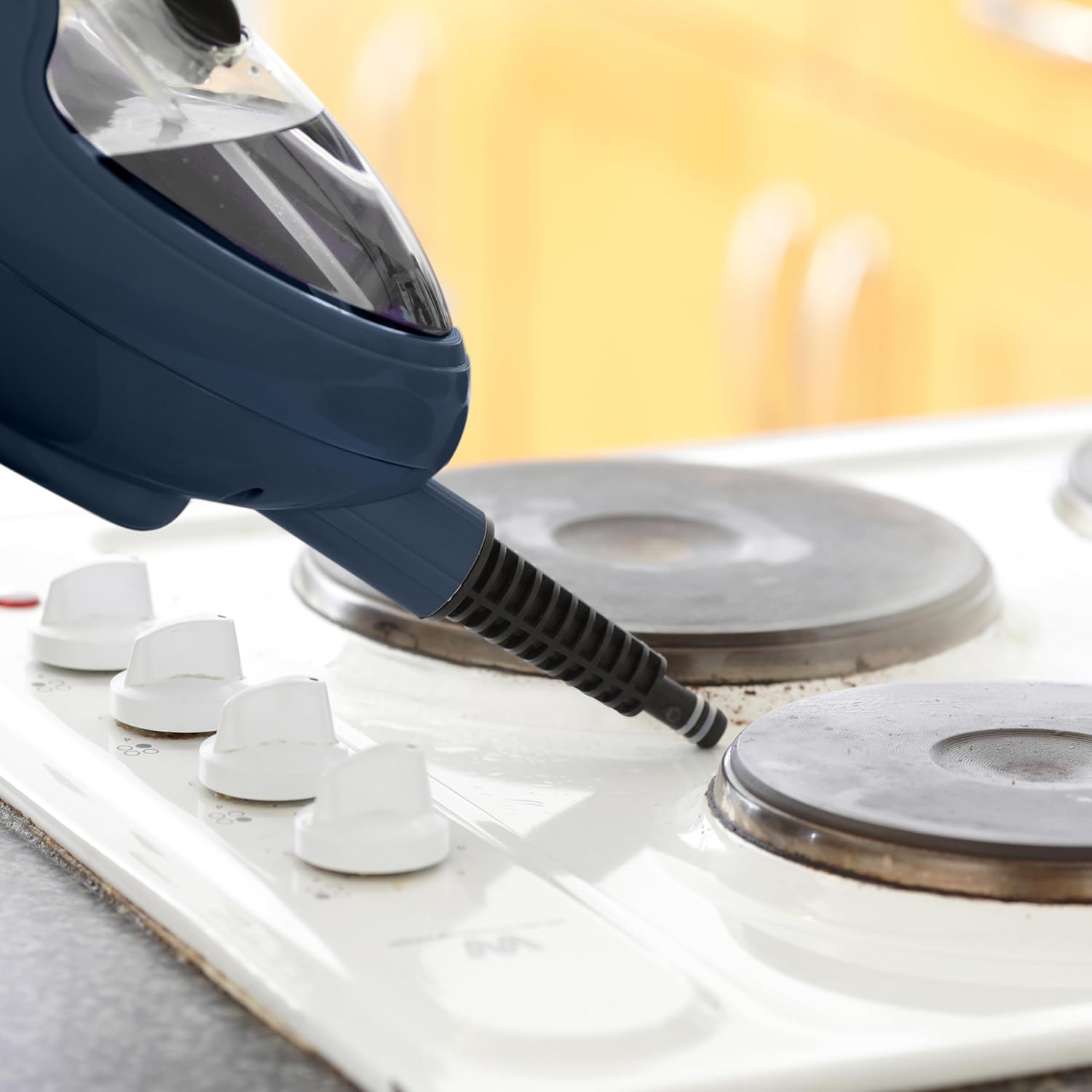
Image: The handheld steam unit being used to clean a stovetop, demonstrating its ability to target specific areas.

Image: The handheld steam unit cleaning a bathroom faucet, illustrating its use for sanitizing fixtures.

Image: The handheld steam unit with a brush attachment cleaning the interior of a microwave, showing its effectiveness on tough grime.
5. જાળવણી
યુનિટની સફાઈ:
- સફાઈ કરતા પહેલા હંમેશા ખાતરી કરો કે ઉપકરણ અનપ્લગ થયેલ છે અને સંપૂર્ણપણે ઠંડુ છે.
- સ્ટીમ મોપના બાહ્ય ભાગને નરમ, ડી. થી સાફ કરો.amp કાપડ ઘર્ષક ક્લીનર્સ અથવા સોલવન્ટનો ઉપયોગ કરશો નહીં.
- Remove and wash microfiber mop pads after each use. They can typically be machine washed with mild detergent and air dried. Do not use bleach or fabric softeners.
- Empty any remaining water from the tank after each use to prevent stagnant water and mineral buildup.
Descaling (Mineral Buildup Removal):
Over time, mineral deposits can accumulate inside the steam mop, especially if tap water is used. This can reduce steam output. Descale your unit regularly (e.g., every 1-3 months depending on water hardness and usage).
- Prepare a descaling solution: Mix 1 part white vinegar with 2 parts distilled water.
- Ensure the unit is unplugged and cool. Empty any water from the tank.
- ડીસ્કેલિંગ સોલ્યુશનને પાણીની ટાંકીમાં રેડો.
- Plug in the unit and allow it to heat up. Run the steam mop until half of the solution has been used.
- Unplug the unit and let it sit for 30 minutes to allow the solution to work.
- Plug it back in and run the remaining solution through.
- Empty the tank and rinse thoroughly with fresh distilled water. Run one full tank of fresh distilled water through the unit to flush out any remaining solution.
સંગ્રહ:
- Ensure the steam mop is completely cool and dry before storing.
- પાણીની ટાંકી ખાલી કરો.
- Store the appliance in a cool, dry place, away from direct sunlight and extreme temperatures.
- Wrap the power cord neatly around the designated cord wraps if available.
6. મુશ્કેલીનિવારણ
| સમસ્યા | સંભવિત કારણ | ઉકેલ |
|---|---|---|
| વરાળ નહીં અથવા વરાળનું ઉત્પાદન ઓછું. |
|
|
| યુનિટમાંથી પાણી લીક થઈ રહ્યું છે. |
|
|
| Mop pad not cleaning effectively. |
|
|
| યુનિટ ચાલુ થતું નથી. |
|
|
7. સ્પષ્ટીકરણો
| બ્રાન્ડ: | નિયો |
| મોડલ નંબર: | STM-MOP |
| શક્તિ: | 1500 વોટ્સ |
| ભાગtage: | ૨.૪E+૨ વોલ્ટ (૨૪૦V) |
| પાણીની ટાંકીની ક્ષમતા: | ૫૦ મિલીલીટર |
| વસ્તુનું વજન: | 2.3 કિલોગ્રામ |
| પેકેજ પરિમાણો: | 40 x 20 x 20 સેમી |
| ખાસ લક્ષણો: | Detachable, Portable |
| ભલામણ કરેલ સપાટી: | Floor, Window |
| સમાવાયેલ ઘટકો: | Nozzle, Nylon Brush, Measuring Cup, Dosing Glass (refer to Product Overview for full accessory list) |
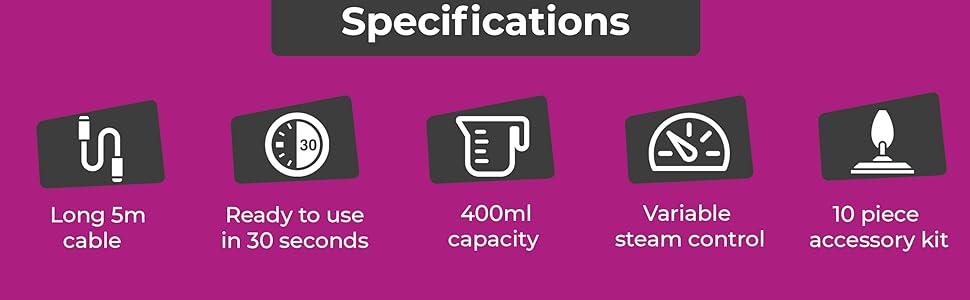
Image: An infographic summarizing key specifications including 5m cable, 30-second heat-up time, 400ml capacity, variable steam control, and the 10-piece accessory kit.
8. વોરંટી અને સપોર્ટ
Specific warranty details are not provided in this manual. For warranty information, product support, or to purchase replacement parts and accessories, please contact the manufacturer or your retailer directly.
When contacting support, please have your product model number (STM-MOP) and purchase date available.
Manufacturer: Neo
Ask a question about this manual
Ask about setup, troubleshooting, compatibility, parts, safety, or missing instructions. Manuals+ will review the question and use this page’s manual context to help answer it.