
1. પરિચય
ખરીદી બદલ આભારasing the SOAR XL ShockBox BTH6 Wireless Bluetooth Speaker. This speaker is designed to provide high-quality audio with versatile connectivity options, including Bluetooth 5.0, AM/FM radio, USB, and Aux inputs. Its portable and shockproof design, combined with dynamic multicolor LED lights, makes it suitable for various environments. Please read this manual carefully to ensure proper use and maintenance of your device.
2. ઉત્પાદન ઓવરview
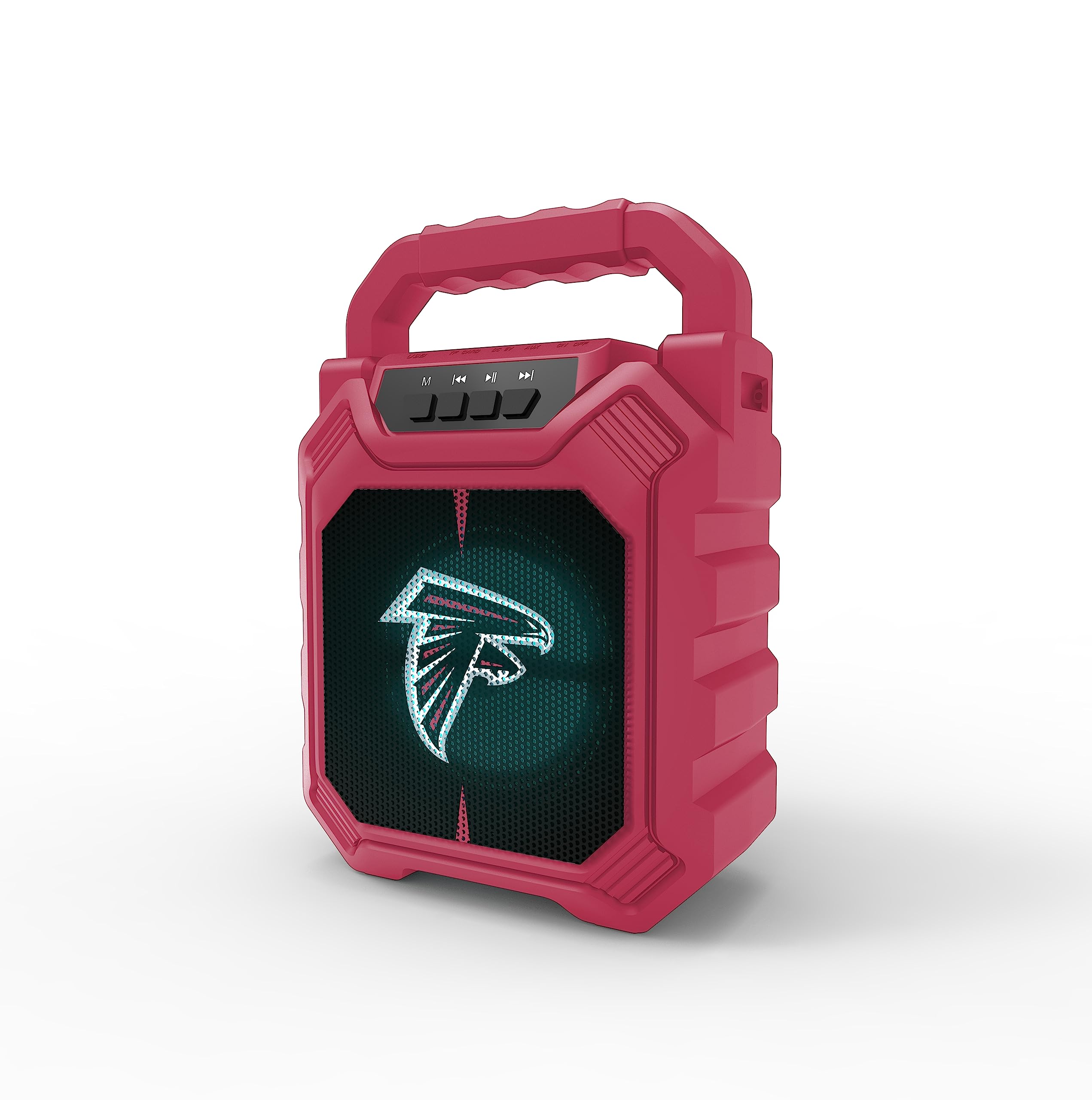
છબી 1: આગળ view of the SOAR XL ShockBox BTH6 Wireless Bluetooth Speaker, featuring the Atlanta Falcons logo.
મુખ્ય લક્ષણો:
- બ્લૂટૂથ 5.0 કનેક્ટિવિટી: For seamless wireless audio streaming.
- બહુવિધ ઑડિઓ ઇનપુટ્સ: Supports AM/FM radio, USB, and Aux connections.
- પોર્ટેબલ ડિઝાઇન: Features a convenient top handle and shockproof construction.
- લાંબી બેટરી જીવન: Provides over 5 hours of playback on a single charge.
- ડાયનેમિક એલઇડી લાઇટ્સ: Multicolor LED lights pulse with the music.
- ટ્રુ વાયરલેસ સ્ટીરિયો (TWS): Connect two speakers for enhanced stereo sound.
૪.૨. નિયંત્રણો અને પોર્ટ્સ

Image 2: Top panel of the speaker, illustrating the control buttons and various input ports.
બટન કાર્યો:
- પાવર બટન: Press and hold to turn the speaker ON/OFF. Short press to switch modes (Bluetooth, FM, USB, Aux).
- 'M' (મોડ) બટન: Short press to cycle through input modes (Bluetooth, FM Radio, USB, Aux).
- Previous Track / Volume Down: Short press for previous track (in Bluetooth/USB mode). Press and hold to decrease volume.
- પ્લે/પોઝ બટન: Short press to play or pause audio. In FM mode, short press to auto-scan and save stations.
- Next Track / Volume Up: Short press for next track (in Bluetooth/USB mode). Press and hold to increase volume.
ઇનપુટ બંદરો:
- માઇક્રો-યુએસબી ચાર્જિંગ પોર્ટ: સ્પીકર ચાર્જ કરવા માટે.
- યુએસબી પોર્ટ: USB ફ્લેશ ડ્રાઇવમાંથી ઓડિયો ચલાવવા માટે.
- Aux-in Port (3.5mm): For connecting external audio devices via an auxiliary cable.
- માઇક્રોએસડી કાર્ડ સ્લોટ: For playing audio from a MicroSD card.
4. સેટઅપ અને ઓપરેશન
૩.૧ સ્પીકરને ચાર્જ કરવું
- Connect the provided micro-USB cable to the charging port on the speaker.
- કેબલના બીજા છેડાને USB પાવર એડેપ્ટર (શામેલ નથી) અથવા કમ્પ્યુટરના USB પોર્ટ સાથે કનેક્ટ કરો.
- ચાર્જિંગ સૂચક લાઇટ પ્રકાશિત થશે. એકવાર સંપૂર્ણ ચાર્જ થયા પછી, લાઇટનો રંગ બદલાઈ શકે છે અથવા બંધ થઈ શકે છે.
- A full charge provides over 5 hours of playback time.
4.2 પાવરિંગ ચાલુ/બંધ
- To turn ON, press and hold the Power button until you hear an audible prompt.
- To turn OFF, press and hold the Power button again until the speaker powers down.
4.3 બ્લૂટૂથ પેરિંગ
- Turn on the speaker. It will automatically enter Bluetooth pairing mode, indicated by a flashing LED light and an audible prompt.
- તમારા ઉપકરણ (સ્માર્ટફોન, ટેબ્લેટ, વગેરે) પર, બ્લૂટૂથ સક્ષમ કરો અને ઉપલબ્ધ ઉપકરણો શોધો.
- Select "SOAR BTH6" from the list of devices.
- એકવાર જોડી થઈ ગયા પછી, સ્પીકર એક શ્રાવ્ય પુષ્ટિકરણ બહાર કાઢશે, અને LED લાઇટ ફ્લેશ થવાનું બંધ થઈ જશે.
- જો ઉપકરણ રેન્જમાં હોય અને બ્લૂટૂથ સક્ષમ હોય, તો સ્પીકર ચાલુ થવા પર છેલ્લા જોડીવાળા ઉપકરણ સાથે આપમેળે ફરીથી કનેક્ટ થશે.
૬.૫ એફએમ રેડિયો ઓપરેશન
- Turn on the speaker and press the 'M' (Mode) button until you enter FM Radio mode.
- To auto-scan and save available FM stations, short press the Play/Pause button. The speaker will scan and store stations automatically.
- Use the Previous Track and Next Track buttons to navigate between saved stations.
4.5 USB and Aux Input
- યુએસબી ઇનપુટ: Insert a USB flash drive into the USB port. The speaker will automatically switch to USB mode and begin playing audio files.
- Uxક્સ ઇનપુટ: Connect an external audio device (e.g., MP3 player) to the Aux-in port using a 3.5mm audio cable. Press the 'M' button to switch to Aux mode.
4.6 LED લાઇટિંગ મોડ્સ

Image 3: The speaker displaying its dynamic LED lights in a vibrant setting.
The speaker features dynamic multicolor LED lights that pulse to the rhythm of the music. These lights activate automatically when the speaker is in use. There are no user-adjustable modes for the LED lights; they are designed to enhance the audio experience visually.
૬.૪ ટ્રુ વાયરલેસ સ્ટીરિયો (TWS) પેરિંગ

Image 4: Two SOAR XL ShockBox BTH6 speakers paired together for True Wireless Stereo (TWS) sound.
To achieve a wider soundstage, you can pair two SOAR XL ShockBox BTH6 speakers together using the TWS function:
- Ensure both speakers are turned OFF.
- Turn ON both speakers. They will enter Bluetooth pairing mode.
- On one of the speakers (this will be your primary speaker), double-press the 'M' (Mode) button. The speakers will attempt to connect to each other.
- Once successfully paired, you will hear an audible confirmation. The LED lights on both speakers will synchronize.
- હવે, વિભાગ 4.3 માં વર્ણવ્યા મુજબ બ્લૂટૂથ દ્વારા તમારા ઉપકરણને પ્રાથમિક સ્પીકર સાથે કનેક્ટ કરો. ઓડિયો બંને સ્પીકર્સ દ્વારા સ્ટીરિયોમાં વાગશે.
5. જાળવણી
- સફાઈ: સ્પીકરના બાહ્ય ભાગને સાફ કરવા માટે નરમ, સૂકા કપડાનો ઉપયોગ કરો. ઘર્ષક ક્લીનર્સ અથવા સોલવન્ટનો ઉપયોગ કરશો નહીં.
- સંગ્રહ: સ્પીકરને સીધા સૂર્યપ્રકાશ અને અતિશય તાપમાનથી દૂર ઠંડી, સૂકી જગ્યાએ સંગ્રહિત કરો.
- બેટરી સંભાળ: બેટરી લાઇફ વધારવા માટે, સ્પીકરને નિયમિતપણે ચાર્જ કરો, ભલે વારંવાર ઉપયોગમાં ન હોય. લાંબા સમય સુધી બેટરીને સંપૂર્ણપણે ડિસ્ચાર્જ કરવાનું ટાળો.
- પાણી પ્રતિકાર: While designed to be durable, avoid submerging the speaker in water.
6. મુશ્કેલીનિવારણ
| સમસ્યા | શક્ય ઉકેલ |
|---|---|
| સ્પીકર ચાલુ થતું નથી. | Ensure the battery is charged. Connect the speaker to a power source using the micro-USB cable. |
| બ્લૂટૂથ દ્વારા જોડી બનાવી શકાતી નથી. | Make sure the speaker is in Bluetooth mode and within range (approx. 10 meters). Turn off and on your device's Bluetooth. Forget "SOAR BTH6" from your device's Bluetooth list and try pairing again. |
| કોઈ અવાજ નથી કે ઓછો અવાજ નથી. | Check the volume levels on both the speaker and your connected device. Ensure the correct input mode is selected. |
| એફએમ રેડિયો રિસેપ્શન નબળું છે. | Adjust the speaker's position. Ensure you are in an area with good signal strength. |
| TWS જોડી નિષ્ફળ જાય છે. | Ensure both speakers are fully charged and not connected to any other Bluetooth devices. Follow the TWS pairing steps carefully. |
7. સ્પષ્ટીકરણો
| લક્ષણ | વિગત |
|---|---|
| મોડલ નંબર | BTH6 (Variant: NFL-BTH6-DLPH) |
| બ્લૂટૂથ સંસ્કરણ | 5.0 |
| Audioડિઓ ઇનપુટ્સ | Bluetooth, AM/FM Radio, USB, Aux-in, MicroSD |
| રમવાનો સમય | Over 5 hours (per charge) |
| ચાર્જિંગ પોર્ટ | માઇક્રો-યુએસબી |
| ઉત્પાદક | પ્રાઇમ બ્રાન્ડ્સ ગ્રુપ ઇન્ક |
| તારીખ પ્રથમ ઉપલબ્ધ | સપ્ટેમ્બર 6, 2023 |
8. સત્તાવાર ઉત્પાદન વિડિઓ
વિડિઓ ૪.૧: એક સત્તાવાર ઉત્પાદન વિડિઓ શોasing the features and dynamic LED lights of the SOAR BTH6 Wireless Bluetooth Speaker.
9. વોરંટી અને સપોર્ટ
For warranty information and customer support, please refer to the documentation included with your product or contact the manufacturer, Prime Brands Group Inc., directly. Details regarding specific warranty periods and support procedures are typically provided at the point of purchase or on the manufacturer's official webસાઇટ