
1. પરિચય
The Shanrya GFQ3-80/4P Dual Power Automatic Transfer Switch (ATS) is a miniature household power switch designed for automatic switching between a main power source and a backup power source. It is primarily used to ensure continuous power supply by automatically transferring the load to the backup source when the main power fails, and back to the main source when it is restored. This device is suitable for PZ30 distribution boxes and is ideal for emergency power systems in various settings such as factories, shopping centers, and nurseries, operating at 50 or 60Hz AC rated 220V.
2. સલામતી માહિતી
- માત્ર લાયકાત ધરાવતા કર્મચારીઓ: ઇન્સ્ટોલેશન અને જાળવણી માત્ર લાયક ઇલેક્ટ્રીશિયનો દ્વારા જ થવી જોઈએ.
- પાવર ડિસ્કનેક્ટ કરો: Always disconnect all power sources before installing, wiring, or servicing the switch to prevent electric shock.
- યોગ્ય વાયરિંગ: Ensure all wiring connections are secure and comply with local electrical codes and standards. Incorrect wiring can lead to malfunction or hazards.
- પર્યાવરણીય પરિસ્થિતિઓ: ઉપકરણને વધુ પડતા ભેજ, ધૂળ અથવા અતિશય તાપમાનના સંપર્કમાં ન લાવો.
- નિરીક્ષણ: Regularly inspect the switch for any signs of damage or wear. Do not operate a damaged device.
3. ઉત્પાદન ઓવરview
The GFQ3-80/4P ATS is engineered for reliability and ease of use. It features a compact design and robust construction using PC flame-retardant plastic material and silver contacts, ensuring high insulation, temperature resistance, and anti-aging properties.
મુખ્ય લક્ષણો:
- Millisecond-Level Switching: Ensures a non-stop power supply by transferring to backup power almost instantaneously when the main power is abnormal.
- ટકાઉ બાંધકામ: Made from PC flame-retardant plastic with high insulation and silver contacts for enhanced safety and reliability.
- ડ્યુઅલ ઓપરેશન મોડ્સ: Supports both automatic and manual switching for flexible control.
- સરળ સ્થાપન: Designed for 35mm standard DIN rail mounting with snap-on installation.
ઘટક ઓળખ:
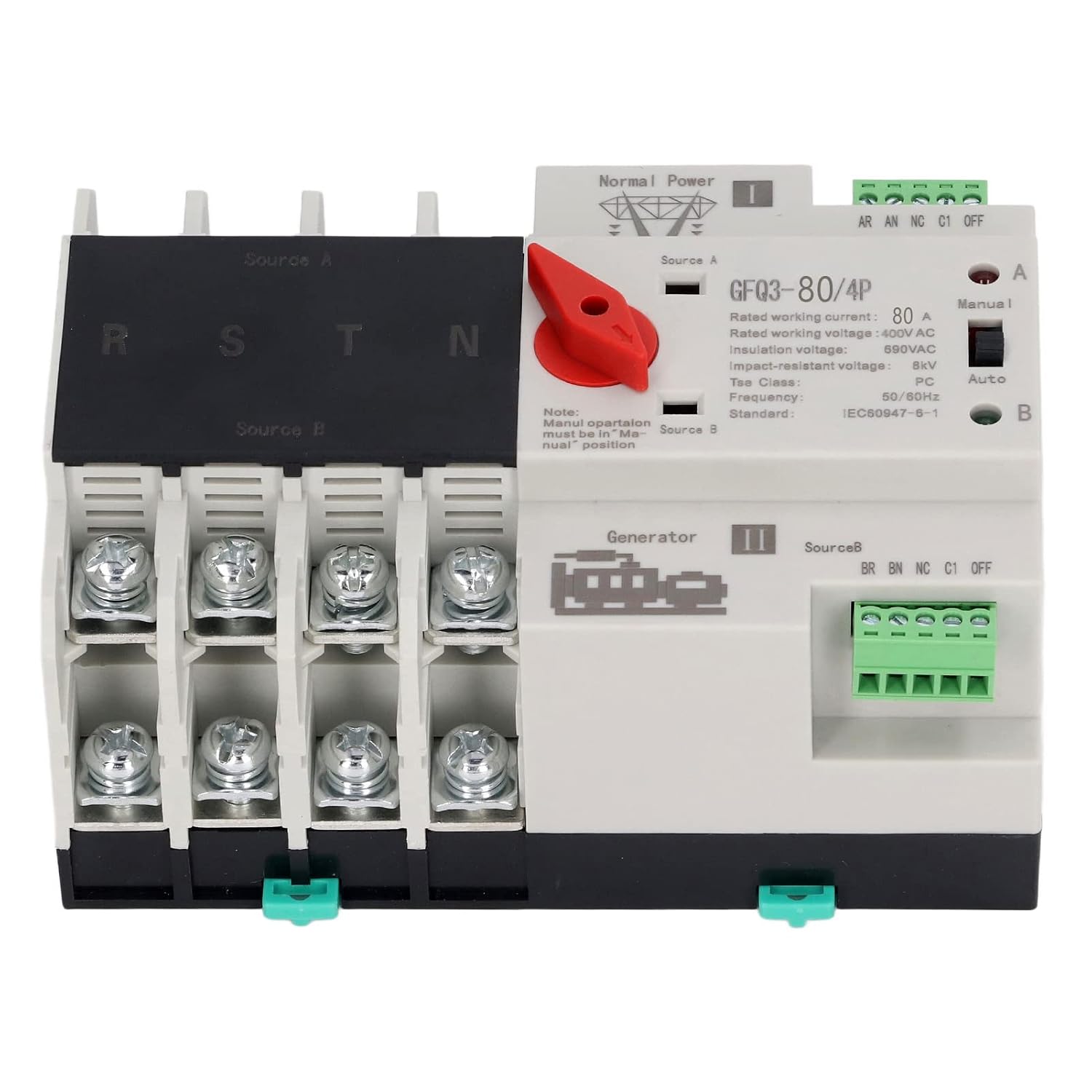
આકૃતિ 1: આગળ view of the GFQ3-80/4P ATS, showing terminals for Source A (Normal Power) and Source B (Generator), output terminals (R, S, T, N), and the Manual/Auto selector switch.

આકૃતિ 2: કોણીય view of the GFQ3-80/4P ATS, highlighting the red manual selector handle and control terminals.
4. સ્પષ્ટીકરણો
| પરિમાણ | મૂલ્ય |
|---|---|
| આઇટમ પ્રકાર | ડ્યુઅલ પાવર ઓટોમેટિક ટ્રાન્સફર સ્વિચ |
| મોડલ | GFQ3-80/4P |
| સામગ્રી | PC, Silver |
| Rated Current (Le) | 80A |
| ઇન્સ્યુલેશન વોલ્યુમtage (Ui) | AC690V |
| રેટેડ વોલ્યુમtage (Ue) | AC400V |
| આવર્તન | 50/60Hz |
| રેટ કરેલ નિયંત્રણ વોલ્યુમtage (Us) | 220VAC (85%Us-110%Us) |
| ગ્રેડ | PC Grade |
| ધ્રુવો | 4P |
5. સેટઅપ અને ઇન્સ્ટોલેશન
The GFQ3-80/4P ATS is designed for easy installation on a standard 35mm DIN rail. Ensure all power is disconnected before proceeding with installation.
5.1 માઉન્ટ કરવાનું
- Locate a suitable 35mm DIN rail within your PZ30 distribution box or electrical panel.
- Align the ATS with the DIN rail. The device features a snap-on mechanism for secure attachment.
- Press the ATS firmly onto the DIN rail until it clicks into place. Ensure it is stable and does not wobble.

આકૃતિ 3: Illustration of the 35mm standard guide rail and snap installation method for the ATS.
5.2.૨.૨ વાયરિંગ
Refer to the wiring diagram on the device and the following instructions for proper connection. Ensure all connections are tight and secure.
- Source A (Normal Power): Connect the main power supply (e.g., utility grid) to the 'Source A' input terminals. These are typically labeled R, S, T, N for a 4-pole system.
- Source B (Backup Power): Connect the backup power supply (e.g., generator, UPS) to the 'Source B' input terminals. These are also typically labeled R, S, T, N.
- લોડ આઉટપુટ: Connect the electrical load (e.g., building's electrical system) to the output terminals of the ATS.
- નિયંત્રણ ટર્મિનલ્સ: Connect the control wiring as per your system requirements. The device has terminals for 'Normal Power' and 'Generator' status monitoring and control.

આકૃતિ 4: Example of the ATS wired into an electrical panel, demonstrating connections to power sources and load.
6. ઓપરેટિંગ સૂચનાઓ
The GFQ3-80/4P ATS offers both automatic and manual operation modes.
6.1 ઓટોમેટિક મોડ
- Ensure the 'Manual/Auto' switch on the front panel is set to the 'Auto' position.
- In this mode, the switch will automatically monitor the main power supply (Source A).
- If Source A fails or its voltage drops below acceptable levels, the ATS will automatically switch the load to Source B (backup power) within milliseconds.
- When Source A is restored and stable, the ATS will automatically switch the load back to Source A.
6.2 મેન્યુઅલ મોડ
- Set the 'Manual/Auto' switch on the front panel to the 'Manual' position.
- To manually switch between Source A and Source B, use the red selector handle.
- Rotate the red handle to position 'I' to connect to Source A.
- Rotate the red handle to position 'II' to connect to Source B.
- નોંધ: Manual operation overrides automatic functions. Always ensure the desired power source is available and stable before manual switching.
7. જાળવણી
નિયમિત જાળવણી તમારા ATS ની આયુષ્ય અને વિશ્વસનીય કામગીરી સુનિશ્ચિત કરે છે.
- દ્રશ્ય નિરીક્ષણ: Periodically inspect the device for any signs of physical damage, loose connections, or overheating.
- સફાઈ: Keep the device free from dust and debris. Use a dry, soft cloth for cleaning. Do not use liquid cleaners.
- કનેક્શન તપાસો: Ensure all terminal connections remain tight and secure. Loose connections can cause arcing and overheating.
- કાર્યાત્મક પરીક્ષણ: Periodically test the automatic transfer function by temporarily disconnecting the main power source to ensure the switch transfers to backup power correctly.
8. મુશ્કેલીનિવારણ
If you encounter issues with your ATS, refer to the following troubleshooting guide:
| સમસ્યા | સંભવિત કારણ | ઉકેલ |
|---|---|---|
| Device does not switch automatically | Switch is in Manual mode; No power from backup source; Faulty control circuit. | Set switch to 'Auto' mode; Check backup power supply; Consult a qualified electrician. |
| પાવર આઉટપુટ નથી | Both power sources are off; Loose wiring connections; Internal fault. | Verify both power sources are active; Check all wiring connections; Contact support. |
| ઓવરહિટીંગ | Loose connections; Overload; Insufficient ventilation. | Tighten all connections; Ensure load does not exceed rated current; Improve ventilation around the device. |
જો આ ઉકેલો અજમાવવા પછી પણ સમસ્યા ચાલુ રહે, તો કૃપા કરીને ગ્રાહક સપોર્ટનો સંપર્ક કરો.
9. વોરંટી અને સપોર્ટ
For warranty information, technical support, or service inquiries, please refer to the documentation provided with your purchase or contact the seller directly. Keep your purchase receipt as proof of purchase.