
1. પરિચય
This manual provides detailed instructions for the installation, operation, and maintenance of your Rosewill CMG5 1000W Modular Power Supply. Please read this manual thoroughly before installation and retain it for future reference.
The Rosewill CMG5 1000W is a fully modular 80 PLUS Gold certified power supply designed for personal computers. It is compatible with ATX 3.0 & 3.1 standards and features a native 600W PCIe 5.0 / Gen 5 12+4 Pin 12V-2x6 cable, supporting modern high-performance graphics cards.
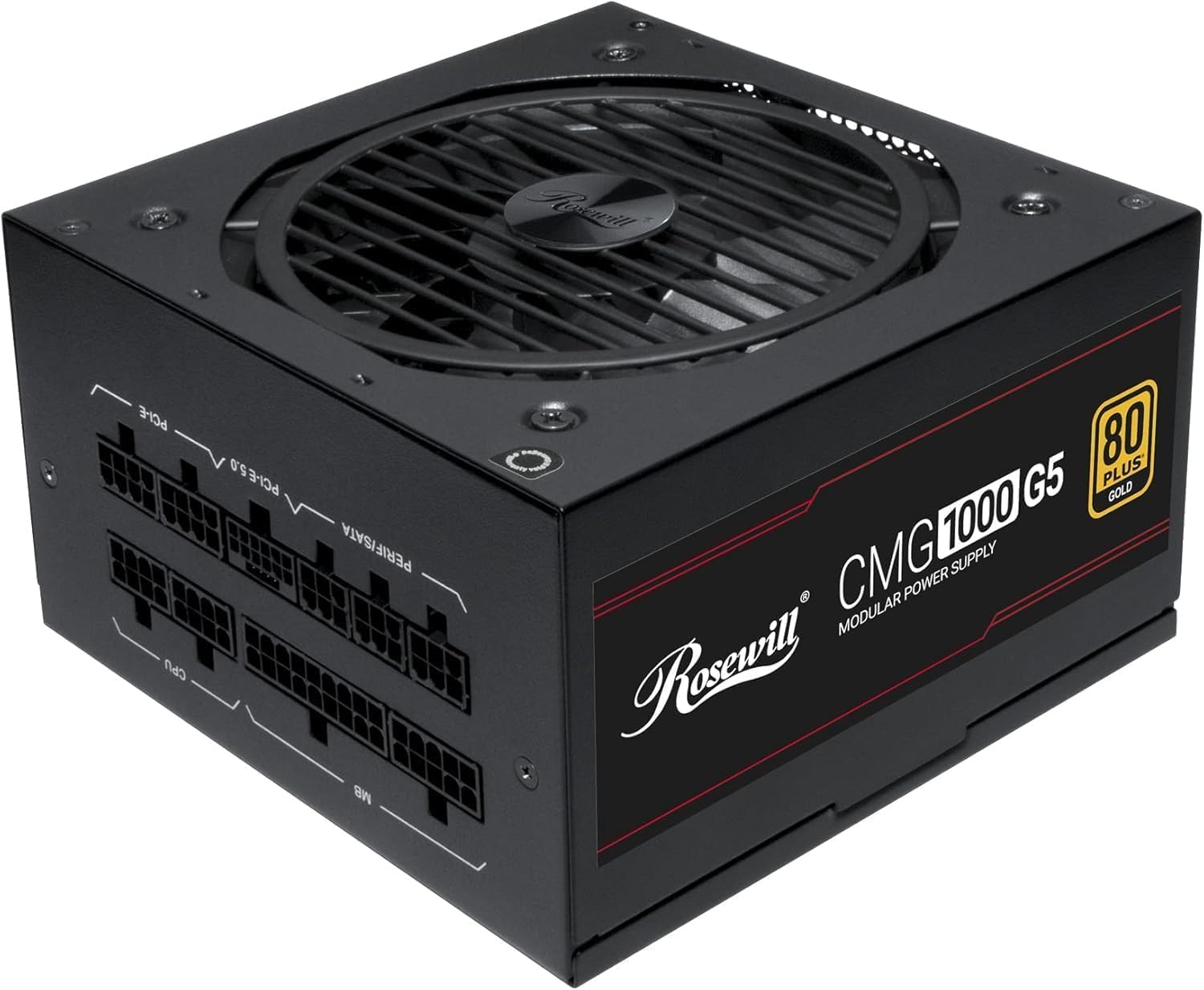
છબી: આગળ view of the Rosewill CMG5 1000W Modular Power Supply, showing the fan grille and branding.
2. સલામતી માહિતી
WARNING: Improper installation or use can lead to serious injury or equipment damage. Always follow these safety guidelines:
- ઇન્સ્ટોલેશન અથવા હેન્ડલિંગ પહેલાં ખાતરી કરો કે પાવર સપ્લાય AC પાવર આઉટલેટથી ડિસ્કનેક્ટ થયેલ છે.
- પાવર સપ્લાય યુનિટ ખોલશો નહીં. ઉચ્ચ વોલ્યુમtages અંદર હાજર છે, અને કોઈ વપરાશકર્તા-સેવાયોગ્ય ભાગો નથી.
- Install the power supply in a well-ventilated area. Do not block any ventilation openings.
- Use only the modular cables provided with this power supply. Using incompatible cables can damage the PSU and connected components.
- Ensure all cable connections are secure and fully seated to prevent electrical shorts or overheating.
- વીજ પુરવઠાને ભેજ અથવા અતિશય તાપમાનના સંપર્કમાં આવવાનું ટાળો.
- If the power supply emits smoke, unusual odors, or loud noises, immediately disconnect it from the AC power and contact support.
3. પેકેજ સામગ્રી
ખાતરી કરો કે બધી વસ્તુઓ તમારા પેકેજમાં હાજર છે:
- Rosewill CMG5 1000W Modular Power Supply Unit
- એસી પાવર કોર્ડ
- Modular Cable Set (see below for details)
- માઉન્ટિંગ સ્ક્રૂ
- વપરાશકર્તા માર્ગદર્શિકા (આ દસ્તાવેજ)

Image: Rear panel of the Rosewill CMG5 1000W Power Supply showing the modular cable connection ports labeled for MB, CPU, PERIF/SATA, PCI-E 5.0, and PCI-E.
મોડ્યુલર કેબલ સેટ:

Image: Diagram illustrating the types and lengths of modular cables included with the Rosewill CMG5 1000W Power Supply, including 24-pin Motherboard, 12+4-pin PCIe 5.0, 4+4-pin CPU, 6+2-pin PCIe, SATA, and 4-pin Molex connectors.
- 1x 24-pin Motherboard Cable (600mm)
- 1x 12+4-pin PCIe 5.0 Cable (600mm)
- 2x 4+4-pin CPU Cables (700mm each)
- 4x 6+2-pin PCIe Cables (500mm each, with two connectors per cable)
- 2x SATA Cables (500mm, with four SATA connectors per cable)
- 1x 4-pin Molex Cable (500mm, with four Molex connectors)
4. સેટઅપ અને ઇન્સ્ટોલેશન
Follow these steps to install your Rosewill CMG5 1000W Power Supply:
- તમારી સિસ્ટમ તૈયાર કરો:
- તમારા કમ્પ્યુટરને બંધ કરો અને AC પાવર કોર્ડને દિવાલના આઉટલેટથી ડિસ્કનેક્ટ કરો.
- તમારા કમ્પ્યુટર કેસ ખોલો.
- If replacing an existing power supply, disconnect all cables from the old PSU and remove it from the case.
- Install the Power Supply:
- Carefully place the new Rosewill CMG5 1000W PSU into the power supply bay of your computer case.
- Secure the PSU to the case using the provided mounting screws. Ensure the fan is facing the correct direction for optimal airflow (typically facing down if there's a bottom vent, or up if not).
- મોડ્યુલર કેબલ્સ જોડો:
- Identify the necessary cables for your components (Motherboard, CPU, PCIe, SATA, Molex). Refer to the "Package Contents" section for cable types.
- Connect the required modular cables to the corresponding ports on the power supply unit. Ensure they click firmly into place.
- Connect the other end of each cable to your motherboard, CPU, graphics card(s), storage drives, and other peripherals. Pay close attention to the orientation of each connector.
- For PCIe 5.0 graphics cards, use the dedicated 12+4-pin PCIe 5.0 cable. Ensure it is fully inserted into both the PSU and the graphics card.
- અંતિમ તપાસ:
- Double-check all cable connections to ensure they are secure. Loose connections can cause system instability or damage.
- Organize cables to improve airflow within the case.
- તમારા કમ્પ્યુટર કેસ બંધ કરો.
- પાવર ચાલુ:
- AC પાવર કોર્ડને પાવર સપ્લાય સાથે અને પછી વોલ આઉટલેટ સાથે કનેક્ટ કરો.
- Flip the main power switch on the back of the PSU to the "ON" position.
- તમારા કમ્પ્યુટર પર પાવર કરો.

છબી: પાછળનો ભાગ view of the Rosewill CMG5 1000W Power Supply, showing the AC power input, main power switch, and an "ECO" mode switch.
5. ઓપરેટિંગ સૂચનાઓ
The Rosewill CMG5 1000W Power Supply is designed for reliable and efficient operation.
Eco Silent Mode:
- The power supply features an "ECO" mode switch located on the rear panel.
- When the ECO mode is ON, the 120mm Fluid Dynamic Bearing (FDB) fan will operate in a semi-fanless mode. The fan will remain off under low to moderate loads, providing silent operation. It will automatically spin up when the load increases to maintain optimal temperatures.
- When the ECO mode is બંધ, the fan will operate continuously, adjusting its speed based on the internal temperature and load.
- Choose the mode that best suits your preference for noise levels and cooling performance.
Power Excursion Capabilities:
This power supply is designed to handle power excursions up to 235% and GPU power excursions up to 300%, ensuring stable power delivery during peak demands from high-performance components.
6. જાળવણી
યોગ્ય જાળવણી તમારા પાવર સપ્લાયના લાંબા આયુષ્ય અને શ્રેષ્ઠ પ્રદર્શનની ખાતરી આપે છે.
- સફાઈ: Periodically clean the exterior of the power supply and its fan grille to prevent dust buildup. Use compressed air to gently clear dust from the fan blades and internal components. Ensure the PSU is powered off and unplugged before cleaning.
- કેબલ મેનેજમેન્ટ: Ensure cables are not obstructing airflow within your computer case. Re-route or tie cables as needed to maintain good ventilation.
- પર્યાવરણીય પરિસ્થિતિઓ: Operate the power supply in a clean, dry environment with adequate ventilation. Avoid extreme temperatures and humidity.
7. મુશ્કેલીનિવારણ
જો તમને તમારા પાવર સપ્લાયમાં સમસ્યાઓ આવે, તો નીચેની સામાન્ય સમસ્યાઓ અને ઉકેલોનો સંદર્ભ લો:
| સમસ્યા | સંભવિત કારણ | ઉકેલ |
|---|---|---|
| કમ્પ્યુટર ચાલુ થતું નથી. |
|
|
| સિસ્ટમ ક્રેશ થાય છે અથવા રેન્ડમ રીતે ફરી શરૂ થાય છે. |
|
|
| PSU માંથી અસામાન્ય અવાજો. |
|
|
| Cables appear melted or discolored. |
|
|
8. સ્પષ્ટીકરણો
| લક્ષણ | વિગત |
|---|---|
| મોડેલનું નામ | CMG1000G5 |
| બ્રાન્ડ | રોઝવિલ |
| આઉટપુટ વોટtage | 1000 વોટ્સ |
| ફોર્મ ફેક્ટર | એટીએક્સ |
| ઠંડક પદ્ધતિ | Air (120mm FDB Fan) |
| આઇટમના પરિમાણો (L x W x H) | 11.4 x 9 x 4.6 ઇંચ (289.56 x 228.6 x 116.84 mm) |
| વસ્તુનું વજન | 6.3 પાઉન્ડ (2.86 કિગ્રા) |
| પાવર સપ્લાય ડિઝાઇન | સંપૂર્ણ મોડ્યુલર |
| કાર્યક્ષમતા પ્રમાણપત્ર | 80 PLUS ગોલ્ડ |
| ઇનપુટ વોલ્યુમtage | 100-240 વોલ્ટ એ.સી. |
| ઇનપુટ આવર્તન | 50-60 હર્ટ્ઝ |
| કનેક્ટર્સ | ATX, PCIe (including 12V-2x6 for PCIe 5.0) |
| ATX સ્ટાન્ડર્ડ | ATX 3.0 & 3.1 Compatible |
| કેપેસિટર્સ | 100% જાપાનીઝ ઇલેક્ટ્રોલિટીક કેપેસિટર્સ |
| રક્ષણ | OCP, OPP, OTP, OVP, SCP, UCP (Over Current, Over Power, Over Temperature, Over Voltage, Short Circuit, Under Current Protection) |

છબી: બાજુ view of the Rosewill CMG5 1000W Power Supply, displaying the electrical specifications label including AC input, DC output voltages, and total output power.
9. વોરંટી અને સપોર્ટ
વોરંટી માહિતી:
The Rosewill CMG5 1000W Power Supply comes with a ૧ વર્ષની ઉત્પાદકની વોરંટી. આ વોરંટી સામાન્ય ઉપયોગ હેઠળ સામગ્રી અને કારીગરીમાં ખામીઓને આવરી લે છે. વોરંટી દાવાઓ માટે કૃપા કરીને ખરીદીનો પુરાવો રાખો.
For detailed warranty terms and conditions, please refer to the official Rosewill webસાઇટ અથવા તેમની ગ્રાહક સેવાનો સંપર્ક કરો.
ગ્રાહક આધાર:
If you have any questions, require technical assistance, or need to initiate a warranty claim, please contact Rosewill customer support:
- Webસાઇટ: Visit the official Rosewill webસપોર્ટ સંસાધનો, વારંવાર પૂછાતા પ્રશ્નો અને સંપર્ક માહિતી માટેની સાઇટ.
- ઇમેઇલ/ફોન: Refer to the Rosewill webસૌથી અદ્યતન સંપર્ક વિગતો માટે સાઇટ.
When contacting support, please have your product model (CMG1000G5) and proof of purchase readily available.