
1. ઉત્પાદન ઓવરview
The Y&H 100A Solar Charge Controller is designed to manage power flow from your solar panels to your battery bank, ensuring efficient and safe charging. It features advanced Maximum Power Point Tracking (MPPT) technology for optimal energy harvesting and is compatible with various battery types.
મહત્વપૂર્ણ નોંધ: This controller utilizes high-quality compatible MPPT + PWM solar regulation. It is not a 100% true MPPT controller, but it offers efficient performance for its class.

આકૃતિ 1: ફ્રન્ટ view of the Y&H 100A Solar Charge Controller, showing the LCD display and control interface.

આકૃતિ 2: બાજુ view of the Y&H 100A Solar Charge Controller.
2. મુખ્ય લક્ષણો
- Advanced Maximum Power Point Tracking (MPPT) technology with tracking efficiency not less than 99.5%.
- Dynamic LCD screen display for operating data and device status.
- Compatibility with Seal, Gel, Flooded, and LiFePO4 battery types.
- Two 5V USB charging ports for external devices.
- Automatic identification of 12V/24V/36V/48V battery systems.
- Comprehensive protection features: over-voltage, અતિ-વર્તમાન અને અતિશય તાપમાન રક્ષણ.
- Seven selectable working modes for diverse applications.
- Display of key controller parameters: working mode, battery voltage, PV charging current, battery discharge current, product operating temperature, and delay time.
- User-adjustable and savable controller parameters.
- LCD display with backlight for improved visibility.

Figure 3: The controller supports multiple battery types, including SLD, GEL, Flooded, and Lithium (LiFePO4).
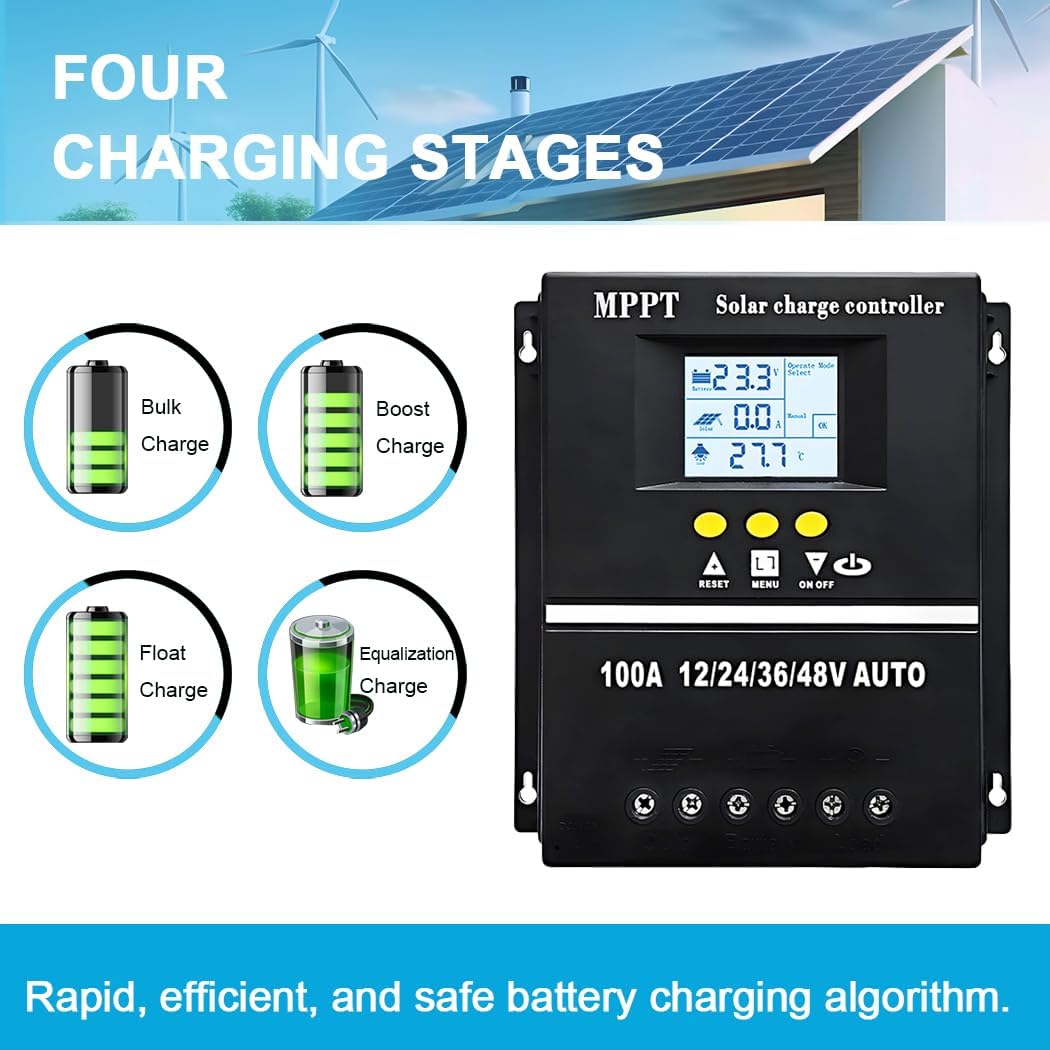
Figure 4: The controller employs a four-stage charging algorithm for efficient and safe battery charging.
3. સલામતી સૂચનાઓ
Please read all instructions carefully before installation and operation. Failure to follow these instructions may result in serious injury, damage to the controller, or damage to other components.
- Ensure all connections are tight and correct to avoid loose connections that can cause excessive heat.
- કંટ્રોલરને સારી રીતે હવાની અવરજવરવાળા વિસ્તારમાં સ્થાપિત કરો, જ્વલનશીલ પદાર્થો અને સીધા સૂર્યપ્રકાશથી દૂર.
- પહેલા બેટરી, પછી સોલાર પેનલ અને છેલ્લે લોડ જોડો. વિપરીત ક્રમમાં ડિસ્કનેક્ટ કરો.
- Do not attempt to repair or modify the controller yourself. Contact qualified personnel for service.
- Use appropriate circuit breakers or fuses for all connections to protect against overcurrent.
- Wear protective eyewear when working with batteries.
4. ઇન્સ્ટોલેશન અને વાયરિંગ
તમારા સોલાર ચાર્જ કંટ્રોલરના સલામત અને કાર્યક્ષમ સંચાલન માટે યોગ્ય ઇન્સ્ટોલેશન ખૂબ જ મહત્વપૂર્ણ છે. આ પગલાં કાળજીપૂર્વક અનુસરો:
- ઇન્સ્ટોલેશન માટે તૈયાર કરો: Choose a dry, well-ventilated location, protected from direct sunlight and moisture. Ensure there is sufficient space around the controller for heat dissipation.
- બેટરી કનેક્ટ કરો: Connect the battery to the controller's battery terminals. Ensure correct polarity (+ to + and - to -). The controller will automatically detect the battery voltage.
- સોલાર પેનલ જોડો: Connect the solar panel to the controller's PV terminals. Again, observe correct polarity.
- લોડ કનેક્ટ કરો (વૈકલ્પિક): If you are connecting a DC load directly to the controller, connect it to the load terminals. Ensure correct polarity.

Figure 5: Wiring diagram for the Y&H 100A Solar Charge Controller. Connect battery first, then solar panel, then load.

આકૃતિ 6: પાછળ view of the controller, illustrating the connection terminals and USB ports.
5. કંટ્રોલરનું સંચાલન
The controller's LCD display and buttons allow for monitoring and configuration.
5.1 LCD ડિસ્પ્લે ઇન્ટરફેસ
The LCD screen dynamically displays various operating parameters and the device's working status.
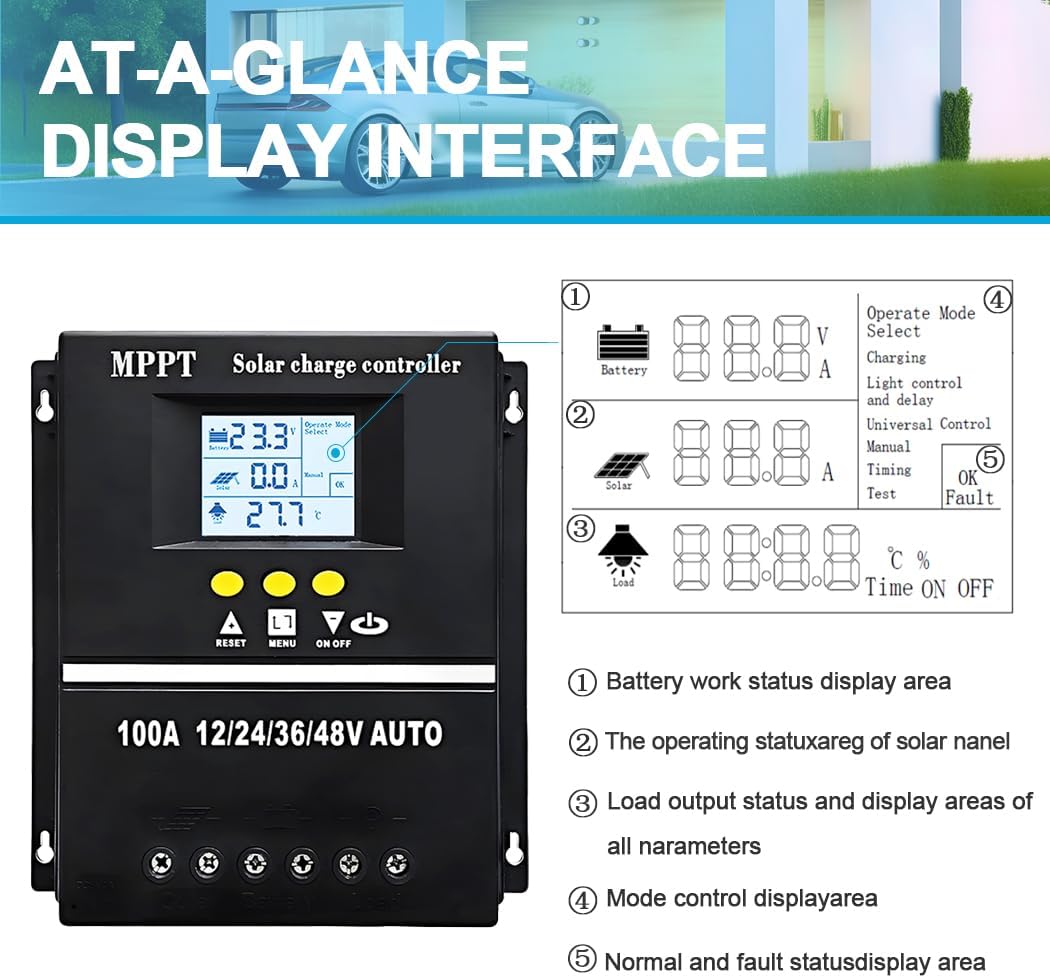
Figure 7: At-a-glance display interface, showing battery work status, solar panel operating status, load output status, mode control, and fault status areas.
5.2 વર્કિંગ મોડ્સ
The controller offers seven distinct working modes to suit different application needs:
- ચાર્જ મોડ: No discharge under any circumstances.
- પ્રકાશ નિયંત્રણ મોડ: Discharges after a 10-minute delay when night is detected, stops discharge after a 10-minute delay when day is detected.
- Light Control and Delay Mode: Discharges after a 10-minute delay when night is detected, then counts down for a user-set duration (up to 23:59). Discharge stops when the timer reaches zero.
- યુનિવર્સલ કંટ્રોલ મોડ: Continuous discharge under normal conditions.
- મેન્યુઅલ કંટ્રોલ મોડ: Allows manual control of discharge (on/off).
- સમય નિયંત્રણ મોડ: Configurable schedule for opening or closing discharge.
- પરીક્ષણ મોડ: Similar to Light Control and Delay Mode, but with a fixed 10-minute delay.
The controller also features undervoltage protection. If discharge continues by holding a button for 5 seconds under undervoltage, be aware that this can potentially damage the battery.

આકૃતિ 8: ઓવરview of selectable load working modes.
5.3 પેરામીટર સેટિંગ્સ
Certain controller parameters, such as battery type, charge/discharge thresholds, and delay times, can be modified, set, and saved by the user via the control buttons and LCD interface. Refer to the on-screen menus for specific adjustment options.
6. જાળવણી
નિયમિત જાળવણી તમારા સૌર ચાર્જ કંટ્રોલરની આયુષ્ય અને શ્રેષ્ઠ કામગીરીની ખાતરી કરે છે.
- કનેક્શન્સ તપાસો: Periodically check all wiring connections for tightness and corrosion. Loose connections can lead to power loss and overheating.
- કંટ્રોલર સાફ કરો: કંટ્રોલરને સ્વચ્છ અને ધૂળ અને કાટમાળથી મુક્ત રાખો. બહારનો ભાગ સાફ કરવા માટે સૂકા કપડાનો ઉપયોગ કરો. પ્રવાહી અથવા દ્રાવકનો ઉપયોગ કરશો નહીં.
- વેન્ટિલેશન: ખાતરી કરો કે ગરમીનું યોગ્ય રીતે નિકાલ થાય તે માટે વેન્ટિલેશનના છિદ્રો અવરોધિત ન હોય.
- બેટરી આરોગ્ય: Monitor your battery's health and voltage regularly. Ensure it is compatible with the controller's settings.
- પર્યાવરણીય પરિસ્થિતિઓ: Verify that the controller is operating within its specified temperature range and protected from extreme weather conditions.
7. મુશ્કેલીનિવારણ
If you encounter issues with your Y&H 100A Solar Charge Controller, refer to the following common problems and solutions:
| સમસ્યા | સંભવિત કારણ | ઉકેલ |
|---|---|---|
| એલસીડી પર કોઈ ડિસ્પ્લે નથી | બેટરી કનેક્ટેડ નથી અથવા ઓછું વોલ્યુમ છેtage; વિપરીત ધ્રુવીયતા. | બેટરી કનેક્શન અને વોલ્યુમ તપાસોtage. યોગ્ય ધ્રુવીયતા સુનિશ્ચિત કરો. |
| બેટરી ચાર્જ થતી નથી | Solar panel not connected; low solar input; incorrect battery type setting. | Check solar panel connections and ensure sufficient sunlight. Verify battery type setting. |
| લોડ કામ કરી રહ્યું નથી | Load disconnected; battery low; load mode setting incorrect; overcurrent protection. | Check load connections. Ensure battery has sufficient charge. Adjust load mode. Reduce load. |
| ઓવરહિટીંગ | ખરાબ વેન્ટિલેશન; વધુ પડતો ભાર. | Ensure adequate airflow around the controller. Reduce load if necessary. |
8. સ્પષ્ટીકરણો
Detailed technical specifications for the Y&H 100A Solar Charge Controller:
| પરિમાણ | મૂલ્ય |
|---|---|
| મોડલ નંબર | 100A (SY10048) |
| બેટરી વોલ્યુમtage | 12V/24V/36V/48V ઑટો |
| ચાર્જ કરંટ | 100 એ |
| Max Solar Input (12V Battery) | 15-25V |
| Max Solar Input (24V Battery) | 30-50V |
| Max Solar Input (36V Battery) | 45-75V |
| Max Solar Input (48V Battery) | 60-100V |
| મહત્તમ પીવી ઇનપુટ પાવર (૧૨વોલ્ટ બેટરી) | 1200 ડબ્લ્યુ |
| મહત્તમ પીવી ઇનપુટ પાવર (૧૨વોલ્ટ બેટરી) | 2400 ડબ્લ્યુ |
| મહત્તમ પીવી ઇનપુટ પાવર (૧૨વોલ્ટ બેટરી) | 3600 ડબ્લ્યુ |
| મહત્તમ પીવી ઇનપુટ પાવર (૧૨વોલ્ટ બેટરી) | 4800 ડબ્લ્યુ |
| પરિમાણો (L x W x H) | 19 x 18 x 6 સેમી |
| વજન | 890 ગ્રામ |
| સામગ્રી | પ્લાસ્ટિક |
| ડિસ્પ્લે પ્રકાર | એલસીડી |
| સમાવાયેલ ઘટકો | MPPT + PWM Controller |

Figure 9: Physical dimensions of the controller.
9. વોરંટી અને સપોર્ટ
વોરંટી માહિતી, ટેકનિકલ સપોર્ટ અથવા સેવા પૂછપરછ માટે, કૃપા કરીને ઉત્પાદક અથવા તમારા ખરીદી બિંદુનો સંપર્ક કરો. ખરીદીના પુરાવા તરીકે તમારી ખરીદી રસીદ રાખો.