
1. પરિચય
Thank you for choosing the Generic Replacement Remote Control. This remote is designed to be a direct replacement for your original Formuler (Z10 SE, Z+ Neo, Z Plus) 4K UHD IPTV Android HDTV Box remote. It operates using infrared (IR) technology and requires no complex setup or programming.
મહત્વપૂર્ણ: Please ensure your original remote control matches the appearance of this replacement remote to guarantee compatibility. This remote is specifically designed for the models listed.
2. સેટઅપ
2.1 બેટરી ઇન્સ્ટોલેશન
રિમોટ કંટ્રોલને ઓપરેશન માટે બે (2) AAA બેટરી (શામેલ નથી) ની જરૂર છે. બેટરી ઇન્સ્ટોલ કરવા માટે આ પગલાં અનુસરો:
- રિમોટ કંટ્રોલની પાછળના ભાગમાં બેટરીનો ડબ્બો શોધો.
- લેચ પર નીચે દબાવો અને બેટરી કવરને ખોલવા માટે તેને નીચે તરફ સ્લાઇડ કરો.
- બે AAA બેટરી દાખલ કરો, ખાતરી કરો કે ધન (+) અને ઋણ (-) ટર્મિનલ્સ કમ્પાર્ટમેન્ટની અંદરના નિશાનો સાથે યોગ્ય રીતે ગોઠવાય છે.
- જ્યાં સુધી તે સુરક્ષિત રીતે ક્લિક ન કરે ત્યાં સુધી બેટરી કવરને પાછું સ્થાન પર સ્લાઇડ કરો.

આકૃતિ 1: કવર દૂર કરેલ બેટરી કમ્પાર્ટમેન્ટ.
2.2 પ્રારંભિક ઉપયોગ
This replacement remote control is an infrared (IR) device and does not require any pairing, programming, or code setup. Once batteries are correctly installed, it is ready for immediate use with compatible Formuler devices.
3. ઓપરેટિંગ સૂચનાઓ
Point the remote control directly towards your Formuler 4K UHD IPTV Android HDTV Box. Ensure there are no obstructions between the remote and the device. The maximum effective range is approximately 10 meters (33 feet).

આકૃતિ 2: ફ્રન્ટ view રિમોટ કંટ્રોલનું.
3.1 બટન કાર્યો
The remote control features standard buttons for navigating and controlling your Formuler device. Refer to your Formuler device's user manual for specific functions of each button, as their behavior may vary slightly depending on the device model and software version.
- Power (TV/STB): Turns the TV or Set-Top Box on/off.
- નંબર પેડ (0-9): For direct channel input or numerical selections.
- Navigation (Up, Down, Left, Right, OK): મેનુ નેવિગેશન અને પસંદગી માટે.
- વોલ્યુમ (+/-): વોલ્યુમ સ્તરને સમાયોજિત કરે છે.
- ચેનલ (CH +/-): ચેનલો બદલે છે.
- Menu/Info/Back/Exit: Accesses menus, displays information, goes back, or exits current screen.
- મીડિયા પ્લેબેક નિયંત્રણો (પ્લે, પોઝ, સ્ટોપ, રીવાઇન્ડ, ફાસ્ટ ફોરવર્ડ): મીડિયા પ્લેબેકને નિયંત્રિત કરે છે.
- રંગીન બટનો (લાલ, લીલો, પીળો, વાદળી): Often used for specific functions within applications or menus.
4. જાળવણી
4.1 સફાઈ
To clean the remote control, wipe it gently with a soft, dry cloth. Do not use liquid cleaners, abrasive pads, or chemical solvents, as these can damage the remote's surface or internal components.
4.2 બેટરી રિપ્લેસમેન્ટ
Replace batteries when the remote control's response becomes sluggish or stops working. Always replace both batteries at the same time with new AAA batteries. Do not mix old and new batteries, or different types of batteries.
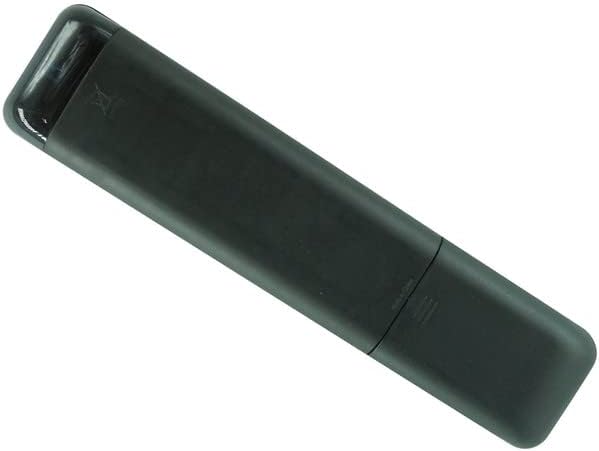
આકૃતિ 3: પાછળ view રિમોટ કંટ્રોલનું.
5. મુશ્કેલીનિવારણ
- રિમોટ જવાબ આપી રહ્યું નથી:
- ખાતરી કરો કે બેટરી યોગ્ય પોલેરિટી (+/-) સાથે યોગ્ય રીતે દાખલ કરવામાં આવી છે.
- જૂની બેટરીઓને નવી AAA બેટરીથી બદલો.
- Check for any obstructions between the remote control and your Formuler device.
- ખાતરી કરો કે તમે અસરકારક ઓપરેટિંગ રેન્જ (૧૦ મીટર સુધી) ની અંદર છો.
- Some buttons do not work:
- Verify that the remote control is indeed compatible with your specific Formuler model (Z10 SE, Z+ Neo, Z Plus). If your model is not listed, this remote may not be fully compatible.
- Some functions may be specific to the original remote or require specific software versions on your device.
- રિમોટ સમયાંતરે કામ કરે છે:
- આ ઘણીવાર ઓછી બેટરી પાવર સૂચવે છે. બેટરી બદલો.
- Ensure a clear line of sight to the device.
If issues persist after following these steps, please refer to the support section.
6. સ્પષ્ટીકરણો
| બ્રાન્ડ | સામાન્ય |
| મોડલ નંબર | ઇઝીટ્રી20118 |
| કનેક્ટિવિટી ટેકનોલોજી | ઇન્ફ્રારેડ (IR) |
| સુસંગત ઉપકરણો | Formuler Z10 SE, Z+ Neo, Z Plus 4K UHD IPTV Android HDTV Box |
| સમર્થિત ઉપકરણોની મહત્તમ સંખ્યા | 1 |
| નિયંત્રક પ્રકાર | બટન નિયંત્રણ |
| મહત્તમ શ્રેણી | ૧૦ મીટર (આશરે ૩૩ ફૂટ) |
| બેટરી જરૂરી છે | 2 x AAA બેટરી |
7. વોરંટી અને સપોર્ટ
7.1 વોરંટી માહિતી
આ ઉત્પાદન એ સાથે આવે છે 90-દિવસની વોરંટી from the date of purchase. This warranty covers manufacturing defects. It does not cover damage caused by misuse, accidents, unauthorized modifications, or normal wear and tear.
7.2 ગ્રાહક સપોર્ટ
For any questions, concerns, or troubleshooting assistance not covered in this manual, please contact the seller directly through the platform where the product was purchased. Please have your order number and product details ready for faster service.