
1. પરિચય
This manual provides detailed instructions for the installation, operation, and maintenance of the EVURU Digital Single Phase Energy Meter. This device is designed to measure active energy (kWh), voltage, current, and power consumption in single-phase AC circuits. Please read this manual thoroughly before installation and use to ensure safe and correct operation.
2. સલામતી માહિતી
- સ્થાપન અને જાળવણી ફક્ત લાયક કર્મચારીઓ દ્વારા જ થવી જોઈએ.
- Ensure the power supply is disconnected before any installation or wiring work.
- Do not operate the meter in environments with excessive moisture, dust, or corrosive gases.
- Verify all connections are secure and correct according to the wiring diagrams to prevent damage to the meter or electrical system.
- The meter is designed for indoor use only.
3. ઉત્પાદન ઓવરview અને લક્ષણો
The EVURU Digital Single Phase Energy Meter is a compact device for DIN rail installation, offering precise measurement of electrical parameters. Key features include:
- LCD display with backlight for clear readings.
- Measures total Energy (kWh), temporary Energy (kWh), real Voltage (V), real Current (A), and real Power (W).
- Pulse LED indicator for active energy measurement.
- 35mm DIN rail mounting.
- Temporary kWh can be reset to zero. Total kWh is non-resettable.

આકૃતિ 1: ઓવરview of DDS662, DDS667, and DDS668 models.

Figure 2: Feature comparison table for DDS662, DDS667, and DDS668 models.
4. સ્પષ્ટીકરણો
| પરિમાણ | મૂલ્ય |
|---|---|
| મહત્તમ વર્તમાન | 80A |
| પલ્સ આવર્તન | 1000imp / kWh |
| નામાંકિત ભાગtage | 220V AC |
| સ્થાપન | 35 મીમી ડીઆઇએન રેલ |
| ડિસ્પ્લે પ્રકાર | બેકલાઇટ સાથે એલસીડી |
| માપેલા પરિમાણો | Total kWh, Temporary kWh, Voltage, કરંટ, પાવર |
| Temporary kWh Reset | Yes (hold button for 6 seconds) |
| Total kWh Reset | ના |
| Wiring Modes | Upper input lower output, Lower input upper output |
| વસ્તુનું વજન | ૦.૦૩૫ ઔંસ (આશરે ૧ ગ્રામ) |
૫. ઇન્સ્ટોલેશન (સેટઅપ)
5.1 પરિમાણો
Before installation, ensure adequate space for the meter. The dimensions are suitable for standard DIN rail enclosures.

Figure 3: Meter dimensions (example shown for DDS668).
5.2 DIN રેલ માઉન્ટિંગ
The meter is designed for 35mm DIN rail installation. Simply clip the meter onto the DIN rail in your electrical panel.
5.3 વાયરિંગ ડાયાગ્રામ
Ensure all power is OFF before proceeding with wiring. Connect the meter according to the appropriate diagram for your model and desired wiring mode.
5.3.1 DDS662 Wiring
The DDS662 model typically uses a direct connection for single-phase two-wire systems.

Figure 4: Wiring diagram for DDS662 model.
5.3.2 DDS667 Wiring
The DDS667 model can be integrated with circuit breakers for protection.

Figure 5: Wiring diagram for DDS667 model, showing integration with circuit breakers.
5.3.3 DDS668 Wiring Modes
The DDS668 model supports two wiring configurations: upper input/lower output and lower input/upper output.
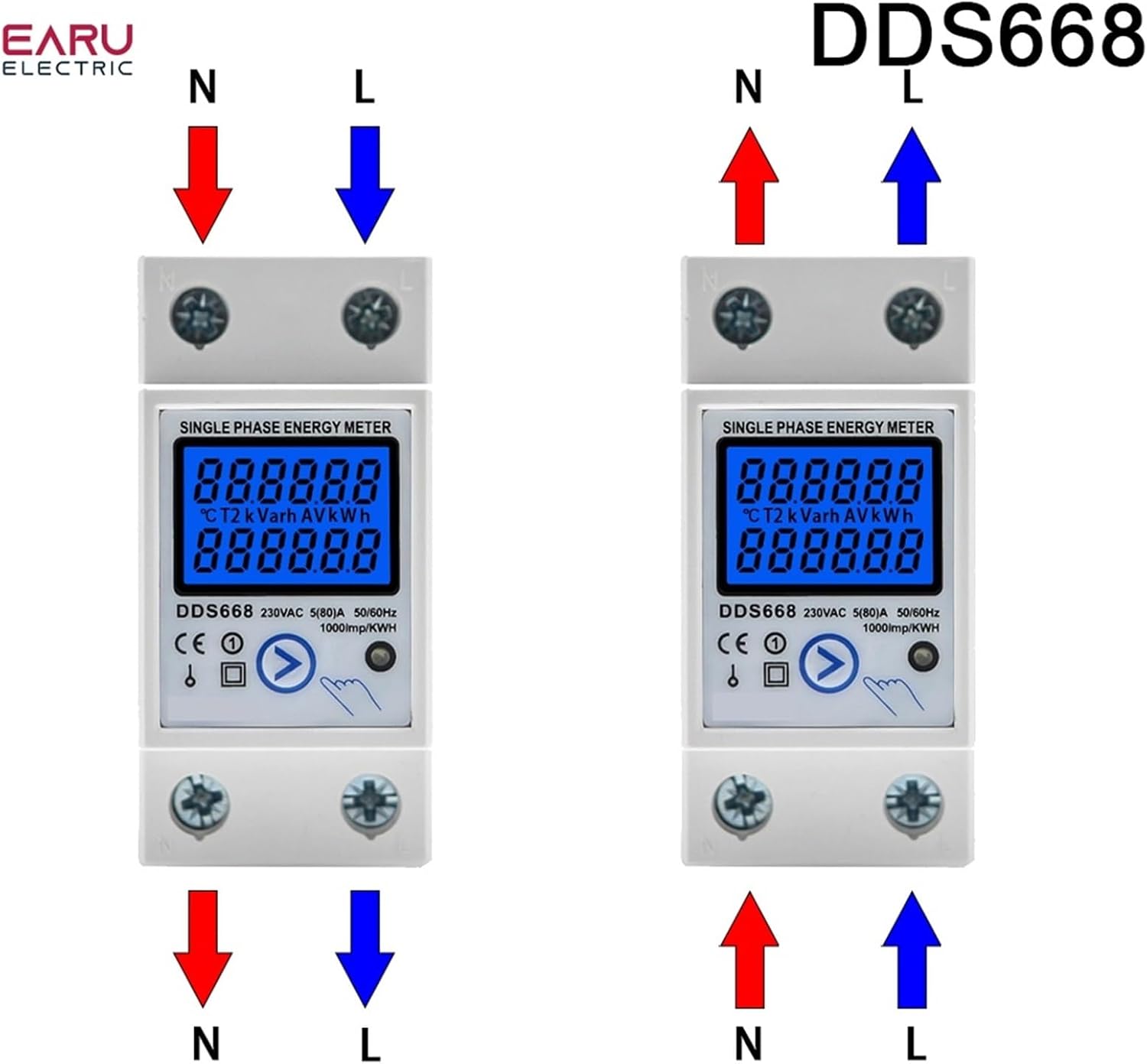
Figure 6: Wiring diagrams for DDS668 model, illustrating upper input/lower output and lower input/upper output modes.
6. ઓપરેશન
6.1 પાવર ચાલુ
Once correctly wired and mounted, restore power to the circuit. The LCD display will illuminate, showing the current readings.
6.2 Reading Displayed Values
The meter cycles through various parameters on its LCD display. You can manually press the button (if available on your model, e.g., DDS667, DDS668) to cycle through:
- કુલ ઊર્જા (kWh)
- Temporary Energy (kWh)
- Real Voltage (V)
- Real Current (A)
- વાસ્તવિક શક્તિ (W)
The pulse LED will flash to indicate active energy measurement.
6.3 Resetting Temporary kWh
To reset the temporary kWh reading to zero, press and hold the button on the front of the meter for approximately 6 seconds. Note that the total kWh reading cannot be reset.
7. જાળવણી
The EVURU Digital Single Phase Energy Meter requires minimal maintenance.
- Keep the meter clean and free from dust. Use a soft, dry cloth for cleaning.
- ઘર્ષક ક્લીનર્સ અથવા સોલવન્ટનો ઉપયોગ કરશો નહીં.
- Regularly inspect wiring connections for tightness and signs of wear or damage.
- ખાતરી કરો કે કાર્યકારી વાતાવરણ ચોક્કસ પરિસ્થિતિઓ (તાપમાન, ભેજ) માં રહે છે.
8. મુશ્કેલીનિવારણ
- No Display / Meter Not Powering On:
- Check the power supply to the circuit.
- ડાયાગ્રામ અનુસાર બધા વાયરિંગ કનેક્શન સુરક્ષિત અને સાચા છે કે નહીં તે ચકાસો.
- ખોટા વાંચન:
- Ensure the meter is correctly wired for the load. Incorrect wiring can lead to inaccurate measurements.
- વોલ્યુમની પુષ્ટિ કરોtage and current are within the meter's specified range (e.g., 220V AC, max 80A).
- Temporary kWh Not Resetting:
- Ensure you are holding the reset button for the full 6 seconds.
- Note that the total kWh cannot be reset.
- Pulse LED Not Flashing:
- Verify there is an active load connected and drawing power through the meter.
- Check wiring for proper current flow.
9. વોરંટી અને સપોર્ટ
વોરંટી માહિતી અથવા તકનીકી સહાય માટે, કૃપા કરીને ઉત્પાદન પેકેજિંગનો સંદર્ભ લો અથવા તમારા રિટેલરનો સંપર્ક કરો. ખરીદીના પુરાવા તરીકે તમારી ખરીદી રસીદ રાખો.