
1. પરિચય
This manual provides essential instructions for the Generic replacement remote control, model Easytry20225. This remote is designed to operate various AC air conditioner units from brands such as Derby, Gre, WESTPOINT, and MYCOD. Please verify your air conditioner model number against the compatible models listed below to ensure proper functionality.
સુસંગત મોડલ્સ: Derby Y512F, KFR-26G/J11; Gre WESTPOINT Y512F, Y502, Y201; MYCOD YC0D1, YAD0F, Y502K, Y502E, Y512N.
This remote control operates using infrared (IR) technology.
2. સેટઅપ: બેટરી ઇન્સ્ટોલેશન
The remote control requires two (2) AAA batteries for operation. Batteries are not included with the remote control.
- રિમોટ કંટ્રોલની પાછળના ભાગમાં બેટરીનો ડબ્બો શોધો.
- બેટરી કમ્પાર્ટમેન્ટ કવરને ખોલવા માટે તેને નીચે તરફ અથવા તીર દ્વારા દર્શાવેલ દિશામાં સ્લાઇડ કરો.
- બે નવી AAA બેટરીઓ દાખલ કરો, ખાતરી કરો કે પોઝિટિવ (+) અને નેગેટિવ (-) ટર્મિનલ્સ કમ્પાર્ટમેન્ટની અંદરના નિશાનો સાથે યોગ્ય રીતે ગોઠવાય છે.
- બેટરી કમ્પાર્ટમેન્ટ કવરને સુરક્ષિત રીતે ક્લિક ન થાય ત્યાં સુધી તેને પાછું સ્થાને સ્લાઇડ કરો.

Image 2.1: Back of the remote control with the battery compartment. The compartment cover is located at the bottom, designed to slide open for battery insertion.
મહત્વપૂર્ણ: Do not mix old and new batteries, or different types of batteries. Remove batteries if the remote control will not be used for an extended period.
3. ઓપરેટિંગ સૂચનાઓ
After installing batteries, the remote control is ready for use. Point the remote control directly at the infrared receiver on your air conditioner unit.
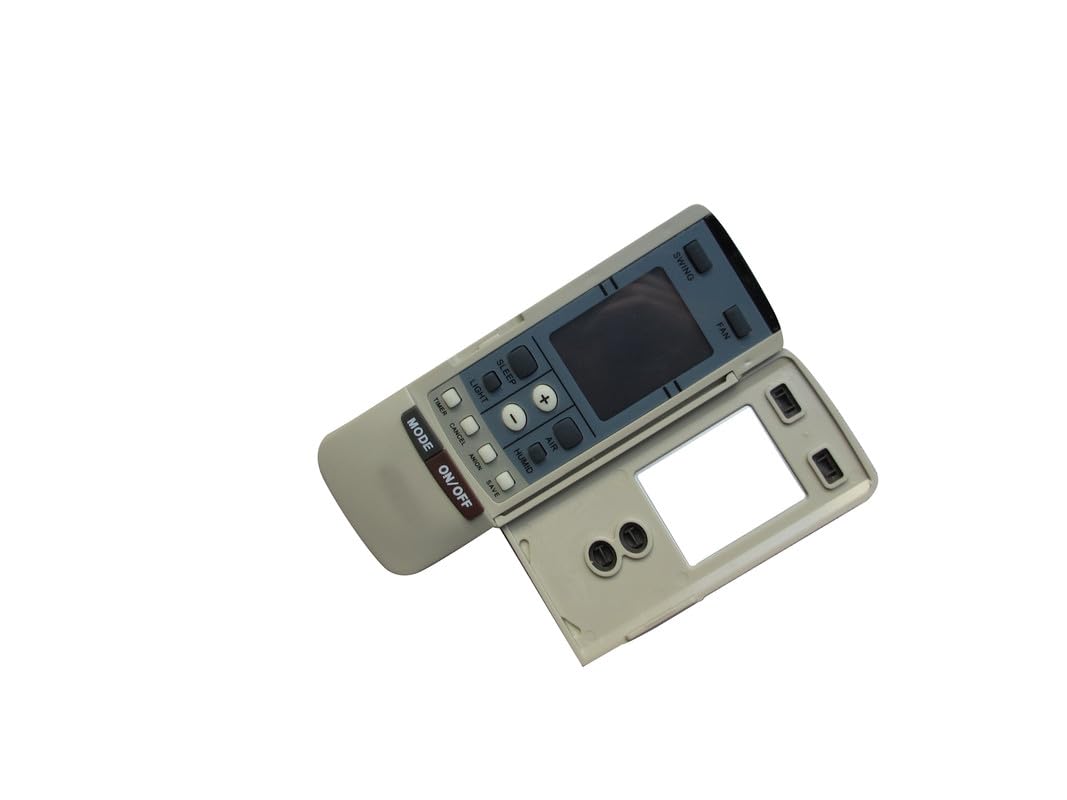
છબી 3.1: આગળ view of the remote control, displaying various function buttons and the LCD screen.
બટન કાર્યો:
- ચાલુ/બંધ બટન: એર કન્ડીશનર યુનિટ ચાલુ કે બંધ કરવા માટે દબાવો.
- મોડ બટન: Cycles through available operating modes (e.g., Cool, Heat, Fan, Dry, Auto). Press repeatedly to select the desired mode.
- Temperature Adjustment Buttons (+ / -): Increases or decreases the set temperature. The display shows temperature in Celsius.
- ફેન બટન: Adjusts the fan speed (e.g., Low, Medium, High, Auto). Press repeatedly to cycle through speeds.
- સ્વિંગ બટન: એર કન્ડીશનરના લૂવર્સના ઓટોમેટિક સ્વિંગ ફંક્શનને સક્રિય અથવા નિષ્ક્રિય કરે છે.
For specific advanced functions or detailed mode descriptions, please refer to your air conditioner unit's original instruction manual.
4. જાળવણી
- સફાઈ: રિમોટ કંટ્રોલને નરમ, સૂકા કપડાથી સાફ કરો. પ્રવાહી ક્લીનર્સ અથવા ઘર્ષક સામગ્રીનો ઉપયોગ કરશો નહીં.
- બેટરી રિપ્લેસમેન્ટ: Replace batteries when the remote's display becomes dim or the unit no longer responds to commands. Always replace both batteries simultaneously with new AAA batteries.
- સંગ્રહ: જો રિમોટ કંટ્રોલનો લાંબા સમય સુધી ઉપયોગ ન થાય, તો લીકેજ અને નુકસાન અટકાવવા માટે બેટરીઓ દૂર કરો. ઠંડી, સૂકી જગ્યાએ સ્ટોર કરો.
5. મુશ્કેલીનિવારણ
| સમસ્યા | સંભવિત કારણ | ઉકેલ |
|---|---|---|
| રીમોટ કંટ્રોલ કામ કરતું નથી. |
|
|
| ડિસ્પ્લે ઝાંખું અથવા ખાલી છે. | ઓછી બેટરી પાવર. | બેટરીઓને નવી AAA બેટરીથી બદલો. |
| AC unit responds intermittently. | Weak battery signal or interference. | Replace batteries. Ensure no strong light sources (e.g., direct sunlight) are interfering with the IR signal. |
6. સ્પષ્ટીકરણો
- ઉત્પાદન પ્રકાર: Replacement AC Remote Controller
- મોડલ નંબર: ઇઝીટ્રી20225
- બ્રાન્ડ: સામાન્ય
- કનેક્ટિવિટી ટેકનોલોજી: ઇન્ફ્રારેડ (IR)
- પાવર સ્ત્રોત: 2 x AAA બેટરી (શામેલ નથી)
- વિશેષ લક્ષણ: સેલ્સિયસમાં તાપમાનનું પ્રદર્શન
- ઉત્પાદક: એસઝેડએચકેએચએક્સડી
7. વોરંટી માહિતી
આ ઉત્પાદન એ સાથે આવે છે 90-દિવસની વોરંટી from the date of purchase. This warranty covers manufacturing defects. It does not cover damage caused by misuse, accidents, unauthorized modifications, or normal wear and tear. Please retain your proof of purchase for warranty claims.
8. આધાર
For further assistance or inquiries regarding this remote control, please contact the seller or manufacturer directly through the platform where the purchase was made. Ensure you have your order details and product model number (Easytry20225) ready when contacting support.