
1. સલામતી માહિતી
સવારી કરતી વખતે હંમેશા હેલ્મેટ પહેરો.
Operating an electric kickscooter carries inherent risks, including but not limited to loss of control, collisions, and falls. To minimize these risks, it is crucial to read and follow all instructions and warnings in this manual. Ensure you understand how to operate the kickscooter safely before your first ride.
- હેલ્મેટ, ઘૂંટણના પેડ્સ અને કોણીના પેડ્સ સહિત હંમેશા યોગ્ય સલામતી ગિયર પહેરો.
- Do not ride in wet conditions, on slippery surfaces, or in poor visibility.
- Adhere to local laws and regulations regarding electric kickscooter use.
- અન્ય વાહનો અને રાહદારીઓથી સુરક્ષિત ગતિ અને અંતર જાળવો.
- Avoid sudden maneuvers, sharp turns, and excessive speeds.
- Do not allow children under the recommended age or individuals exceeding the weight limit to operate the kickscooter.
- Regularly inspect the kickscooter for any damage or loose parts before each ride.
2. ઉત્પાદન ઓવરview
The Segway Ninebot F2 Pro Electric KickScooter is designed for urban commuting, offering a balance of performance, safety, and convenience. It features a robust design with advanced functionalities.
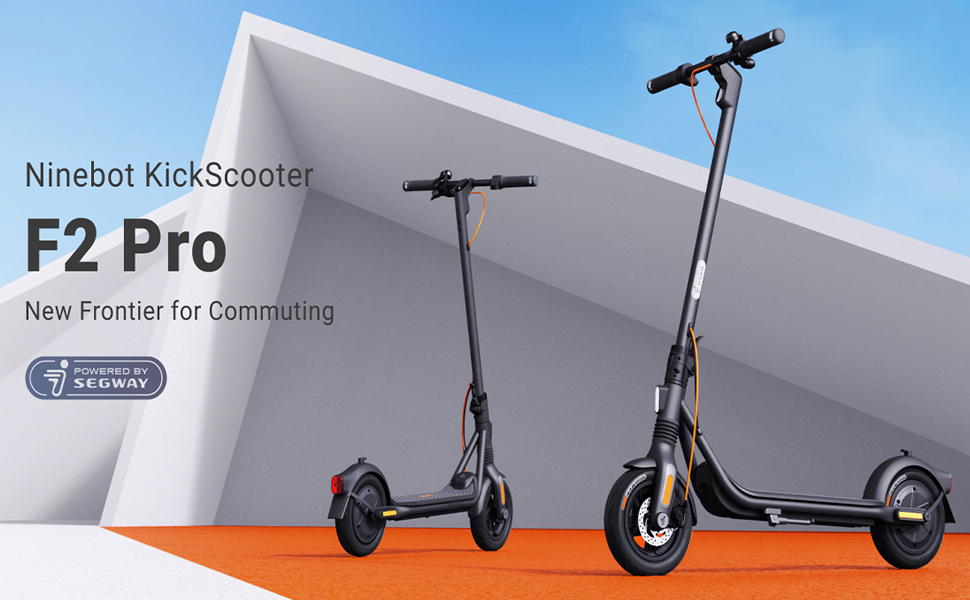
Image: The Segway Ninebot F2 Pro Electric KickScooter, showcasing its design for urban commuting.
મુખ્ય લક્ષણો:
- મહત્તમ ઝડપ: 32 કિમી/કલાક (20 માઇલ પ્રતિ કલાક)
- મહત્તમ રેન્જ: 55 કિમી (34 માઇલ) સુધી
- મોટર આઉટપુટ: 800W maximum power
- ટાયર: 10-inch self-sealing tubeless tires
- સસ્પેન્શન: Front spring suspension for a smoother ride
- બ્રેકિંગ સિસ્ટમ: Dual braking system (front disc brake + rear E-ABS)
- સલામતી સુવિધાઓ: Integrated turn signals, Traction Control System (TCS), high-decibel electric horn, built-in LED headlight.
- કનેક્ટિવિટી: Bluetooth connection, Apple Find My compatibility.
- પોર્ટેબિલિટી: Portable folding design.

છબી: આગળ view of the Segway Ninebot F2 Pro Electric KickScooter.

છબી: બાજુ view of the Segway Ninebot F2 Pro Electric KickScooter.

છબી: પાછળનો ભાગ view of the Segway Ninebot F2 Pro Electric KickScooter.
3. સેટઅપ
૨.૧ કિકસ્કૂટર ખોલવું
- Place the kickscooter on a flat surface.
- Lift the stem until it locks into the upright position. Ensure the locking mechanism is securely engaged.
- સ્કૂટરને ટેકો આપવા માટે કિકસ્ટેન્ડ ખોલો.

Image: Dimensions of the Segway Ninebot F2 Pro KickScooter in both folded and unfolded states.
3.2 પ્રારંભિક ચાર્જિંગ
Before first use, fully charge the kickscooter's battery. Connect the charger to the charging port and then to a power outlet. The charging indicator on the charger will change color (e.g., red to green) when fully charged.
- સંપૂર્ણ ચાર્જ કરવા માટે ચાર્જિંગનો સમય આશરે 8 કલાક છે.
- Only use the official charger provided with the kickscooter.

છબી: આંતરિક view of the battery cells within the kickscooter deck, illustrating the 34-mile max range and 8-hour fast charging capability.
3.3 Connecting to the Smart App
Download the official Segway-Ninebot app from your smartphone's app store. Follow the in-app instructions to connect your F2 Pro KickScooter via Bluetooth. The app allows for firmware updates, riding status monitoring, and scooter locking/unlocking.

Image: Screenshot of the Segway-Ninebot smart app, demonstrating features like Bluetooth connection, lock/unlock, riding status, cruise mode, and firmware updates.
4. ઓપરેટિંગ સૂચનાઓ
4.1 પાવરિંગ ચાલુ/બંધ
- પાવર ચાલુ: Press the power button located on the display panel.
- પાવર બંધ: પાવર બટનને થોડી સેકંડ માટે દબાવી રાખો.
4.2 Riding the KickScooter
- એક પગ ડેક પર મજબૂતીથી મૂકો.
- શરૂઆતની ગતિ મેળવવા માટે તમારા બીજા પગથી દબાણ કરો.
- Once moving, gently press the throttle lever to engage the motor.
- તમારો બીજો પગ ડેક પર મૂકો.
- To slow down, release the throttle. To brake, use the brake lever on the handlebar.

Image: Detail of the front wheel, highlighting the disc brake and front suspension system.

Image: Diagram showing the front spring suspension, designed for smooth riding over bumps.
4.3 Using Turn Signals and Horn
- ટર્ન સિગ્નલો: Use the switch on the handlebar to activate the integrated turn signals for indicating turns.
- હોર્ન: Press the horn button on the handlebar to alert others.

Image: Close-up of the handlebar, showing the activated turn signal for improved visibility.
૫.૨ પરિવહન માટે ફોલ્ડિંગ
To fold the kickscooter for storage or transport:
- Ensure the kickscooter is powered off.
- Locate the folding mechanism at the base of the stem.
- Follow the specific instructions in the quick start guide to release the latch and fold the stem down until it clicks into place.

Image: A person carrying the folded Segway Ninebot F2 Pro KickScooter, demonstrating its portability.
5. જાળવણી
Regular maintenance ensures the longevity and safe operation of your Segway Ninebot F2 Pro KickScooter.
5.1 સામાન્ય સફાઈ
Wipe the kickscooter with a soft, damp cloth. Do not use alcohol, gasoline, kerosene, or other corrosive chemical solvents to clean the scooter. Do not wash the scooter with a high-pressure water jet.
૬.૨ ટાયરની સંભાળ
The F2 Pro features 10-inch self-sealing tubeless tires, which reduce the risk of punctures. However, it is important to regularly check tire pressure and inflate to the recommended PSI for optimal performance and safety.

Image: Diagram showing the self-sealing layer within the tire, designed to prevent punctures.
5.3 બેટરી જાળવણી
- Avoid fully discharging the battery. Charge it regularly, even if not in use for extended periods.
- Store the kickscooter in a cool, dry place, away from direct sunlight and extreme temperatures.
- બૅટરી પૅકને ડિસએસેમ્બલ કરવાનો કે તેમાં ફેરફાર કરવાનો પ્રયાસ કરશો નહીં.
૬.૩ બ્રેક સિસ્ટમ ચેક
Periodically check the functionality of both the front disc brake and the rear E-ABS brake. Ensure the brake levers operate smoothly and the braking power is effective. If you notice any issues, consult a qualified technician.

Image: Illustration detailing the dual braking system, which includes a front disc brake and a rear E-ABS for effective stopping power.
6. મુશ્કેલીનિવારણ
This section addresses common issues you might encounter with your F2 Pro KickScooter.
6.1 KickScooter Not Powering On
- બેટરી લેવલ તપાસો: Ensure the battery is sufficiently charged. Connect the charger and attempt to power on after a short charge.
- પાવર બટન: Confirm the power button is being pressed correctly and held for the required duration.
૮.૨ એપ કનેક્શન સમસ્યાઓ
- બ્લૂટૂથ: Ensure Bluetooth is enabled on your smartphone and the kickscooter is within range.
- એપ્લિકેશન પુનઃપ્રારંભ: Close and reopen the Segway-Ninebot app.
- ફર્મવેર અપડેટ: If possible, check for and install any pending firmware updates via the app on a successful connection.
6.3 Reduced Performance or Range
- ટાયરનું દબાણ: Incorrect tire pressure can significantly impact range and performance. Check and adjust to recommended levels.
- સવારીની શરતો: Steep inclines, heavy loads, and aggressive riding (e.g., frequent acceleration/braking) will reduce range.
- બેટરી આરોગ્ય: Over time, battery capacity may decrease. Ensure proper battery maintenance.
7. સ્પષ્ટીકરણો
| લક્ષણ | સ્પષ્ટીકરણ |
|---|---|
| મોડેલનું નામ | F2 પ્રો |
| આઇટમ મોડલ નંબર | 051203યુ |
| બ્રાન્ડ | સેગવે |
| મહત્તમ ઝડપ | 32 કિમી/કલાક (20 માઇલ પ્રતિ કલાક) |
| મહત્તમ રેન્જ | 55 કિમી (34 માઇલ) સુધી |
| મોટર આઉટપુટ | 900W (પીક) |
| હિલ ગ્રેડ | 22% સુધી |
| ટાયર માપ | 10 Inches (Self-Sealing Tubeless) |
| બ્રેક પ્રકાર | Front Disc Brake, Rear E-ABS |
| સસ્પેન્શન | Front Spring Suspension |
| બેટરીનો પ્રકાર | લિથિયમ આયન (1 જરૂરી, શામેલ) |
| ચાર્જિંગ સમય | આશરે. 8 કલાક |
| ઉત્પાદનના પરિમાણો (અનફોલ્ડ) | 56.9 x 125.22 x 115.82 સેમી |
| વસ્તુનું વજન | ૦.૫૫ કિગ્રા (આશરે ૧.૨૧ પાઉન્ડ) |
| મહત્તમ વજન ક્ષમતા | 265 પાઉન્ડ |
| વય શ્રેણી | પુખ્ત |
| સામગ્રી | Aluminum (Frame: Alloy Steel) |
| પાણી પ્રતિકાર | IPX5 Resistant |
| સમાવાયેલ ઘટકો | ચાર્જર |

Image: Infographic detailing key specifications and features such as range, speed, power, climbing slope, TCS, dual braking, front suspension, electric horn, self-sealing tires, and Apple Find My compatibility.
8. વોરંટી અને સપોર્ટ
Specific warranty details and support contact information are typically provided with the product packaging or available on the manufacturer's official website. Please refer to the documentation included with your purchase or visit the official Segway website for the most up-to-date information regarding warranty coverage and customer support.
૫.૩. પ્રોડક્ટ વિડિઓઝ
No official product videos from the seller were provided in the available data for embedding in this manual.