
1. પરિચય
The LiTime 1000W Pure Sine Wave Inverter is designed to convert 12V DC power from batteries into stable 110-120V AC power, suitable for various applications including home, RV, truck, camping, and off-grid solar systems. This inverter provides 1000W continuous power and a 2000W peak surge capacity, ensuring reliable operation for a wide range of appliances. Its pure sine wave output minimizes interference, making it safe for sensitive electronics. The integrated LCD display offers real-time status monitoring and comprehensive protection features to safeguard your equipment.
2. મહત્વપૂર્ણ સલામતી સૂચનાઓ
Please read and follow these safety instructions carefully to ensure proper installation and operation. Failure to comply may result in serious injury or damage to the product.
- Read all instructions and cautions in this manual before using the inverter.
- આ પ્રોડક્ટની અંદર કોઈ વપરાશકર્તા-સેવાયોગ્ય ભાગો નથી. ઇન્વર્ટરને ડિસએસેમ્બલ કરશો નહીં અથવા રિપેર કરવાનો પ્રયાસ કરશો નહીં.
- ONLY 12V battery banks are suitable for this inverter.
- આ ઉત્પાદનનો ઉપયોગ કાયમી પાવર સ્ત્રોત (બેટરી) સાથે થાય છે. ઉત્પાદન બંધ હોય ત્યારે પણ ઇનપુટ અને/અથવા આઉટપુટ ટર્મિનલ્સ ખતરનાક રીતે ઉર્જાયુક્ત હોઈ શકે છે. ઉત્પાદનની જાળવણી અથવા સર્વિસિંગ કરતા પહેલા હંમેશા ખાતરી કરો કે ઇન્વર્ટર બંધ સ્થિતિમાં છે અને બધા AC અને DC કનેક્શન ડિસ્કનેક્ટ કરો.
- Consult the battery manufacturer's information to ensure that the product is intended for use with the battery. Check the specific requirements of the batteries used in the system and always follow the battery manufacturer's safety instructions.
- જ્યાં ગેસ અથવા ધૂળના વિસ્ફોટનું જોખમ હોય ત્યાં ઉત્પાદનનો ક્યારેય ઉપયોગ કરશો નહીં.
ઇન્સ્ટોલેશન સલામતી
- ડીસી અને એસી ઇનપુટ કેબલ્સને ફ્યુઝ કરીને સર્કિટ બ્રેકર્સથી ફીટ કરવાની ભલામણ કરવામાં આવે છે.
- Before applying power, ensure that the available power source matches the product configuration settings described in the manual.
- The product should be installed in a well-ventilated, cool, and dry environment. Make sure there is adequate ventilation space around the product and check that the ventilation holes are not blocked.
- ઇન્સ્ટોલેશન પછી, ઢીલા જોડાણોને કારણે ગરમીના સંચયના જોખમને ટાળવા માટે બધા વાયરિંગ જોડાણો ચુસ્ત અને વિશ્વસનીય છે કે કેમ તે તપાસો.
3. ઉત્પાદન ઓવરview
મુખ્ય લક્ષણો
- ઉચ્ચ રૂપાંતરણ કાર્યક્ષમતા: Achieves 91% conversion efficiency, providing 1000W continuous DC to AC power and 2000W peak surge for reliable energy supply.
- વ્યાપક રક્ષણ: Built-in safeguards include low voltagઇ પ્રોટેક્શન, ઓવર વોલ્યુમtage protection, inverter overheat prevention, output overload protection, and output short circuit protection.
- રીઅલ-ટાઇમ મોનિટરિંગ: An integrated LCD display shows real-time status, including output power, load ratio, DC input voltage, fault prompts, frequency, and AC output voltage.
- કાર્યક્ષમ ઠંડક: Equipped with two cooling fans that operate effectively in temperatures ranging from -20°C to 40°C, ensuring stable performance even in harsh conditions.
- સ્વચ્છ પાવર આઉટપુટ: Pure sine wave technology delivers stable, low-interference power, making it safe for all appliances.
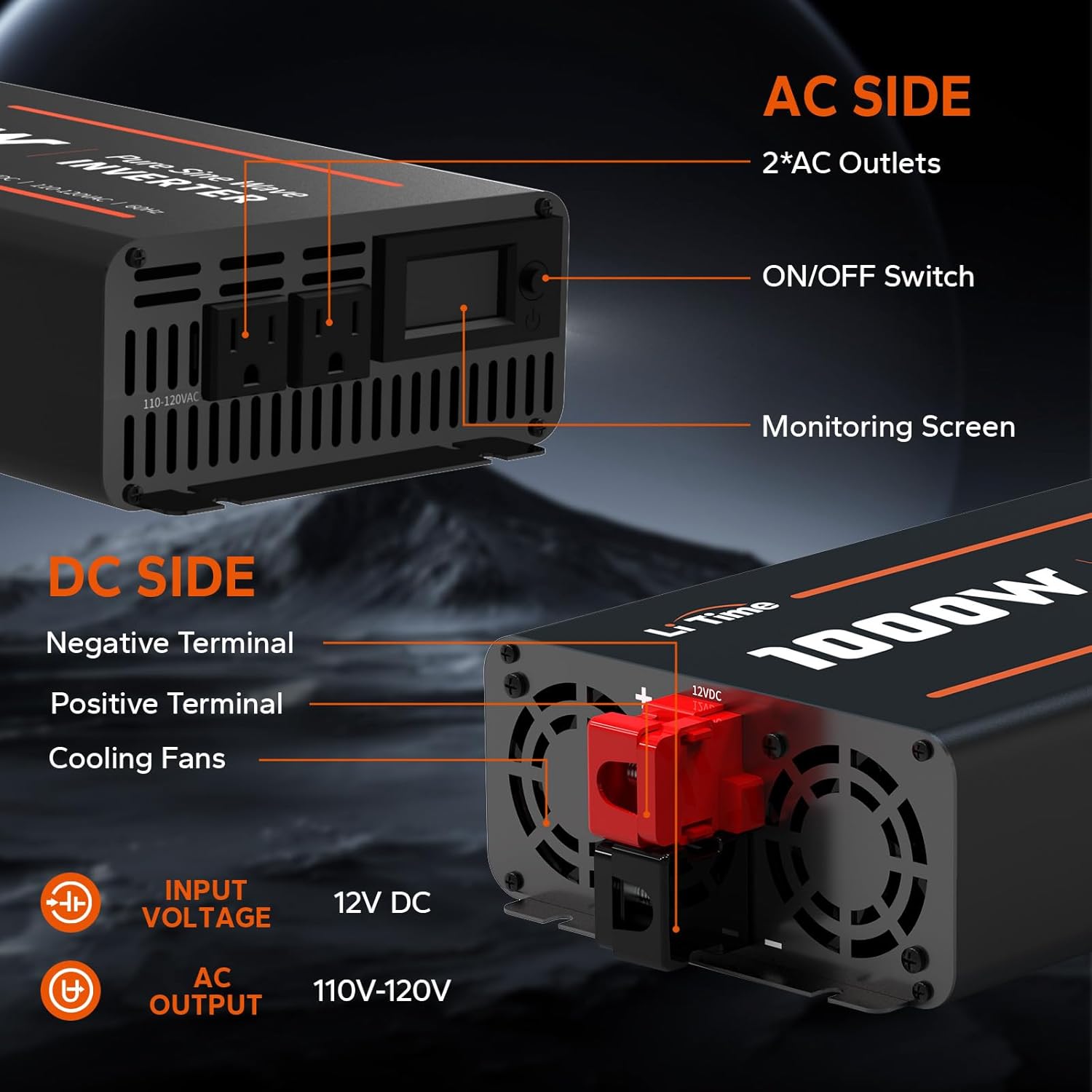
ઘટકો
The LiTime 1000W Pure Sine Wave Inverter includes the following components:
- LiTime 1000W Pure Sine Wave Inverter unit
- 2 AC outlets (110-120V AC)
- ચાલુ/બંધ સ્વીચ
- LCD Monitoring Screen
- Negative Terminal (DC Side)
- Positive Terminal (DC Side)
- ૧ કુલિંગ ફેન
- 2 x 1.97FT Battery to Inverter Cables (Red and Black)
- 4 માઉન્ટ કરવાનું સ્ક્રુઝ
- 4 પ્લાસ્ટિક એન્કર

4. સ્પષ્ટીકરણો
| સ્પષ્ટીકરણ | મૂલ્ય |
|---|---|
| મોડેલનું નામ | 1000W 12V પ્યોર સાઈન વેવ ઈન્વર્ટર |
| વાટtage | 1000 વોટ |
| પાવર સ્ત્રોત | બેટરી સંચાલિત |
| ભલામણ કરેલ ઉપયોગો | Home, Off-grid Cabin, RV |
| બ્રાન્ડ | Litime |
| ઉત્પાદક | Litime |
| ઉત્પાદન પરિમાણો | 9.54 x 6.24 x 3.93 ઇંચ |
| વસ્તુનું વજન | 6.38 પાઉન્ડ |
| આઇટમ મોડલ નંબર | L12V1KW-M |
5. સેટઅપ અને ઇન્સ્ટોલેશન
Follow these steps to properly set up and install your LiTime 1000W Pure Sine Wave Inverter.
5.1. કનેક્શન પ્રક્રિયા
- Ensure the inverter's ON/OFF switch is in the OFF position.
- Connect the provided red battery cable to the positive (+) terminal of the inverter and the positive (+) terminal of your 12V battery.
- Connect the provided black battery cable to the negative (-) terminal of the inverter and the negative (-) terminal of your 12V battery.
- Ensure all connections are tight and secure to prevent loose connections and potential hazards.
- Once the inverter is connected to the battery, you can connect your AC loads to the inverter's AC outlets.

5.2. Disconnection Procedure
- Ensure the inverter's ON/OFF switch is in the OFF position.
- Disconnect all AC loads from the inverter's outlets.
- Disconnect the black battery cable from the negative (-) terminal of the inverter and the battery.
- Disconnect the red battery cable from the positive (+) terminal of the inverter and the battery.
૪. મહત્વપૂર્ણ બાબતો
- મેચિંગ વોલ્યુમtage: Ensure your battery system voltage matches the inverter's 12V DC input. Mismatched voltages can cause system damage.
- વેન્ટિલેશન: ઓવરહિટીંગ અટકાવવા માટે ઇન્વર્ટરને સારી રીતે હવાની અવરજવરવાળી જગ્યાએ સ્થાપિત કરો.
- ઓવરલોડિંગ: Do not exceed the inverter's continuous or peak wattagઇ રેટિંગ્સ.

5.4. માઉન્ટ કરવાનું
The inverter can be mounted horizontally or vertically using the provided screws and anchors. Horizontal mounting is generally recommended for optimal heat dissipation.

6. ઓપરેટિંગ સૂચનાઓ
Once properly installed, operating the inverter is straightforward.
6.1. પાવર ચાલુ/બંધ
- To power on, ensure the inverter is connected to a 12V battery, then press the ON/OFF switch. The LCD display will illuminate, showing real-time status.
- To power off, press the ON/OFF switch. The LCD display will turn off.
6.2. એલસીડી ડિસ્પ્લે
The LCD display provides critical information for monitoring the inverter's performance and status:
- આઉટપુટ પાવર: વર્તમાન વોટ દર્શાવે છેtage being drawn by connected AC loads.
- Load Ratio: ટકા દર્શાવે છેtage of the inverter's capacity currently in use.
- ડીસી ઇનપુટ વોલ્યુમtage: વર્તમાન વોલ્યુમ બતાવે છેtage of the connected 12V battery.
- Fault Prompts: Alerts to any protection activations (e.g., low voltage, overload).
- આવર્તન: આઉટપુટ AC ફ્રીક્વન્સી (60Hz) દર્શાવે છે.
- એસી આઉટપુટ વોલ્યુમtage: Shows the output AC voltage (110-120V).

૧૨. કુલિંગ ફેન
The inverter features two intelligent cooling fans that automatically activate when the internal temperature rises, ensuring optimal operating conditions and preventing overheating. The fans operate with low noise.

7. જાળવણી
To ensure the longevity and optimal performance of your LiTime 1000W Pure Sine Wave Inverter, follow these maintenance guidelines:
- Keep the inverter in a dry, well-ventilated area, away from direct sunlight and moisture.
- Regularly inspect all cable connections to ensure they are tight and free from corrosion.
- Keep the ventilation openings clear of dust and debris to allow proper airflow.
- Do not attempt to open or repair the inverter yourself. Refer to qualified personnel for service.
8. મુશ્કેલીનિવારણ
The LCD display will provide fault prompts if any protection features are activated. Refer to the specific error message on the display to identify and resolve the issue.
- લો વોલ્યુમtage રક્ષણ: The inverter will shut down if the input DC voltage drops below a safe level to protect the battery. Recharge your battery.
- વોલtage રક્ષણ: The inverter will shut down if the input DC voltage exceeds a safe level. Check your battery charging system.
- અતિશય ગરમીથી રક્ષણ: The inverter will shut down if its internal temperature becomes too high. Ensure adequate ventilation and reduce load if necessary.
- Output Overload Protection: The inverter will shut down if the connected AC load exceeds its continuous or peak wattage rating. Reduce the connected load.
- આઉટપુટ શોર્ટ સર્કિટ પ્રોટેક્શન: The inverter will shut down if a short circuit is detected at the AC output. Disconnect all loads and check for faults.

9. વોરંટી અને સપોર્ટ
LiTime products are CE/FCC/RoHS certified, guaranteeing both safety and quality assurance. The inverter comes with the same excellent after-sales service as LiTime's LiFePO4 batteries.
- ગ્રાહક સેવા: Professional technical support and customer service are available via phone or online services, with quick feedback within 24 hours.
- સેવાનો સમયગાળો: Enjoy up to 5-year service.
10. અરજીઓ
The LiTime 1000W Pure Sine Wave Inverter is versatile and suitable for a wide range of applications, providing clean and low-interference power wherever you need it.
- ઘર વપરાશ: Power essential appliances during outages or in areas without grid access.
- RV & Camping: Run electronics, small appliances, and charging devices while on the go.
- ટ્રક: Provide AC power for tools and electronics in commercial or recreational vehicles.
- Off-Grid Solar Systems: Integrate with solar panels and batteries for independent power solutions.


