
1. પરિચય
This manual provides detailed instructions for the installation, operation, maintenance, and troubleshooting of your XPG CORE Reactor II VE 650W Power Supply Unit (PSU). Please read this manual thoroughly before using the product to ensure proper functionality and safety.
2. સલામતી માહિતી
- Always disconnect the power cord from the wall outlet before installing, removing, or cleaning the PSU.
- PSU c ખોલશો નહીંasing. ઉચ્ચ વોલ્યુમtages are present inside, which can cause electric shock. The warranty will be void if the casing ખુલે છે.
- ગરમીના સ્ત્રોતો, સીધા સૂર્યપ્રકાશ અને ભેજથી દૂર, સારી રીતે વેન્ટિલેટેડ વિસ્તારમાં PSU સ્થાપિત કરો.
- Ensure all cables are securely connected. Loose connections can cause damage to components.
- Use only the modular cables provided with this PSU. Using third-party cables may cause damage and void the warranty.
- This product is designed for use in computer systems only. Do not use it for any other purpose.
3. પેકેજ સામગ્રી
ખાતરી કરો કે નીચે સૂચિબદ્ધ બધી વસ્તુઓ તમારા ઉત્પાદન પેકેજમાં હાજર છે:
- XPG CORE Reactor II VE 650W Power Supply Unit
- Modular Cable Set (including 12V-2x6 cable)
- એસી પાવર કોર્ડ
- માઉન્ટિંગ સ્ક્રૂ
- ઝડપી પ્રારંભ માર્ગદર્શિકા

Image: The XPG CORE Reactor II VE 650W power supply unit shown with its retail box, modular cables, AC power cord, and quick start guide.
4. ઉત્પાદન ઓવરview
The XPG CORE Reactor II VE 650W is an 80 PLUS Gold certified power supply compliant with Intel's ATX 3.1 specifications. It features a fully modular design and an FDB (Fluid Dynamic Bearing) fan for efficient and quiet operation.

છબી: આગળની બાજુ view of the XPG CORE Reactor II VE 650W power supply, showcasing its fan grille and XPG branding.

Image: The rear panel of the XPG CORE Reactor II VE 650W power supply, featuring the AC power inlet and the main power switch.

Image: A close-up of the modular cable connection panel on the XPG CORE Reactor II VE 650W PSU, showing labeled ports for Motherboard, CPU & VGA, 12V-2x6, and SATA & Molex connectors.
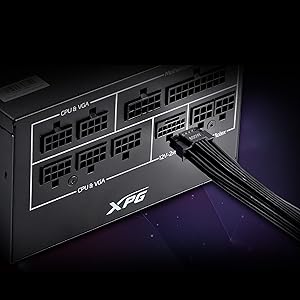
છબી: વિગતવાર view of the 12V-2x6 connector port on the XPG CORE Reactor II VE 650W PSU, designed for next-generation graphics cards.
5. સેટઅપ અને ઇન્સ્ટોલેશન
Follow these steps to properly install your XPG CORE Reactor II VE 650W PSU into your computer system:
- તમારી સિસ્ટમ તૈયાર કરો: ખાતરી કરો કે તમારું કમ્પ્યુટર સંપૂર્ણપણે બંધ છે અને દિવાલના આઉટલેટમાંથી અનપ્લગ થયેલ છે. તમારા કમ્પ્યુટર કેસ ખોલો.
- જૂનું PSU દૂર કરો (જો લાગુ હોય તો): તમારા જૂના PSU માંથી બધા કેબલ ડિસ્કનેક્ટ કરો અને તેને કેસમાંથી દૂર કરો.
- નવું PSU માઉન્ટ કરો: Insert the XPG CORE Reactor II VE 650W PSU into the designated PSU bay in your computer case. Secure it with the provided mounting screws.
- આવશ્યક કેબલ્સ જોડો:
- 24-પિન ATX કેબલને તમારા મધરબોર્ડ સાથે જોડો.
- Connect the 4+4-pin or 8-pin EPS/CPU cable(s) to your motherboard's CPU power connector(s).
- Connect the appropriate PCI-E (6+2-pin) or 12V-2x6 cable(s) to your graphics card(s).
- Connect SATA power cables to your storage drives (HDDs, SSDs) and optical drives.
- Connect Molex cables to any peripherals requiring them.
Ensure all modular cables are firmly seated into both the PSU and the respective components.
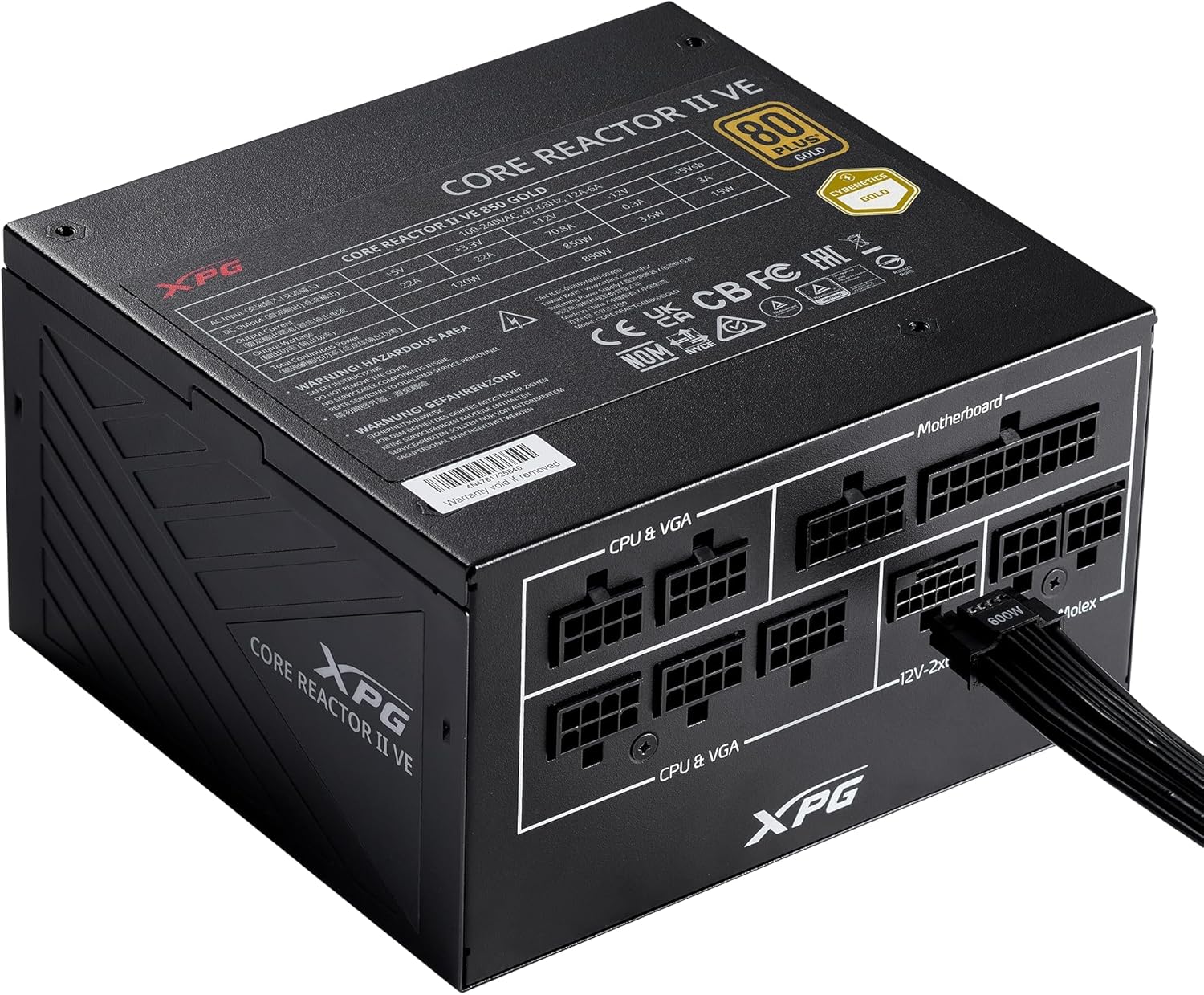
Image: The XPG CORE Reactor II VE 650W power supply with a 12V-2x6 cable connected to its modular port, illustrating a typical cable connection.
- કેબલ મેનેજમેન્ટ: તમારા કેસમાં હવા પ્રવાહ અને સૌંદર્ય શાસ્ત્ર સુધારવા માટે કેબલ્સને સુઘડ રીતે રૂટ કરો.
- કેસ બંધ કરો અને પાવર કનેક્ટ કરો: Close your computer case. Connect the AC power cord to the PSU's inlet and then to a wall outlet.
- પાવર ચાલુ: Flip the power switch on the back of the PSU to the 'ON' position and power on your computer.
6. ઓપરેટિંગ સૂચનાઓ
The XPG CORE Reactor II VE 650W PSU operates automatically once installed and powered on. It features an FDB fan with intelligent fan control, which adjusts its speed based on the PSU's temperature and load to maintain optimal cooling and minimize noise.
The PSU is designed to provide stable and reliable power to your system. No user intervention is typically required during normal operation.
7. જાળવણી
To ensure the longevity and optimal performance of your XPG CORE Reactor II VE 650W PSU, consider the following maintenance tips:
- ધૂળ દૂર કરવી: Periodically clean the fan grille and the interior of your computer case to prevent dust buildup. Dust can impede airflow and lead to overheating. Use compressed air for this purpose, ensuring the system is powered off and unplugged.
- કેબલ ચેક: Occasionally check all modular cable connections to ensure they remain secure.
- પર્યાવરણ: Operate the PSU in a clean, dry, and well-ventilated environment.
8. મુશ્કેલીનિવારણ
If you encounter issues with your XPG CORE Reactor II VE 650W PSU, refer to the following common troubleshooting steps:
- કોઈ શક્તિ નથી:
- ખાતરી કરો કે AC પાવર કોર્ડ PSU અને વોલ આઉટલેટ બંને સાથે સુરક્ષિત રીતે જોડાયેલ છે.
- Check that the power switch on the back of the PSU is in the 'ON' position.
- બીજા ઉપકરણને પ્લગ ઇન કરીને ખાતરી કરો કે વોલ આઉટલેટ કાર્યરત છે.
- Confirm that the 24-pin ATX and 4+4-pin/8-pin EPS/CPU cables are correctly and firmly connected to the motherboard.
- સિસ્ટમ અસ્થિરતા/રેન્ડમ શટડાઉન:
- Ensure all power cables to components (motherboard, CPU, GPU, drives) are securely connected.
- Check for proper ventilation within your computer case. Overheating can cause instability.
- If you have recently added new components, ensure the 650W output is sufficient for your total system load.
- ફરતો ન હોય તેવો પંખો:
- The FDB fan features intelligent control and may not spin at low loads or temperatures. This is normal operation.
- If the fan does not spin under heavy load and the PSU feels excessively hot, contact support.
- અસામાન્ય અવાજો:
- A slight coil whine can sometimes occur under specific loads; this is generally not indicative of a fault.
- If you hear grinding or scraping noises, power off the system immediately and contact support.
જો આ પગલાંઓ તમારી સમસ્યાનું નિરાકરણ ન લાવે, તો વધુ સહાય માટે કૃપા કરીને વોરંટી અને સપોર્ટ વિભાગનો સંદર્ભ લો.
9. સ્પષ્ટીકરણો
Key technical specifications for the XPG CORE Reactor II VE 650W PSU:
| લક્ષણ | સ્પષ્ટીકરણ |
|---|---|
| મોડલ નંબર | COREREACTORIIVE650G-BKCUS |
| આઉટપુટ વોટtage | 650 વોટ્સ |
| કાર્યક્ષમતા પ્રમાણપત્ર | 80 PLUS Gold, CYBENETICS Gold |
| ATX સ્ટાન્ડર્ડ | ATX 3.1 / EPS v2.92 |
| ફોર્મ ફેક્ટર | એટીએક્સ |
| ઠંડક પદ્ધતિ | Air (FDB 120mm Fan) |
| પાવર સપ્લાય ડિઝાઇન | સંપૂર્ણ મોડ્યુલર |
| ઉત્પાદનના પરિમાણો (L x W x H) | ૩૯.૫ x ૨૦.૫ x ૩૮ ઇંચ (૧૦૦૦x૫૩૦x૯૭૦ મીમી) |
| વસ્તુનું વજન | 5.07 પાઉન્ડ |
| કનેક્ટર પ્રકારો | ATX, Molex, PCI Express, SATA, 12V-2x6 |
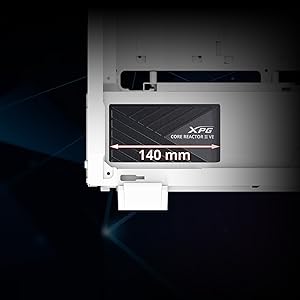
Image: A diagram illustrating the compact 140mm length of the XPG CORE Reactor II VE power supply, highlighting its compatibility with various PC cases.

Image: Visual representation of the multiple protection mechanisms integrated into the PSU, including OPP (Over Power Protection), OVP (Over Voltage Protection), SIP (Surge & Inrush Protection), SCP (Short Circuit Protection), UVP (Under Voltage Protection), OCP (Over Current Protection), OTP (Over Temperature Protection), and NLO (No Load Operation).
10. વોરંટી અને સપોર્ટ
For warranty information, technical support, or service inquiries regarding your XPG CORE Reactor II VE 650W PSU, please visit the official XPG website or contact their customer support directly. Details can typically be found on the product packaging or the manufacturer's official support pages.
વોરંટી દાવા માટે તમારી ખરીદીનો પુરાવો રાખો.