
1. પરિચય
This manual provides essential information for the proper use and maintenance of your Reflex Active Series 23 Smart Watch. Please read it thoroughly before using your device to ensure optimal performance and longevity.
The Reflex Active Series 23 Smart Watch is designed to integrate seamlessly into your daily life, offering features such as communication, health monitoring, and activity tracking. It features a black strap and a black brushed alloy case.
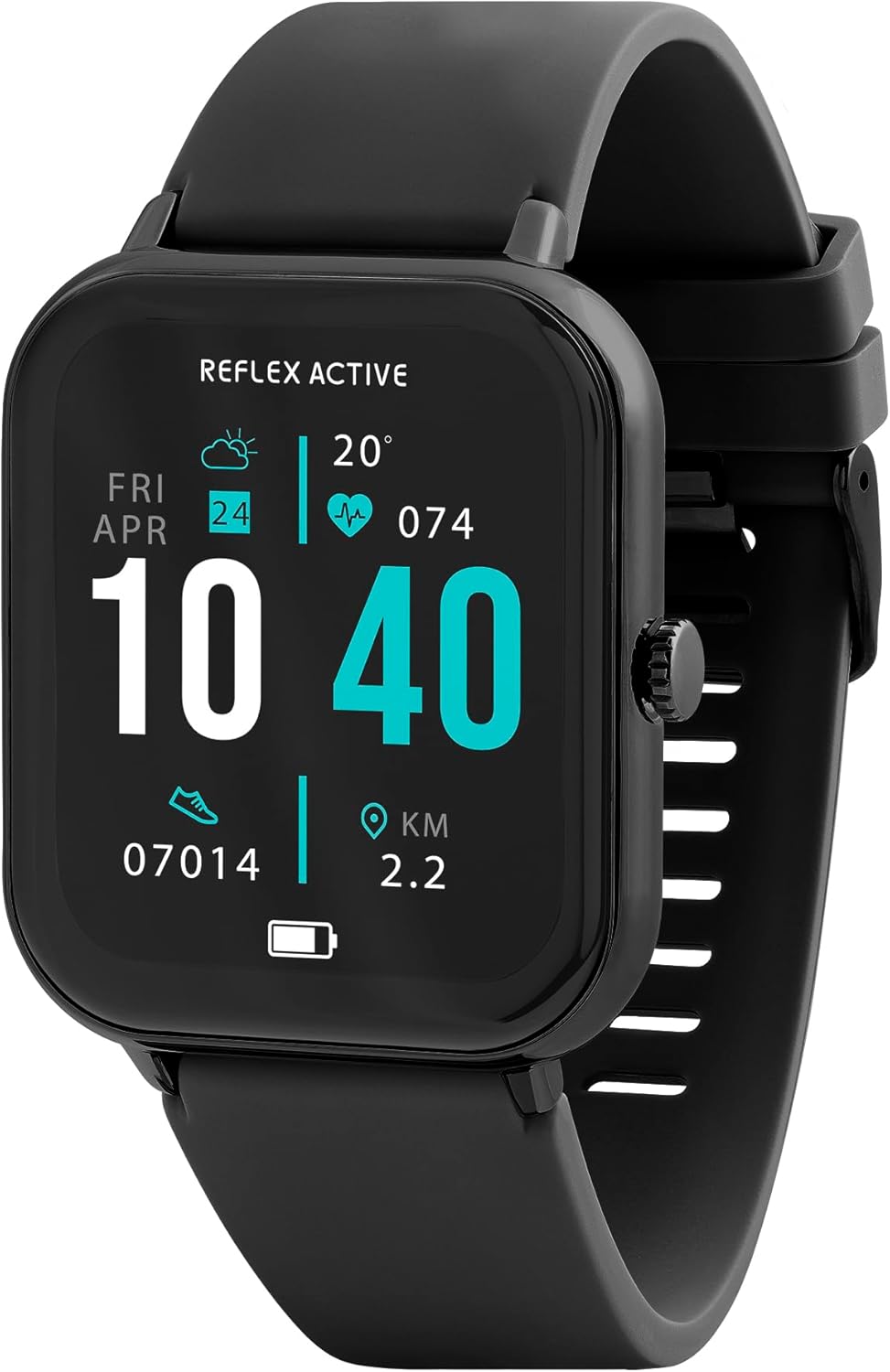
Image 1.1: Reflex Active Series 23 Smart Watch displaying key information.
2. સલામતી માહિતી
- તબીબી અસ્વીકરણ: This device is not a medical device. Data provided by the watch, including heart rate, blood oxygen, and activity tracking, is for reference only and should not be used for medical diagnosis or treatment. Consult a medical professional for any health concerns.
- બેટરી સલામતી: Do not attempt to replace the battery yourself. Improper battery replacement can lead to overheating, fire, or explosion.
- પાણી પ્રતિકાર: The device is IP68 water resistant. This means it is protected against immersion in water up to 1.5 meters for up to 30 minutes. It is suitable for everyday use and shallow-water activities but not for diving or high-pressure water activities. Avoid exposure to hot water, steam, or chemicals.
- ગૂંગળામણનું જોખમ: Keep the device and its accessories out of reach of small children.
- ડ્રાઇવિંગ સલામતી: Do not operate the watch or check notifications while driving or in situations that require full attention.
- ત્વચાની બળતરા: If you experience skin irritation, redness, or discomfort, discontinue use and consult a doctor. Ensure the watch is clean and dry before wearing.
3. સેટઅપ
3.1. અનબોક્સિંગ અને પ્રારંભિક નિરીક્ષણ
પેકેજ ખોલતી વખતે, ખાતરી કરો કે બધા ઘટકો હાજર છે:
- Reflex Active Series 23 Smart Watch
- યુએસબી ચાર્જિંગ કેબલ
- સૂચના માર્ગદર્શિકા (આ દસ્તાવેજ)
- 2-Year Guarantee Information

Image 3.1: Package contents of the Reflex Active Smart Watch.
3.2. સ્માર્ટ વોચ ચાર્જ કરવી
Before first use, fully charge your smart watch. Connect the magnetic charging cable to the charging points on the back of the watch and plug the USB end into a compatible power adapter (not included) or a computer's USB port. The watch display will indicate charging status.
3.3. એપ્લિકેશન ઇન્સ્ટોલેશન
To unlock the full functionality of your Reflex Active Series 23 Smart Watch, you need to install the free Reflex Active Red App on your smartphone. The app is compatible with both iOS and Android devices.
- Scan the QR code in the instruction guide or search for "Reflex Active Red App" in your device's app store.
- એપ્લિકેશન ડાઉનલોડ કરો અને ઇન્સ્ટોલ કરો.
- Follow the on-screen instructions to create an account and set up your profile.

Image 3.2: Reflex Active Red App download options.
૩.૨. તમારી સ્માર્ટ ઘડિયાળનું જોડાણ બનાવવું
After installing the app, follow these steps to pair your watch with your smartphone:
- ખાતરી કરો કે તમારી ઘડિયાળ ચાર્જ થયેલ છે અને ચાલુ છે.
- તમારા સ્માર્ટફોન પર બ્લૂટૂથ સક્ષમ કરો.
- Open the Reflex Active Red App.
- એપ્લિકેશનમાં ઉપકરણ જોડી વિભાગ પર નેવિગેટ કરો.
- Select your Reflex Active Series 23 from the list of available devices.
- તમારી ઘડિયાળ અને સ્માર્ટફોન બંને પર જોડી બનાવવાની વિનંતીની પુષ્ટિ કરો.
૪. તમારી સ્માર્ટ ઘડિયાળનું સંચાલન
4.1. મૂળભૂત નેવિગેશન
The Reflex Active Series 23 features a responsive touchscreen and a side button for navigation:
- ઉપર/નીચે સ્વાઇપ કરો: મેનુઓ અને સૂચનાઓ દ્વારા સ્ક્રોલ કરો.
- ડાબે/જમણે સ્વાઇપ કરો: ઝડપી ઍક્સેસ-view widgets or different watch faces.
- ટૅપ કરો: કોઈ વસ્તુ પસંદ કરો અથવા એપ્લિકેશન ખોલો.
- સાઇડ બટન: Press to return to the home screen or wake the display. Long press for power options.
4.2. સંચાર સુવિધાઓ
તમારા કાંડાથી સીધા જોડાયેલા રહો.
- કૉલ્સ કરવા અને પ્રાપ્ત કરવા: Once paired, you can make and receive calls directly on your watch.
- સંદેશ સૂચનાઓ: Receive alerts for incoming messages from various apps.

Image 4.1: Receiving an incoming call on the smart watch.

Image 4.2: Smart watch displaying a wellness feature.
4.3. આરોગ્ય અને પ્રવૃત્તિ ટ્રેકિંગ
The watch offers comprehensive tracking features:
- હાર્ટ રેટ મોનિટર: તમારા હૃદયના ધબકારાને સતત ટ્રૅક કરે છે.
- સ્ટેપ કાઉન્ટર: Records your daily steps and distance.
- સ્લીપ ટ્રેકિંગ: Monitors your sleep patterns and quality.
- કેલરી ટ્રેકિંગ: પ્રવૃત્તિના આધારે બર્ન થયેલી કેલરીનો અંદાજ કાઢે છે.
- સાયકલ ટ્રેકિંગ: Helps monitor menstrual cycles (via app).
- Multi-Activity Tracking: Supports various sports modes.
- શ્વાસ લેવાની કસરતો: આરામ માટે માર્ગદર્શિત શ્વાસ લેવાની કસરતો.
- હાઇડ્રેશન ચેતવણીઓ: Reminders to drink water.
- બેઠાડુ રીમાઇન્ડર્સ: નિષ્ક્રિયતાના સમયગાળા પછી તમને ખસેડવા માટે ચેતવણી આપે છે.
- જીપીએસ કનેક્શન: આઉટડોર પ્રવૃત્તિઓ દરમિયાન સચોટ રૂટ ટ્રેકિંગ માટે તમારા ફોનના GPSનો ઉપયોગ કરે છે.

છબી 4.3: ઓવરview of Reflex Active Smart Watch features.
4.4. વધારાની સુવિધાઓ
- સંગીત નિયંત્રણ: Control music playback on your smartphone directly from your watch.
- કેમેરા નિયંત્રણ: તમારા સ્માર્ટફોન કેમેરા માટે તમારી ઘડિયાળનો રિમોટ શટર તરીકે ઉપયોગ કરો.
- Personalised Photo Dials: Customize your watch face with your own photos via the app.
- Watch Locator: Use the app to find your watch if it's misplaced nearby.
- હવામાન અપડેટ્સ: રીઅલ-ટાઇમ હવામાન માહિતી મેળવો.
- ફ્લેશલાઇટ: A simple flashlight function on the watch display.
4.5. General Product Video
નીચેનો વિડીયો સામાન્ય માહિતી પૂરી પાડે છેview of Reflex Active smartwatch features, including calling, notifications, health tracking, and customization. While it may feature other series, the core functionalities are similar to your Series 23.
વિડિઓ ૧: જનરલ ઓવરview of Reflex Active Smart Watch features (Note: Features shown may vary slightly by model series).
5. જાળવણી
5.1. Cleaning Your Smart Watch
તમારી ઘડિયાળનો દેખાવ અને કાર્યક્ષમતા જાળવી રાખવા માટે:
- Wipe the screen and case with a soft, lint-free cloth.
- For the strap, use a damp cloth and mild soap if necessary, then rinse thoroughly and dry completely before wearing.
- કઠોર રસાયણો અથવા ઘર્ષક સામગ્રીનો ઉપયોગ કરવાનું ટાળો.
5.2. પાણી પ્રતિકાર (IP68)
Your Reflex Active Series 23 Smart Watch is rated IP68 water resistant. This means it can withstand dust, dirt, and sand, and is resistant to submersion up to a maximum depth of 1.5m underwater for up to thirty minutes. It is suitable for everyday use, such as washing hands or light rain exposure. However, it is not recommended for swimming, showering, or prolonged water exposure, especially in hot water or with soap, as this can compromise the seals.
5.3. બેટરી કેર
- Charge the watch regularly to prevent deep discharge.
- ઘડિયાળને અતિશય તાપમાનમાં રાખવાનું ટાળો, જેનાથી બેટરીનું જીવન ઘટી શકે છે.
- આપેલ ચાર્જિંગ કેબલનો જ ઉપયોગ કરો.
6. મુશ્કેલીનિવારણ
If you encounter issues with your Reflex Active Series 23 Smart Watch, try the following solutions:
- ઘડિયાળ ચાલુ નથી થઈ રહી: ખાતરી કરો કે ઘડિયાળ સંપૂર્ણપણે ચાર્જ થયેલ છે. તેને ઓછામાં ઓછા 30 મિનિટ માટે ચાર્જર સાથે કનેક્ટ કરો.
- Not pairing with smartphone:
- ખાતરી કરો કે તમારા ફોન પર બ્લૂટૂથ સક્ષમ છે.
- ખાતરી કરો કે ઘડિયાળ તમારા ફોનની રેન્જમાં છે.
- તમારી ઘડિયાળ અને સ્માર્ટફોન બંનેને રીસ્ટાર્ટ કરો.
- Check if the Reflex Active Red App is updated to the latest version.
- જો પહેલાં જોડી બનાવી હોય, તો તમારા ફોનના બ્લૂટૂથ સેટિંગ્સ અને એપ્લિકેશન દ્વારા ઉપકરણને અનપેયર અને ફરીથી જોડી બનાવવાનો પ્રયાસ કરો.
- અચોક્કસ પ્રવૃત્તિ ટ્રેકિંગ:
- ખાતરી કરો કે ઘડિયાળ તમારા કાંડા પર, તમારા કાંડાના હાડકાથી લગભગ એક આંગળી જેટલી પહોળાઈ પર, ચુસ્તપણે પહેરેલી છે.
- Calibrate your stride length in the Reflex Active Red App if steps or distance are consistently off.
- Ensure your personal information (height, weight, age) is accurate in the app.
- સૂચનાઓ દેખાતી નથી:
- Check notification settings within the Reflex Active Red App to ensure desired apps are enabled.
- Verify that your phone's notification settings allow the Reflex Active Red App to send notifications.
- ખાતરી કરો કે ઘડિયાળ બ્લૂટૂથ દ્વારા જોડાયેલ છે.
- સ્ક્રીન પ્રતિભાવવિહીન: Try restarting the watch by long-pressing the side button until power options appear, then select restart. If unresponsive, allow the battery to fully drain and then recharge.
7. સ્પષ્ટીકરણો
| મોડલ નંબર | આરએ23-2170 |
| બ્રાન્ડ | રીફ્લેક્સ સક્રિય |
| કેસ સામગ્રી | Black Brushed Alloy |
| સ્ટ્રેપ સામગ્રી | બ્લેક સિલિકોન |
| પાણી પ્રતિકાર | IP68 |
| બેટરીનો પ્રકાર | 1 લિથિયમ પોલિમર (સમાવેલ) |
| પેકેજ પરિમાણો | 18.4 x 8.9 x 2.4 સેમી |
| વસ્તુનું વજન | 38 ગ્રામ |
| સુસંગતતા | iOS & Android (via Reflex Active Red App) |
8. વોરંટી અને સપોર્ટ
Your Reflex Active Series 23 Smart Watch comes with a 2 વર્ષની ગેરંટી ખરીદીની તારીખથી, ઉત્પાદન ખામીઓને આવરી લેતી. વોરંટી દાવાઓ માટે કૃપા કરીને ખરીદીનો પુરાવો રાખો.
For further assistance, troubleshooting, or warranty inquiries, please contact the UK support team. Details can be found on the Reflex Active website or within the Reflex Active Red App.
Supportનલાઇન સપોર્ટ: Visit the official Reflex Active webવારંવાર પૂછાતા પ્રશ્નો અને સહાયક સંસાધનો માટેની સાઇટ.
એપ્લિકેશન સપોર્ટ: The Reflex Active Red App often includes a support section or contact information.