
1. પરિચય
Thank you for choosing the LOLARAN AL1000 Money Counter Machine. This manual provides essential information for the safe and efficient operation of your device. Please read it thoroughly before use and retain it for future reference.
The AL1000 is designed for high-speed banknote counting and advanced counterfeit detection, supporting both Dollar and Euro currencies. It features multiple detection methods and operational modes to streamline your cash handling processes.
2. સલામતી માહિતી
- ખાતરી કરો કે મશીન સ્થિર, સ્તરની સપાટી પર મૂકવામાં આવ્યું છે.
- યોગ્ય વોલ્યુમ સાથે મશીનને ગ્રાઉન્ડેડ પાવર આઉટલેટ સાથે કનેક્ટ કરોtage.
- ભીના હાથે અથવા ભીના હાથે મશીન ચલાવશો નહીંamp વાતાવરણ
- ઓપરેશન દરમિયાન આંગળીઓ, વાળ અને છૂટા કપડાંને ફરતા ભાગોથી દૂર રાખો.
- Unplug the power cord before cleaning or performing any maintenance.
- Do not attempt to disassemble or repair the machine yourself. Contact qualified service personnel.
- બાળકોની પહોંચથી દૂર રાખો.
3. ઉત્પાદન ઓવરview
The LOLARAN AL1000 is a robust money counter machine equipped with advanced features for accurate and secure cash processing.

Image: The LOLARAN AL1000 Money Counter Machine, showcasing its design with banknotes loaded for counting and an external display unit.
મુખ્ય લક્ષણો:
- મૂલ્યની ગણતરી: Calculates the total sum of money. Requires manual denomination setting for multi-denomination batches.
- અદ્યતન નકલી શોધ: Utilizes UV (Ultraviolet), MG (Magnetic), MT (Magnetic Thread), IR (Infrared), and DD (Dimension Detection) technologies. An alarm sounds and the display turns red upon detecting a counterfeit or broken banknote.
- 3.7" Bright LCD Display: Provides clear readability of counting data. Includes an external display for multi-angle viewing
- ઉચ્ચ કાર્યક્ષમતા: Counts up to 1,000 notes per minute with a hopper capacity of 200 banknotes, minimizing paper jams.
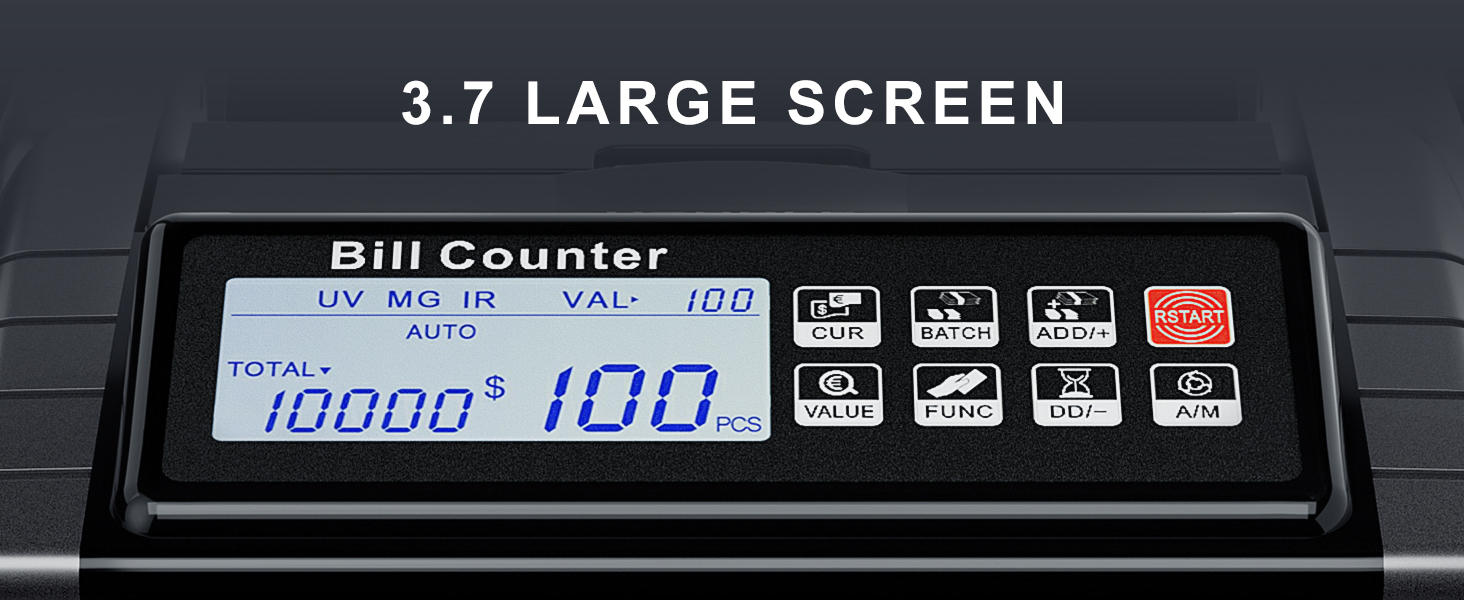
છબી: વિગતવાર view of the machine's 3.7-inch LCD screen, showing various operational indicators and counting results.
4. પેકેજ સામગ્રી
કૃપા કરીને ખાતરી કરો કે નીચે સૂચિબદ્ધ બધી વસ્તુઓ તમારા પેકેજમાં શામેલ છે:

Image: All components included in the LOLARAN AL1000 Money Counter Machine package.
- 1 x LOLARAN AL1000 Money Counter Machine
- 1 x પાવર કોર્ડ
- 1 x સફાઈ બ્રશ
- 1 x External Display
- 1 x Spare Parts (e.g., fuse)
- 4 x Currency Straps
- 1 x સૂચના માર્ગદર્શિકા
5. સેટઅપ
Follow these steps to set up your money counter machine:
- અનપેક કરો: પેકેજિંગમાંથી તમામ ઘટકોને કાળજીપૂર્વક દૂર કરો.
- પ્લેસમેન્ટ: Place the money counter on a flat, stable, and dry surface, ensuring adequate ventilation.
- પાવર કનેક્શન: પાવર કોર્ડને મશીનના પાવર ઇનપુટ સાથે અને પછી યોગ્ય ઇલેક્ટ્રિકલ આઉટલેટ સાથે જોડો.
- બાહ્ય પ્રદર્શન (વૈકલ્પિક): If desired, connect the external display cable to the designated port on the machine.
- પાવર ચાલુ: Press the power switch, usually located on the rear or side of the machine. The display should illuminate.
6. ઓપરેટિંગ સૂચનાઓ
The AL1000 offers various modes for efficient banknote counting and detection.

Image: The control panel of the money counter, highlighting various function buttons.
6.1. Basic Counting
- ખાતરી કરો કે મશીન ચાલુ છે.
- Place a stack of banknotes neatly into the hopper. Ensure they are aligned and not folded or crumpled.
- The machine will automatically start counting (if in Auto mode) or press the START બટન
- The count will be displayed on the LCD screen.
6.2. ઓપરેશનલ મોડ્સ
Use the function buttons on the control panel to select different modes:

Image: Visual representation of Value, Add, and Batch modes on the display.
- Value Mode: દબાવો VALUE button. Manually set the denomination of the banknotes being counted. The machine will then calculate the total monetary value. Note: The machine does not automatically recognize mixed denominations; the value must be set for each batch.
- મોડ ઉમેરો: દબાવો ADD/+ button. This mode accumulates the count of multiple batches. Each new batch counted will be added to the previous total.
- બેચ મોડ: દબાવો બેચ button. You can preset a desired number of banknotes (e.g., 100). The machine will stop counting once the preset number is reached.
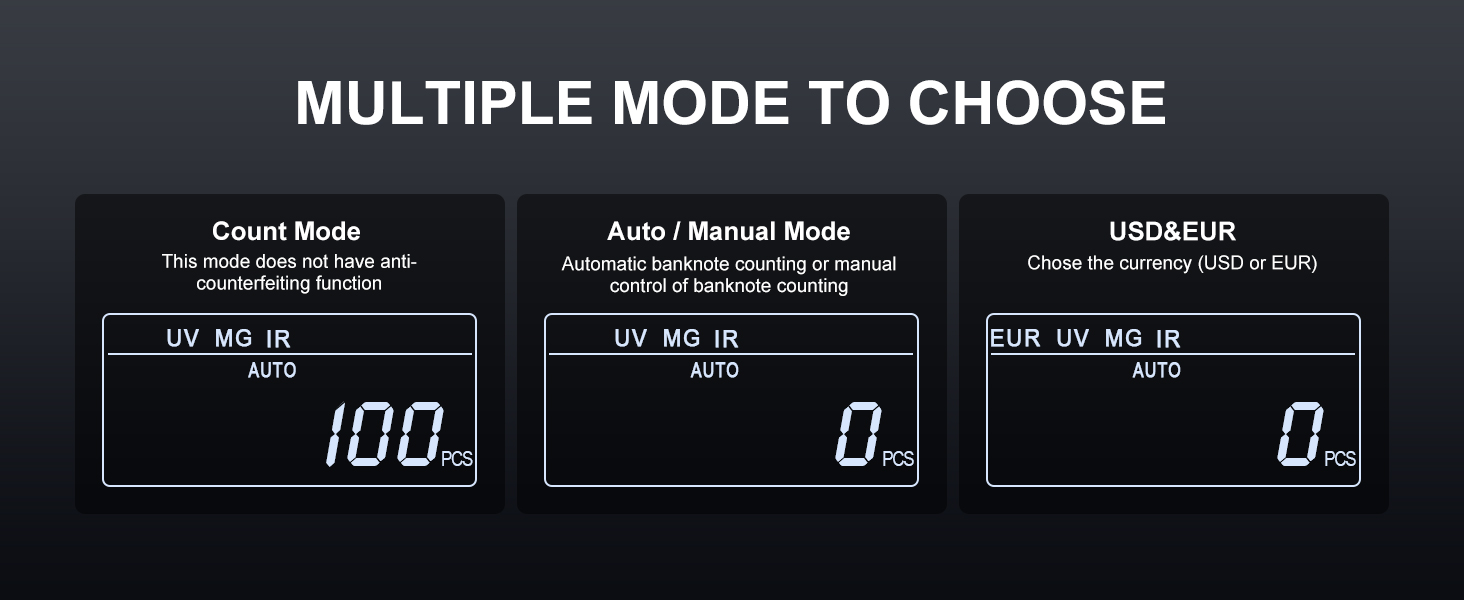
Image: Visual representation of Count, Auto/Manual, and Currency selection modes on the display.
- ગણતરી મોડ: This is the basic counting mode, providing only the number of pieces. Anti-counterfeiting functions are typically active in this mode unless specified otherwise.
- સ્વતઃ/મેન્યુઅલ મોડ: દબાવો એ / એમ button to switch between automatic banknote counting (starts when notes are placed) and manual counting (starts after pressing START).
- ચલણની પસંદગી: દબાવો CUR button to select between USD (United States Dollar) and EUR (Euro).
6.3. નકલી શોધ
The AL1000 employs multiple detection methods to identify suspicious banknotes:

Image: Illustration of the various counterfeit detection technologies used by the machine.
- UV (Ultraviolet): Detects security threads and fibers visible under UV light.
- MG (Magnetic): Checks for magnetic ink patterns present on genuine banknotes.
- MT (Magnetic Thread): Verifies the magnetic properties of the security thread.
- IR (ઇન્ફ્રારેડ): Identifies infrared ink patterns and properties.
- DD (Dimension Detection): Measures the width of banknotes to detect discrepancies.
If a suspicious banknote is detected, the machine will stop, the display will turn red, and an audible alarm will sound. Remove the suspicious note and press START ગણતરી ફરી શરૂ કરવા માટે.

Image: Internal components of the money counter responsible for banknote handling and detection.
7. જાળવણી
Regular cleaning ensures optimal performance and longevity of your money counter.
- પાવર બંધ: Always turn off and unplug the machine before cleaning.
- ધૂળ દૂર કરવી: Use the provided cleaning brush to gently remove dust and paper residue from the hopper, stacker, and internal sensors.
- સેન્સર સફાઈ: Carefully clean the sensors (UV, MG, IR) with a soft, dry cloth or cotton swab. Avoid using abrasive materials or liquids.
- બાહ્ય સફાઈ: Wipe the exterior of the machine with a soft, slightly damp કાપડ કઠોર રસાયણો અથવા સોલવન્ટનો ઉપયોગ કરશો નહીં.
- Regular Intervals: Clean the machine regularly, especially if used frequently or in dusty environments.
8. મુશ્કેલીનિવારણ
If you encounter issues with your AL1000, refer to the following common problems and solutions:
| સમસ્યા | સંભવિત કારણ | ઉકેલ |
|---|---|---|
| મશીન ચાલુ થતું નથી | પાવર કોર્ડ જોડાયેલ નથી; પાવર સ્વીચ બંધ; ફૂંકાયેલ ફ્યુઝ | Check power cord connection; Ensure power switch is ON; Replace fuse (refer to spare parts) |
| Banknotes jam frequently | Banknotes are crumpled/folded; Hopper overloaded; Dust/debris in path | Straighten banknotes; Do not overload hopper; Clean banknote path and sensors with brush |
| અચોક્કસ ગણતરી | Sensors are dirty; Banknotes are not aligned properly | Clean all sensors; Ensure banknotes are neatly stacked and aligned in the hopper |
| Counterfeit detection alarm sounds frequently on genuine notes | Sensors are dirty; Banknotes are worn or damaged | Clean detection sensors; Try counting the notes again or with a different orientation. If issue persists, contact support. |
| ડિસ્પ્લે એક ભૂલ કોડ બતાવે છે | Specific internal error | Refer to the full instruction manual for specific error code meanings, or power cycle the machine. If the error persists, contact support. |
9. સ્પષ્ટીકરણો
| લક્ષણ | વિગત |
|---|---|
| મોડલ નંબર | LX-AL1000 |
| ગણતરીની ઝડપ | Up to 1,000 notes/min |
| હૂપર ક્ષમતા | 200 ની નોટ |
| નકલી શોધ | UV, MG, MT, IR, DD |
| ડિસ્પ્લે | 3.7" LCD, External Display included |
| સપોર્ટેડ કરન્સી | USD, EUR |
| વસ્તુનું વજન | 10.43 પાઉન્ડ |
| પેકેજ પરિમાણો | 13.19 x 11.69 x 7.44 ઇંચ |
| સામગ્રીનો પ્રકાર | એલોય સ્ટીલ |
| ઉત્પાદક | લોલરન |
10. વોરંટી અને સપોર્ટ
LOLARAN provides lifetime service support for the AL1000 Money Counter Machine. If you have any questions, require technical assistance, or need to report an issue, please contact our customer support team.
For assistance, please refer to the contact information provided with your purchase or visit the official LOLARAN webસાઇટ