
પરિચય
This manual provides detailed instructions for the safe and efficient operation of your CAIWEI X99+ 4K Smart Projector. Please read this manual thoroughly before using the projector and retain it for future reference.
સલામતી માહિતી
સલામત કામગીરી સુનિશ્ચિત કરવા અને નુકસાન અટકાવવા માટે, નીચેની સાવચેતીઓનું પાલન કરો:
- Do not place the projector in boxes or cabinets with poor ventilation properties. Ensure adequate airflow around the device to prevent overheating.
- Avoid direct exposure of the projector lens to sunlight.
- વેન્ટિલેશન ઓપનિંગ્સને અવરોધિત કરશો નહીં.
- પ્રોજેક્ટર સાથે પૂરા પાડવામાં આવેલ પાવર એડેપ્ટરનો જ ઉપયોગ કરો.
- પ્રોજેક્ટરને પાણી અથવા અન્ય પ્રવાહીથી દૂર રાખો.
- પ્રોજેક્ટરને જાતે ડિસએસેમ્બલ કરવાનો કે રિપેર કરવાનો પ્રયાસ કરશો નહીં. સહાય માટે લાયક સેવા કર્મચારીઓનો સંપર્ક કરો.
પેકેજ સામગ્રી
ખાતરી કરો કે બધી વસ્તુઓ પેકેજમાં હાજર છે:
- CAIWEI X99+ Smart Projector
- રીમોટ કંટ્રોલ
- HDMI કેબલ
- Power Cable (UK-plug)
- એ.વી. કેબલ
- પ્રોજેક્ટર બેગ
- વપરાશકર્તા માર્ગદર્શિકા (આ દસ્તાવેજ)
ઉત્પાદન ઓવરview
The CAIWEI X99+ is a smart projector designed for versatile entertainment and presentation needs. It features a native 1080P resolution with 4K support, 800 ANSI lumens brightness, and an integrated Android 9.0 operating system.

Figure 1: CAIWEI X99+ Smart Projector front view, શોકasinતેની કોમ્પેક્ટ ડિઝાઇન અને મુખ્ય વિશેષતાઓ.
મુખ્ય લક્ષણો:
- ડિસ્પ્લે ટેકનોલોજી: Native 1920x1080P resolution, 4K support, 800 ANSI lumens, 15500:1 contrast ratio.
- સ્માર્ટ ઓપરેટિંગ સિસ્ટમ: Android 9.0 with access to over 6000 authorized apps (Netflix, YouTube, Prime Video, etc.).
- મેમરી: 2GB રેમ + 16GB રોમ.
- વાયરલેસ કનેક્ટિવિટી: Dual 2.4G/5G WiFi, Airplay/DLNA/Miracast support, Bluetooth 5.0.
- ઓડિયો: Integrated 10W high-power stereo speakers, Dolby Audio support, 3.5mm audio output.
- છબી સુધારણા: HDR10 processing, MEMC technology for smoother motion.
- ગોઠવણો: 4D and ±50° vertical/horizontal electronic keystone correction, 40% digital image zoom.
- ટકાઉપણું: Fully sealed optical engine for dust protection and extended lifespan.

Figure 2: Visual representation of the projector's color accuracy, brightness, and image quality in various lighting conditions.
સેટઅપ
1. પ્લેસમેન્ટ
Position the projector on a stable, flat surface or mount it to the ceiling using the four screw holes. Ensure the projector is placed at an appropriate distance from the projection surface to achieve the desired screen size. Maintain adequate ventilation around the unit.
2. પાવર કનેક્શન
- પાવર કેબલને પ્રોજેક્ટરના પાવર ઇનપુટ પોર્ટ સાથે જોડો.
- પાવર કેબલના બીજા છેડાને યોગ્ય ઇલેક્ટ્રિકલ આઉટલેટમાં પ્લગ કરો.
- ઉપકરણ ચાલુ કરવા માટે પ્રોજેક્ટર અથવા રિમોટ કંટ્રોલ પર પાવર બટન દબાવો.
3. Initial Focus and Keystone Adjustment
Upon initial power-on, the projected image may appear blurry or distorted. Adjust these settings for optimal clarity:
- ફોકસ: છબી તીક્ષ્ણ અને સ્પષ્ટ ન થાય ત્યાં સુધી પ્રોજેક્ટર લેન્સ પર ફોકસ રિંગ ફેરવો.
- કીસ્ટોન કરેક્શન: Use the remote control to access the keystone correction settings. The projector supports 4D keystone correction and ±50° vertical/horizontal electronic correction to square the image if the projector is not perfectly perpendicular to the screen.
- ડિજિટલ ઝૂમ: Adjust the image size without moving the projector using the digital zoom function (40% zoom out/in).
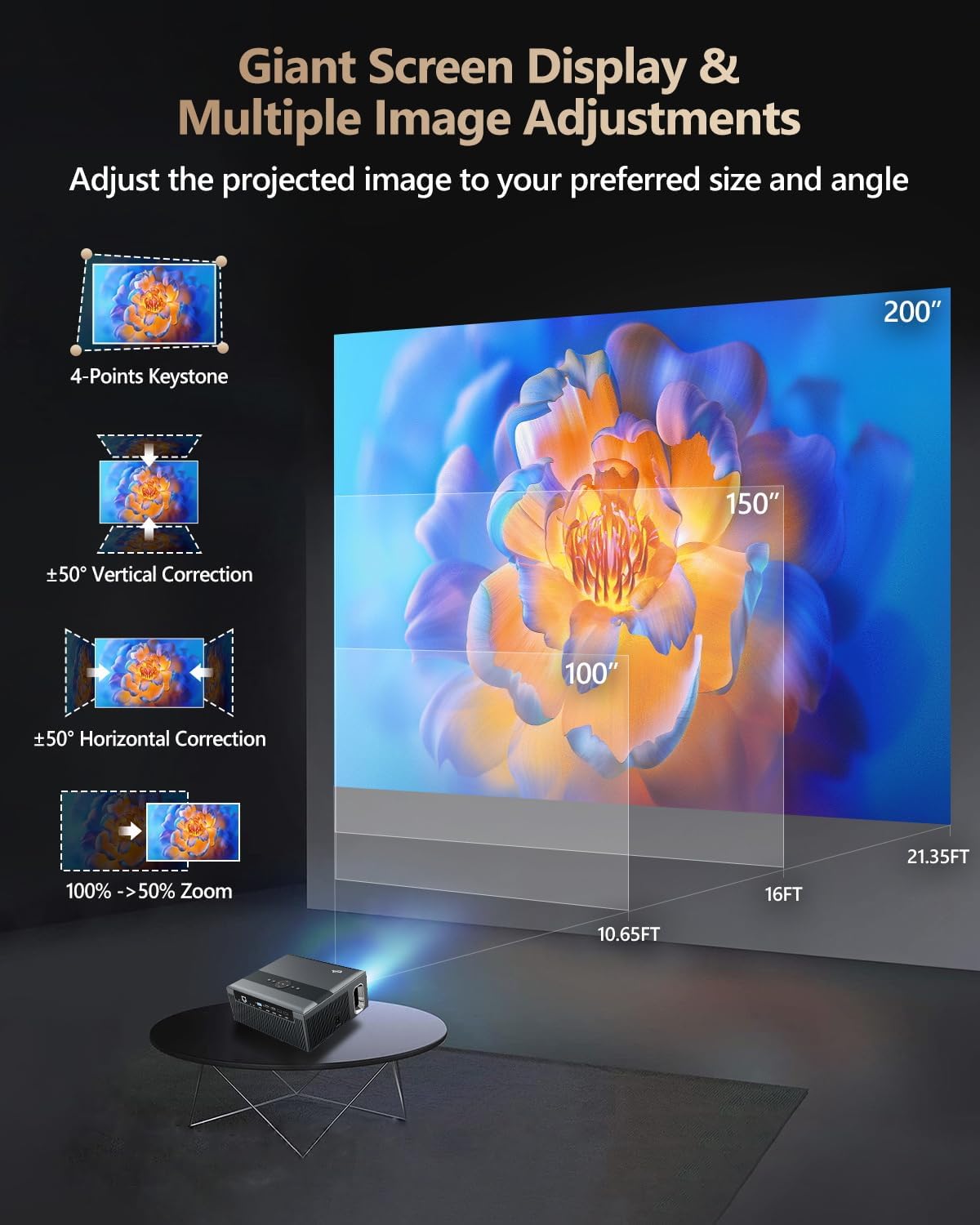
Figure 3: Image adjustment options including keystone correction and digital zoom.
4. નેટવર્ક કનેક્શન
Connect the projector to the internet for access to streaming apps and online content.
- Wi-Fi: Navigate to the network settings in the Android OS. Select your desired 2.4G or 5G Wi-Fi network and enter the password.
- LAN (ઇથરનેટ): Connect an Ethernet cable from your router to the RJ45 port on the projector for a wired internet connection.
5. બ્લૂટૂથ જોડી
Pair Bluetooth devices such as external speakers, headphones, mice, keyboards, or gamepads.
- ખાતરી કરો કે બ્લૂટૂથ ઉપકરણ પેરિંગ મોડમાં છે.
- On the projector, go to Bluetooth settings within the Android OS.
- Select the desired device from the list and confirm pairing.

Figure 4: Wireless connectivity for streaming and audio.
ઓપરેટિંગ સૂચનાઓ
1. Android TV OS Navigation
Use the remote control to navigate the Android 9.0 interface. The home screen provides access to installed applications, settings, and input sources.

Figure 5: Android TV 9.0 interface with pre-installed and accessible applications.
2. App Installation and Usage
The projector comes with pre-installed apps like Netflix, YouTube, and Prime Video. You can download additional authorized applications from the app store within the Android OS.
- Select an app icon from the home screen to launch it.
- Follow on-screen prompts for login or content selection.
3. Screen Mirroring (Airplay/DLNA/Miracast)
Synchronize your smartphone, tablet, or laptop screen wirelessly to the projector.
- Ensure your device and the projector are connected to the same Wi-Fi network.
- Select the appropriate mirroring function (Airplay for iOS, Miracast for Android/Windows, DLNA for compatible devices) on the projector's interface.
- Initiate screen mirroring from your source device.
4. બાહ્ય ઉપકરણોને કનેક્ટ કરવું
The projector offers multiple ports for connecting various external devices.

Figure 6: Available input and output ports for external devices.
- એચડીએમઆઈ: Connect Blu-ray/DVD players, TV sticks, game consoles (PS5), PCs, or laptops using an HDMI cable. Select the corresponding HDMI input from the projector's source menu.
- યુએસબી: Insert USB flash drives or hard drives into the USB ports to play media files સીધું.
- વીજીએ: Connect older PCs or laptops using a VGA cable.
- એ.વી .: Use the AV cable to connect devices with composite video and stereo audio outputs.
5. ઓડિયો આઉટપુટ
The projector features built-in 10W stereo speakers. For alternative audio experiences:
- બ્લૂટૂથ: Pair with external Bluetooth speakers or headphones as described in the Setup section.
- 3.5mm ઓડિયો આઉટ: Connect wired headphones or external speakers using a 3.5mm audio cable.

Figure 7: Projector's integrated audio system.
જાળવણી
1. સફાઈ
- લેન્સ: ઓપ્ટિકલ લેન્સ માટે ખાસ રચાયેલ નરમ, લિન્ટ-ફ્રી કાપડનો ઉપયોગ કરો. ઘર્ષક ક્લીનર્સનો ઉપયોગ કરશો નહીં.
- બાહ્ય: પ્રોજેક્ટરના બાહ્ય ભાગને નરમ, સૂકા કપડાથી સાફ કરો. હઠીલા નિશાનો માટે, સહેજ ડીampપાણી સાથે કાપડ.
- વેન્ટિલેશન ઓપનિંગ્સ: Periodically check and gently clean the ventilation openings to ensure unobstructed airflow.
2. Dust Protection
The CAIWEI X99+ features a fully sealed optical engine and an air purifier filter, which significantly reduces dust accumulation and light decay, contributing to a longer service life.

Figure 8: Dust-proof design of the CAIWEI X99+ projector.
3. સંગ્રહ
When not in use for extended periods, store the projector in a cool, dry place, preferably in its original packaging or the provided projector bag, to protect it from dust and physical damage.
મુશ્કેલીનિવારણ
જો તમને તમારા પ્રોજેક્ટરમાં સમસ્યાઓ આવે, તો નીચેની સામાન્ય સમસ્યાઓ અને ઉકેલોનો સંદર્ભ લો:
| સમસ્યા | સંભવિત કારણ | ઉકેલ |
|---|---|---|
| કોઈ છબી નથી અથવા "કોઈ સિગ્નલ નથી" સંદેશ નથી | ખોટો ઇનપુટ સ્રોત પસંદ કરેલ છે; કેબલ કનેક્શન છૂટું છે; ઉપકરણ ચાલુ નથી. |
|
| અસ્પષ્ટ છબી | ફોકસ ગોઠવ્યો નથી; કીસ્ટોન કરેક્શન જરૂરી છે. |
|
| કોઈ અવાજ નથી | Volume too low; incorrect audio output selected; external device audio issue. |
|
| Wi-Fi કનેક્શન સમસ્યાઓ | ખોટો પાસવર્ડ; રેન્જની બહાર; રાઉટર સમસ્યાઓ. |
|
| રીમોટ કંટ્રોલ કામ કરતું નથી | ડેડ બેટરી; અવરોધ; જોડી બનાવવામાં સમસ્યા. |
|
વિશિષ્ટતાઓ
| બ્રાન્ડ | CAIWEI |
| મોડલ | X99+ |
| ડિસ્પ્લે રિઝોલ્યુશન | મૂળ ૧૯૨૦ x ૧૦૮૦ (૪K ને સપોર્ટ કરે છે) |
| તેજ | 800 ANSI Lumens (12000 LED Lumens) |
| કોન્ટ્રાસ્ટ રેશિયો | 15500:1 |
| ઓપરેટિંગ સિસ્ટમ | એન્ડ્રોઇડ 9.0 |
| સ્મૃતિ | 2GB RAM + 16GB ROM |
| કનેક્ટિવિટી ટેકનોલોજી | Bluetooth 5.0, Dual-band Wi-Fi (2.4G/5G), USB, HDMI, VGA, AV, LAN (RJ45) |
| ખાસ લક્ષણો | Built-In Wi-Fi, Portable, Wireless, HDR10, MEMC, Dolby Audio, Sealed Optical Engine, 4D Keystone Correction, Digital Zoom |
| ઓડિયો | 10W High Power Stereo Speakers, 3.5mm Audio Output |
| ઉત્પાદન પરિમાણો | 10.55 x 9.25 x 4.92 ઇંચ |
| વસ્તુનું વજન | 7.48 પાઉન્ડ |
વોરંટી અને આધાર
For warranty information and technical support, please refer to the warranty card included with your product or visit the official CAIWEI webસાઇટ. આ માર્ગદર્શિકામાં આવરી લેવામાં ન આવતી કોઈપણ સમસ્યાઓ માટે સહાય માટે ગ્રાહક સેવાનો સંપર્ક કરો.
ઉત્પાદક: CAIWEI
Webસાઇટ: CAIWEI Official Store on Amazon