
ANKEWAY AW1010
ANKEWAY Double Din Car Stereo User Manual
મોડેલ: AW1010
1. પરિચય
Thank you for choosing the ANKEWAY Double Din Car Stereo. This advanced car audio receiver features a 7-inch touchscreen, integrating wireless CarPlay and Android Auto for seamless smartphone connectivity. Equipped with Bluetooth, WiFi, RDS/FM radio, GPS navigation, and support for a backup camera, this unit provides a comprehensive in-car entertainment and navigation solution. This manual provides detailed instructions for installation, operation, and troubleshooting to ensure optimal performance and user experience.

Image: The ANKEWAY 7-inch Double Din Car Stereo, highlighting its compatibility with CarPlay and Android Auto.
2. સલામતી માહિતી
Please read all safety instructions carefully before installation and operation. Failure to follow these guidelines may result in injury or damage to the device or vehicle.
- Always consult a professional for installation if you are unsure about any wiring or electrical connections.
- ઉપકરણને એવી રીતે ચલાવશો નહીં કે જે તમને વાહન ચલાવવાથી વિચલિત કરે. હંમેશા માર્ગ સલામતીને પ્રાથમિકતા આપો.
- શોર્ટ સર્કિટ અટકાવવા માટે ખાતરી કરો કે બધા જોડાણો સુરક્ષિત અને યોગ્ય રીતે ઇન્સ્યુલેટેડ છે.
- યુનિટને અતિશય તાપમાન, લાંબા સમય સુધી સીધો સૂર્યપ્રકાશ અથવા વધુ પડતા ભેજના સંપર્કમાં આવવાનું ટાળો.
- Keep the volume at a level that allows you to hear external traffic sounds.
3. પેકેજ સામગ્રી
ઇન્સ્ટોલેશન શરૂ કરતા પહેલા ખાતરી કરો કે બધી વસ્તુઓ પેકેજમાં હાજર છે:
- ANKEWAY Double Din Car Stereo Unit
- પાવર હાર્નેસ
- જીપીએસ એન્ટેના
- USB Cables (Dual)
- બાહ્ય માઇક્રોફોન
- પાછળ View કેમેરા
- આરસીએ કેબલ્સ
- માઉન્ટિંગ કૌંસ અને સ્ક્રૂ
- વપરાશકર્તા માર્ગદર્શિકા (આ દસ્તાવેજ)

છબી: ઓવરview of the main unit and included accessories.
4. ઉત્પાદન સુવિધાઓ
The ANKEWAY AW1010 Car Stereo is designed with a range of features to enhance your driving experience:
- એન્ડ્રોઇડ સિસ્ટમ: Runs on an Android operating system with 2GB RAM and 32GB internal storage, allowing app installation via the Play Store.
- વાયરલેસ કારપ્લે અને એન્ડ્રોઇડ ઓટો: Seamlessly integrate your iPhone or Android smartphone for navigation, music, calls, and voice commands. Supports both wired and wireless connections.
- 7.0-inch HD 1080P IPS Touch Screen: High-definition, sensitive, and transparent display with 2.5D curved edge for clear visuals and responsive interaction.
- મિરર લિંક: Project your phone's display directly onto the car stereo screen.
- કનેક્ટિવિટી: Dual USB ports, Bluetooth for hands-free calls and music streaming, WiFi for internet access, and support for external steering wheel controls (SWC).
- GPS નેવિગેશન: Built-in GPS module with pre-installed navigation software (e.g., TomTom, Here WeGO).
- ઑડિયો/વિડિયો આઉટપુટ: 4x60W audio output and 1080P HD video support. Features an equalizer for sound customization (Pop, Rock, Jazz, etc.).
- રીઅર કેમેરા ઇનપુટ: Includes a backup camera for enhanced safety during reversing.
- રેડિયો: RDS/FM radio tuner for clear reception.

Image: Visual representation of the car stereo's core features.

Image: Detail of the HD Full Touch Screen technology.
5. સેટઅપ અને ઇન્સ્ટોલેશન
Proper installation is crucial for the performance and longevity of your car stereo. It is recommended to have the unit installed by a qualified professional.
5.1 વાયરિંગ ડાયાગ્રામ
Refer to the following diagram for correct wiring connections. Ensure all wires are connected to their corresponding terminals in your vehicle's wiring harness.

Image: Main Cable Wiring Diagram.
- Speaker Connections (RL/RR/FL/FR): Connect to your vehicle's 4 speakers.
- ANT-CONT: Connect to the antenna control wire (if applicable).
- Lamp Control (ILL): Connect to the car's front small light wire.
- Back (REVERSE): Connect to the rear camera signal input cable.
- KEY1(KEY2): Use one of these cables to connect to the signal output cable of your car's Steering Wheel Control (SWC). If KEY1 is not compatible, select KEY2.
- જી.એન.ડી. Connect to the battery negative/iron/ground.
- B+: Connect to the car battery positive.
- ACC: Connect to the car ignition detection cable.
5.2 ભૌતિક સ્થાપન
- Carefully remove your existing car stereo.
- Connect the ANKEWAY stereo's wiring harness to your vehicle's harness according to the diagram.
- Connect the GPS antenna, WiFi antenna, and external microphone. Position the GPS antenna in a location with a clear view of the sky (e.g., dashboard or windshield).
- પાછળ સ્થાપિત કરો view camera and connect its video and power cables to the stereo.
- Secure the stereo unit into the dashboard using the provided mounting brackets and screws.
- Test all functions (power, audio, radio, GPS, camera, Bluetooth, CarPlay/Android Auto) before fully reassembling the dashboard.
6. ઓપરેટિંગ સૂચનાઓ
The ANKEWAY car stereo features an intuitive touchscreen interface. Here are basic operating guidelines:
૫.૪ ટચસ્ક્રીન ઓપરેશન
Navigate through menus and control functions by tapping, swiping, and dragging on the 7-inch IPS touchscreen. The interface is designed to be responsive and user-friendly.

Image: Various screen interfaces of the car stereo.
૬.૮ સ્ટીયરીંગ વ્હીલ કંટ્રોલ (SWC)
If your vehicle supports steering wheel controls, you can configure them to operate the stereo. Access the 'Steering Learn' or 'SWC Settings' menu in the system settings to map your vehicle's steering wheel buttons to the stereo's functions (e.g., volume up/down, track skip, mode change).

છબી: સ્ટીયરીંગ વ્હીલ કંટ્રોલ લર્નિંગ ઇન્ટરફેસ.
7. કનેક્ટિવિટી
૬.૧ વાયરલેસ કારપ્લે અને એન્ડ્રોઇડ ઓટો
This unit supports both wireless and wired CarPlay and Android Auto. To connect wirelessly:
- ખાતરી કરો કે તમારા સ્માર્ટફોન પર બ્લૂટૂથ અને Wi-Fi સક્ષમ છે.
- On the car stereo, go to the CarPlay/Android Auto application.
- Follow the on-screen prompts to pair your phone via Bluetooth. Once paired, the system will automatically establish a Wi-Fi connection for CarPlay/Android Auto functionality.
This allows access to navigation apps (e.g., Waze, Google Maps), music streaming (e.g., Spotify, YouTube Music), hands-free calling, and voice assistants (Siri, Google Assistant) directly from the stereo display.

Image: CarPlay interface on the stereo and smartphone integration.

Image: Android Auto interface with Spotify.

Image: Wireless CarPlay and Android Auto with voice command exampલેસ
7.2 બ્લૂટૂથ
હેન્ડ્સ-ફ્રી કૉલિંગ અને ઑડિયો સ્ટ્રીમિંગ માટે બ્લૂટૂથ દ્વારા તમારા સ્માર્ટફોનને જોડી દો.
- On the stereo, go to the Bluetooth application.
- તમારા ફોન પર બ્લૂટૂથ ચાલુ કરો અને ઉપલબ્ધ ઉપકરણો શોધો.
- Select 'ANKEWAY' (or similar device name) from the list and confirm pairing.
- Once connected, you can make/receive calls and play music through the car speakers.
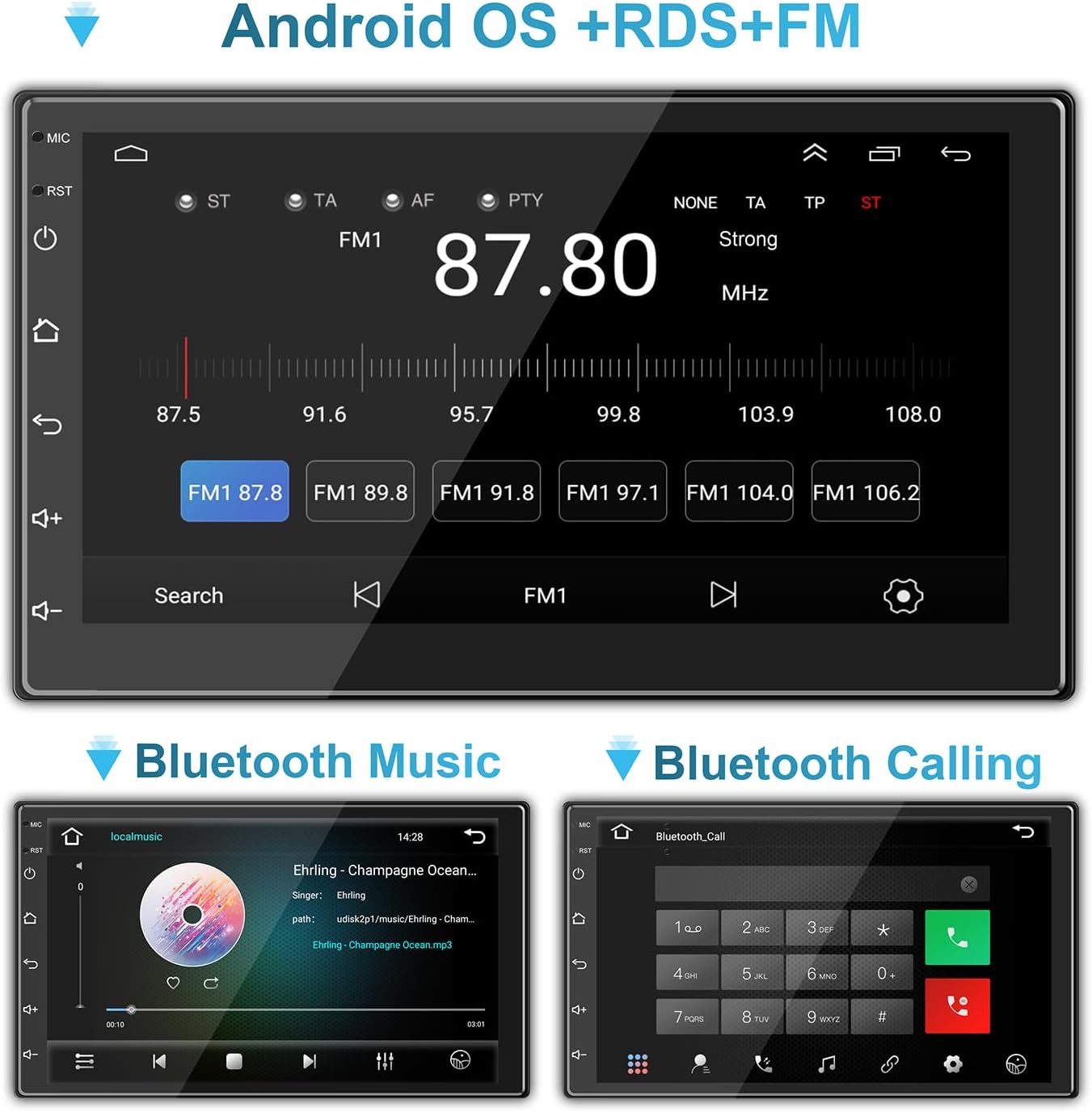
Image: Bluetooth music and calling interfaces.
7.3 WiFi & Internet
Connect the stereo to a Wi-Fi network (e.g., mobile hotspot) to access online features, download apps, and stream content.
- Go to 'Settings' on the stereo and select 'Wi-Fi'.
- Wi-Fi ચાલુ કરો અને સૂચિમાંથી તમારું ઇચ્છિત નેટવર્ક પસંદ કરો.
- જો પૂછવામાં આવે તો પાસવર્ડ દાખલ કરો અને કનેક્ટ કરો.

Image: Connecting to mobile WiFi and streaming content.

Image: WiFi and Bluetooth connectivity features.
૬.૬ મિરર લિંક
Mirror Link allows you to display your smartphone's screen directly on the car stereo. This feature is typically accessed via a dedicated app on the stereo and may require a wired USB connection for initial setup.
૬.૩. GPS નેવિગેશન
The stereo comes with a built-in GPS module and pre-installed navigation software. Ensure the GPS antenna is properly installed and has a clear view ચોક્કસ સ્થિતિ માટે આકાશનું.
- Access the navigation application from the main menu.
- Enter your destination, and the system will provide turn-by-turn directions.
- Maps can be updated via Wi-Fi connection or by downloading map data to the unit's storage.
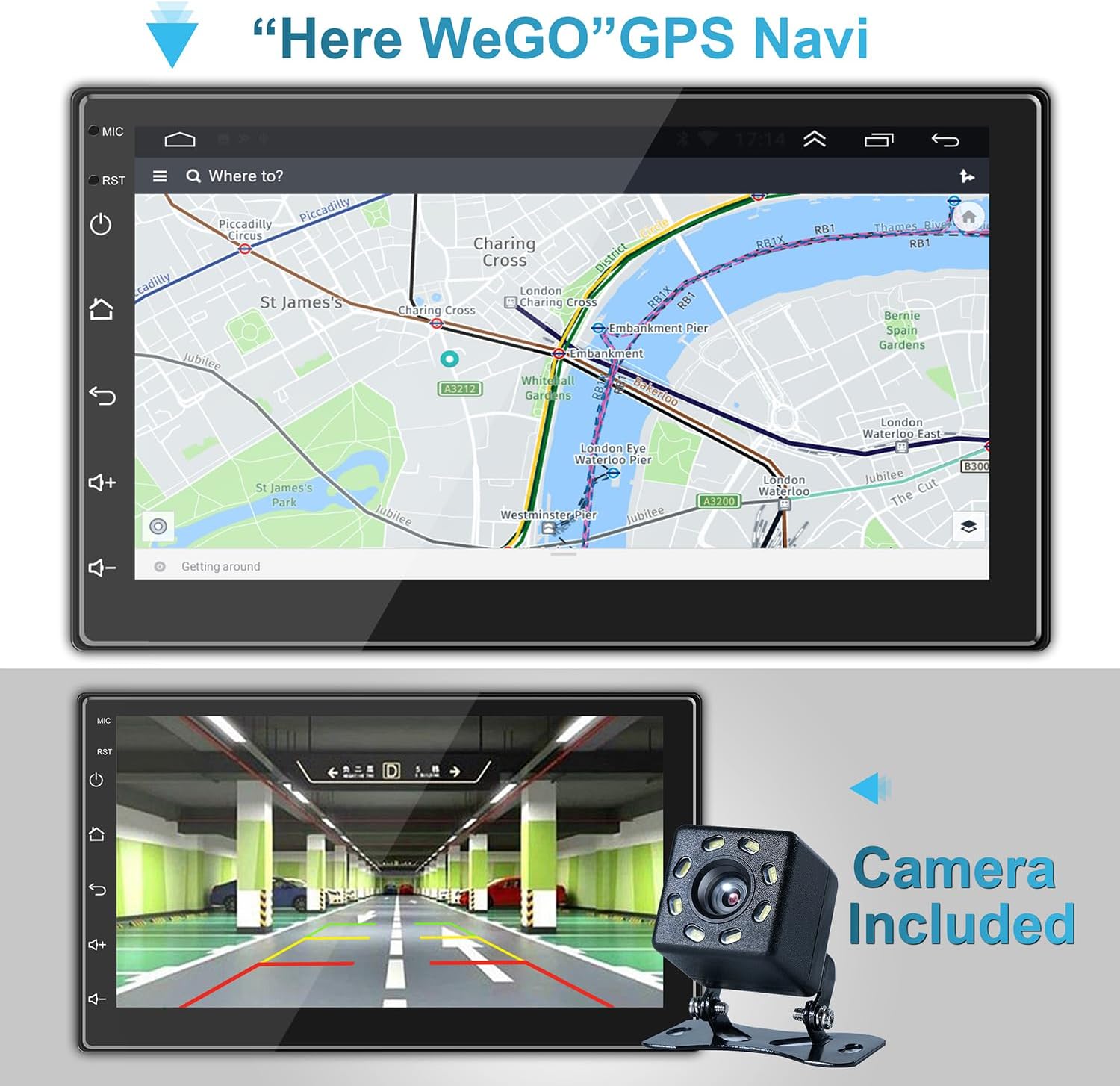
Image: GPS Navigation interface.

Image: GPS Navigation within CarPlay.
9. Backup Camera
The included backup camera automatically displays the rear view on the stereo screen when the vehicle is shifted into reverse gear. This feature significantly aids in safe parking and maneuvering.
- Ensure the camera is properly installed and connected to the 'Back (REVERSE)' input on the stereo's wiring harness.
- The screen will automatically switch to the camera view જ્યારે રિવર્સ ગિયર રોકાયેલ હોય.
Image: Backup camera view on the stereo screen.
10. Multimedia Settings
The stereo supports various multimedia functions, including audio playback and video viewing
10.1 Audio Equalizer
Customize your audio experience using the built-in equalizer. Access the equalizer settings to adjust sound effects and music styles (e.g., Pop, Rock, Jazz, Classical, Custom).
10.2 વિડિઓ પ્લેબેક
The unit supports 1080P HD video playback from USB drives or streaming via connected Wi-Fi. Ensure video files are in compatible formats (e.g., H.264).
Image: High-definition video playback.
11. જાળવણી
To ensure the longevity and optimal performance of your ANKEWAY car stereo, follow these maintenance tips:
- સફાઈ: Use a soft, dry cloth to clean the touchscreen and unit exterior. For stubborn smudges, slightly dampપાણી અથવા સ્ક્રીન-સેફ ક્લીનરથી કપડાને સાફ કરો. ઘર્ષક સામગ્રી અથવા કઠોર રસાયણો ટાળો.
- તાપમાન: Do not expose the unit to extreme temperatures. Prolonged exposure to direct sunlight or very cold conditions can affect performance and lifespan.
- સૉફ્ટવેર અપડેટ્સ: Periodically check for software updates from the manufacturer to ensure the best performance and access to new features. Updates can often be downloaded via Wi-Fi.
- જોડાણો: સમયાંતરે બધા વાયરિંગ કનેક્શન્સ તપાસો જેથી ખાતરી થાય કે તે સુરક્ષિત છે અને કાટથી મુક્ત છે.
12. મુશ્કેલીનિવારણ
જો તમને તમારી કાર સ્ટીરિયોમાં સમસ્યાઓ આવે, તો નીચેની સામાન્ય સમસ્યાઓ અને ઉકેલોનો સંદર્ભ લો:
| સમસ્યા | સંભવિત કારણ | ઉકેલ |
|---|---|---|
| નો પાવર | ઢીલું પાવર કનેક્શન; ફૂંકાયેલ ફ્યુઝ; ખોટું વાયરિંગ. | Check ACC and B+ wiring; Inspect fuse in the vehicle's fuse box and on the stereo's harness; Ensure proper grounding. |
| કોઈ અવાજ નથી | Speaker wires disconnected; Volume too low; Mute function active; Incorrect audio settings. | Verify speaker connections; Increase volume; Check if mute is on; Adjust audio output settings. |
| Bluetooth/Wi-Fi Connectivity Issues | Phone not discoverable; Incorrect pairing; Weak signal; Software glitch. | Ensure phone's Bluetooth/Wi-Fi is on and discoverable; Re-pair device; Move closer to Wi-Fi source (for hotspot); Restart stereo and phone. |
| કારપ્લે/એન્ડ્રોઇડ ઓટો કનેક્ટ થઈ રહ્યું નથી | Incorrect USB cable; Phone software outdated; App not installed/updated; Wireless connection issues. | Use a high-quality USB cable; Update phone OS and CarPlay/Android Auto apps; Ensure Bluetooth and Wi-Fi are active for wireless connection. |
| GPS Signal Lost/Inaccurate | GPS antenna obstructed or disconnected; Poor satellite reception. | Ensure GPS antenna is securely connected and placed in a clear area (e.g., dashboard); Move vehicle to an open area. |
| પાછળનો કેમેરો દેખાતો નથી | Camera power/video cable disconnected; Reverse trigger wire (BACK) not connected. | Check camera connections; Ensure the 'BACK' wire is correctly connected to the vehicle's reverse light trigger. |
If the problem persists after trying these solutions, please contact ANKEWAY customer support for further assistance.
13. સ્પષ્ટીકરણો
| લક્ષણ | સ્પષ્ટીકરણ |
|---|---|
| મોડલ નંબર | AW1010 |
| ઉત્પાદન પરિમાણો | ૨૧.૬૫"ઊંડ x ૨૨.૦૫"પાઉડ x ૫૫.૧૨"ઊંડ (૫૫ x ૫૬ x ૧૪૦ સેમી) |
| વસ્તુનું વજન | 2.38 પાઉન્ડ (1.08 કિગ્રા) |
| સ્ક્રીન માપ | 7 ઇંચ (18 સે.મી.) |
| ઓપરેટિંગ સિસ્ટમ | એન્ડ્રોઇડ |
| મેમરી (RAM) | 2GB |
| સ્ટોરેજ (ROM) | 32GB |
| કનેક્ટિવિટી ટેકનોલોજી | USB, RCA, Cable, Bluetooth, WiFi |
| ખાસ લક્ષણો | Wireless Android Auto, Wireless Apple CarPlay, Mirror Link, GPS Navigation, RDS/FM Radio |
| ઓડિયો આઉટપુટ મોડ | સ્ટીરિયો |
| આઉટપુટ પાવર | 4 x 60 વોટ્સ |
| વિડિઓ એન્કોડિંગ | એચ.264 |

Image: Product dimensions and rear panel layout.
14. વોરંટી અને સપોર્ટ
For warranty information, technical support, or any inquiries regarding your ANKEWAY Double Din Car Stereo, please contact ANKEWAY customer service. Refer to the contact information provided with your purchase or visit the official ANKEWAY webઆધાર સંસાધનો માટે સાઇટ.
Ask a question about this manual
Ask about setup, troubleshooting, compatibility, parts, safety, or missing instructions. Manuals+ will review the question and use this page’s manual context to help answer it.