
FSP HG2-850-G5T
FSP Hydro G PRO 850W Power Supply User Manual
Model: HG2-850-G5T
1. પરિચય
This manual provides detailed instructions for the installation, operation, and maintenance of your FSP Hydro G PRO 850W Power Supply. This unit is an 80 Plus Gold certified, fully modular power supply compliant with ATX 3.1 and PCIe 5.1 standards, featuring a native 12V-2X6 connector.

છબી: આગળની બાજુ view of the FSP Hydro G PRO 850W Power Supply.
2. મુખ્ય લક્ષણો
- ATX 3.1 & PCIe 5.1 Compliance: Designed to meet the latest ATX 3.1 and PCIe 5.1 specifications, including a native 12V-2X6 connector and cable for next-generation hardware.
- 80 Plus Gold Certified: Ensures high power efficiency, operating at a minimum of 90% efficiency at 50% load, reducing electricity consumption and heat generation.
- Full Modular Design: Allows for flexible cable management by connecting only the necessary cables, improving airflow and reducing clutter within the PC case.
- Off-Wet Technology (Conformal Coating): Features an exclusive conformal coating for enhanced reliability and performance in challenging environments, tested to function effectively in up to 95% relative humidity.
- કોમ્પેક્ટ કદ: With a length of 150mm, the power supply offers a smaller footprint, facilitating easier installation in various PC chassis.
- Exceptional Quiet Operation with Eco Switch: Includes an Eco switch that, when activated, optimizes power consumption and allows the fan to remain off under 30% load, providing a silent computing experience.
3. સેટઅપ અને ઇન્સ્ટોલેશન
Before installation, ensure your system components are compatible with an 850W power supply and that your PC case has adequate space for the unit (dimensions: 150mm L x 150mm W x 86mm H).
3.1 અનપેકિંગ અને નિરીક્ષણ
Carefully remove the power supply and all modular cables from the packaging. Inspect for any visible damage. If any damage is found, contact your retailer or FSP support immediately.
3.2 પાવર સપ્લાય માઉન્ટ કરવાનું
- Position the power supply in the designated PSU bay of your PC case. Ensure the fan is oriented correctly for optimal airflow (typically facing downwards if your case has a bottom vent, or upwards if not).
- Secure the power supply to the case using the provided screws.
૪.૨ મોડ્યુલર કેબલ્સને જોડવા
The FSP Hydro G PRO is fully modular, allowing you to connect only the cables required for your system. Refer to the image below for the connector layout on the power supply unit.
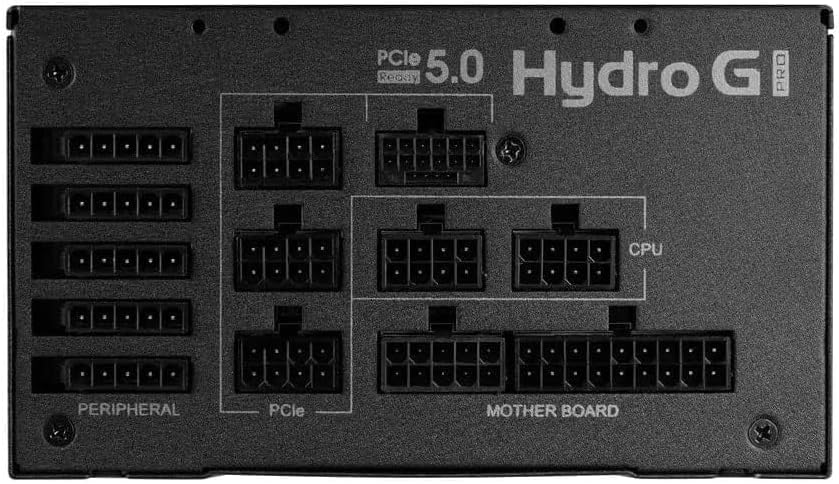
Image: Modular connector panel of the FSP Hydro G PRO power supply, showing clearly labeled ports for Motherboard, CPU, PCIe, and Peripheral connections.
- Motherboard Power: 24-પિન એટીએક્સ કેબલને મધરબોર્ડથી કનેક્ટ કરો.
- CPU Power: Connect the 8-pin (4+4 pin) EPS/CPU cables to your motherboard's CPU power connectors. Modern motherboards may require one or two such connectors.
- PCIe Power (Graphics Cards): Use the appropriate PCIe cables for your graphics card(s). This unit includes a native 12V-2X6 connector for compatible PCIe 5.1 graphics cards. For older cards, use the standard 6+2 pin PCIe connectors.
- Peripheral Power: Connect SATA power cables for storage drives (SSDs, HDDs) and other peripherals. Use Molex connectors for older devices or case fans if needed.
Ensure all connections are secure and properly seated. Route cables neatly to improve airflow and aesthetics.
4. ઓપરેટિંગ સૂચનાઓ
4.1 પ્રારંભિક પાવર ચાલુ
- After all internal connections are made, connect the AC power cord to the power supply and then to a wall outlet.
- પાવર સપ્લાયની પાછળના મુખ્ય પાવર સ્વીચને 'ચાલુ' સ્થિતિમાં ફેરવો.
- સિસ્ટમ શરૂ કરવા માટે તમારા કમ્પ્યુટર કેસ પર પાવર બટન દબાવો.
4.2 Eco Switch Functionality
The FSP Hydro G PRO features an Eco switch located on the rear panel. This switch controls the fan's operation based on load.

છબી: પાછળનો ભાગ view of the FSP Hydro G PRO power supply, highlighting the Eco switch for fan control.
- When the Eco switch is ON, the power supply fan will not operate under low load (below 30%), providing a silent experience during low power consumption. The fan will automatically activate when the load exceeds 30% to maintain optimal cooling.
- When the Eco switch is બંધ, the power supply fan will operate continuously, regardless of the load, providing constant airflow.
5. જાળવણી
The FSP Hydro G PRO power supply is designed for long-term reliability with minimal maintenance.

Image: Illustration of internal components protected by conformal coating.
- ધૂળ દૂર કરવી: Periodically inspect the power supply's fan intake and exhaust vents for dust accumulation. Use compressed air to gently clear any dust to ensure proper airflow and cooling. Ensure the power supply is turned off and unplugged before cleaning.
- કન્ફોર્મલ કોટિંગ: The unit features an "Off-Wet Technology" conformal coating, providing protection against dust, moisture, and stains. This reduces the need for frequent internal cleaning in typical environments.
6. મુશ્કેલીનિવારણ
If you encounter issues with your FSP Hydro G PRO power supply, consider the following steps:
- કોઈ શક્તિ નથી:
- ખાતરી કરો કે AC પાવર કોર્ડ પાવર સપ્લાય અને વોલ આઉટલેટ બંને સાથે સુરક્ષિત રીતે જોડાયેલ છે.
- Verify that the main power switch on the back of the power supply is in the 'ON' position.
- Check all modular cables (24-pin ATX, CPU, PCIe, etc.) are firmly seated in both the power supply and the respective components.
- વોલ આઉટલેટ પાવર સપ્લાય કરી રહ્યું છે તેની ખાતરી કરવા માટે બીજા ઉપકરણ સાથે તેનું પરીક્ષણ કરો.
- સિસ્ટમ અસ્થિરતા/રેન્ડમ શટડાઉન:
- ખાતરી કરો કે તમારા સિસ્ટમની પાવર જરૂરિયાતો પાવર સપ્લાયની 850W ક્ષમતા કરતાં વધુ ન હોય.
- Check for proper ventilation around the power supply and within the PC case to prevent overheating.
- Verify that all power connectors are correctly installed and not loose.
- Fan Not Spinning (Eco Mode):
- If the Eco switch is ON, the fan is designed not to spin under low load (below 30%). This is normal operation. The fan will activate automatically when the system load increases.
- If the Eco switch is OFF and the fan is not spinning, ensure the power supply is receiving power and is not faulty.
If issues persist after performing these checks, contact FSP customer support or your retailer for further assistance.
7. સ્પષ્ટીકરણો
| લક્ષણ | વિગત |
|---|---|
| મોડેલનું નામ | HG2-850-G5T |
| આઉટપુટ વોટtage | 850 વોટ્સ |
| ૮૦ પ્લસ સર્ટિફિકેશન | સોનું |
| ATX સંસ્કરણ | 3.1 |
| PCIe સંસ્કરણ | 5.1 (with 12V-2X6 connector) |
| ફોર્મ ફેક્ટર | એટીએક્સ |
| મોડ્યુલારિટી | સંપૂર્ણ મોડ્યુલર |
| ઠંડક પદ્ધતિ | Air (with Eco fan control) |
| ઉત્પાદનના પરિમાણો (L x W x H) | 150mm x 150mm x 86mm (6 x 6 x 3.5 ઇંચ) |
| વસ્તુનું વજન | 3.38 કિલોગ્રામ (7.44 પાઉન્ડ) |
| ઉત્પાદક | FSP Group INC |
8. વોરંટી અને સપોર્ટ
The FSP Hydro G PRO 850W Power Supply comes with a 10 વર્ષની વોરંટી, ensuring long-term reliability and peace of mind. For warranty claims, technical support, or any product-related inquiries, please contact FSP customer service through their official webસાઇટ અથવા તમારા ખરીદી બિંદુ.
વોરંટી માન્યતા માટે કૃપા કરીને તમારી ખરીદીનો પુરાવો રાખો.
Ask a question about this manual
Ask about setup, troubleshooting, compatibility, parts, safety, or missing instructions. Manuals+ will review the question and use this page’s manual context to help answer it.