
1. ઉત્પાદન ઓવરview
The Armorcope CQ1S is a wireless 2K HD solar-powered security camera designed for outdoor surveillance. This camera system offers a 360° PTZ (Pan-Tilt-Zoom) view, color night vision with an integrated spotlight, two-way audio communication, and advanced motion detection capabilities. Its solar power feature ensures continuous operation without the need for constant recharging or wired power connections, making it ideal for various outdoor environments.

Figure 1.1: Armorcope CQ1S Solar Security Cameras (Set of 2)
This image displays two Armorcope CQ1S cameras, each equipped with a solar panel for continuous power. The cameras are designed for outdoor installation, providing comprehensive surveillance.
2. પેકેજ સામગ્રી
Upon opening the package, verify that all components are present and in good condition. The standard package for the Armorcope CQ1S (Lot de 2) includes:
- 2 x Armorcope CQ1S Wireless 2K HD Solar Security Cameras
- 2 x Solar Panels (integrated or separate, depending on model variant)
- 2 x Mounting Brackets and Screws
- 1 x USB Charging Cable (for initial charge, if needed)
- ૧ x વપરાશકર્તા માર્ગદર્શિકા (આ દસ્તાવેજ)
- 1 x ઝડપી પ્રારંભ માર્ગદર્શિકા
Note: An SD card for local storage is not included and must be purchased separately if desired.
3. સેટઅપ અને ઇન્સ્ટોલેશન
3.1 Initial Charging (Optional)
While the camera is solar-powered, it is recommended to fully charge the internal battery using the provided USB cable before the first use, especially if installing in an area with limited initial sunlight.
૩.૨ એપ ઇન્સ્ટોલેશન અને એકાઉન્ટ બનાવવું
The Armorcope CQ1S camera operates with the વિકોહોમ application. Download the Vicohome app from your smartphone's app store (iOS App Store or Google Play Store). Follow the on-screen instructions to create an account and log in.
3.3 Camera Pairing and Wi-Fi Connection
- Open the Vicohome app and tap "Add Device" or the "+" icon.
- Select the Armorcope CQ1S camera model from the list.
- Power on the camera. The camera will enter pairing mode (indicated by a specific LED light pattern or voice prompt).
- Connect your smartphone to a 2.4 GHz Wi-Fi નેટવર્ક. Note: 5G Wi-Fi networks are not supported.
- Follow the app's instructions to scan the QR code displayed on your phone with the camera lens, or enter your Wi-Fi credentials manually.
- Once connected, the camera will confirm successful pairing.
3.4 ભૌતિક સ્થાપન
Choose a suitable outdoor location for installation, ensuring the solar panel receives adequate direct sunlight throughout the day. The camera is designed for wall mounting.
- માઉન્ટિંગ બ્રેકેટનો ઉપયોગ કરીને ટેમ્પ્લેટ તરીકે ડ્રિલિંગ પોઈન્ટને ચિહ્નિત કરો.
- છિદ્રો ડ્રિલ કરો અને જો જરૂરી હોય તો દિવાલ એન્કર દાખલ કરો.
- આપેલા સ્ક્રૂનો ઉપયોગ કરીને માઉન્ટિંગ બ્રેકેટને દિવાલ સાથે જોડો.
- કેમેરાને માઉન્ટિંગ બ્રેકેટ સાથે જોડો.
- Adjust the angle of the solar panel to maximize sun exposure.

Figure 3.1: Solar Wireless Charging Setup
This image illustrates the camera mounted on a wall, with its solar panel connected and positioned to efficiently capture sunlight for continuous wireless charging.
4. ઓપરેટિંગ સૂચનાઓ
4.1 જીવંત View અને PTZ નિયંત્રણ
Access the live video feed through the Vicohome app. The camera features a 355° horizontal pan and 100° vertical tilt range, allowing for comprehensive area coverage. Use the directional controls within the app to adjust the camera's viewકોણ કોણ.

Figure 4.1: All-Round Full View (PTZ)
This image demonstrates the camera's extensive pan and tilt capabilities, providing a wide, comprehensive view of the monitored area, controllable via the mobile application.
4.2 2K HD Resolution and Color Night Vision
The camera records in Full HD 2K resolution, providing clear and detailed video footage during both day and night. The advanced color night vision technology, enhanced by the integrated spotlight, ensures vivid and accurate colors even in low-light conditions.
4.3 PIR Motion Detection and Alarm
Equipped with PIR (Passive Infrared) sensors, the camera accurately detects human motion, minimizing false alarms from insects or swaying branches. When motion is detected, you will receive instant notifications on your smartphone. The camera can also activate a sound-light alarm to deter intruders.
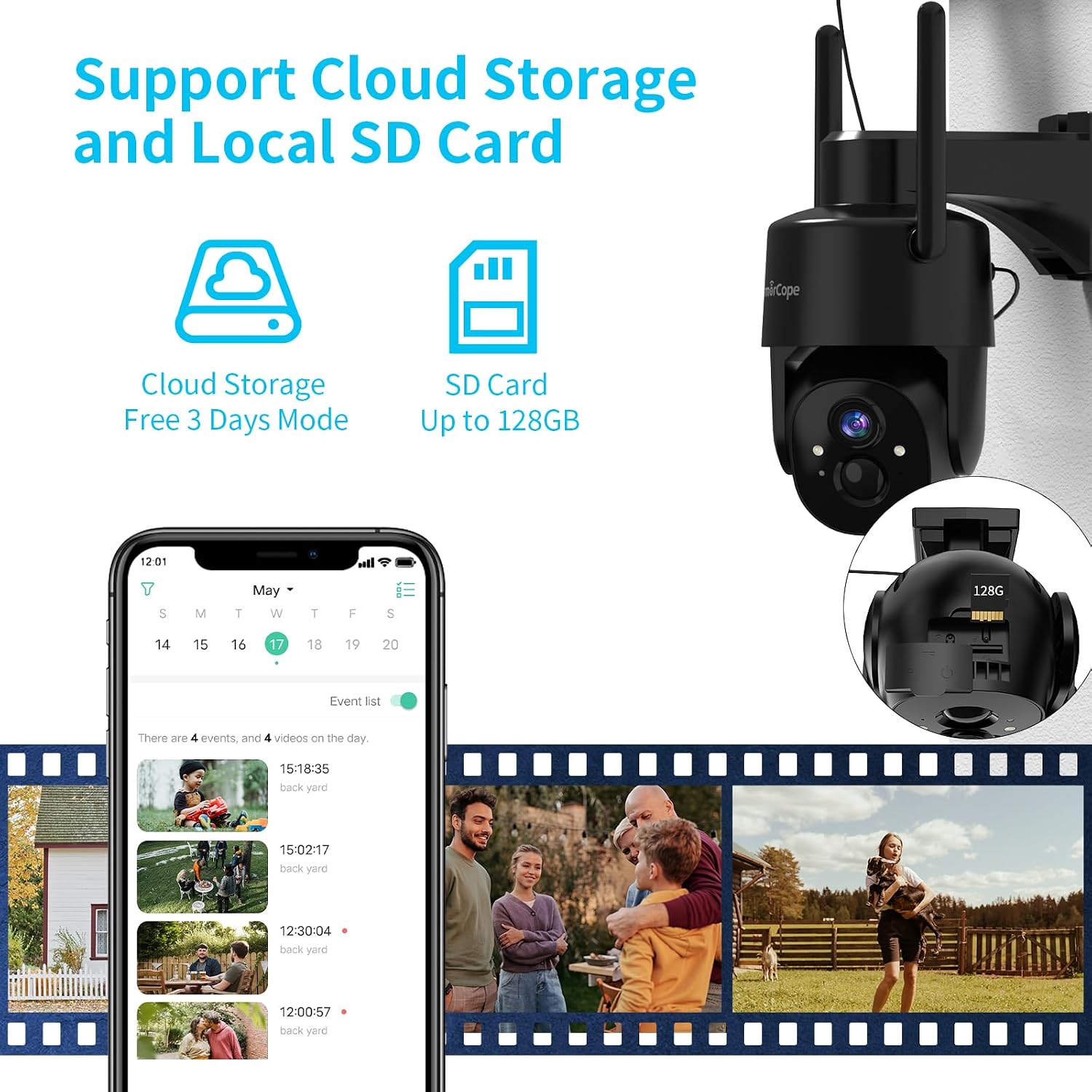
Figure 4.2: Motion Detection and Sound-Light Alarm
This image illustrates the camera's motion detection feature, showing how it identifies human presence and triggers an alert, along with the option for a sound and light alarm.
૫.૨ ટુ-વે ઓડિયો
The built-in microphone and speaker enable two-way communication. You can listen to what's happening around the camera and speak through the camera to communicate with visitors or deter unwanted individuals, directly from your smartphone.

આકૃતિ 4.3: ટુ-વે ઓડિયો કોમ્યુનિકેશન
This image demonstrates the two-way audio functionality, allowing users to communicate remotely with individuals near the camera, such as delivery personnel.
૪.૫ વિડિઓ સ્ટોરેજ વિકલ્પો
The Armorcope CQ1S offers flexible storage solutions for recorded events:
- સ્થાનિક SD કાર્ડ સ્ટોરેજ: Supports up to a 128GB Micro SD card (not included). Insert the SD card into the designated slot on the camera.
- મેઘ સંગ્રહ: A free 3-day cloud storage plan for event videos is available. Paid subscription plans for extended cloud storage are also offered through the Vicohome app.

Figure 4.4: Cloud and Local SD Card Storage
This image highlights the camera's dual storage capabilities, supporting both cloud-based recording and local storage via a Micro SD card for event footage.
5. જાળવણી
૬.૨ હવામાન પ્રતિકાર
The Armorcope CQ1S camera has an IP65 waterproof rating, making it resistant to dust and water jets. It is designed to operate reliably in various weather conditions, including rain and snow, within a temperature range of -15.6 °C to 55 °C (4 °F to 131 °F).

Figure 5.1: IP65 Weather Resistant Design
This image illustrates the camera's robust IP65 weather-resistant construction, ensuring reliable operation in diverse environmental conditions such as rain, snow, and dust.
5.2 Solar Panel Cleaning
To ensure optimal charging efficiency, periodically clean the surface of the solar panel to remove any dust, dirt, or debris that may accumulate. Use a soft, damp સફાઈ માટે કાપડ.
5.3 બેટરી જીવન
The camera is powered by a rechargeable Lithium-ion battery (included). With sufficient sunlight exposure, the solar panel continuously charges the battery, allowing for uninterrupted operation. In periods of low sunlight, the battery will sustain camera function.
6. મુશ્કેલીનિવારણ
- કેમેરા Wi-Fi થી કનેક્ટ થતો નથી: Ensure your Wi-Fi network is 2.4 GHz. Check Wi-Fi signal strength at the camera's location. Restart your router and the camera.
- કોઈ ગતિ શોધ ચેતવણીઓ નથી: Verify that motion detection is enabled in the Vicohome app settings. Adjust PIR sensitivity if necessary. Ensure there are no obstructions blocking the sensor.
- નબળી વિડિઓ ગુણવત્તા: Check your Wi-Fi connection stability. Ensure the camera lens is clean and free from smudges or dirt.
- બેટરી ચાર્જ થઈ રહી નથી: Ensure the solar panel is clean and receiving direct sunlight for several hours daily. Check the connection between the solar panel and the camera.
- દ્વિ-માર્ગી ઑડિઓ સમસ્યાઓ: Check microphone and speaker permissions for the Vicohome app on your smartphone. Ensure volume levels are adequate.
7. સ્પષ્ટીકરણો
| લક્ષણ | સ્પષ્ટીકરણ |
|---|---|
| મોડલ નંબર | CQ1S |
| બ્રાન્ડ | આર્મરકોપ |
| રંગ | Black (Lot de 2) |
| વસ્તુઓની સંખ્યા | 2 |
| વાયરલેસ કોમ્યુનિકેશન ટેકનોલોજી | વાઇ-ફાઇ (ફક્ત 2.4 GHz) |
| ફોર્મ ફેક્ટર | ડોમ |
| Viewએન્ગલ | 360 Degrees (PTZ: 355° Horizontal, 100° Vertical) |
| ઇન્સ્ટોલેશનનો પ્રકાર | વોલ માઉન્ટ |
| પાવર સ્ત્રોત | Solar Powered / Battery Powered (6 Watts) |
| આઇટમના પરિમાણો (L x W x H) | 10.16 x 10.16 x 15.24 સેમી (4 x 4 x 6 ઇંચ) |
| વસ્તુનું વજન | 1.78 કિલોગ્રામ (3.92 lbs) |
| બેટરી | ૧ લિથિયમ-આયન (શામેલ) |
| ખાસ લક્ષણો | Waterproof (IP65), Color Night Vision, Two-Way Audio, Motion Detection, Spotlight |
| સુસંગત ઉપકરણો | Alexa, Android |
| વિડિઓ રેકોર્ડિંગ રીઝોલ્યુશન | 2K |
| ભલામણ કરેલ ઉપયોગો | Outdoor Security, Indoor Security |
8. વોરંટી અને સપોર્ટ
For warranty information and technical support, please refer to the contact details provided with your product packaging or visit the official Armorcope website. While specific spare parts availability information is not provided, general product support can be obtained through the manufacturer's customer service channels.
For app-related issues, please contact Vicohome app support directly.