
1. પરિચય
This manual provides essential information for the setup, operation, maintenance, and troubleshooting of your DELTACO GAMING WM87 Gaming Mouse. Please read these instructions carefully to ensure proper use and to maximize your gaming experience.
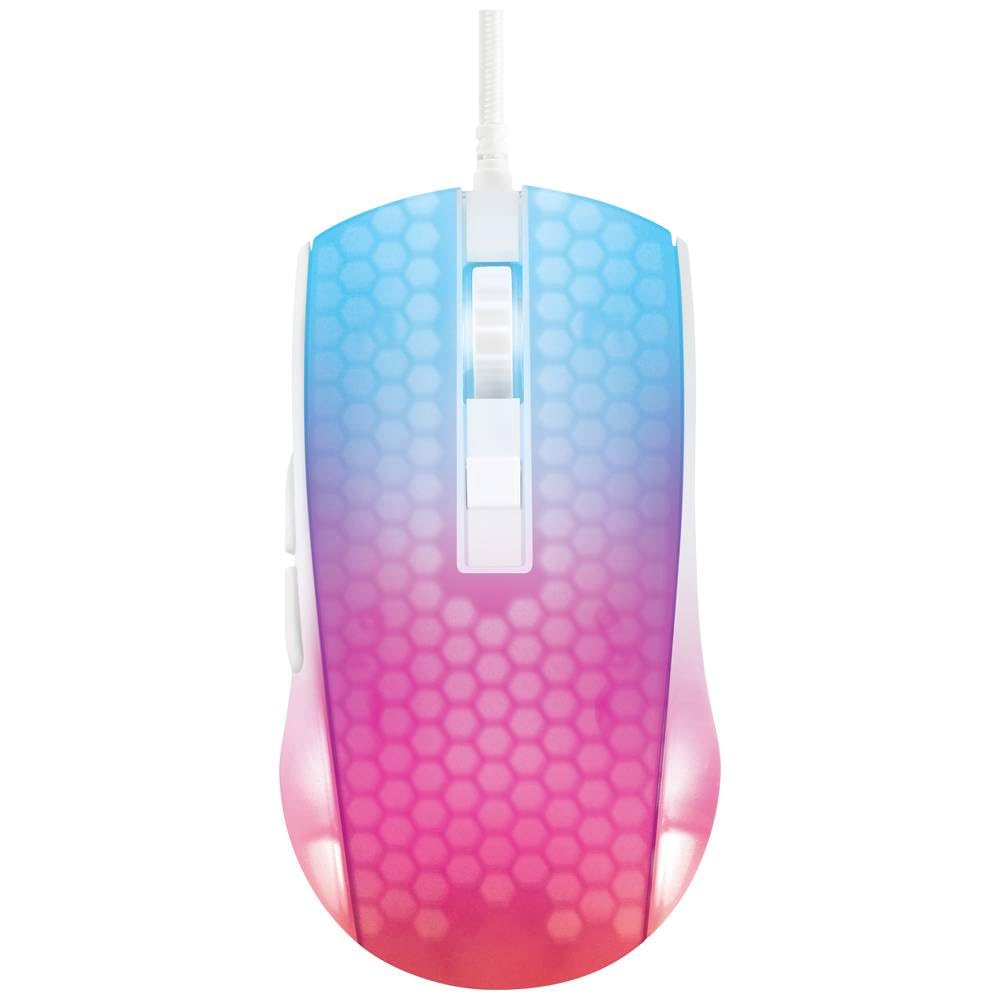
એક ઓવરહેડ view of the DELTACO GAMING WM87 Gaming Mouse. The mouse features a translucent white body with an illuminated honeycomb pattern that transitions from blue at the front to pink and red at the rear. It has a scroll wheel and two main buttons, along with two side buttons visible on the left.
2. ઉત્પાદન ઓવરview
The DELTACO GAMING WM87 is a high-performance gaming mouse designed for precision and comfort. It features a transparent design with integrated illumination, a high-accuracy optical sensor, and six programmable buttons.
મુખ્ય લક્ષણો:
- કનેક્ટિવિટી: યુએસબી વાયર્ડ
- સેન્સર: Optical, up to 6200 DPI
- બટનો: 6 (Left, Right, Scroll Click, DPI Cycle, Forward, Back)
- ડિઝાઇન: Transparent shell with illuminated honeycomb pattern
- સુસંગતતા: પર્સનલ કમ્પ્યુટર, લેપટોપ
3. સેટઅપ સૂચનાઓ
- માઉસ ખોલો: Carefully remove the DELTACO GAMING WM87 mouse from its packaging.
- કમ્પ્યુટરથી કનેક્ટ કરો: Locate an available USB port on your personal computer or laptop. Insert the USB connector of the mouse firmly into the USB port.
- ડ્રાઇવર ઇન્સ્ટોલેશન: The mouse is plug-and-play. Your operating system should automatically detect and install the necessary drivers. No additional software installation is typically required for basic functionality.
- કાર્યક્ષમતા ચકાસો: Once connected, move the mouse and click the buttons to ensure it is working correctly. The integrated illumination should light up.
4. ઓપરેટિંગ સૂચનાઓ
મૂળભૂત કાર્યો:
- ડાબું ક્લિક કરો: પ્રાથમિક ક્રિયા, પસંદગી.
- જમણું બટન દબાવો: સંદર્ભ મેનૂ, ગૌણ ક્રિયા.
- સ્ક્રોલ વ્હીલ: Scroll up/down pages. Pressing the scroll wheel typically acts as a middle click.
- આગળ/પાછળ બટનો: Located on the left side of the mouse, these buttons are commonly used for navigation in web બ્રાઉઝર્સ અથવા file સંશોધકો
DPI ગોઠવણ:
The DELTACO GAMING WM87 mouse features adjustable DPI (Dots Per Inch) settings, allowing you to change the cursor sensitivity on the fly. A dedicated DPI button (often located behind the scroll wheel) cycles through preset DPI levels up to 6200 DPI. Press this button to adjust the sensitivity to your preference.
રોશની:
The mouse features integrated illumination. The lighting pattern and colors are typically pre-programmed and may change based on DPI settings or automatically cycle through colors. Refer to any potential software for advanced customization, if available.
5. જાળવણી
- સફાઈ: Use a soft, dry, lint-free cloth to clean the exterior of the mouse. For stubborn dirt, slightly dampen the cloth with water. Avoid using harsh chemicals, solvents, or abrasive materials.
- સેન્સર સફાઈ: Occasionally, dust or debris may accumulate around the optical sensor on the underside of the mouse. Use a cotton swab or compressed air to gently clean the sensor area.
- સંગ્રહ: જ્યારે ઉપયોગમાં ન હોય, ત્યારે માઉસને અતિશય તાપમાન અને સીધા સૂર્યપ્રકાશથી દૂર સ્વચ્છ, સૂકા વાતાવરણમાં સંગ્રહિત કરો.
- કેબલ કેર: નુકસાન અટકાવવા માટે USB કેબલને વધુ પડતું વાળવાનું કે વાળવાનું ટાળો.
6. મુશ્કેલીનિવારણ
- માઉસ જવાબ આપતો નથી:
- ખાતરી કરો કે USB કેબલ કાર્યરત USB પોર્ટમાં સુરક્ષિત રીતે પ્લગ થયેલ છે.
- તમારા કમ્પ્યુટર પર માઉસને બીજા USB પોર્ટમાં પ્લગ કરવાનો પ્રયાસ કરો.
- તમારા કમ્પ્યુટરને ફરીથી પ્રારંભ કરો.
- અનિયમિત કર્સર ચળવળ:
- માઉસની નીચેની બાજુએ આવેલા ઓપ્ટિકલ સેન્સરને સાફ કરો.
- ખાતરી કરો કે તમે માઉસનો ઉપયોગ યોગ્ય સપાટી પર કરી રહ્યા છો (દા.ત., માઉસ પેડ). ખૂબ પ્રતિબિંબિત અથવા પારદર્શક સપાટીઓ ટાળો.
- રોશની કામ કરતી નથી:
- યુએસબી કનેક્શન તપાસો.
- If the mouse has a dedicated lighting control button or software, ensure it is enabled.
7. સ્પષ્ટીકરણો
| લક્ષણ | વિગત |
|---|---|
| બ્રાન્ડ | DELTACO ગેમિંગ |
| મોડલ નંબર | GAM-144-W (WM87) |
| કનેક્ટિવિટી ટેકનોલોજી | યુએસબી |
| મૂવમેન્ટ ડિટેક્શન ટેકનોલોજી | ઓપ્ટિકલ |
| બટનોની સંખ્યા | 6 |
| ડીપીઆઈ | 6200 સુધી |
| હેન્ડ ઓરિએન્ટેશન | અધિકાર |
| ભલામણ કરેલ ઉત્પાદન ઉપયોગ | ગેમિંગ |
| સુસંગત ઉપકરણો | લેપટોપ, પર્સનલ કોમ્પ્યુટર |
| ઉત્પાદન પરિમાણો | 180 x 0.07 x 0.12 cm (Note: These dimensions appear to be for the cable or packaging, not the mouse itself. Please refer to product packaging for accurate mouse dimensions.) |
| વજન | Approximately 65 Grams (Lithium battery weight, likely referring to overall mouse weight if no battery is present) |
| પ્રથમ ઉપલબ્ધ તારીખ | સપ્ટેમ્બર 16, 2023 |
8. વોરંટી અને સપોર્ટ
For warranty information, technical support, or service inquiries regarding your DELTACO GAMING WM87 Gaming Mouse, please refer to the warranty card included with your product or visit the official DELTACO GAMING webસાઇટ. વોરંટી દાવાઓ માટે તમારી ખરીદીનો પુરાવો રાખો.