
1. ઉત્પાદન ઓવરview
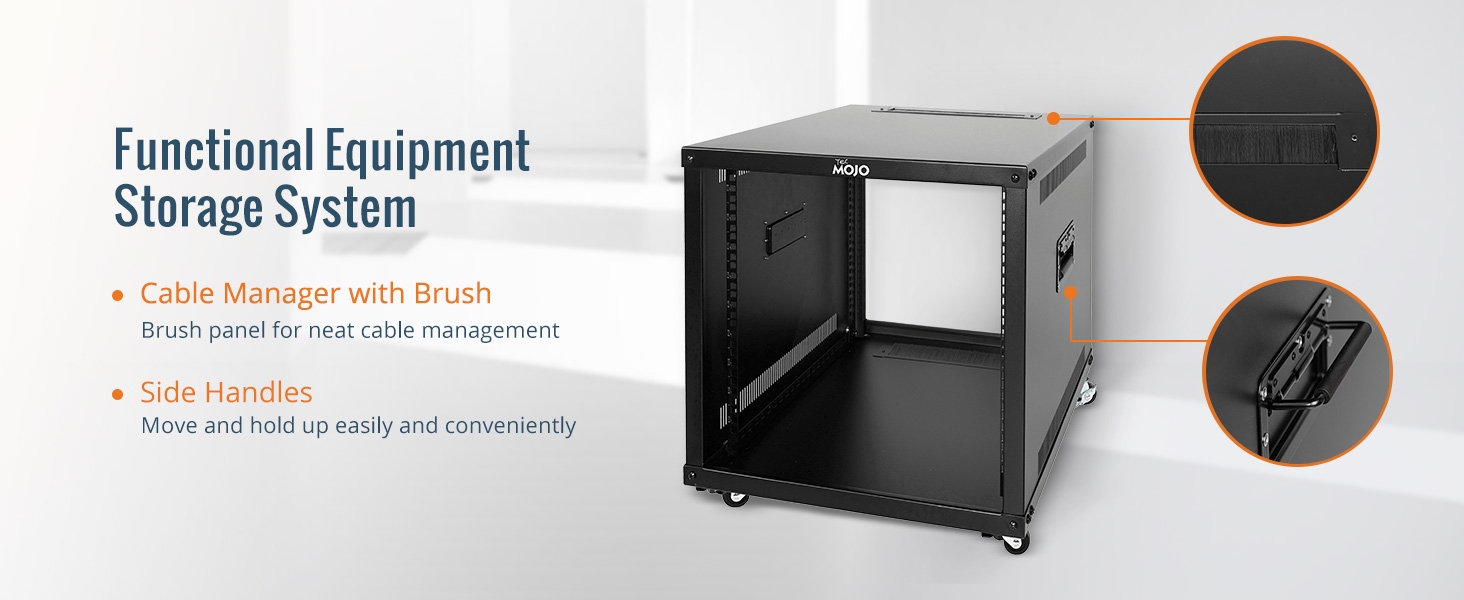
The Tecmojo 9U Portable Rolling Network Rack is a robust and versatile 4-post open frame server cabinet designed for organizing and securing various IT, data, AV, and network equipment. Constructed from premium cold rolled steel, it offers durability and a weight capacity of up to 132 lbs (60 kg). Its mobile design, featuring built-in handles and locking casters, allows for easy transportation and secure placement.
- ટકાઉ બાંધકામ: Made of premium cold rolled steel, capable of holding up to 132 lbs (60 kg). Features an electrostatic powder coat for rust and corrosion prevention.
- User-friendly Mobility: Equipped with built-in handles on both sides for easy transport and roller casters for convenient movement and positioning.
- Dust Prevention & Ventilation: Open frame design with nylon brushed cable managers helps protect against dust and dirt accumulation while increasing heat dissipation.
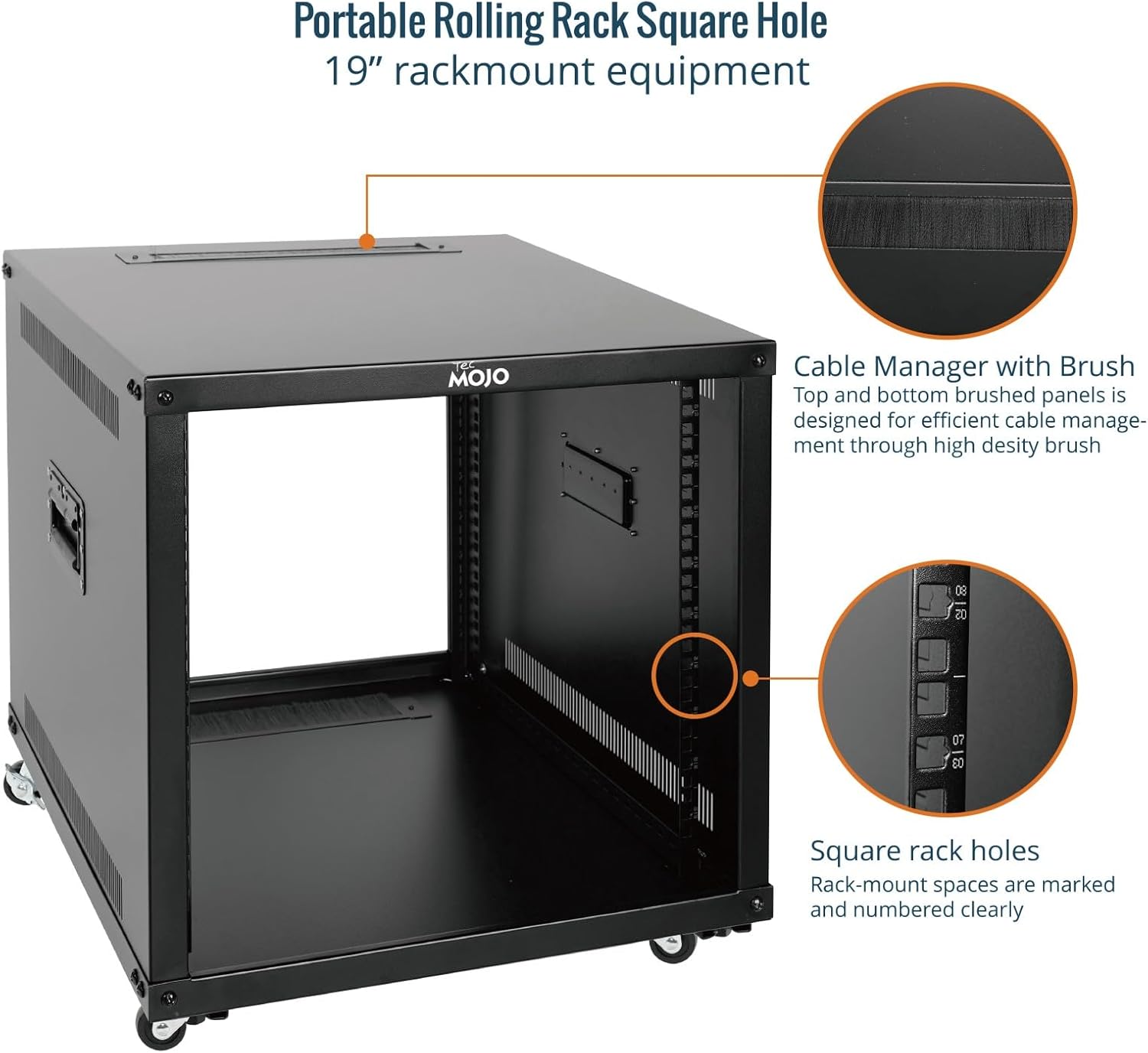
- વ્યાપક એપ્લિકેશન: Suitable for 19-inch standard equipment and devices, including networking, AV, and rack mount components.
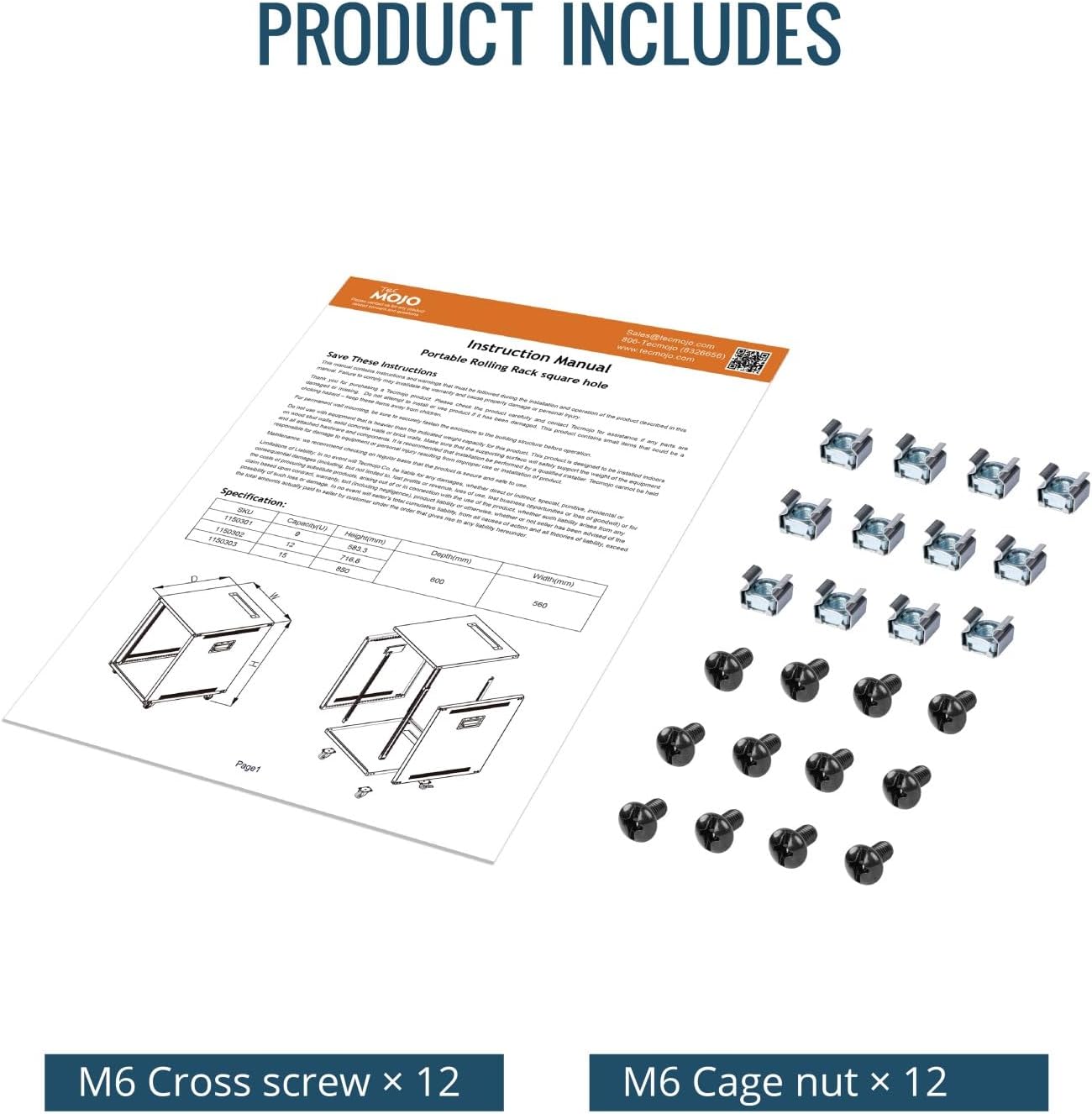
- સાર્વત્રિક સુસંગતતા: EIA/ECA-310-E compliant. Includes M6 cage nuts and screws for installation. Available in 9U, 12U, and 15U sizes.

2. સલામતી માહિતી
Please read all safety instructions carefully before assembling or operating the Tecmojo 9U Portable Rolling Network Rack. Failure to follow these instructions may result in injury or damage to the product or connected equipment.
- વજન ક્ષમતા: Do not exceed the maximum weight capacity of 132 lbs (60 kg). Distribute equipment evenly to maintain stability.
- વિધાનસભા: Assemble the rack on a flat, stable surface. Ensure all screws and fasteners are securely tightened before use.
- રેક ખસેડવું: When moving the rack, ensure all equipment is securely mounted. Use the built-in handles and unlock the casters. Exercise caution on uneven surfaces. Lock casters once the rack is in its desired position.
- ઇલેક્ટ્રિકલ સલામતી: When installing electrical equipment, ensure proper grounding and follow all manufacturer guidelines for power connections. Avoid overloading power strips.
- વેન્ટિલેશન: Maintain adequate airflow around the rack to prevent overheating of equipment. The open frame design aids in ventilation.
- બાળકો અને પાળતુ પ્રાણી: Keep children and pets away from the rack during assembly and operation to prevent accidents.
3. સેટઅપ અને એસેમ્બલી
Follow these steps to assemble your Tecmojo 9U Portable Rolling Network Rack. It is recommended to have two people for assembly due to the weight and size of the components.
૩.૧ અનપેકિંગ અને ઘટકોની તપાસ
Carefully unpack all components and verify against the included parts list. Ensure no parts are missing or damaged. If any parts are missing or damaged, contact customer support.
૪.૪ એસેમ્બલી વિડિઓ માર્ગદર્શિકા
Watch the official assembly video for a visual guide on setting up your network rack.
3.3 સ્ટેપ-બાય-સ્ટેપ એસેમ્બલી સૂચનાઓ
- સાઇડ પેનલ્સ જોડો: Place the bottom plate on a stable surface. Fix the two side panels symmetrically onto the bottom plate using the provided screws. Ensure they are aligned correctly.
- સુરક્ષિત ટોચની પેનલ: Place the top panel onto the assembled side panels and secure it with screws. Ensure all connections are tight.
- રેક રેલ્સ ઇન્સ્ટોલ કરો: Insert the four rack rails into their designated slots on the top and bottom panels. Secure them with the appropriate fasteners. Ensure the square holes are facing inwards and are aligned for equipment mounting.
- કાસ્ટર્સ ઇન્સ્ટોલ કરો: Carefully tilt the rack or lay it on its side. Attach the four casters to the bottom plate using the provided screws. Ensure two of the casters are locking casters and are positioned for easy access.

4. ઓપરેટિંગ સૂચનાઓ
Once assembled, the Tecmojo 9U Portable Rolling Network Rack is ready for equipment installation.
4.1 માઉન્ટ કરવાનું સાધન
- Identify the desired U-height for your equipment. The rack-mount spaces are clearly marked and numbered.
- Use the provided M6 cage nuts and screws to secure your 19-inch standard equipment to the rack rails. Ensure equipment is evenly distributed to maintain balance.
- For heavy equipment, consider using rack shelves (sold separately) for additional support.
4.2 કેબલ મેનેજમેન્ટ
- Utilize the integrated cable manager with a brush on the top panel to route cables neatly and prevent dust entry.
- Bundle cables using cable ties or Velcro straps to maintain an organized setup and improve airflow.
5. જાળવણી
Regular maintenance ensures the longevity and optimal performance of your Tecmojo 9U Portable Rolling Network Rack.
- સફાઈ: Wipe down the rack with a soft, damp ધૂળ અને ગંદકી દૂર કરવા માટે કાપડ. ઘર્ષક ક્લીનર્સ અથવા સોલવન્ટ્સ ટાળો જે ફિનિશને નુકસાન પહોંચાડી શકે છે.
- ફાસ્ટનર તપાસ: Periodically inspect all screws and fasteners to ensure they remain tight. Re-tighten if necessary.
- ઢાળગર નિરીક્ષણ: Check casters for smooth operation and ensure locking mechanisms function correctly. Clean any debris from the wheels.
- કેબલ મેનેજમેન્ટ: Review cable routing periodically to ensure cables are not pinched or obstructing airflow.
6. મુશ્કેલીનિવારણ
This section addresses common issues you might encounter with your network rack.
| સમસ્યા | સંભવિત કારણ | ઉકેલ |
|---|---|---|
| રેક અસ્થિર અથવા ધ્રુજતો છે. | Loose fasteners; uneven weight distribution; uneven floor. | Ensure all assembly screws are tightened. Redistribute equipment weight evenly. Move the rack to a level surface or use shims if necessary. |
| Casters not rolling smoothly. | Debris in wheels; casters locked. | Clean any debris from the caster wheels. Ensure locking mechanisms are disengaged before moving. |
| Difficulty mounting equipment. | Incorrect cage nut placement; misaligned equipment. | Ensure M6 cage nuts are correctly inserted into the square holes. Verify equipment is 19-inch standard and aligned with the rack rails. |
7. સ્પષ્ટીકરણો
| લક્ષણ | વિગત |
|---|---|
| બ્રાન્ડ | ટેકમોજો |
| મોડલ | 9U Portable Rolling Network Rack |
| રંગ | કાળો |
| ઉત્પાદનના પરિમાણો (D x W x H) | ૧૧.૪૨" x ૩.૫૪" x ૨.૩૬" (૨૯૦ મીમી x ૯૦ મીમી x ૬૦ મીમી) |
| સામગ્રી | એલોય સ્ટીલ (કોલ્ડ રોલ્ડ સ્ટીલ) |
| વસ્તુનું વજન | 44.55 પાઉન્ડ |
| સુસંગત ઉપકરણો | Server, Networking, AV, IT Equipment |
| માઉન્ટિંગ પ્રકાર | ફ્લોર માઉન્ટ |
| બિડાણ સામગ્રી | એલોય સ્ટીલ |
| વજન ક્ષમતા | 132 lbs (60 કિગ્રા) |
| અનુપાલન | EIA/ECA-310-E compliant |

8. વોરંટી માહિતી
The Tecmojo 9U Portable Rolling Network Rack comes with a 3-વર્ષ ઉત્પાદક વોરંટી. This warranty covers defects in materials and workmanship under normal use. Please retain your proof of purchase for warranty claims. For detailed terms and conditions, please refer to the official Tecmojo webસાઇટ અથવા ગ્રાહક સપોર્ટનો સંપર્ક કરો.
9. ગ્રાહક આધાર
For any questions, technical assistance, or warranty inquiries, please contact Tecmojo customer support:
- Webસાઇટ: ની મુલાકાત લો Tecmojo Official Store on Amazon ઉત્પાદન માહિતી અને સહાયક સંસાધનો માટે.
- ઈમેલ: તમારા ઉત્પાદન પેકેજિંગ અથવા સત્તાવારનો સંદર્ભ લો webસૌથી વર્તમાન સપોર્ટ ઇમેઇલ સરનામાં માટે સાઇટ.
- ફોન: તમારા ઉત્પાદન પેકેજિંગ અથવા સત્તાવારનો સંદર્ભ લો webસૌથી વર્તમાન સપોર્ટ ફોન નંબર માટે સાઇટ.
When contacting support, please have your product model (9U Portable Rolling Network Rack) and purchase information ready.