
1. મહત્વપૂર્ણ સલામતી માહિતી
Before beginning any exercise program, consult with your physician. This is especially important for individuals over age 35 or persons with pre-existing health problems. Read all instructions before using the ProForm X Bike.
- Always place the exercise bike on a level surface.
- ઉપયોગ દરમિયાન બાળકો અને પાલતુ પ્રાણીઓને સાધનોથી દૂર રાખો.
- Inspect the bike for worn or loose parts before each use. Do not use if any components are damaged.
- યોગ્ય કસરતના કપડાં અને ફૂટવેર પહેરો.
- મહત્તમ વપરાશકર્તા વજન ક્ષમતા 250 lbs (113.4 kg) થી વધુ ન રાખો.
- Maintain a safe distance around the bike during operation.
2. સેટઅપ અને એસેમ્બલી
The ProForm X Bike is designed for easy assembly. Follow these steps to set up your exercise bike.
2.1 અનપેકિંગ
Carefully remove all components from the packaging. Place all parts on a clear, open area and ensure all items listed in the parts diagram (not provided here, refer to included manual) are present.
2.2 એસેમ્બલી પગલાં
- Attach the front and rear stabilizers to the main frame using the provided hardware.
- Secure the pedals to the crank arms. Note that the left pedal (L) and right pedal (R) thread in opposite directions.
- Install the seat post and seat. Adjust the seat height to your preference.
- Attach the handlebars and the LCD monitor. Connect the sensor wires from the main frame to the monitor.
- Insert batteries into the LCD monitor (batteries not included).
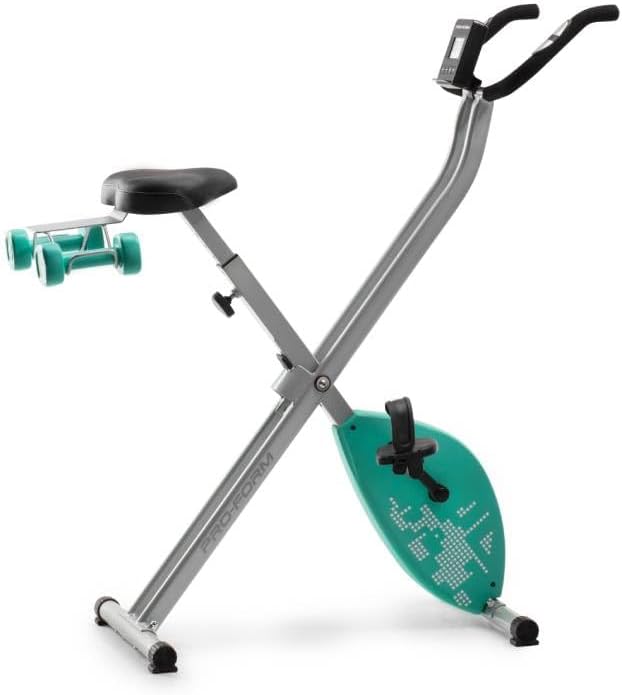
Figure 1: The ProForm X Bike shown in its compact, folded configuration, highlighting its space-saving design.

Figure 2: A woman demonstrates proper form while exercising on the ProForm X Bike, holding the included 2 lb dumbbells for an upper body workout.
3. ઓપરેટિંગ સૂચનાઓ
Familiarize yourself with the functions of your ProForm X Bike for an effective workout.
૫.૧ સીટ ગોઠવવી
To adjust the seat height, loosen the adjustment knob located on the seat post. Raise or lower the seat to a comfortable position where your leg has a slight bend at the knee when the pedal is at its lowest point. Tighten the knob securely before use.
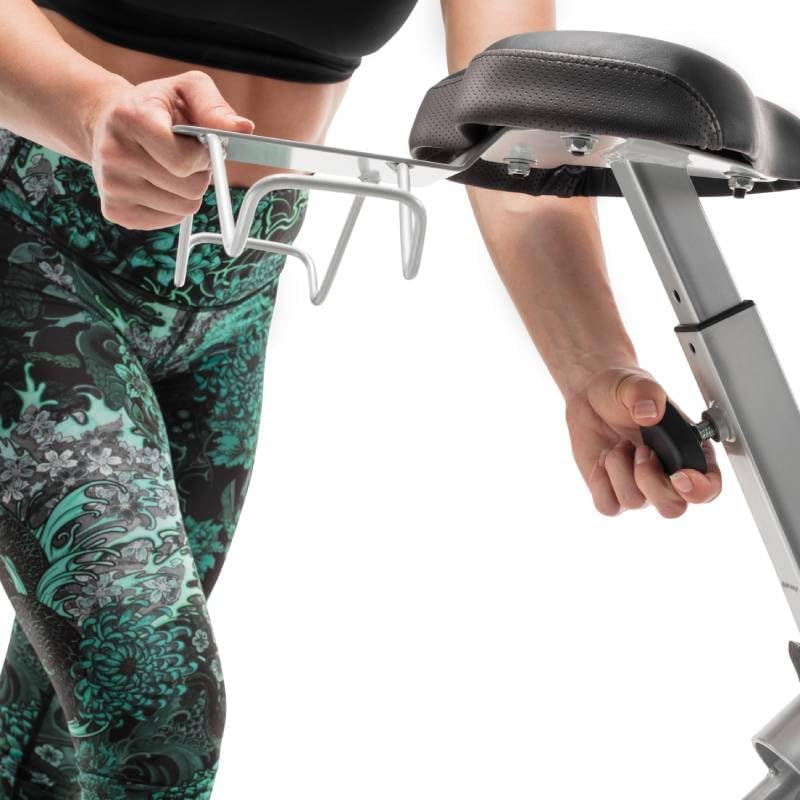
Figure 3: A hand adjusting the quick-release knob to modify the seat height of the ProForm X Bike for personalized comfort.
૪.૪ એલસીડી મોનિટરનો ઉપયોગ
The LCD monitor displays key workout metrics. Press the 'DISPLAY' button to cycle through different readings such as time, speed, distance, calories burned, and heart rate. The monitor automatically turns on when you begin pedaling or press a button.
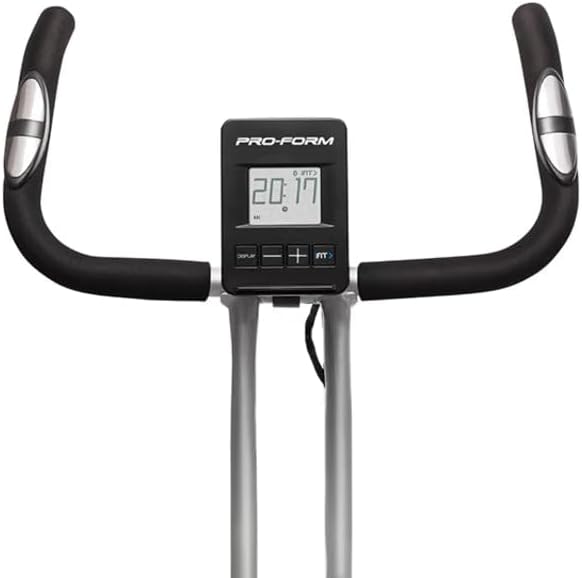
આકૃતિ ૪.૧: વિગતવાર view of the ProForm X Bike's LCD monitor, displaying workout metrics such as time, speed, distance, calories, and heart rate.
3.3 Heart Rate Monitoring (EKG Grip)
To measure your heart rate, firmly grasp the EKG grip sensors on the handlebars with both hands. Your heart rate will be displayed on the LCD monitor after a few seconds. Ensure your hands are clean and dry for accurate readings.
3.4 Adjusting Resistance Levels
The ProForm X Bike features 10 digital resistance levels. Turn the resistance knob located below the handlebars to increase or decrease the intensity of your workout. Higher numbers indicate greater resistance.
૫.૩ સમાવિષ્ટ ડમ્બેલ્સનો ઉપયોગ
Two 2 lb dumbbells are included for upper body workouts. These can be stored in the integrated holder behind the seat. Incorporate them into your routine while cycling for a full-body exercise.

Figure 5: The two 2 lb dumbbells resting in their integrated storage holder on the back of the ProForm X Bike's seat post.
૫.૨ ફોલ્ડિંગ અને સ્ટોરેજ
To fold the bike for storage, loosen the folding knob on the main frame and carefully fold the bike. Ensure it is securely latched in the folded position before moving. The integrated transport wheels allow for easy relocation.
4. જાળવણી
Regular maintenance ensures the longevity and optimal performance of your ProForm X Bike.
- સફાઈ: જાહેરાત સાથે બાઇકને સાફ કરોamp દરેક ઉપયોગ પછી પરસેવો અને ધૂળ દૂર કરવા માટે કાપડનો ઉપયોગ કરો. ઘર્ષક ક્લીનર્સ ટાળો.
- નિરીક્ષણ: સમયાંતરે બધા નટ, બોલ્ટ અને ફરતા ભાગોને કડકતા અને ઘસારો માટે તપાસો. કોઈપણ છૂટા ફાસ્ટનર્સને કડક કરો.
- લુબ્રિકેશન: The magnetic resistance system is generally maintenance-free. No lubrication is required for the resistance mechanism.
- સંગ્રહ: Store the bike in a dry, cool place away from direct sunlight and extreme temperatures. Utilize the folding feature for compact storage.
5. મુશ્કેલીનિવારણ
If you encounter issues with your ProForm X Bike, refer to the following common solutions.
- LCD Monitor Not Displaying:
- ખાતરી કરો કે બેટરી યોગ્ય રીતે ઇન્સ્ટોલ કરેલી છે અને ખાલી નથી થઈ ગઈ. જો જરૂરી હોય તો બદલો.
- Check that all sensor wires are securely connected to the monitor and the main frame.
- No Resistance Change:
- Verify the resistance knob is functioning correctly and turning freely.
- Ensure no obstructions are interfering with the magnetic resistance mechanism.
- Unusual Noises (Clicking/Banging):
- Check all assembly bolts and nuts for tightness, especially around the pedals and crank arms.
- Ensure the bike is on a stable, level surface.
- Inspect pedals and straps for damage or misalignment.
- હાર્ટ રેટનું અચોક્કસ વાંચન:
- Ensure hands are clean, dry, and firmly gripping both EKG sensors.
- Avoid excessive movement during measurement.
જો સમસ્યાઓ ચાલુ રહે, તો ગ્રાહક સપોર્ટનો સંપર્ક કરો.
6. સ્પષ્ટીકરણો
| લક્ષણ | વિગત |
|---|---|
| મોડલ નંબર | PFEX78918T |
| ઉત્પાદનના પરિમાણો (L x W x H) | ૩૦ડી x ૨૫વોટ x ૬૫એચ સેન્ટિમીટર (૧૧.૮ x ૯.૮ x ૨૫.૬ ઇંચ) |
| વસ્તુનું વજન | 18.6 કિગ્રા (41 lbs) |
| મહત્તમ વપરાશકર્તા વજન | 113.4 કિગ્રા (250 lbs) |
| પ્રતિકાર મિકેનિઝમ | Magnetic (SMR Silent Magnetic Resistance) |
| પ્રતિકાર સ્તરો | 10 ડિજિટલ સ્તરો |
| ડિસ્પ્લે પ્રકાર | એલસીડી |
| મોનિટર મેટ્રિક્સ | Calories Burned, Electrocardiogram, Heart Rate, Speed, Time |
| ખાસ લક્ષણો | Adjustable Footstrap, Adjustable Pedal, Adjustable Resistance Level, Adjustable Seat, Dual Function, Folding Design |
| સમાવાયેલ એસેસરીઝ | બે 2 પાઉન્ડ ડમ્બેલ્સ |
| સામગ્રી | સ્ટેનલેસ સ્ટીલ |
| રંગ | ટીલ |
7. વોરંટી અને સપોર્ટ
ProForm products are manufactured with quality and durability in mind. For specific warranty details, please refer to the warranty card included with your product or visit the official ProForm webસાઇટ
7.1 ગ્રાહક સપોર્ટ
If you have questions, require assistance with assembly, or need troubleshooting beyond this manual, please contact ProForm customer support:
- Supportનલાઇન સપોર્ટ: અધિકારીની મુલાકાત લો એમેઝોન પર પ્રોફોર્મ સ્ટોર or the main ProForm webસાઇટ
- ફોન સપોર્ટ: Refer to your product's warranty documentation for regional contact numbers.