
1. પરિચય
Thank you for choosing the ieGeek 5MP Outdoor Wi-Fi Security Camera. This manual provides essential information for the proper installation, operation, and maintenance of your camera. Please read these instructions carefully before use and retain them for future reference. This camera is designed to provide reliable outdoor surveillance with advanced features for enhanced security.
2. ઉત્પાદન ઓવરview
The ieGeek 5MP Outdoor Wi-Fi Security Camera offers high-definition monitoring with flexible connectivity and smart detection capabilities.
મુખ્ય લક્ષણો:
- 5MP HD રિઝોલ્યુશન: Provides clear and vivid images and videos with 2880x1600 resolution and 4x digital zoom.
- Dual-Band Wi-Fi (2.4/5 GHz): Supports both 2.4 GHz and 5 GHz Wi-Fi for stable and faster network connection.
- 360° PTZ Monitoring: Pan (355° horizontal) and Tilt (120° vertical) functionality allows for comprehensive area coverage.
- કલર નાઇટ વિઝન: Three night vision modes (color, infrared, smart) with a range of up to 15 meters (50 feet).
- PIR Humanoid Detection: Advanced human detection reduces false alarms caused by non-human movements.
- ધ્વનિ અને પ્રકાશ એલાર્મ: Deters intruders with customizable sound and light alerts.
- 24/7 સતત રેકોર્ડિંગ: Supports continuous recording and event-based recording.
- સ્થાનિક અને ક્લાઉડ સ્ટોરેજ: Compatible with Micro SD cards (up to 128GB, not included) and cloud storage options.
- મલ્ટિ-યુઝર શેરિંગ: Share camera access with family members via the dedicated app.
- IP65 હવામાન પ્રતિકાર: Designed for outdoor use, resistant to dust and water.
કેમેરા ઘટકો:
The camera unit typically includes the main camera body, dual Wi-Fi antennas, a power input port, and a Micro SD card slot.
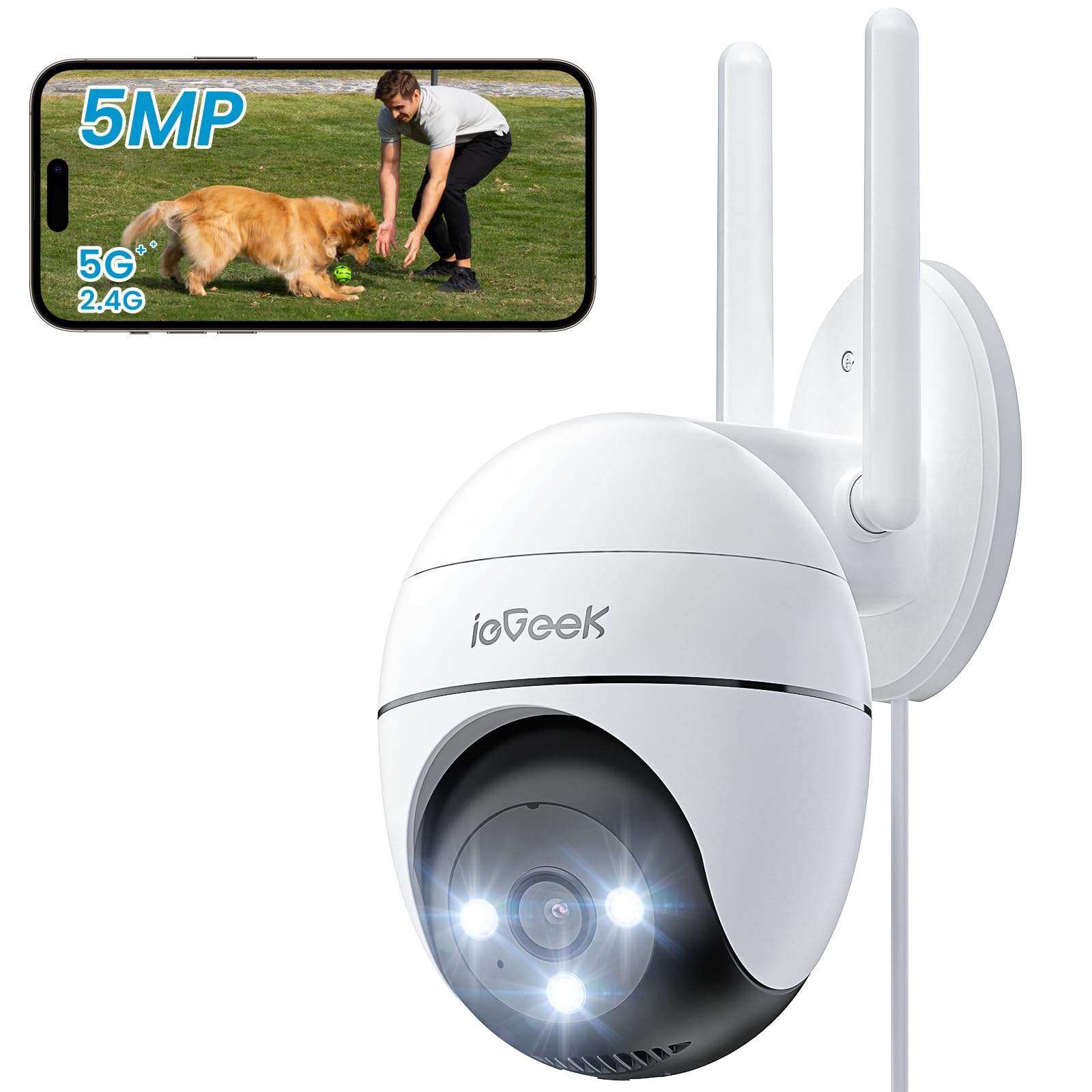
Figure 2.1: ieGeek 5MP Outdoor Wi-Fi Security Camera (Model ZS-GQ4)

આકૃતિ 2.2: ઓવરview of ieGeek 5MP Camera Features including PTZ, 24/7 recording, 2-way audio, humanoid tracking, Alexa compatibility, local and cloud storage, multi-user sharing, customizable alert areas, AI detection, and acoustic/light alarms.

Figure 2.3: The camera features a 5dBi antenna for improved Wi-Fi signal strength and stability.
3. સેટઅપ સૂચનાઓ
3.1 પેકેજ સામગ્રી
- ieGeek 5MP Outdoor Wi-Fi Security Camera
- પાવર એડેપ્ટર
- માઉન્ટિંગ સ્ક્રૂ અને એન્કર
- વપરાશકર્તા માર્ગદર્શિકા
૩.૧ એપ ડાઉનલોડ અને એકાઉન્ટ રજીસ્ટ્રેશન
- ડાઉનલોડ કરો ieGeek Cam or ક્લાઉડ એજ app from your smartphone's app store (iOS/Android).
- Register for an account using your email address and create a secure password.
3.3 કેમેરા કનેક્શન
- Power on the camera by connecting it to a power outlet using the provided adapter.
- Open the ieGeek Cam/CloudEdge app and tap the "+" icon to add a new device.
- Follow the on-screen instructions to connect the camera to your 2.4 GHz or 5 GHz Wi-Fi network. Ensure your phone is connected to the same Wi-Fi network during setup.
- Scan the QR code displayed on your phone with the camera lens when prompted.
- એકવાર કનેક્ટ થઈ ગયા પછી, તમે તમારા કેમેરાને નામ આપી શકો છો અને લાઇવ શરૂ કરી શકો છો viewing

Figure 3.1: Connecting the power adapter to the camera.
3.4 ભૌતિક સ્થાપન
- Choose a suitable outdoor location with a clear view and strong Wi-Fi signal.
- Use the provided mounting template to mark drill holes.
- Drill holes, insert anchors, and secure the camera base with screws.
- કેમેરાના એંગલને જરૂર મુજબ એડજસ્ટ કરો.

Figure 3.2: Ensure optimal Wi-Fi signal strength at the chosen installation location for stable performance.
4. ઓપરેટિંગ સૂચનાઓ
4.1 જીવંત View અને PTZ નિયંત્રણ
- Open the ieGeek Cam/CloudEdge app and select your camera to view જીવંત ફીડ.
- Use the on-screen joystick or swipe gestures to control the camera's pan (horizontal 355°) and tilt (vertical 120°) movements.

Figure 4.1: Control the camera's 355° horizontal and 120° vertical rotation directly from your smartphone app.
૪.૨ નાઇટ વિઝન મોડ્સ
કેમેરા ત્રણ નાઇટ વિઝન મોડ્સ ઓફર કરે છે:
- કલર નાઇટ વિઝન: Utilizes built-in spotlights to provide full-color images in low-light conditions.
- ઇન્ફ્રારેડ નાઇટ વિઝન: સંપૂર્ણ અંધારામાં કાળા અને સફેદ છબીઓ માટે ઇન્ફ્રારેડ LED નો ઉપયોગ કરે છે.
- સ્માર્ટ નાઇટ વિઝન: Automatically switches between infrared and color night vision upon detection of motion.
૫.૩ ગતિ શોધ અને એલાર્મ્સ
- PIR Humanoid Detection: Configure sensitivity levels in the app to minimize false alarms.
- કસ્ટમાઇઝ ડિટેક્શન ઝોન્સ: Set specific areas for motion detection to focus on critical zones.
- ધ્વનિ અને પ્રકાશ એલાર્મ: When motion is detected, the camera can activate a siren and/or spotlights to deter intruders. You can choose between silent, spotlight only, siren only, or both siren and spotlight modes.

Figure 4.2: Select from silent, spotlight only, siren only, or both siren and spotlight alarm modes to suit your security needs.

Figure 4.3: The camera's humanoid motion tracking follows detected human figures, reducing false alarms from other movements.

Figure 4.4: AI smart monitoring can differentiate between various detection types such as people, animals, packages, and vehicles (some features may require a subscription).
૬.૮ રેકોર્ડિંગ અને સ્ટોરેજ
- સતત રેકોર્ડિંગ: The camera supports 24/7 continuous recording to a Micro SD card (not included).
- ઇવેન્ટ રેકોર્ડિંગ: Records video clips when motion is detected.
- માઇક્રો એસડી કાર્ડ: સ્થાનિક સ્ટોરેજ માટે નિયુક્ત સ્લોટમાં માઇક્રો SD કાર્ડ (૧૨૮GB સુધી) દાખલ કરો.
- મેઘ સંગ્રહ: Optional cloud storage plans are available through the app for secure off-site backup.

Figure 4.5: The camera supports 24/7 continuous recording, ensuring constant surveillance.
5. જાળવણી
૪.૧ કેમેરા સાફ કરવો
- સફાઈ કરતા પહેલા ખાતરી કરો કે કેમેરા બંધ છે.
- સોફ્ટનો ઉપયોગ કરો, ડીamp કેમેરા બોડી સાફ કરવા માટે કાપડ.
- For the lens, use a specialized lens cleaning cloth to avoid scratches. Do not use harsh chemicals or abrasive cleaners.
5.2 પર્યાવરણીય વિચારણાઓ
- The camera has an IP65 weather resistance rating, making it suitable for outdoor use in various weather conditions.
- ઓપરેટિંગ તાપમાન શ્રેણી: -20°C થી 50°C (-4°F થી 122°F).

Figure 5.1: The camera is designed with IP65 weather resistance to withstand outdoor elements like rain.

Figure 5.2: The camera operates effectively within a wide temperature range of -20°C to 50°C.
6. મુશ્કેલીનિવારણ
If you encounter issues with your ieGeek camera, please refer to the following common troubleshooting steps:
૫.૧ કનેક્શન સમસ્યાઓ
- કૅમેરા ઑફલાઇન: Ensure the camera is powered on and within range of your Wi-Fi router. Check your Wi-Fi signal strength in the app. Try restarting the camera and your router.
- Failed to Connect to Wi-Fi: Verify your Wi-Fi password is correct. Ensure you are connecting to a 2.4 GHz or 5 GHz network as supported. If using a dual-band router, ensure the camera is connecting to the correct band.
૬.૨ ગતિ શોધ સમસ્યાઓ
- Too Many False Alarms: Adjust the PIR detection sensitivity in the app. Define specific detection zones to exclude areas with frequent irrelevant movements (e.g., trees swaying).
- કોઈ ગતિ શોધ નથી: Ensure motion detection is enabled in the app settings. Check the camera's field of view for obstructions. Increase detection sensitivity if necessary.
૬.૩ છબી ગુણવત્તા સમસ્યાઓ
- અસ્પષ્ટ છબી: Clean the camera lens carefully. Ensure there is no condensation on the lens.
- નબળી નાઇટ વિઝન: Ensure the night vision mode is set correctly (color, infrared, or smart). Check for any obstructions blocking the infrared LEDs or spotlights.
૯.૪ અન્ય મુદ્દાઓ
- SD કાર્ડ રેકોર્ડિંગ નથી કરી રહ્યું: Ensure the Micro SD card is inserted correctly and is not full. Format the SD card via the app if it's a new card or if issues persist.
- એપ્લિકેશન પ્રતિસાદ આપતી નથી: Close and restart the app. Ensure your smartphone's operating system is up to date.
If these steps do not resolve your issue, please contact ieGeek customer support for further assistance.
7. સ્પષ્ટીકરણો
| મોડલ | ZS-GQ4 |
| ઠરાવ | 5 એમપી (2880 x 1600) |
| લેન્સ | 3.6 મીમી |
| ડિજિટલ ઝૂમ | 4x |
| નાઇટ વિઝન ડિસ્ટન્સ | 15 મીટર (50 ફૂટ) સુધી |
| Wi-Fi કનેક્ટિવિટી | 2.4 GHz / 5 GHz Dual-Band |
| પાન/ટિલ્ટ રેન્જ | પાન 355°, ટિલ્ટ 120° |
| સંગ્રહ વિકલ્પો | માઇક્રો એસડી કાર્ડ (૧૨૮ જીબી સુધી, શામેલ નથી), ક્લાઉડ સ્ટોરેજ |
| હવામાન પ્રતિકાર | IP65 |
| ઓપરેટિંગ તાપમાન | -20°C થી 50°C (-4°F થી 122°F) |
| પરિમાણો | 17 x 9 x 10 સેમી |
| નિયંત્રણ પદ્ધતિ | Mobile App (ieGeek Cam / CloudEdge) |
| એલાર્મ પ્રકાર | PIR Humanoid Motion Detection, Sound & Light Alarm |
8. વોરંટી અને સપોર્ટ
ieGeek is committed to providing high-quality products and excellent customer service.
8.1 વોરંટી માહિતી
- 2 વર્ષની વોરંટી: Your ieGeek camera is covered by a 2-year warranty from the date of purchase, protecting against manufacturing defects.
- 30-દિવસ મની-બેક ગેરંટી: If you are not satisfied with your purchase, you may return the product for a full refund within 30 days.

Figure 8.1: ieGeek offers a 2-year warranty and a 30-day money-back guarantee, along with lifetime support.
8.2 ગ્રાહક સપોર્ટ
For any questions, technical assistance, or warranty claims, please contact ieGeek customer support. Refer to the contact information provided with your product packaging or visit the official ieGeek webઆધાર વિગતો માટે સાઇટ.
- Supportનલાઇન સપોર્ટ: મુલાકાત www.iegeek.com/support (દા.તample link, please refer to actual webસાઇટ)
- ઇમેઇલ સપોર્ટ: support@iegeek.com (દા.તample email, please refer to actual contact)
- આજીવન ટેકનિકલ સપોર્ટ: ieGeek provides lifetime technical support for its products.


