
1. પરિચય
This manual provides instructions for the safe and effective use of your LLAVETOR Digital Torque Adapter. This device converts any standard ratchet wrench into a precise digital torque wrench, suitable for various applications including bicycles, motorcycles, automotive repair, and industrial use.
મુખ્ય લાક્ષણિકતાઓમાં શામેલ છે:
- High-definition LED backlight display for easy reading in dark environments.
- Accuracy of ±2% clockwise and ±3% counter-clockwise.
- Four selectable torque units: N.m, ft-lb, in-lb, kg.cm.
- પોર્ટેબિલિટી માટે કોમ્પેક્ટ અને લાઇટવેઇટ ડિઝાઇન.
- Includes 1/2", 3/8", and 1/4" adapters for versatility.
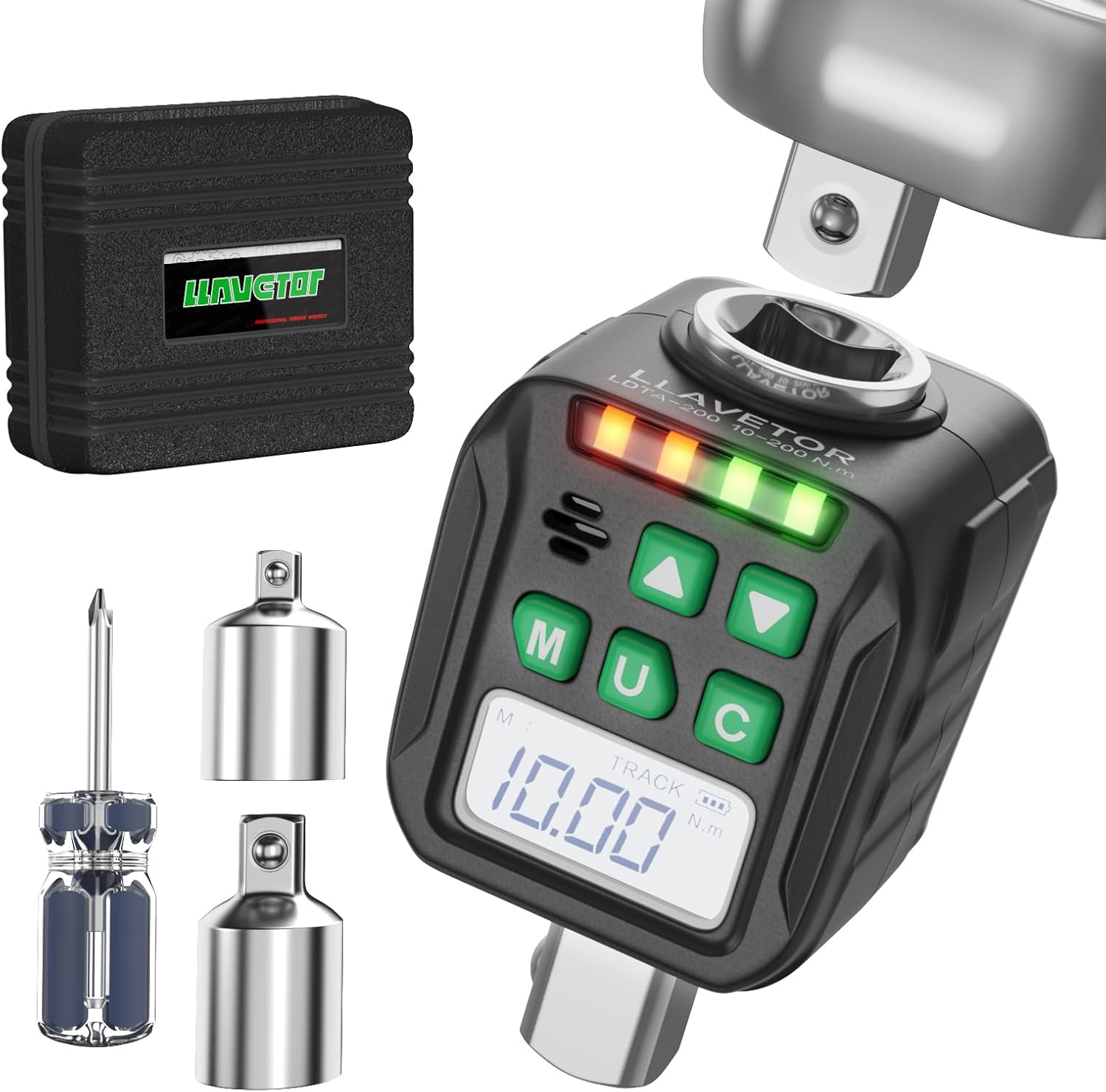
Image 1: LLAVETOR Digital Torque Adapter. This image shows the compact design of the digital torque adapter, ready for use with a ratchet.
2. સેટઅપ
2.1 પેકેજ સામગ્રી
ખાતરી કરો કે બધી વસ્તુઓ પેકેજમાં હાજર છે:
- 1 x 1/2" Digital Torque Adapter
- 1 x 3/8" Adapter
- 1 x 1/4" Adapter
- 2 x AA બેટરી
- 1 x સ્ક્રુડ્રાઈવર
2.2 બેટરી ઇન્સ્ટોલેશન
The digital torque adapter requires two AA batteries for operation.
- ઉપકરણની પાછળ બેટરી કમ્પાર્ટમેન્ટ કવર શોધો.
- Use the provided screwdriver to open the battery compartment.
- યોગ્ય ધ્રુવીયતા (+/-) સુનિશ્ચિત કરીને, બે AA બેટરી દાખલ કરો.
- બેટરી કમ્પાર્ટમેન્ટ કવર બંધ કરો અને તેને સ્ક્રૂ વડે સુરક્ષિત કરો.
2.3 Attaching Adapters
The digital torque adapter comes with 1/2", 3/8", and 1/4" adapters to fit various drive sizes.
- Select the appropriate adapter (e.g., 3/8" or 1/4") if your ratchet or socket is not 1/2".
- Insert the adapter into the 1/2" square drive of the digital torque adapter.
- Attach your ratchet wrench to the input square drive of the digital torque adapter.
- Attach the desired socket to the output square drive of the digital torque adapter (or the attached adapter).
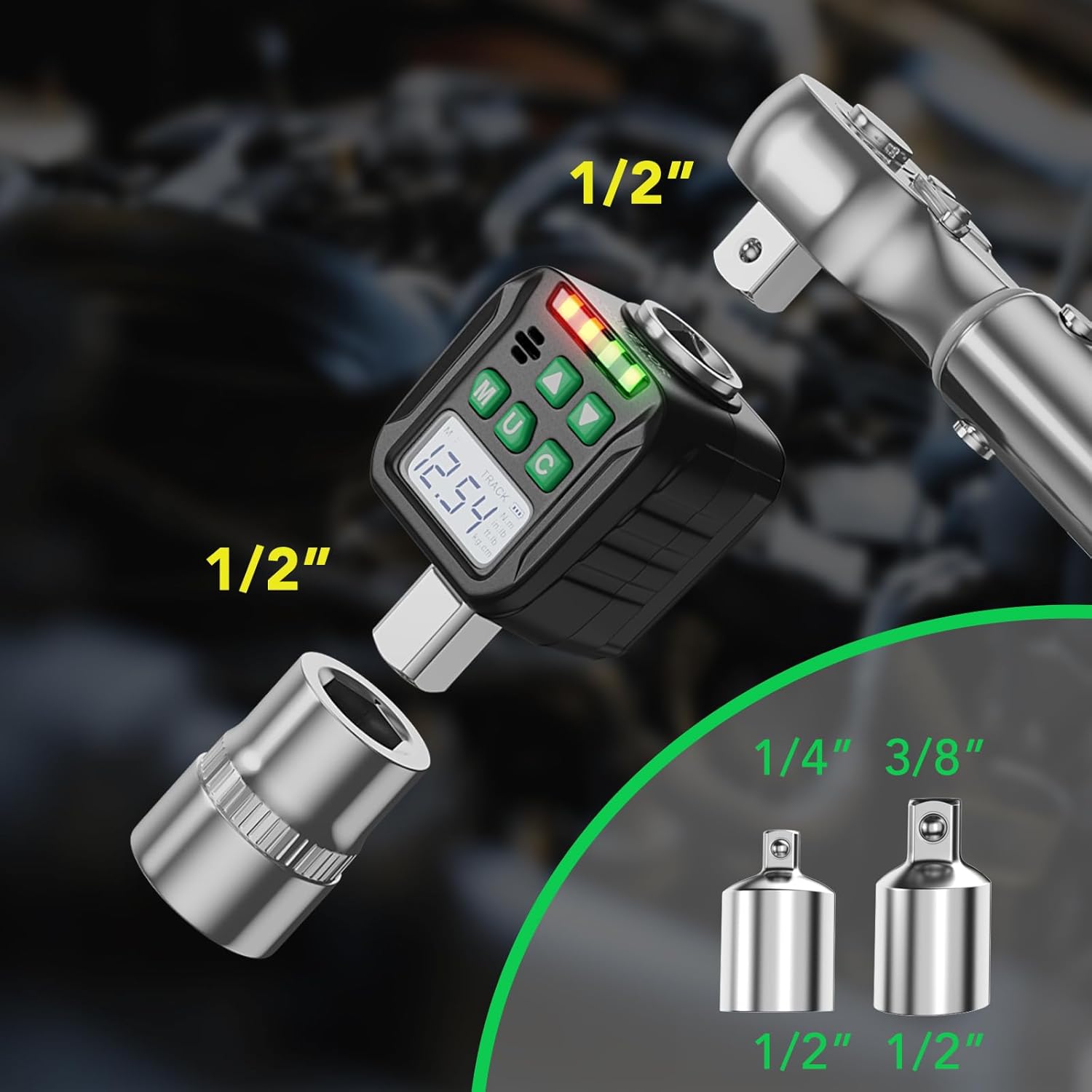
Image 2: Adapter Connections. This image illustrates how to connect the digital torque adapter to a ratchet and how to use the included 3/8" and 1/4" adapters for different socket sizes.
3. ઓપરેટિંગ સૂચનાઓ
3.1 પાવર ચાલુ/બંધ
- દબાવો M button to power on the device. The LED display will illuminate.
- પાવર બંધ કરવા માટે, ને દબાવો અને હોલ્ડ કરો M button for 3 seconds. The device will also automatically power off after a period of inactivity to conserve battery.
3.2 એકમ પસંદગી
The device supports four torque units: N.m, ft-lb, in-lb, and kg.cm.
- દબાવો U button to cycle through the available units. The selected unit will be displayed on the screen.

Image 3: Four Measurement Modes. This image displays the digital torque adapter's screen, highlighting the four selectable measurement units: Newton-meters (N.m), foot-pounds (ft-lb), inch-pounds (in-lb), and kilogram-centimeters (kg.cm).
3.3 Mode Selection (Track Mode / Peak Mode)
The adapter features two operating modes: Track Mode and Peak Mode.
- To switch between modes, press and hold the U button for 3 seconds. Use the Up (▲) and Down (▼) buttons to select the desired mode.
ટ્રેક મોડ
In Track Mode, the device displays the torque value in real-time as force is applied. This is useful for monitoring torque during tightening.
પીક મોડ
In Peak Mode, the device captures and displays the maximum torque value achieved during the tightening process. This value remains on the screen until reset or a higher peak is reached.

Image 4: Track and Peak Modes. This image illustrates the difference between Track Mode, which shows real-time torque, and Peak Mode, which displays the maximum torque applied.
3.4 Setting Target Torque (Preset Value Mode)
The device allows you to set a target torque value. When the applied torque approaches the target, the device will provide visual and audible alerts.
- દબાવો M button to enter the preset value setting mode.
- Use the Up (▲) and Down (▼) buttons to adjust the target torque value.
- દબાવો M button again to confirm and save the setting.
The device can store up to 6 groups of preset values and 500 groups of stored data.

Image 5: Preset Values and Data Storage. This image highlights the device's ability to store 6 groups of preset torque values and up to 500 groups of measurement data.
3.5 Torque Application and Indication
As torque is applied, the LED indicator lights will illuminate, and a buzzer will sound to indicate proximity to the target torque.
- લીલી લાઈટો: Indicate that the applied torque is approaching the target value.
- લાલ બત્તીઓ: Indicate that the target torque has been reached or exceeded.
- બઝર: Sounds when the target torque is reached.

Image 6: LED Indicators and Buzzer. This image shows the digital torque adapter in use, with its LED indicator lights and an icon representing the audible buzzer, which alert the user when the target torque is reached.
3.6 Clockwise and Counter-Clockwise Torque
The adapter can measure torque in both clockwise and counter-clockwise directions with specified accuracy.

Image 7: Accuracy and Mode Switching. This image emphasizes the device's accuracy of ±3% and visually differentiates between Peak Mode and Track Mode displays, which can be switched by holding the 'U' button.
4. જાળવણી
4.1 સફાઈ
- ઉપકરણને નરમ, સૂકા કપડાથી સાફ કરો. ઘર્ષક ક્લીનર્સ અથવા સોલવન્ટનો ઉપયોગ કરશો નહીં.
4.2 સંગ્રહ
- Store the digital torque adapter in a dry place, away from direct sunlight and extreme temperatures.
- જો ઉપકરણ લાંબા સમય સુધી ઉપયોગમાં ન આવે તો લીકેજ અટકાવવા માટે બેટરીઓ દૂર કરો.
4.3 માપાંકન
- For optimal accuracy, periodic calibration by a qualified technician is recommended.
5. મુશ્કેલીનિવારણ
5.1 Device does not power on
- બેટરી ઇન્સ્ટોલેશન અને પોલેરિટી તપાસો.
- નવી AA બેટરી વડે બદલો.
5.2 Inaccurate readings
- Ensure the adapter is securely attached to the ratchet and socket.
- Verify the correct unit of measurement is selected.
- Consider professional calibration if issues persist.
5.3 Display is dim or unreadable
- બેટરી બદલો.
- ખાતરી કરો કે ઉપકરણ અતિશય તાપમાનના સંપર્કમાં ન આવે.
6. સ્પષ્ટીકરણો
| લક્ષણ | વિગત |
|---|---|
| મોડલ | LDTA |
| ડ્રાઇવનું કદ | 1/2 inch (includes 3/8" and 1/4" adapters) |
| ટોર્ક રેંજ | 10-200 Nm (7.38-147.5 Ft-lb) |
| ચોકસાઈ | ±2% Clockwise, ±3% Counter-clockwise |
| ટોર્ક એકમો | N.m, ft-lb, in-lb, kg.cm |
| ડિસ્પ્લે | એલઇડી બેકલાઇટ |
| ડેટા સ્ટોરેજ | 500 જૂથો |
| Preset Values | 6 જૂથો |
| પાવર સ્ત્રોત | 2 x AA બેટરી |
| સામગ્રી | લોખંડ |
| રંગ | ક્રોમ |
| ઓપરેશન મોડ | Mechanical (Digital Readout) |
નોંધ: વિશિષ્ટતાઓ સૂચના વિના બદલવાને પાત્ર છે.
7. વોરંટી અને સપોર્ટ
7.1 વોરંટી માહિતી
This product is covered by a standard manufacturer's warranty against defects in materials and workmanship. Please refer to the packaging or contact LLAVETOR customer service for specific warranty terms and duration.
7.2 ગ્રાહક સપોર્ટ
For technical assistance, troubleshooting, or warranty claims, please contact LLAVETOR customer support.
Visit the official LLAVETOR webસંપર્ક માહિતી અને વધારાના સંસાધનો માટે સાઇટ.


