
YiBiChin ERF2R36H
YiBiChin ERF2R36H Replacement Remote Control User Manual
For Hisense Smart UHD 4K TVs
1. પરિચય
This manual provides instructions for the YiBiChin ERF2R36H Replacement Remote Control. This remote is designed to be a direct replacement for your original Hisense Smart UHD 4K TV remote, offering immediate functionality without the need for complex programming. It is compatible with a wide range of Hisense Smart UHD 4K TV models, including those that originally used the ERF3A80 remote.
Please note that this remote control operates using infrared technology and does not support voice control functions.
2. સેટઅપ
2.1 બેટરી ઇન્સ્ટોલેશન
The ERF2R36H remote control requires two AAA batteries (not included) for operation. Follow these steps to install the batteries:
- રિમોટ કંટ્રોલની પાછળના ભાગમાં બેટરી કમ્પાર્ટમેન્ટ કવર શોધો.
- ટેબ પર નીચે દબાવો અને કમ્પાર્ટમેન્ટ ખોલવા માટે કવરને નીચે તરફ સ્લાઇડ કરો.
- બે AAA બેટરી દાખલ કરો, ખાતરી કરો કે ધન (+) અને ઋણ (-) ટર્મિનલ્સ કમ્પાર્ટમેન્ટની અંદરના નિશાનો સાથે યોગ્ય રીતે ગોઠવાય છે.
- બેટરી કમ્પાર્ટમેન્ટ કવરને સુરક્ષિત રીતે ક્લિક ન થાય ત્યાં સુધી તેને પાછું સ્થાને સ્લાઇડ કરો.

Image: Back of the remote control with the battery compartment open, illustrating the correct insertion of two AAA batteries.
2.2 Initial Use (No Programming Required)
This remote control is pre-programmed for compatible Hisense Smart UHD 4K TVs. Once batteries are installed, it should function immediately with your television. No additional programming or pairing steps are necessary.
3. ઓપરેટિંગ સૂચનાઓ
The ERF2R36H remote control features standard television functions and dedicated shortcut keys for popular streaming services.
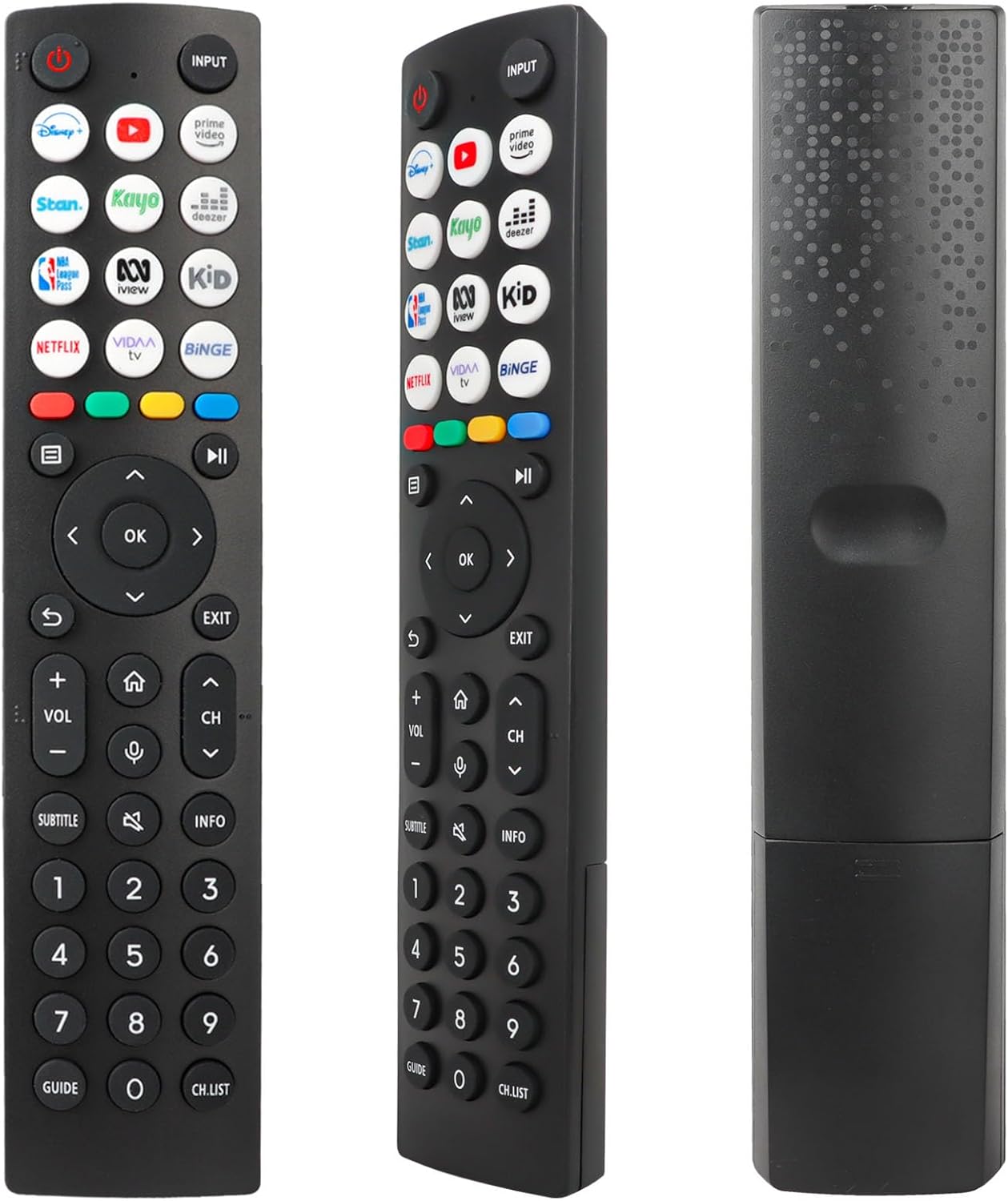
છબી: આગળ view રિમોટ કંટ્રોલનું, બધા બટનોનું લેઆઉટ પ્રદર્શિત કરે છે.
3.1 મૂળભૂત કાર્યો
- શક્તિ (Red Circle with Line): ટીવી ચાલુ કે બંધ કરે છે.
- ઇનપુટ: Selects the input source (e.g., HDMI 1, HDMI 2, AV).
- વોલ્યુમ અપ/ડાઉન (VOL +/-): ધ્વનિની માત્રાને સમાયોજિત કરે છે.
- ચેનલ ઉપર/નીચે (CH +/-): ટેલિવિઝન ચેનલ બદલે છે.
- મૌન (Speaker with X): ટીવીના અવાજને મ્યૂટ અથવા અનમ્યૂટ કરે છે.
- નેવિગેશન પેડ (ઉપર, નીચે, ડાબે, જમણે, બરાબર): મેનુઓ નેવિગેટ કરવા અને પસંદગીઓની પુષ્ટિ કરવા માટે વપરાય છે.
- પાછળ (Curved Arrow): પાછલી સ્ક્રીન અથવા મેનૂ પર પાછા ફરે છે.
- બહાર નીકળો: વર્તમાન મેનુ અથવા એપ્લિકેશનમાંથી બહાર નીકળે છે.
- ઘર (ઘરનું ચિહ્ન): Accesses the TV's main home screen or smart hub.
- માહિતી: વર્તમાન પ્રોગ્રામ અથવા સામગ્રી વિશેની માહિતી દર્શાવે છે.
- ઉપશીર્ષક: સબટાઈટલ ચાલુ અથવા બંધ ટૉગલ કરે છે.
- માર્ગદર્શિકા: ઇલેક્ટ્રોનિક પ્રોગ્રામ માર્ગદર્શિકા ખોલે છે.
- CH.LIST: ચેનલ સૂચિ પ્રદર્શિત કરે છે.
- નંબર બટનો (0-9): સીધા ચેનલ નંબરો દાખલ કરો.
3.2 શોર્ટકટ કી
The remote control includes 12 dedicated shortcut buttons for quick access to popular streaming applications. To use these buttons, ensure the corresponding applications are installed and configured on your Hisense Smart TV.
- ડિઝની+: Launches the Disney+ streaming service.
- YouTube: YouTube એપ્લિકેશન લોન્ચ કરે છે.
- પ્રાઇમ વિડીયો: Launches Amazon Prime Video.
- Stan: Launches the Stan streaming service.
- Kayo: Launches the Kayo Sports streaming service.
- ડીઝર: Launches the Deezer music streaming service.
- NBA: Launches the NBA League Pass application.
- iView: Launches the ABC iView અરજી
- બાળક: Likely a shortcut to a Kids' content section or app.
- નેટફ્લિક્સ: Launches the Netflix streaming service.
- VIDAA ટીવી: Launches the VIDAA Smart TV platform interface.
- Binge: Launches the Binge streaming service.
4. જાળવણી
4.1 બેટરી રિપ્લેસમેન્ટ
Replace the batteries when the remote control's response becomes sluggish or stops working. Always replace both AAA batteries at the same time with new ones. Do not mix old and new batteries, or different types of batteries.
4.2 સફાઈ
રિમોટ કંટ્રોલ સાફ કરવા માટે, નરમ, સૂકા કપડાનો ઉપયોગ કરો. હઠીલા ગંદકી માટે, થોડું ડીampપાણી અથવા હળવા, ઘર્ષક ન હોય તેવા ક્લીનરથી કપડાને સાફ કરો. કઠોર રસાયણો અથવા ઘર્ષક સામગ્રીનો ઉપયોગ કરવાનું ટાળો, કારણ કે આ રિમોટની સપાટી અથવા આંતરિક ઘટકોને નુકસાન પહોંચાડી શકે છે.
4.3 સંગ્રહ
Store the remote control in a dry place, away from direct sunlight and extreme temperatures. If the remote will not be used for an extended period, it is advisable to remove the batteries to prevent leakage.
5. મુશ્કેલીનિવારણ
- રિમોટ પ્રતિસાદ આપતું નથી:
- બેટરીઓ યોગ્ય ધ્રુવીયતા સાથે યોગ્ય રીતે દાખલ કરવામાં આવી છે કે નહીં તે તપાસો.
- તાજી AAA બેટરીઓ સાથે બેટરી બદલો.
- ખાતરી કરો કે રિમોટ કંટ્રોલ અને ટીવીના ઇન્ફ્રારેડ રીસીવર વચ્ચે સ્પષ્ટ દૃષ્ટિ રેખા છે. અવરોધો સિગ્નલને અવરોધિત કરી શકે છે.
- ખાતરી કરો કે રિમોટ સીધો ટીવી પર હોય.
- મર્યાદિત ઓપરેટિંગ રેન્જ:
- This remote has a maximum range of 10 meters. If you are further away, move closer to the TV.
- Weak batteries can reduce the effective range. Replace them if necessary.
- Shortcut keys not working:
- Ensure the corresponding streaming applications are installed and updated on your Hisense Smart TV.
- Verify your TV has an active internet connection.
- No voice control:
- This remote control operates via infrared and does not support voice control functionality. This is a design characteristic, not a malfunction.
6. સ્પષ્ટીકરણો
| લક્ષણ | વર્ણન |
|---|---|
| બ્રાન્ડ | YiBiChin |
| મોડેલનું નામ | ERF2R36H |
| કનેક્ટિવિટી ટેકનોલોજી | ઇન્ફ્રારેડ |
| સુસંગત ઉપકરણો | Hisense Smart UHD 4K Televisions |
| ખાસ લક્ષણ | કોઈ પ્રોગ્રામિંગ જરૂરી નથી |
| રંગ | કાળો |
| બટનોની સંખ્યા | 12 shortcut buttons plus standard controls |
| નિયંત્રક પ્રકાર | ઇન્ફ્રારેડ નિયંત્રણ |
| મહત્તમ શ્રેણી | 10 મીટર |
| બેટરીની આવશ્યકતા | 2 x AAA બેટરી (શામેલ નથી) |
7. આધાર
If you receive an incorrect or damaged remote control, please contact the seller for assistance. They will respond as soon as possible to provide a satisfactory solution.
ભાવિ સંદર્ભ માટે કૃપા કરીને આ માર્ગદર્શિકા જાળવી રાખો.
Ask a question about this manual
Ask about setup, troubleshooting, compatibility, parts, safety, or missing instructions. Manuals+ will review the question and use this page’s manual context to help answer it.