
1. મહત્વપૂર્ણ સલામતી સૂચનાઓ
કૃપા કરીને એસેમ્બલી અને ઉપયોગ કરતા પહેલા બધી સૂચનાઓ વાંચો અને સમજો. ભવિષ્યના સંદર્ભ માટે આ માર્ગદર્શિકા રાખો.
- એસેમ્બલી પહેલાં ખાતરી કરો કે બધા ઘટકો હાજર છે અને તેમને કોઈ નુકસાન થયું નથી.
- Do not overtighten screws during assembly to prevent damage to the material.
- Place the night stand on a flat, stable surface to prevent tipping.
- Do not exceed the weight capacity of the tabletop (50 lbs) or drawers/shelf (30 lbs).
- Keep liquids away from the charging station and power outlets to prevent electrical hazards.
- Unplug the power cord from the wall outlet before cleaning or moving the unit.
- Do not attempt to modify or repair the electrical components. Contact customer support for assistance.
2. પેકેજ સામગ્રી
ચકાસો કે નીચે સૂચિબદ્ધ બધા ભાગો તમારા પેકેજમાં શામેલ છે. જો કોઈ ભાગો ખૂટે છે અથવા ક્ષતિગ્રસ્ત છે, તો કૃપા કરીને ગ્રાહક સેવાનો સંપર્ક કરો.
- ટોચની પેનલ
- સાઇડ પેનલ્સ (2)
- પાછા પેનલ
- ડ્રોઅર ફ્રન્ટ્સ (2)
- Drawer Sides & Backs
- ડ્રોઅર બોટમ્સ
- શેલ્ફ પેનલ
- પગ (4)
- Charging Station Unit (pre-installed or separate)
- LED Light Strip with Human Sensor
- Hardware Kit (screws, dowels, drawer slides, handles, etc.)
- સૂચના માર્ગદર્શિકા
3. એસેમ્બલી સૂચનાઓ
Follow these steps carefully for proper assembly. Each part is labeled with a number for easy identification.
- ખોલો અને ઓળખો: Lay out all components on a clean, soft surface. Identify each part using the labels and the parts list.
- ફ્રેમ એસેમ્બલ કરો: Attach the side panels to the bottom panel and back panel using the provided screws and dowels.
- શેલ્ફ ઇન્સ્ટોલ કરો: Insert the shelf panel into the designated slots or attach with screws.
- ડ્રોઅર્સ ભેગા કરો: Construct the two drawers by attaching the sides, back, and bottom to the drawer front. Install drawer slides.
- ડ્રોઅર્સ દાખલ કરો: Carefully slide the assembled drawers into the frame.
- ટોચની પેનલ જોડો: Secure the top panel to the assembled frame.
- પગ સ્થાપિત કરો: Attach the four legs to the bottom of the night stand.
- વિદ્યુત ઘટકો જોડો: If the charging station and LED light strip are not pre-installed, follow the specific instructions provided in the hardware kit to secure them and connect the necessary wiring. Ensure all connections are firm.
- અંતિમ તપાસ: Ensure all screws are tightened and the night stand is stable.

આકૃતિ 3.1: Product dimensions and weight capacities for tabletop, shelf, and drawers. Dimensions are 15.75"D x 17.72"W x 23.62"H. Tabletop capacity is 50 lbs, shelf/drawer capacity is 30 lbs.
4. ઓપરેટિંગ સૂચનાઓ
૨.૧ એલઇડી લાઇટિંગ સિસ્ટમ
The night stand features an integrated LED light strip with three color modes and a human sensor.
- પાવર ચાલુ/બંધ: Locate the control button for the LED lights. A short press typically turns the lights on or off.
- રંગ મોડ બદલો: With the lights on, short press the control button repeatedly to cycle through the three available color modes: White light, Warm light, and Cold light.
- બ્રાઇટનેસ એડજસ્ટ કરો: To adjust brightness (0-100%), press and hold the control button. The brightness will cycle up or down. Release the button when the desired brightness is reached.
- Human Sensor Function: The integrated human body sensor automatically activates the LED lights when motion is detected within 2-3 meters. The lights will turn off after a period of inactivity. This feature provides convenient illumination without manual operation.
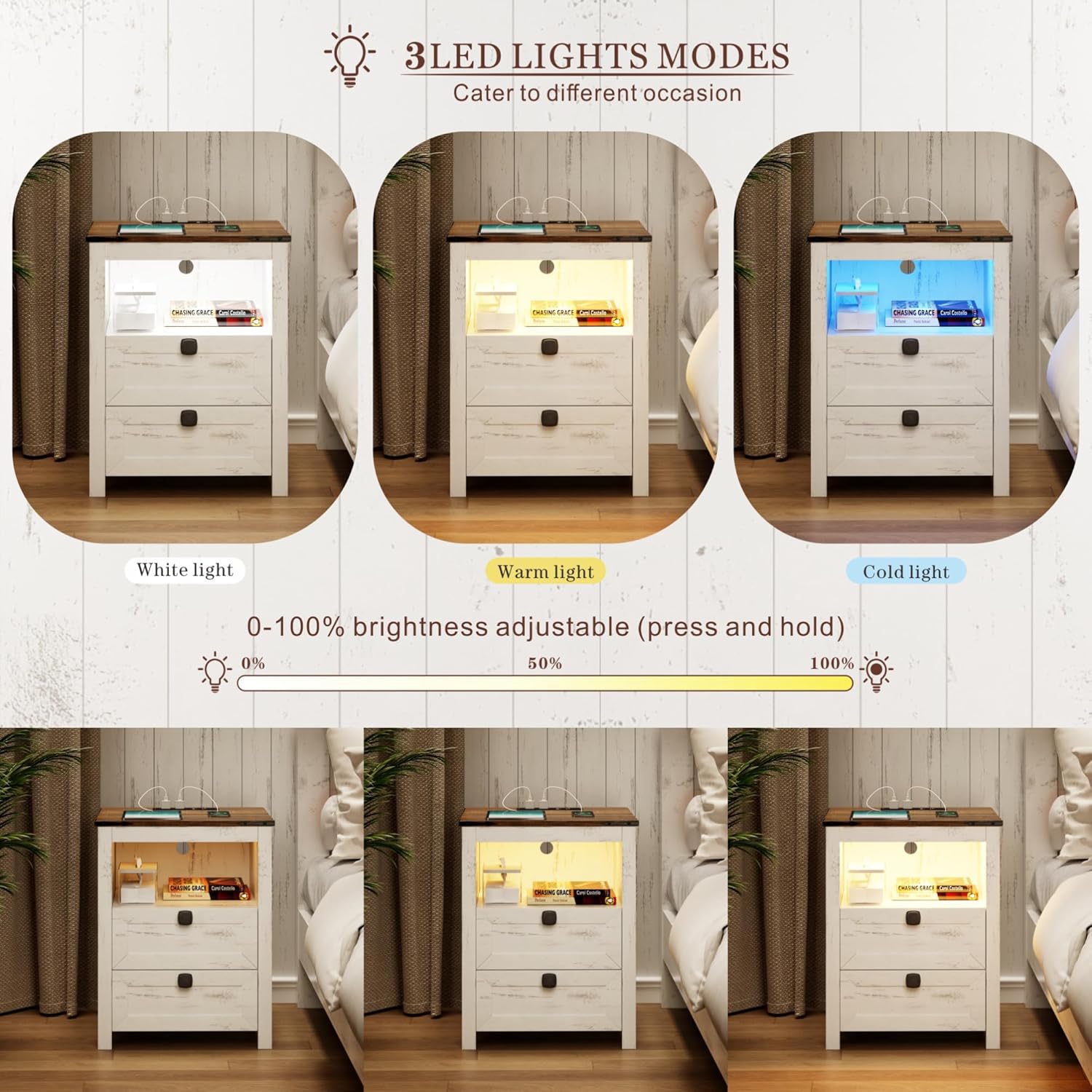
આકૃતિ 4.1: Illustration of the three LED light modes (White, Warm, Cold) and the brightness adjustment range from 0% to 100% by pressing and holding the control button.

આકૃતિ 4.2: Depiction of the human sensor's operation, showing it detects movement within a 2-3 meter range to automatically illuminate the night stand.
4.2 ચાર્જિંગ સ્ટેશન
આ ઇન્ટિગ્રેટેડ ચાર્જિંગ સ્ટેશન તમારા ઇલેક્ટ્રોનિક ઉપકરણો માટે અનુકૂળ પાવર એક્સેસ પ્રદાન કરે છે.
- પાવર કનેક્શન: Ensure the night stand's main power cord is securely plugged into a standard 120V/12A wall outlet.
- યુએસબી પોર્ટ્સ: Use the 1 x USB-A port (5V/2A) to charge compatible devices such as smartphones, tablets, or other USB-powered accessories.
- ટાઇપ-સી પોર્ટ: Use the 1 x Type-C port (5V/2A) for devices that utilize a USB-C connection.
- એસી આઉટલેટ્સ: The 2 x standard AC power outlets (120V/12A) can be used for larger electronics like laptops, lamps, or other appliances.
- કેબલ મેનેજમેન્ટ: Route charging cables neatly to avoid clutter and potential hazards.

આકૃતિ 4.3: વિગતવાર view of the charging station, highlighting the 1 USB port, 1 Type-C port, and 2 AC power outlets, along with their respective power specifications.
5. જાળવણી
Proper care will extend the life and appearance of your night stand.
- સફાઈ: સોફ્ટ સાથે સપાટીઓ સાફ કરો, ડીamp કાપડ. કઠોર રસાયણો અથવા ઘર્ષક ક્લીનર્સ ટાળો, જે ફિનિશને નુકસાન પહોંચાડી શકે છે.
- ડસ્ટિંગ: Regularly dust the night stand, especially around the charging ports and LED light area, to prevent dust buildup.
- સ્પિલ્સ: Immediately wipe up any spills to prevent moisture damage to the wood and electrical components.
- વિદ્યુત ઘટકો: Ensure the charging station and LED lights remain dry. Do not immerse in water.
- ફાસ્ટનર્સને સજ્જડ કરો: માળખાકીય અખંડિતતા જાળવવા માટે સમયાંતરે બધા સ્ક્રૂ અને ફાસ્ટનર્સને તપાસો અને કડક કરો.
6. મુશ્કેલીનિવારણ
સામાન્ય સમસ્યાઓ અને તેમના ઉકેલો માટે આ વિભાગનો સંદર્ભ લો.
| સમસ્યા | સંભવિત કારણ | ઉકેલ |
|---|---|---|
| એલઇડી લાઇટ ચાલુ થતી નથી. | પ્લગ ઇન નથી; ઢીલું કનેક્શન; પાવર આઉટપુટtage; faulty LED strip. | Ensure power cord is securely plugged into a working outlet. Check LED strip connection. Test outlet with another device. Contact customer support if faulty. |
| ચાર્જિંગ સ્ટેશન કામ કરતું નથી. | Not plugged in; loose connection; device not compatible; overloaded circuit. | Verify power cord is plugged in. Check connections. Ensure device is compatible with USB/Type-C/AC specifications. Unplug some devices if overloaded. |
| Human sensor not detecting motion. | Obstruction; sensor dirty; out of range; sensor malfunction. | Ensure clear line of sight to the sensor. Clean sensor surface. Stand within 2-3 meter range. Contact customer support if malfunction persists. |
| ડ્રોઅર્સ ચોંટી જાય છે અથવા સરળતાથી સરકતા નથી. | Improper assembly; debris in slides; damaged slides. | Review assembly steps for drawers and slides. Clear any debris. Contact customer support if slides are damaged. |
7. સ્પષ્ટીકરણો
- બ્રાન્ડ: ફ્રીડીઝ
- મોડલ: Smart LED Night Stand
- ઉત્પાદન પરિમાણો: 15.74"D x 17.71"W x 23.62"H
- રંગ: White (Farmhouse Style)
- Tabletop Weight Capacity: 50 lbs
- Shelf/Drawer Weight Capacity: 30 lbs
- એલઇડી લાઇટ્સ: 3 Color Modes (White, Warm, Cold), 0-100% Brightness Adjustable
- Human Sensor Range: 2-3 મીટર
- ચાર્જિંગ સ્ટેશન:
- 1 x USB Port (5V/2A)
- 1 x Type-C Port (5V/2A)
- 2 x AC Power Outlets (120V/12A)
- પાવર કોર્ડ લંબાઈ: 4.92 એફટી
8. વોરંટી અને સપોર્ટ
For warranty information, product support, or to report missing/damaged parts, please contact FREDEES customer service through the retailer where the product was purchased. Please have your purchase receipt and product model number (B0CSPDVKVP) available when contacting support.