
1. પરિચય
This manual provides detailed instructions for the safe and effective use of your iJoy Disney Winnie The Pooh Wireless Bluetooth Speaker. Please read this manual thoroughly before operating the device and retain it for future reference.
2. બોક્સમાં શું છે
Carefully unpack your speaker and ensure all items are present:
- iJoy Disney Winnie The Pooh Wireless Bluetooth Speaker
- યુએસબી ચાર્જિંગ કેબલ
- Backup AUX Cable
- માલિકોની માર્ગદર્શિકા (આ દસ્તાવેજ)

Image: The speaker shown next to its retail packaging, illustrating the product and its box.
3. ઉત્પાદન ઓવરview
3.1 નિયંત્રણ બટનો
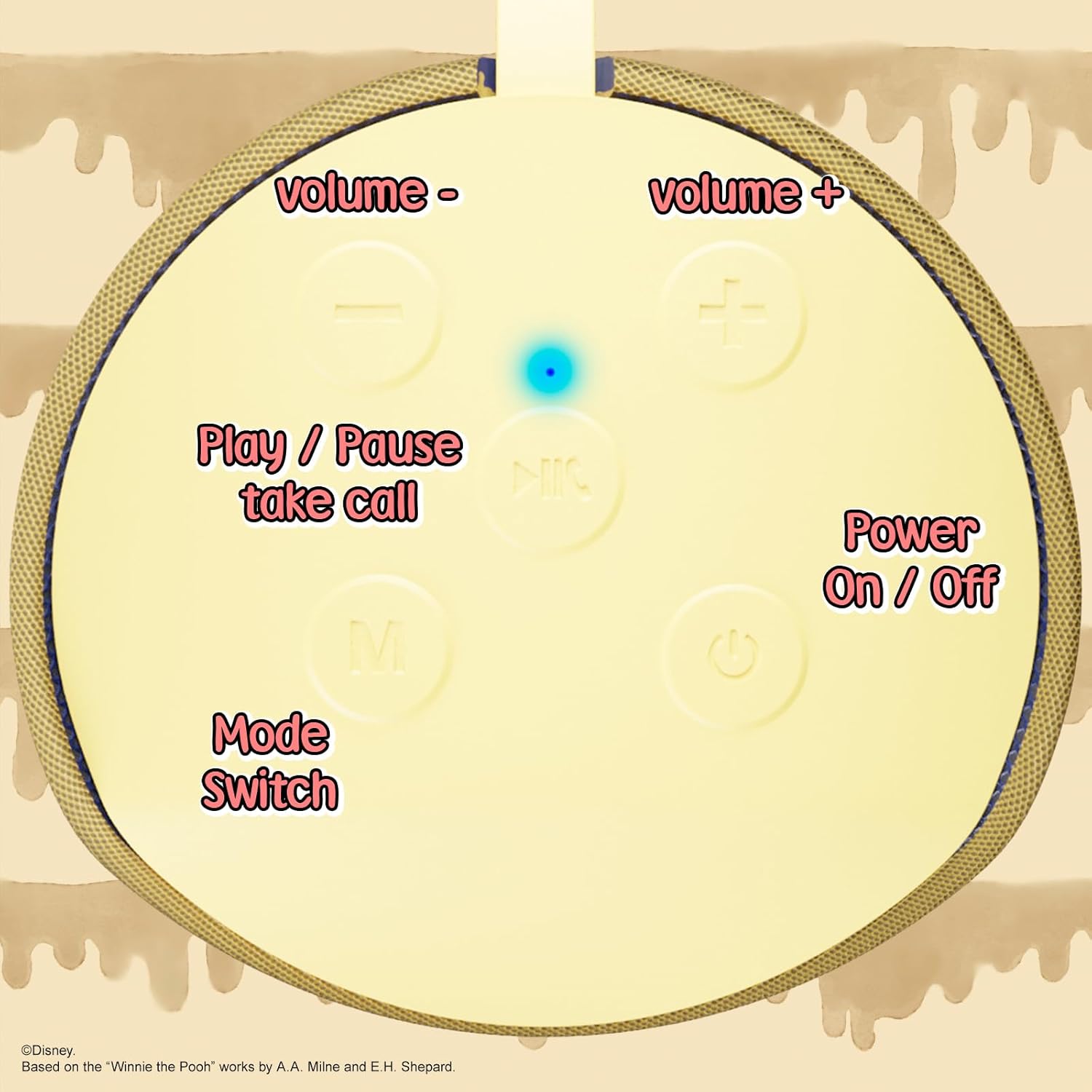
Image: A close-up of the speaker's top panel, displaying the control buttons.
- પાવર ચાલુ / બંધ: સ્પીકરને ચાલુ કે બંધ કરવા માટે દબાવી રાખો.
- પ્લે/પોઝ બટન: Press to play or pause audio. Also used to answer or end phone calls.
- વોલ્યુમ વધારો (+) બટન: વૉલ્યૂમ વધારવા માટે દબાવો. આગલા ટ્રેક પર જવા માટે દબાવો અને પકડી રાખો.
- અવાજ ઘટાડો (-) બટન: વોલ્યુમ ઘટાડવા માટે દબાવો. પાછલા ટ્રેક પર જવા માટે દબાવો અને પકડી રાખો.
- Mode Switch (M) Button: Press to switch between Bluetooth, FM Radio, SD Card, and USB modes.
3.2 બંદરો અને સૂચકાંકો

છબી: વિગતવાર view of the speaker's rear panel, highlighting the AUX port, SD card slot, USB port, and Micro USB charging port.
- AUક્સ પોર્ટ: For connecting external audio devices via the provided 3.5mm AUX cable.
- SD કાર્ડ સ્લોટ: Insert a microSD card for direct audio playback.
- યુએસબી પોર્ટ: Insert a USB flash drive for direct audio playback.
- માઇક્રો યુએસબી ચાર્જિંગ પોર્ટ: Connect the USB charging cable here to charge the speaker.
- એલઇડી સૂચક પ્રકાશ: Indicates charging status and Bluetooth pairing status.
4. સેટઅપ
૩.૧ સ્પીકરને ચાર્જ કરવું
- Connect the Micro USB end of the charging cable to the speaker's Micro USB charging port.
- Connect the standard USB end of the cable to a USB power adapter (not included) or a computer's USB port.
- The LED indicator light will illuminate during charging and turn off once fully charged.
- સંપૂર્ણ ચાર્જ થવામાં સામાન્ય રીતે લગભગ 2 કલાક લાગે છે.
4.2 બ્લૂટૂથ પેરિંગ
- ખાતરી કરો કે સ્પીકર સંપૂર્ણપણે ચાર્જ થયેલ છે.
- Press and hold the Power On/Off button to turn on the speaker. You will hear an audible prompt, and the LED indicator will flash, indicating it's in pairing mode.
- On your mobile device (smartphone, tablet, etc.), enable Bluetooth.
- માટે શોધો available Bluetooth devices. The speaker will appear as "iJoy Winnie The Pooh Speaker" or similar.
- Select the speaker from the list to pair. Once successfully paired, you will hear a confirmation sound, and the LED indicator will stop flashing and remain solid.
- જો ઉપકરણનું બ્લૂટૂથ સક્રિય હોય અને રેન્જમાં હોય, તો સ્પીકર ચાલુ થવા પર છેલ્લા જોડીવાળા ઉપકરણ સાથે આપમેળે ફરીથી કનેક્ટ થઈ જશે.
5. ઓપરેટિંગ સૂચનાઓ
5.1 બ્લૂટૂથ મોડ
After successful pairing, you can stream audio wirelessly from your device to the speaker. Use your device's controls or the speaker's Play/Pause, Volume Up/Down buttons to manage playback.
5.2 FM રેડિયો મોડ
- FM રેડિયો મોડ પર સ્વિચ કરવા માટે મોડ (M) બટન દબાવો.
- Press the Play/Pause button to automatically scan and save available FM stations.
- સેવ કરેલા સ્ટેશનો વચ્ચે નેવિગેટ કરવા માટે વોલ્યુમ અપ (+) અને વોલ્યુમ ડાઉન (-) બટનો (ટૂંકું દબાવો) નો ઉપયોગ કરો.
5.3 SD Card / USB Playback
- Insert a microSD card into the SD card slot or a USB flash drive into the USB port.
- The speaker will automatically switch to the corresponding mode and begin playing audio files. If not, press the Mode (M) button to select the correct mode.
- Use the speaker's Play/Pause, Volume Up/Down buttons to control playback.
5.4 AUX મોડ
- Connect one end of the provided 3.5mm AUX cable to the speaker's AUX port.
- તમારા ઓડિયો ડિવાઇસના હેડફોન જેક સાથે બીજા છેડાને જોડો.
- The speaker will automatically switch to AUX mode. If not, press the Mode (M) button.
- Control playback and volume primarily from your connected audio device.
૪.૫ હેન્ડ્સ-ફ્રી કોલિંગ
જ્યારે બ્લૂટૂથ દ્વારા સ્માર્ટફોન સાથે કનેક્ટ થયેલ હોય:
- કૉલનો જવાબ આપો: એકવાર પ્લે/પોઝ બટન દબાવો.
- કૉલ સમાપ્ત કરો: કોલ દરમિયાન એકવાર પ્લે/પોઝ બટન દબાવો.
- કૉલ નકારો: પ્લે/પોઝ બટનને દબાવી રાખો.
6. જાળવણી
- સ્પીકરને નરમ, સૂકા કપડાથી સાફ કરો. ઘર્ષક ક્લીનર્સ અથવા સોલવન્ટનો ઉપયોગ કરશો નહીં.
- The speaker is IPX4 splashproof, meaning it can withstand splashes of water. Do not submerge it in water.
- જ્યારે ઉપયોગમાં ન હોય ત્યારે સ્પીકરને ઠંડી, સૂકી જગ્યાએ સ્ટોર કરો.
- સ્પીકરને અતિશય તાપમાન, સીધો સૂર્યપ્રકાશ અથવા ઉચ્ચ ભેજના સંપર્કમાં આવવાનું ટાળો.
7. મુશ્કેલીનિવારણ
| સમસ્યા | સંભવિત કારણ | ઉકેલ |
|---|---|---|
| સ્પીકર ચાલુ થતું નથી | ઓછી બેટરી | સ્પીકરને સંપૂર્ણ ચાર્જ કરો. |
| બ્લૂટૂથ દ્વારા જોડી બનાવી શકાતી નથી | Speaker not in pairing mode / Device Bluetooth off / Too far from device | ખાતરી કરો કે સ્પીકર પેરિંગ મોડમાં છે (LED ફ્લેશ કરી રહ્યું છે). તમારા ડિવાઇસ પર બ્લૂટૂથ ચાલુ કરો. સ્પીકરને ડિવાઇસની નજીક ખસેડો (30 ફૂટની અંદર). |
| કોઈ અવાજ નથી | Volume too low / Incorrect mode / Device not playing audio | Increase speaker and device volume. Press 'M' button to select correct mode. Ensure audio is playing on your connected device. |
| એફએમ રેડિયો રિસેપ્શન નબળું છે | Weak signal / Interference | Move the speaker to a different location. The AUX cable can act as an antenna; try connecting it. |
8. સ્પષ્ટીકરણો

Image: The speaker with visual indicators showing its height of 6.3 inches and width of 2.9 inches.
| લક્ષણ | વિગત |
|---|---|
| મોડલ નંબર | SS-KH7C-FS4O |
| કનેક્ટિવિટી ટેકનોલોજી | બ્લૂટૂથ |
| વાયરલેસ કોમ્યુનિકેશન રેન્જ | 30 ફૂટ (10 મીટર) સુધી |
| સ્પીકરનો પ્રકાર | ટાવર |
| સ્પીકર મહત્તમ આઉટપુટ પાવર | 20 વોટ્સ |
| ઓડિયો આઉટપુટ મોડ | મોનો |
| બેટરી ક્ષમતા | 800 મિલીamp કલાક |
| ચાર્જિંગ સમય | લગભગ 2 કલાક |
| રમવાનો સમય | Up to 3 Hours (depending on volume and usage) |
| પાણી પ્રતિકાર સ્તર | IPX4 (સ્પ્લેશપ્રૂફ) |
| ઉત્પાદન પરિમાણો | ૧૫.૯૧"ઊંડાઈ x ૨૩.૪૬"ઊંડાઈ x ૧૫.૨૮"ઊંડાઈ (૪૦.૪ સેમીઊંડાઈ x ૫૯.૬ સેમીઊંડાઈ x ૩૮.૮ સેમીઊંડાઈ) |
| વસ્તુનું વજન | 8 ઔંસ (226.8 ગ્રામ) |
| સમાવાયેલ ઘટકો | Bluetooth Speaker, USB Charging Cable, Backup AUX Cable, Owners Manual |
| ખાસ લક્ષણો | Built-in Microphone, LED Indicator Lights, Portable, SD Card Slot, USB Port, FM Radio |
9. વોરંટી અને સપોર્ટ
9.1 વોરંટી માહિતી
This iJoy Disney Winnie The Pooh Wireless Bluetooth Speaker comes with a 90-day manufacturer's warranty from the date of purchase. This warranty covers manufacturing defects and workmanship under normal use. It does not cover damage caused by misuse, accidents, unauthorized modifications, or normal wear and tear.
9.2 ગ્રાહક સપોર્ટ
For technical assistance, warranty claims, or further inquiries, please contact iJoy customer support through their official website or the retailer where the product was purchased. Please have your model number (SS-KH7C-FS4O) and proof of purchase ready.