
1. પરિચય
ખરીદી બદલ આભારasing the ulafbwur 8082T Digital Desk Clock. This device combines a digital clock with a weather forecast station, perpetual calendar, and displays humidity and temperature. Its LED color screen provides clear readability. This manual provides detailed instructions for setup, operation, and maintenance to ensure optimal performance and longevity of your device.
2. સલામતી માહિતી
- ઉપકરણને અતિશય તાપમાન, સીધો સૂર્યપ્રકાશ અથવા ઉચ્ચ ભેજના સંપર્કમાં ન લાવો.
- ઉપકરણને મજબૂત અસરમાં મૂકવા અથવા આધીન કરવાનું ટાળો.
- ઉપકરણને જાતે ડિસએસેમ્બલ કરવાનો કે રિપેર કરવાનો પ્રયાસ કરશો નહીં. બધી સર્વિસિંગ લાયક કર્મચારીઓને સોંપો.
- Use only the specified power source (USB cable or AA batteries).
- બાળકોની પહોંચથી દૂર રાખો.
- સ્થાનિક નિયમો અનુસાર બેટરીનો નિકાલ કરો.
3. પેકેજ સામગ્રી
પેકેજ ખોલતી વખતે કૃપા કરીને તેમાં રહેલી સામગ્રી તપાસો:
- 1 x ulafbwur 8082T Digital Desk Clock
- 1 x USB કેબલ
- ૧ x વપરાશકર્તા માર્ગદર્શિકા (આ દસ્તાવેજ)
Note: AA batteries are not included and must be purchased separately.
4. ઉત્પાદન ઓવરview
The ulafbwur 8082T Digital Desk Clock features a comprehensive display and intuitive controls.
4.1 ફ્રન્ટ ડિસ્પ્લે
The LED color screen displays time, date, day of the week, weather forecast icon, indoor temperature, and humidity.
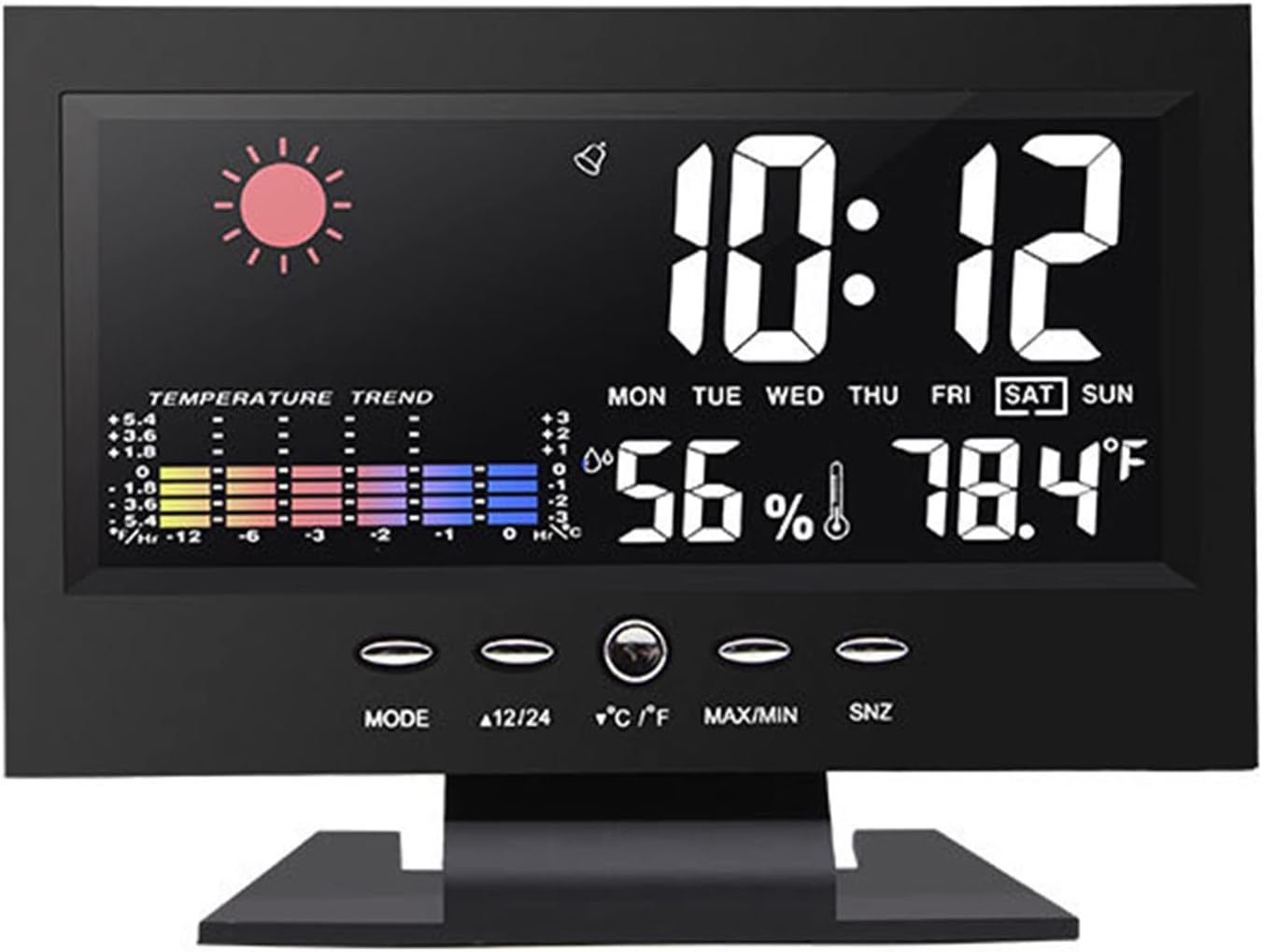
આકૃતિ 1: ફ્રન્ટ view of the ulafbwur 8082T Digital Desk Clock, showing time, date, weather, temperature, and humidity.
4.2 નિયંત્રણ બટનો
The clock features several control buttons located below the display for easy adjustment:
- DIRECTIONS: Used to switch between display modes and enter setting modes.
- 12/24: ૧૨-કલાક અને ૨૪-કલાકના સમય ફોર્મેટ વચ્ચે ટૉગલ કરે છે.
- °C/°F: Switches temperature display between Celsius and Fahrenheit.
- મહત્તમ/મિનિટ: Displays maximum and minimum temperature/humidity records.
- SNZ (Snooze): Activates the snooze function during an alarm.
4.3 રીઅર પેનલ
The rear panel houses the battery compartment and power input.

આકૃતિ 2: પાછળ view of the clock, illustrating the battery compartment for two AA batteries and the DC 4.5V power input.
5. સેટઅપ
5.1 ઉપકરણને પાવરિંગ
The clock can be powered by either the included USB cable or two AA batteries (not included).
- યુએસબી પાવરનો ઉપયોગ: Connect the provided USB cable to the DC 4.5V port on the back of the clock and plug the other end into a compatible USB power adapter (not included) or a USB port. The backlight will remain on when powered by USB.
- બેટરીનો ઉપયોગ: Open the battery compartment on the back of the clock. Insert two AA batteries, ensuring correct polarity (+/-). Close the compartment. Note: When powered by batteries, the backlight will not remain continuously on to conserve power. It will illuminate briefly when a button is pressed.
5.2 પ્રારંભિક સેટિંગ્સ
Upon first power-up, the clock may display default settings. Follow the operating instructions to set the correct time, date, and other preferences.
6. ઓપરેટિંગ સૂચનાઓ
6.1 સમય અને તારીખ સેટ કરવી
- દબાવો અને પકડી રાખો મોડ button for approximately 3 seconds to enter time setting mode. The year display will start flashing.
- નો ઉપયોગ કરો 12/24 or ° C/° F buttons to adjust the flashing value (e.g., year).
- દબાવો મોડ again to confirm the setting and move to the next item (month, day, hour, minute).
- Repeat steps 2 and 3 until all time and date settings are complete.
- દબાવો મોડ one last time or wait for 15 seconds for the clock to exit setting mode automatically.
6.2 એલાર્મ સેટ કરવું
- સામાન્ય સમય પ્રદર્શનમાંથી, દબાવો મોડ એલાર્મ સમય દર્શાવવા માટે એકવાર બટન દબાવો.
- દબાવો અને પકડી રાખો મોડ button for approximately 3 seconds. The alarm hour will start flashing.
- નો ઉપયોગ કરો 12/24 or ° C/° F અલાર્મ કલાકને સમાયોજિત કરવા માટે બટનો.
- દબાવો મોડ again to confirm and move to the alarm minute. Adjust using 12/24 or ° C/° F.
- દબાવો મોડ ફરીથી પુષ્ટિ કરવા અને એલાર્મ સેટિંગ મોડમાંથી બહાર નીકળવા માટે.
- એલાર્મને સક્રિય/નિષ્ક્રિય કરવા માટે, દબાવો 12/24 button while the alarm time is displayed. An alarm icon will appear/disappear on the screen.
6.3 સ્નૂઝ ફંક્શન
જ્યારે એલાર્મ વાગે ત્યારે, દબાવો એસએનઝેડ button to activate the snooze function. The alarm will temporarily stop and sound again after a few minutes (default snooze duration is typically 5 minutes, but may vary). To turn off the alarm completely, press any other button.
૩.૪ ૧૨/૨૪ કલાક ફોર્મેટ પસંદગી
સામાન્ય સમય પ્રદર્શન મોડમાં, દબાવો 12/24 button to toggle between 12-hour (with AM/PM indicator) and 24-hour time formats.
6.5 Celsius/Fahrenheit Selection
સામાન્ય ડિસ્પ્લે મોડમાં, દબાવો ° C/° F button to switch the temperature display between Celsius and Fahrenheit.
6.6 MAX/MIN Temperature and Humidity Records
દબાવો MAX/MIN માટે બટન view the maximum recorded temperature and humidity. Press it again to view the minimum recorded temperature and humidity. Press a third time to return to the current display. The records are typically reset daily or when the device is reset.

આકૃતિ 3: વિગતવાર view of the color screen display, highlighting temperature and humidity readings.
7. જાળવણી
- સફાઈ: Wipe the clock's surface with a soft, dry cloth. Do not use abrasive cleaners or solvents.
- બેટરી રિપ્લેસમેન્ટ: If using batteries, replace them when the display dims or functions become erratic. Ensure correct polarity.
- સંગ્રહ: જો ઘડિયાળને લાંબા સમય સુધી સંગ્રહિત કરી રહ્યા હોવ, તો લીકેજ અટકાવવા માટે બેટરીઓ દૂર કરો.
8. મુશ્કેલીનિવારણ
| સમસ્યા | સંભવિત કારણ | ઉકેલ |
|---|---|---|
| ડિસ્પ્લે ખાલી અથવા ઝાંખું છે. | No power, low batteries, or USB cable not connected. | Ensure USB cable is securely connected or replace AA batteries. Note: Backlight is not continuous on battery power. |
| સમય/તારીખ ખોટી છે. | Not set correctly after power-up or power interruption. | Follow "Setting Time and Date" instructions in Section 6.1. |
| એલાર્મ વાગતો નથી. | એલાર્મ સક્રિય થયેલ નથી અથવા વોલ્યુમ ખૂબ ઓછું છે (જો એડજસ્ટેબલ હોય તો). | Ensure the alarm icon is displayed. Re-check alarm time settings. |
| Inaccurate temperature/humidity. | ઉપકરણ ગરમીના સ્ત્રોતો, વેન્ટ્સ, અથવા સીધા સૂર્યપ્રકાશમાં મૂકવામાં આવે છે. | Relocate the clock to a stable environment away from extreme conditions. Allow time for readings to stabilize. |
9. સ્પષ્ટીકરણો
- મોડલ: 8082T
- સામગ્રી: ABS
- ડિસ્પ્લે પ્રકાર: LED Color Screen
- સમય ફોર્મેટ: 12/24 Hour Switchable
- તારીખ શ્રેણી: 2002-2099 (Perpetual Calendar)
- તાપમાન શ્રેણી: 0°C થી 50°C (32°F થી 122°F)
- પાવર સ્ત્રોત: 2 x AA Batteries (not included) or USB Cable (DC 4.5V)
- ઉત્પાદન પરિમાણો: Approximately 14.5cm x 11cm x 5.5cm (5.71" x 4.33" x 2.17")

Figure 4: Product dimensions of the ulafbwur 8082T Digital Desk Clock.
10. વોરંટી અને સપોર્ટ
This product comes with a standard manufacturer's warranty. For specific warranty details, please refer to the documentation provided at the time of purchase or contact your retailer. For technical support or inquiries, please reach out to the ulafbwur customer service department through your purchase platform.