
1. પરિચય
Thank you for choosing the Muse MH08MB Portable Radio. This device is designed for versatility and durability, offering multiple power sources, audio playback options, and emergency features. Please read this manual carefully to ensure proper use and maintenance of your device.

આકૃતિ 1: Muse MH08MB Portable Radio. This image displays the Muse MH08MB portable radio from a side angle, highlighting its integrated hand crank for dynamo charging, the solar panel on top, and the powerful LED flashlight on the front. A green lanyard is attached for portability.
2. સલામતી માહિતી
- ઉપકરણને લાંબા સમય સુધી અતિશય તાપમાન અથવા સીધા સૂર્યપ્રકાશમાં ન રાખો.
- ઉપકરણને છોડવાનું ટાળો અથવા તેને મજબૂત અસરોને આધિન કરો.
- Keep the device away from water and moisture, despite its splash-proof design, to prevent damage.
- ઉપકરણને જાતે ડિસએસેમ્બલ કરવાનો કે રિપેર કરવાનો પ્રયાસ કરશો નહીં. બધી સર્વિસિંગ લાયક કર્મચારીઓને સોંપો.
- Use only the specified charging methods (USB-C, solar, dynamo) to power the device.
3. પેકેજ સામગ્રી
કૃપા કરીને તપાસો કે બધી વસ્તુઓ હાજર છે:
- Muse MH08MB Portable Radio
- USB-C ચાર્જિંગ કેબલ
- પાવર એડેપ્ટર
- વપરાશકર્તા માર્ગદર્શિકા (આ દસ્તાવેજ)
4. ઉત્પાદન ઓવરview
Familiarize yourself with the various parts and controls of your Muse MH08MB radio.

આકૃતિ 2: ઉપરview of Muse MH08MB Features. A detailed infographic summarizing all major features of the Muse MH08MB portable radio. It includes a jumbo display, FM radio with 5 presets, hands-free function, IP64 dust and splash resistance, siren, clock, 6 hours playtime, multiple charging options (USB-C, hand crank, solar), stereo pairing, LED flashlight, and an AUX-in jack.
મુખ્ય ઘટકો:
- ડિજિટલ ડિસ્પ્લે: Shows frequency, time, and other indicators.
- નિયંત્રણ બટનો: Power, Play/Pause, Skip, Preset selection (1-5).
- ટેલિસ્કોપિક એન્ટેના: સુધારેલ રેડિયો રિસેપ્શન માટે.
- એલઇડી ફ્લેશલાઇટ: સંકલિત પ્રકાશ સ્ત્રોત.
- હેન્ડ ક્રેન્ક: For dynamo charging.
- સૌર પેનલ: સૌર ચાર્જિંગ માટે.
- યુએસબી-સી પોર્ટ: For charging the device and external devices.
- AUX-IN જેક: For connecting external audio sources.
- માઇક્રોફોન: હેન્ડ્સ-ફ્રી કૉલ્સ માટે.
- સાયરન: Emergency alert function.

આકૃતિ 3: ટોચ View with Antenna and Controls. This view of the Muse MH08MB portable radio features its telescopic antenna fully extended for improved radio reception. The top panel shows various control buttons, and the digital display is active.
5. ઉપકરણને ચાર્જ કરી રહ્યું છે
The Muse MH08MB offers multiple charging methods to ensure you always have power.
5.1. USB-C ચાર્જિંગ
- Connect the provided USB-C cable to the USB-C port on the radio.
- Connect the other end of the cable to the power adapter and plug it into a wall outlet.
- ડિસ્પ્લે પર ચાર્જિંગ સૂચક ચાર્જિંગ સ્થિતિ બતાવશે.
૩. સોલાર ચાર્જિંગ
Place the radio with the solar panel facing direct sunlight. The solar panel will convert sunlight into energy to charge the internal battery. This method is ideal for maintaining charge or slow charging in outdoor environments.
5.3. Dynamo (Hand Crank) Charging
Extend the hand crank located on the side of the radio. Rotate the crank clockwise or counter-clockwise at a steady pace. Continuous cranking will generate power to charge the internal battery, useful in emergency situations or when other power sources are unavailable.

આકૃતિ 4: Charging Options and IP64 Design. This infographic illustrates the versatile charging options of the Muse MH08MB, including solar power and hand-crank dynamo. It also points out the USB-C port for charging other devices and emphasizes its IP64 dust and splash-proof design.
6. સેટઅપ
6.1. પ્રારંભિક પાવર ચાલુ
દબાવો અને પકડી રાખો શક્તિ button to turn on the device. The digital display will illuminate.
6.2. ઘડિયાળ સુયોજિત કરી રહ્યા છે
જ્યારે ઉપકરણ ચાલુ હોય, ત્યારે દબાવો ઘડિયાળ button (if available, or refer to the general controls for time setting). Use the Tune/Skip buttons to adjust the hour and minute. Press the ઘડિયાળ પુષ્ટિ કરવા માટે ફરીથી બટન.
7. ઓપરેટિંગ સૂચનાઓ
7.1. પાવર ચાલુ/બંધ
દબાવો અને પકડી રાખો શક્તિ button for approximately 2 seconds to turn the radio on or off.
૫.૩. રેડિયો ઓપરેશન (AM/FM)
- રેડિયો ચાલુ કરો.
- શ્રેષ્ઠ FM રિસેપ્શન માટે ટેલિસ્કોપિક એન્ટેનાને વિસ્તૃત કરો.
- દબાવો મોડ FM અથવા AM બેન્ડ પસંદ કરવા માટે બટન.
- નો ઉપયોગ કરો Tune/Skip buttons to manually tune to a station or press and hold to auto-scan for the next available station.
- To save a preset, tune to your desired station, then press and hold one of the Preset (1-5) buttons until the display confirms it's saved. To recall a preset, simply press the corresponding પ્રીસેટ બટન
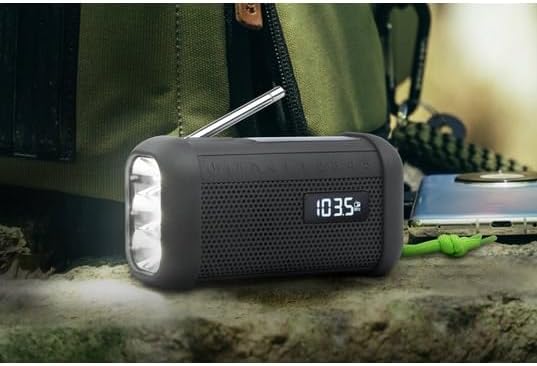
આકૃતિ 5: Digital Display in Radio Mode. The Muse MH08MB portable radio is shown resting on a surface, with its digital display clearly indicating "103.5 MHz", signifying active FM radio tuning. The speaker grille and flashlight are also visible.
7.3. બ્લૂટૂથ જોડી
- Turn on the radio and switch to Bluetooth mode using the મોડ button. The display will show a Bluetooth indicator.
- તમારા મોબાઇલ ઉપકરણ પર, બ્લૂટૂથ સક્ષમ કરો અને ઉપલબ્ધ ઉપકરણો માટે શોધો.
- Select "MH08MB" from the list of devices.
- Once paired, the radio will confirm the connection, and you can play audio from your device.
7.4. Hands-Free Microphone
When connected via Bluetooth to a smartphone, the integrated microphone allows for hands-free calling. When a call comes in, the radio will pause playback. Press the ચલાવો/થોભો જવાબ આપવા અથવા ક endલને સમાપ્ત કરવા માટેનું બટન.
7.5. એલઇડી ફ્લેશલાઇટ
દબાવો ફ્લેશલાઇટ button (or designated button) to turn the LED flashlight on or off. The flashlight features 3 ultra-bright LEDs.
7.6. Siren Function
In an emergency, press and hold the સાયરન button to activate the emergency siren and flashing light. Press again to deactivate.
7.7. Stereo Pairing (TWS)
If you have two Muse MH08MB units, you can pair them for True Wireless Stereo (TWS) sound. Turn on both units and ensure they are in Bluetooth mode. On one unit, press and hold the સ્ટીરિયો જોડી button (refer to controls for exact button). The units will connect, providing a wider stereo soundstage.
7.8. Xક્સ-ઇન મોડ
Connect an external audio device (e.g., MP3 player) to the AUX-IN jack using a 3.5mm audio cable. Switch the radio to AUX mode using the મોડ button. Audio from the external device will play through the radio's speaker.
8. જાળવણી
- સફાઈ: ઉપકરણને નરમ, સૂકા કપડાથી સાફ કરો. ઘર્ષક ક્લીનર્સ અથવા સોલવન્ટનો ઉપયોગ કરશો નહીં.
- સંગ્રહ: Store the radio in a cool, dry place away from direct sunlight when not in use for extended periods.
- બેટરી સંભાળ: To prolong battery life, avoid fully discharging the battery frequently. Charge it regularly, especially if stored for a long time.
9. મુશ્કેલીનિવારણ
| સમસ્યા | સંભવિત કારણ | ઉકેલ |
|---|---|---|
| કોઈ શક્તિ નથી | બેટરી ખાલી થઈ ગઈ છે | Charge the device using USB-C, solar, or dynamo. |
| નબળું રેડિયો રિસેપ્શન | Antenna not extended or weak signal | Extend the telescopic antenna fully. Try moving to a different location. |
| બ્લૂટૂથ કનેક્ટ થઈ રહ્યું નથી | Radio not in pairing mode or device too far | Ensure radio is in Bluetooth mode. Move your device closer. Forget and re-pair on your mobile device. |
| કોઈ અવાજ નથી | Volume too low or incorrect mode | Increase volume. Ensure the correct mode (Radio, Bluetooth, AUX) is selected. |
10. સ્પષ્ટીકરણો
| લક્ષણ | વિગત |
|---|---|
| મોડલ નંબર | MH08MB |
| બ્રાન્ડ | મ્યુઝ |
| રંગ | કાળો |
| કનેક્ટિવિટી | બ્લૂટૂથ |
| રેડિયો બેન્ડ્સ | AM/FM (5 digital presets) |
| પાવર સ્ત્રોતો | USB-C, Solar, Dynamo (Hand Crank) |
| બેટરી | ૧ લિથિયમ-આયન (શામેલ) |
| બેટરી જીવન | Up to 6 hours (depending on volume/content) |
| ખાસ લક્ષણો | Integrated Clock, Hands-free Microphone, LED Flashlight (3 ultra-bright LEDs), Siren, Stereo Pairing (TWS), NFC |
| પાણી પ્રતિકાર | IP64 (ધૂળ અને છાંટા-પ્રતિરોધક) |
| પરિમાણો (L x W x H) | 15.8 x 6.4 x 8 સેમી |
| સમાવાયેલ ઘટકો | Power adapter, USB-C Charging Cable, User manual |

આકૃતિ 6: Product Dimensions. A technical diagram showing the dimensions of the Muse MH08MB portable radio: 158mm length, 80mm height, and 64mm width.
11. વોરંટી અને સપોર્ટ
Muse products are designed for reliability and performance. For warranty information and technical support, please refer to the warranty card included with your purchase or visit the official Muse webસાઇટ. કોઈપણ વોરંટી દાવા માટે તમારી ખરીદીનો પુરાવો રાખો.
For further assistance, please contact Muse customer service.