
1. સલામતી માહિતી
આ ઉત્પાદનનો ઉપયોગ કરતા પહેલા કૃપા કરીને બધી સલામતી સૂચનાઓ કાળજીપૂર્વક વાંચો. આ સૂચનાઓનું પાલન કરવામાં નિષ્ફળતા ઇલેક્ટ્રિક શોક, આગ અથવા અન્ય જોખમોમાં પરિણમી શકે છે.
- આગ અથવા ઇલેક્ટ્રિક આંચકો અટકાવવા માટે પ્રોજેક્ટરને વરસાદ અથવા ભેજ માટે ખુલ્લા ન કરો.
- પ્રોજેક્ટર ખોલશો નહીં casing. અંદર કોઈ ઉપયોગ કરી શકાય તેવા ભાગો નથી. બધી સર્વિસિંગ લાયક સેવા કર્મચારીઓને સોંપો.
- યોગ્ય વેન્ટિલેશનની ખાતરી કરો. વેન્ટિલેશનના છિદ્રોને અવરોધશો નહીં.
- પ્રોજેક્ટર સાથે પૂરા પાડવામાં આવેલ પાવર એડેપ્ટરનો જ ઉપયોગ કરો.
- જ્યારે lamp ચાલુ છે.
- પ્રોજેક્ટરને ગરમીના સ્ત્રોતો અને સીધા સૂર્યપ્રકાશથી દૂર રાખો.
2. પેકેજ સામગ્રી
ખાતરી કરો કે નીચે સૂચિબદ્ધ બધી વસ્તુઓ તમારા પેકેજમાં શામેલ છે:
- 1 x Jectse Mini LED Projector
- 1 x Remote Control (2 AAA batteries not included)
- 1 x AV Line (3-in-1 RCA cable)
- 1 x સૂચના માર્ગદર્શિકા
- 1 x પાવર એડેપ્ટર

Figure 2.1: Contents of the Jectse Mini LED Projector package.
3. ઉત્પાદન ઓવરview
The Jectse Mini LED Projector is a compact and portable device designed for various multimedia applications. It features a 1080P resolution, LED light source, and multiple connectivity options.

આકૃતિ 3.1: આગળ અને ઉપર view of the Jectse Mini LED Projector.
૨.૨ પ્રોજેક્ટર ઘટકો

Figure 3.2: Top panel controls of the Jectse Mini LED Projector.
- લેન્સ: છબીને સ્ક્રીન પર પ્રોજેક્ટ કરે છે.
- વેન્ટિલેશન ગ્રિલ: Ensures proper airflow for cooling.
- નિયંત્રણ બટનો: (Refer to Figure 3.2) For basic navigation and power control.
- ફોકસ વ્હીલ: છબી સ્પષ્ટતાને સમાયોજિત કરે છે.
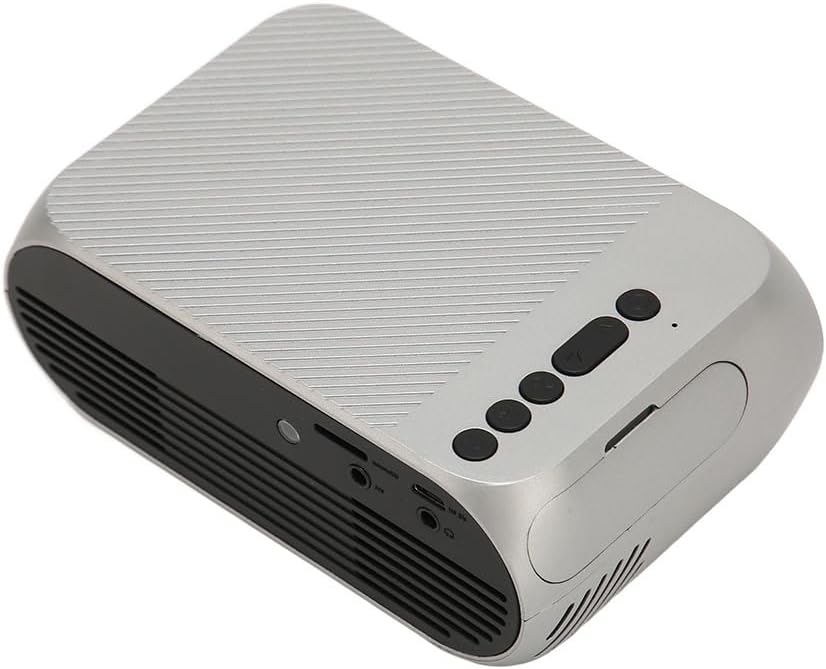
આકૃતિ 3.3: પાછળ અને બાજુ view with input/output ports.
3.2 ઇનપુટ/આઉટપુટ પોર્ટ
- HD Multimedia Interface (HDMI): For connecting devices like laptops, gaming consoles, and media players.
- AV પોર્ટ: For connecting older devices using the included AV cable.
- યુએસબી પોર્ટ: મીડિયા ચલાવવા માટે USB ડ્રાઇવને કનેક્ટ કરવા માટે files સીધું.
- પાવર ઇનપુટ: પાવર એડેપ્ટરને કનેક્ટ કરવા માટે.
- ઓડિયો આઉટપુટ (૩.૫ મીમી જેક): બાહ્ય સ્પીકર્સ અથવા હેડફોન કનેક્ટ કરવા માટે.
4. સેટઅપ
4.1 પ્લેસમેન્ટ
Place the projector on a stable, flat surface. Ensure there is adequate space around the projector for ventilation. The ideal projection distance is between 1.5 to 2 meters for optimal image size and clarity.

Figure 4.1: Recommended projection distance and screen sizes.
4.2 પાવર કનેક્શન
- પાવર એડેપ્ટરને પ્રોજેક્ટરના પાવર ઇનપુટ પોર્ટ સાથે કનેક્ટ કરો.
- પાવર એડેપ્ટરને યોગ્ય ઇલેક્ટ્રિકલ આઉટલેટ (100-240V) માં પ્લગ કરો.
૫.૩ ઇનપુટ સ્ત્રોતોને જોડવા
The projector supports HD Multimedia Interface, AV, and USB inputs.

Figure 4.2: Projector compatibility with various devices.
- HD Multimedia Interface: Connect an HD Multimedia Interface cable from your source device (e.g., laptop, game console) to the projector's HD Multimedia Interface port.
- એ.વી .: Connect the included AV cable to the projector's AV port and the corresponding audio/video output ports on your source device.
- યુએસબી: Insert a USB flash drive into the projector's USB port.
4.4 ફોકસ એડજસ્ટમેન્ટ
After powering on the projector, rotate the focus wheel (usually located near the lens) until the projected image appears clear and sharp.
5. ઓપરેટિંગ સૂચનાઓ
5.1 પાવરિંગ ચાલુ/બંધ
- પાવર ચાલુ કરવા માટે: Press the Power Switch button on the projector or the power button on the remote control.
- પાવર ઓફ કરવા માટે: Press the Power Switch button again. The projector will shut down.
5.2 સ્ત્રોત પસંદગી
After powering on, use the "Signal Source Button" on the projector or the "Source" button on the remote control to cycle through available input sources (HD Multimedia Interface, AV, USB).
5.3 મેનુ નેવિગેશન
Use the Direction Buttons and Confirm Button on the projector or the arrow keys and OK button on the remote control to navigate through the projector's on-screen menu for settings adjustments (e.g., picture mode, aspect ratio, sound settings).
5.4 રીમોટ કંટ્રોલ વપરાશ
Insert two AAA batteries (not included) into the remote control. Point the remote control towards the projector's IR receiver to operate functions such as power, source selection, volume, and menu navigation.
6. જાળવણી
૭.૧ લેન્સ સાફ કરવું
Use a soft, lint-free cloth specifically designed for optical lenses to gently wipe the projector lens. Do not use abrasive cleaners or excessive force, as this can scratch the lens.
6.2 સામાન્ય સફાઈ
Wipe the exterior of the projector with a soft, dry cloth. Do not use liquid cleaners or solvents. Ensure the ventilation grilles are free from dust and debris to maintain optimal cooling.
7. મુશ્કેલીનિવારણ
| સમસ્યા | સંભવિત કારણ | ઉકેલ |
|---|---|---|
| કોઈ છબી પ્રોજેક્ટ કરેલી નથી |
|
|
| છબી અસ્પષ્ટ છે |
|
|
| કોઈ અવાજ નથી |
|
|
| રીમોટ કંટ્રોલ કામ કરતું નથી |
|
|
8. સ્પષ્ટીકરણો
| લક્ષણ | વિગત |
|---|---|
| બ્રાન્ડ | જેક્ટ્સે |
| મોડલ નંબર | Jectse3giz17bkpy |
| ઠરાવ | 1920*1080p |
| પ્રકાશ સ્ત્રોત | એલઇડી |
| એલઇડી જીવન | 3000 કલાક |
| પ્રક્ષેપણ અંતર | 1.5-2 મી |
| પ્રોજેક્શન રેશિયો | 1.6:1 |
| પાસા રેશિયો | 16:9 |
| પાવર ઇનપુટ | 100-240V |
| ઉત્પાદન કદ | ૧૦ x ૧૦ x ૧૦ સેમી (આશરે ૩.૯૪ x ૩.૯૪ x ૩.૯૪ ઇંચ) |
| વસ્તુનું વજન | 1.1 પાઉન્ડ |
| કનેક્ટિવિટી ટેકનોલોજી | HD Multimedia Interface, AV, USB |
| ખાસ લક્ષણો | Adjustable, Portable Design |
9. વોરંટી અને સપોર્ટ
For warranty information or technical support, please refer to the contact details provided with your purchase or visit the official Jectse webસાઇટ. વોરંટી દાવાઓ માટે તમારી ખરીદીનો પુરાવો રાખો.