
પરિચય
The BoxWave AllReader SD Card Reader is a versatile device designed for easy transfer of files between various devices and SD or microSD cards. It features multiple interfaces for broad compatibility, enabling quick access to photos, music, videos, and other data.

ઉત્પાદન લક્ષણો
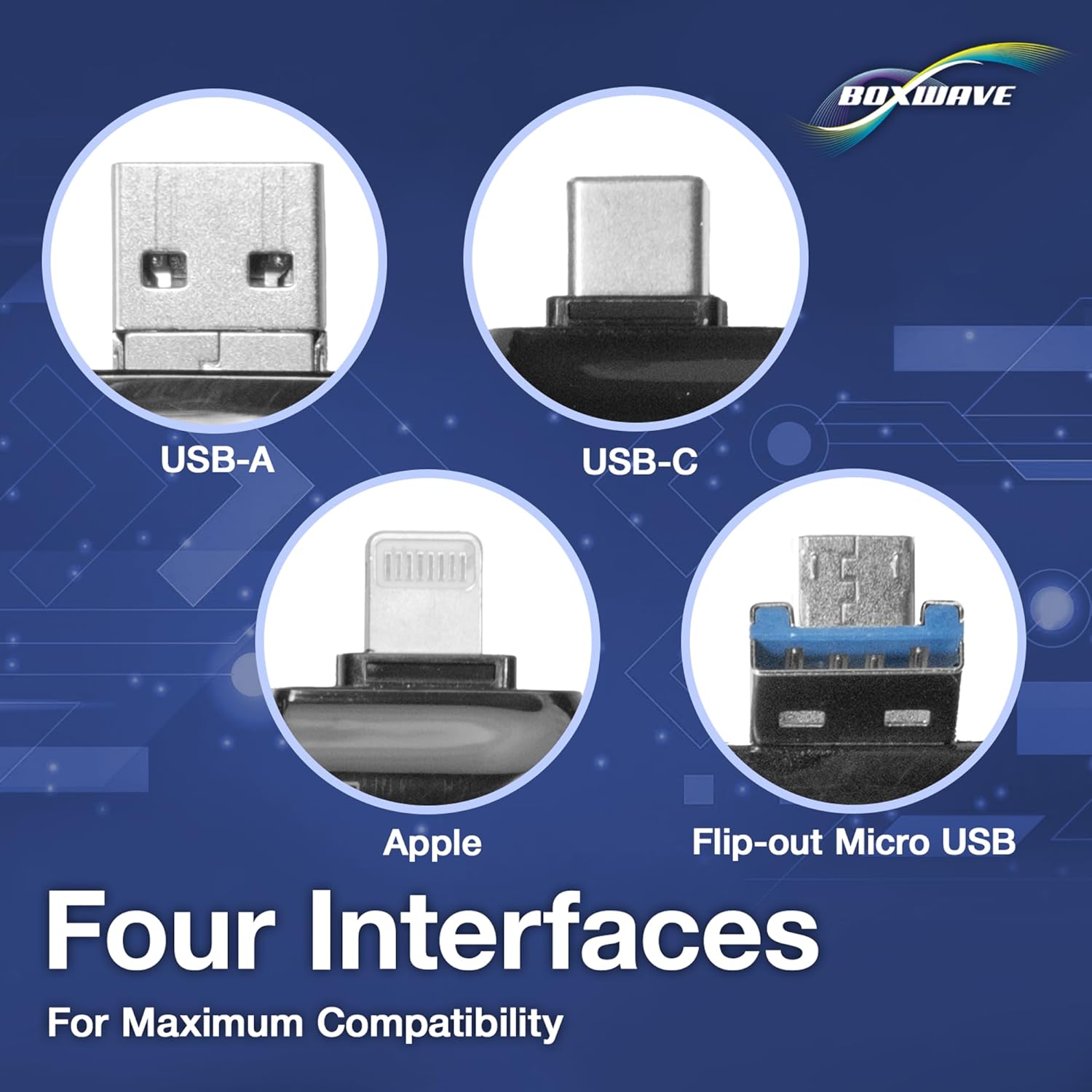
- Four Interfaces: Equipped with USB-C, USB-A, Micro-USB, and Apple (Lightning) connectors for wide compatibility with various devices.
- સરળ File સ્થાનાંતરણ: Facilitates quick and straightforward transfer of files between memory cards and smartphones, tablets, or computers.
- પ્લગ એન્ડ પ્લે: No drivers or software installation required; simply connect and use.
- કોમ્પેક્ટ ડિઝાઇન: Small and portable, making it easy to carry for on-the-go use.
- Universal Card Support: Compatible with both standard SD cards and microSD cards.


સેટઅપ સૂચનાઓ
- મેમરી કાર્ડ દાખલ કરો: Gently insert your SD card or microSD card into the appropriate slot on the AllReader. Ensure the card is fully seated.
- ઉપકરણ સાથે કનેક્ટ કરો: Select the correct connector (USB-C, USB-A, Micro-USB, or Apple) for your smartphone, tablet, or computer. Plug the AllReader into your device's port.
- ઉપકરણ ઓળખ: Your device should automatically detect the AllReader and the inserted memory card. A notification or file explorer window may appear.

ઓપરેટિંગ સૂચનાઓ
Once the AllReader is connected and recognized by your device, you can access and manage fileમેમરી કાર્ડ પર s.
- ઍક્સેસ કરી રહ્યું છે Files:
- On computers, open "This PC" (Windows) or "Finder" (macOS) and locate the removable drive corresponding to the card reader.
- On smartphones/tablets, use a file manager application to browse the connected storage.
- ટ્રાન્સફર કરી રહ્યા છીએ Files:
- નકલ કરવી files થી the card to your device: Select the desired files on the memory card, then copy and paste them to a folder on your device.
- નકલ કરવી files થી the card from your device: Select the desired files on your device, then copy and paste them to a folder on the memory card.
- સુરક્ષિત રીતે બહાર કાઢવું: Before disconnecting, always safely eject the memory card reader from your operating system to prevent data corruption.


જાળવણી
- સફાઈ: Use a soft, dry cloth to clean the exterior of the card reader. Avoid liquid cleaners or abrasive materials.
- સંગ્રહ: કાર્ડ રીડરને સીધા સૂર્યપ્રકાશ અને અતિશય તાપમાનથી દૂર ઠંડી, સૂકી જગ્યાએ સંગ્રહિત કરો.
- હેન્ડલિંગ: Avoid dropping the device or subjecting it to strong impacts. Do not force memory cards or connectors into slots.
- કનેક્ટરની સંભાળ: Keep the connectors free from dust and debris.
મુશ્કેલીનિવારણ
| સમસ્યા | સંભવિત કારણ | ઉકેલ |
|---|---|---|
| ઉપકરણ ઓળખાયું નથી | Incorrect connection, faulty port, or incompatible device. | Ensure the AllReader is fully plugged into the correct port. Try a different port or device. Verify your device supports external storage. |
| Memory card not reading | Card not inserted correctly, damaged card, or incompatible card format. | Re-insert the memory card firmly. Try a different memory card. Ensure the card is not physically damaged. Check if the card format is supported by your device. |
| Slow transfer speeds | Older USB standard, slow memory card, or large file માપો | Ensure you are using a USB 3.0 or higher port if available. Use a high-speed memory card. Transfer fewer or smaller fileએક સમયે s. |
| Files not appearing | છુપાયેલ files, corrupted card, or incorrect file માર્ગ | Check your device's settings to show hidden files. Try accessing the card on another device. Consider formatting the card (this will erase all data). |
વિશિષ્ટતાઓ
- ઇન્ટરફેસ: USB-C, USB-A, Micro-USB, Apple (Lightning)
- કાર્ડ સુસંગતતા: એસડી, માઇક્રોએસડી
- વજન: આશરે 6 ઔંસ
- ઉત્પાદક: બોક્સવેવ
વોરંટી માહિતી
BoxWave products typically come with a limited warranty. For specific details regarding your product's warranty period and terms, please refer to the warranty card included with your purchase or visit the official BoxWave webસાઇટ
આધાર
For technical assistance, troubleshooting, or general inquiries, please contact BoxWave customer support through their official website. You may find FAQs, driver downloads, and contact information on their support pages.
Webસાઇટ: www.boxwave.com