
1. પરિચય
The VOOPOO ARGUS P2 Pod System is an advanced electronic cigarette device designed for a superior vaping experience. Building upon the popular ARGUS P1, the ARGUS P2 features a futuristic design and incorporates five key 'Super Powers': super capacity, super long lifespan, super output, super-fast charging, and superior flavor. It integrates essential functions such as precise airflow adjustment and supports a wide range of vaping styles from Mouth-to-Lung (MTL) to Direct-to-Lung (DL) with its versatile cartridge options.

Image 1.1: The VOOPOO ARGUS P2 Pod System device.
2. પેકેજ સામગ્રી
પેકેજ અનબોક્સ કરતી વખતે, બધી વસ્તુઓ હાજર છે તેની ખાતરી કરવા માટે કૃપા કરીને પેકેજની સામગ્રી તપાસો:
- ARGUS P2 Device x 1
- ARGUS Cartridge 0.4Ω x 1
- ARGUS Cartridge 0.7Ω x 1
- Type-C USB કેબલ x 1
- નેક સ્ટ્રેપ x 1
- વપરાશકર્તા માર્ગદર્શિકા x 1

Image 2.1: Contents included in the ARGUS P2 package.
3. સ્પષ્ટીકરણો
| ઉપકરણનું કદ | 78 x 48.5 x 17.5 મીમી |
| કારતૂસ ક્ષમતા | 2.0 મિલી |
| કારતૂસ સામગ્રી | પીસીટીજી |
| કારતૂસ પ્રતિકાર | 0.4Ω / 0.7Ω |
| Device Material | ઝીંક એલોય + પીસી |
| આઉટપુટ રેન્જ | 5-30 W (3.2-4.2 V) |
| બેટરી ક્ષમતા | 1100 એમએએચ |
| ચાર્જિંગ | Type-C (5V/2A) |
| ખાસ લક્ષણો | Fast Charging, Airflow Adjustment, iCOSM Code Technology |

Image 3.1: Visual overview of the ARGUS P2 specifications.
4. સેટઅપ
4.1 ઉપકરણને ચાર્જ કરવું
Before first use, fully charge the device. Connect the provided Type-C USB cable to the charging port on the device and plug the other end into a suitable USB power adapter (5V/2A recommended). The display will indicate charging status.
4.2 Filling the Cartridge
- Remove the cartridge from the device.
- Locate the silicone plug on the side of the cartridge. Open the plug.
- Carefully fill the cartridge with your desired e-liquid through the filling port. Avoid overfilling.
- Securely close the silicone plug.
- For first-time use or with a new cartridge, allow the e-liquid to soak into the coil for 5-10 minutes before vaping to prevent dry hits.
4.3 Installing the Cartridge
Align the filled cartridge with the pod slot on the device and push it firmly until it clicks into place. Ensure a secure connection.

Image 4.1: The ARGUS P2 device is available in multiple color options.
5. ઓપરેટિંગ સૂચનાઓ
5.1 પાવર ચાલુ/બંધ
ઉપકરણ ચાલુ કરવા માટે on or બંધ, પાવર બટન દબાવો પાંચ વખત rapidly. The screen will display the power status.
5.2 Adjusting Output (Power Mode)
The ARGUS P2 features a 'POWER mode' allowing output adjustment from 5W to 30W in 1W increments. This mode is recommended for users who prefer precise control over their vaping experience, matching output to their cartridge and e-liquid preferences.
5.3 Adjusting Output (Shift Mode)
For a simpler experience, the device also includes a 'SHIFT mode' with three preset output levels. This mode offers intuitive operation and is highly recommended for beginners.

Image 5.1: The ARGUS P2 offers both precise Power Mode and simplified Shift Mode for output adjustment.
5.4 એરફ્લો ગોઠવણ
Adjust the airflow by moving the slider located on the side of the device. This allows customization of the draw resistance and vapor production, from a tighter 'heavy' draw to a looser 'light' draw.

Image 5.2: The side slider for airflow adjustment and a view of the two available cartridge types.
5.5 Cartridge Options
The ARGUS P2 comes with two types of pods:
- 0.4Ω Pod: Recommended for higher vapor production and richer flavor (18W-30W).
- 0.7Ω Pod: Recommended for moderate vapor and a more subdued flavor, ideal for a cigarette-like draw (14W-18W).
You can fine-tune your preferred flavor by adjusting the output and airflow settings.
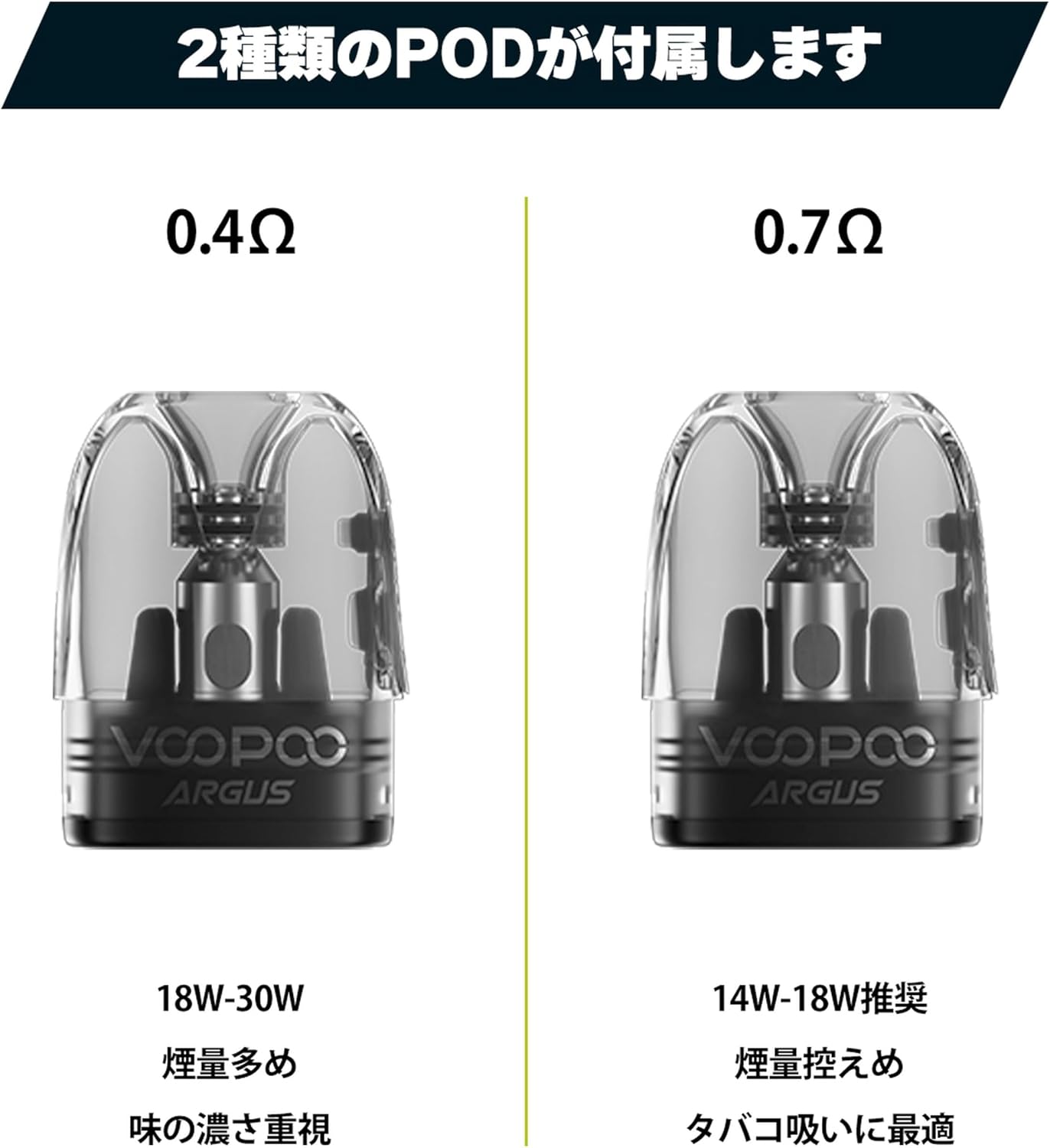
Image 5.3: Comparison of the 0.4Ω and 0.7Ω ARGUS P2 pods.
6. જાળવણી
6.1 ઉપકરણની સફાઈ
Regularly clean the device, especially the pod connection area, with a dry cloth or cotton swab to remove any e-liquid condensation or dust. Keep the charging port free from debris.
૫.૨ કારતૂસ રિપ્લેસમેન્ટ
Replace the cartridge when you notice a burnt taste, reduced vapor production, or diminished flavor. The lifespan of a cartridge varies depending on usage and e-liquid type.
6.3 Leak Prevention (iCOSM Code Technology)
The ARGUS P2 utilizes iCOSM code technology, featuring a unique internal capsule structure designed to prevent e-liquid leakage. To ensure optimal performance and minimize leaks, always ensure the silicone plug is securely closed after filling and the cartridge is properly seated in the device.
Video 6.1: This video demonstrates the iCOSM CODE 2.0 technology, which is equipped in the ARGUS P2 for enhanced flavor and leak prevention.

Image 6.1: Illustration of the iCOSM code technology and its leak-proof design.
7. મુશ્કેલીનિવારણ
7.1 No Vapor or Weak Vapor
- બેટરી લેવલ તપાસો: Ensure the device is sufficiently charged.
- Cartridge Connection: Verify that the cartridge is properly installed and making good contact with the device.
- E-liquid Level: Ensure there is enough e-liquid in the cartridge.
- Coil Condition: If the flavor is burnt or vapor is consistently weak, the coil inside the cartridge may need to be replaced. Install a new cartridge.
7.2 Leaking
- Proper Filling: Ensure the cartridge is not overfilled and the silicone plug is securely closed after filling.
- Cartridge Seating: Make sure the cartridge is firmly seated in the device.
- ઘનીકરણ: A small amount of condensation can accumulate. Regularly clean the inside of the device where the pod sits.
૬.૧ ઉપકરણ ચાલુ ન થવું
- બેટરી ચાર્જ: Connect the device to a charger to confirm it has power.
- પાવર ઓન સિક્વન્સ: Press the power button five times rapidly to ensure it is being turned on correctly.
8. વોરંટી અને સપોર્ટ
This product comes with a standard manufacturer's warranty. Please refer to the warranty card included in your package for specific terms and conditions. For technical support, troubleshooting assistance, or warranty claims, please contact the retailer where you purchased the product or visit the official VOOPOO webગ્રાહક સેવા માહિતી માટેની સાઇટ.
વોરંટી હેતુઓ માટે ખરીદીના પુરાવા તરીકે તમારી ખરીદી રસીદ રાખો.