
T300
Generic T300 LED Mini Projector User Manual
મોડલ: T300
1. પરિચય
ખરીદી બદલ આભારasing the Generic T300 LED Mini Projector. This compact and portable projector is designed for home theater use, offering a clear viewing experience with its short-focus optical lens and diffuse reflection imaging technology, which helps reduce eye strain. This manual provides essential information for setting up, operating, maintaining, and troubleshooting your projector.

આકૃતિ 1.1: The T300 Mini Projector's compact size allows for easy portability, fitting conveniently into a bag.
2. પેકેજ સામગ્રી
પેકેજ અનબોક્સ કરતી વખતે, બધી વસ્તુઓ હાજર છે તેની ખાતરી કરવા માટે કૃપા કરીને પેકેજની સામગ્રી તપાસો:
- 1x T300 Projector
- 1x Power Adapter (EU Plug)
- 1x રીમોટ કંટ્રોલ
- 1x AV કેબલ
- ૧x વપરાશકર્તા માર્ગદર્શિકા (આ દસ્તાવેજ)
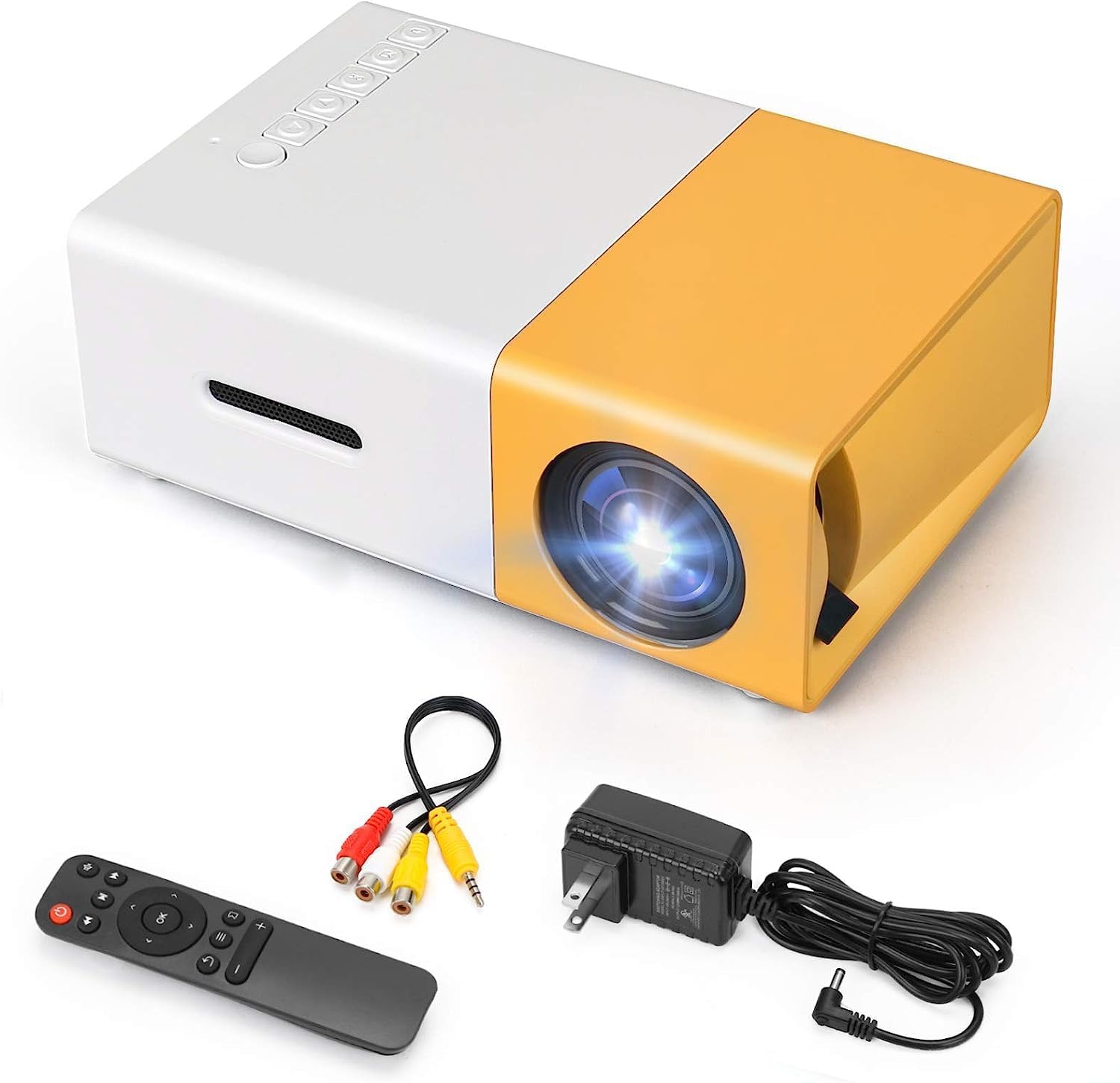
આકૃતિ 2.1: The T300 Mini Projector and its included accessories.
3. ઉત્પાદન ઓવરview
Familiarize yourself with the various ports and controls on your T300 Mini Projector:

આકૃતિ 3.1: આગળ અને પાછળ views of the T300 Mini Projector, detailing its input/output ports and control buttons.
3.1. પોર્ટ અને ઈન્ટરફેસ
- HDMI ઇનપુટ: Connect to laptops, TV boxes, gaming consoles, and other HDMI-enabled devices.
- યુએસબી ઇનપુટ: For playing media directly from USB drives.
- માઇક્રો એસડી કાર્ડ સ્લોટ: For playing media directly from Micro SD cards.
- AV ઇનપુટ: Connect to older devices using the included AV cable.
- Micro USB (5V/2A): Power input option, compatible with power banks or car chargers.
- Earphone Slot: બાહ્ય હેડફોન અથવા સ્પીકર્સને કનેક્ટ કરવા માટે.
- ડીસી પાવર ઇનપુટ: Main power input using the provided power adapter.
3.2. નિયંત્રણો
- વીજળીનું બટન: To turn the projector on or off.
- Navigation Buttons (Left, Right, OK): મેનુ નેવિગેશન અને પસંદગી માટે.
- ઇનપુટ બટન: ઇનપુટ સ્રોત પસંદ કરવા માટે.
- રીટર્ન બટન: મેનુમાં પાછા જવા માટે.
4. સેટઅપ
4.1. પાવર કનેક્શન
- Connect the provided power adapter to the DC Power Input port on the projector.
- પાવર એડેપ્ટરને વોલ આઉટલેટમાં પ્લગ કરો.
- Alternatively, for portable use, connect a 5V/2A power bank or car charger to the Micro USB (5V/2A) port.
4.2. ઉપકરણ કનેક્શન
The T300 projector supports various input sources:
- એચડીએમઆઈ: Connect your laptop, TV box, gaming console (PS4/PS3), or other HDMI devices using an HDMI cable (not included).
- યુએસબી: મીડિયા ચલાવવા માટે USB પોર્ટમાં USB ફ્લેશ ડ્રાઇવ દાખલ કરો. files સીધું.
- માઇક્રો એસડી કાર્ડ: Insert a Micro SD card into the Micro SD card slot to play media files.
- એ.વી .: Use the included AV cable to connect to devices with AV output (e.g., DVD players).

આકૃતિ 4.1: Multimedia connectivity options for the T300 Mini Projector.
4.3. Placement and Focus
- પ્રોજેક્ટરને સ્થિર, સપાટ સપાટી પર મૂકો.
- Position the projector at a distance between 2 to 5 meters from the projection surface to achieve an optimal image size of 60 to 150 inches.
- Adjust the focus ring on the projector lens until the image appears clear and sharp. The short-focus optical lens allows focusing at a distance of 50cm.
5. ઓપરેટિંગ સૂચનાઓ
5.1. પાવર ચાલુ/બંધ
Press the Power Switch on the projector or the power button on the remote control to turn the projector on or off.
૫.૩. ઇનપુટ સ્ત્રોત પસંદ કરવો
After powering on, use the 'Input' button on the projector or the remote control to cycle through available input sources (HDMI, USB, TF Card, AV) until your desired source is displayed.
૪.૫. મલ્ટીમીડિયા પ્લેબેક
The projector supports multi-format video, audio, picture, and e-book playback. Navigate through your media files using the navigation buttons on the projector or remote control and press 'OK' to select.
5.4. ઓડિયો આઉટપુટ
The projector has a built-in miniature speaker. For enhanced audio, connect external speakers or headphones to the Earphone Slot.

આકૃતિ 5.1: Versatile applications of the T300 Mini Projector for entertainment.
6. જાળવણી
6.1. લેન્સ સાફ કરવું
Use a soft, lint-free cloth or lens cleaning paper to gently wipe the projector lens. Avoid using abrasive materials or harsh chemicals that could scratch the lens.
6.2. વેન્ટિલેશન
ઓવરહિટીંગ અટકાવવા માટે ખાતરી કરો કે પ્રોજેક્ટરના વેન્ટિલેશન ઓપનિંગ્સ ઓપરેશન દરમિયાન બ્લોક ન હોય. પ્રોજેક્ટરને સારી રીતે વેન્ટિલેટેડ વિસ્તારમાં રાખો.
6.3. સંગ્રહ
When not in use, store the projector in a cool, dry place, away from direct sunlight and excessive dust. It is recommended to use the original packaging or a protective case.
6.4. એલamp જીવન
એલઇડી એલamp in your T300 projector has an estimated life of 20,000 hours, providing long-term use without frequent lamp બદલી
7. મુશ્કેલીનિવારણ
જો તમને તમારા પ્રોજેક્ટરમાં સમસ્યાઓ આવે, તો નીચેની સામાન્ય સમસ્યાઓ અને ઉકેલોનો સંદર્ભ લો:
- કોઈ છબી પ્રદર્શિત નથી:
- ખાતરી કરો કે પ્રોજેક્ટર ચાલુ છે અને પાવર એડેપ્ટર સુરક્ષિત રીતે જોડાયેલ છે.
- Verify the input source is correctly selected (HDMI, USB, AV, etc.).
- પ્રોજેક્ટર અને સોર્સ ડિવાઇસ વચ્ચે કનેક્શન કેબલ તપાસો.
- છબી ઝાંખી છે:
- છબી સ્પષ્ટ ન થાય ત્યાં સુધી પ્રોજેક્ટર લેન્સ પર ફોકસ રિંગ ગોઠવો.
- Ensure the projection distance is within the recommended range (2-5 meters).
- કોઈ અવાજ નથી:
- પ્રોજેક્ટર અને સોર્સ ડિવાઇસ બંને પર વોલ્યુમ સેટિંગ્સ તપાસો.
- If using external speakers/headphones, ensure they are properly connected to the Earphone Slot.
- Verify the audio output settings on your source device.
- રીમોટ કંટ્રોલ કામ કરતું નથી:
- ખાતરી કરો કે રિમોટ અને પ્રોજેક્ટરના IR રીસીવર વચ્ચે કોઈ અવરોધો નથી.
- જો જરૂરી હોય તો રિમોટ કંટ્રોલમાં બેટરીઓ બદલો.
8. સ્પષ્ટીકરણો
| લક્ષણ | સ્પષ્ટીકરણ |
|---|---|
| મોડલ | T300 |
| આધાર ઠરાવ | 1920 x 1080 (પૂર્ણ HD) |
| મૂળ ઠરાવ | 1920 x 1080 |
| ડિસ્પ્લે પ્રકાર | LCD, DLP |
| ઇન્ટરફેસ | HDMI, USB, TF Card Slot, AV, Micro USB (5V-2A) |
| બિલ્ટ-ઇન સ્પીકર | હા |
| Lamp જીવન | 20,000 કલાક |
| ઉત્પાદન કદ | 114 x 87 x 50 મીમી |
| ભલામણ કરેલ ઉપયોગો | હોમ સિનેમા |
| ખાસ લક્ષણ | પોર્ટેબલ |
| મહત્તમ છબી કદ | 150 ઇંચ |
| ન્યૂનતમ છબી કદ | 60 ઇંચ |
| મહત્તમ થ્રો અંતર | 5 મીટર |
| ન્યૂનતમ થ્રો અંતર | 2 મીટર |
| પાવર ઇનપુટ | 5V/2A |
9. વોરંટી અને સપોર્ટ
9.1. વોરંટી માહિતી
આ ઉત્પાદન સામાન્ય રીતે એ સાથે આવે છે ૩૦-દિવસની રિપ્લેસમેન્ટ પોલિસી from the date of purchase. Please refer to your retailer's specific warranty terms and conditions for detailed information. The LED lamp is designed for a long life of 20,000 hours, which is not typically covered by short-term replacement policies.
9.2. ગ્રાહક આધાર
For technical assistance, troubleshooting beyond this manual, or warranty claims, please contact your original retailer or the manufacturer, SHUBH LABH ENTERPRISES. Keep your purchase receipt or proof of purchase handy when contacting support.
Ask a question about this manual
Ask about setup, troubleshooting, compatibility, parts, safety, or missing instructions. Manuals+ will review the question and use this page’s manual context to help answer it.