
pxton 888S, 666S
pxton 888S and 666S Walkie Talkies User Manual
Models: 888S, 666S
1. પરિચય
Thank you for choosing pxton 888S and 666S walkie talkies. These two-way radios are designed for reliable and clear communication across various environments. This manual provides essential information for setting up, operating, and maintaining your devices to ensure optimal performance.
The pxton 888S and 666S models offer a robust set of features including 16 memory channels, 165 privacy codes, VOX sensitivity adjustment, Time-Out Timer (TOT), emergency alarm, noise reduction, automatic squelch, low battery alert, power-saving mode, scanning, monitoring, and an LED flashlight. They are equipped with a 1500mAh Li-ion battery for extended use.

Image 1.1: An 8-pack of pxton 888S and 666S walkie talkies, showing the devices, charging bases, and included headphones.
2. પેકેજ સામગ્રી
તમારા પેકેજ ખોલતી વખતે, કૃપા કરીને ખાતરી કરો કે નીચેની બધી વસ્તુઓ શામેલ છે:
- pxton 888S Walkie Talkies (quantity as per pack)
- pxton 666S Walkie Talkies (quantity as per pack)
- 1500mAh લિ-આયન બેટરી
- Charging Bases
- પાવર એડેપ્ટર્સ
- હેડફોન
- બેલ્ટ ક્લિપ્સ
- લેનયાર્ડ્સ
- વપરાશકર્તા માર્ગદર્શિકા (આ દસ્તાવેજ)
3. ઉત્પાદન ઓવરview
Familiarize yourself with the main components and controls of your pxton walkie talkie:
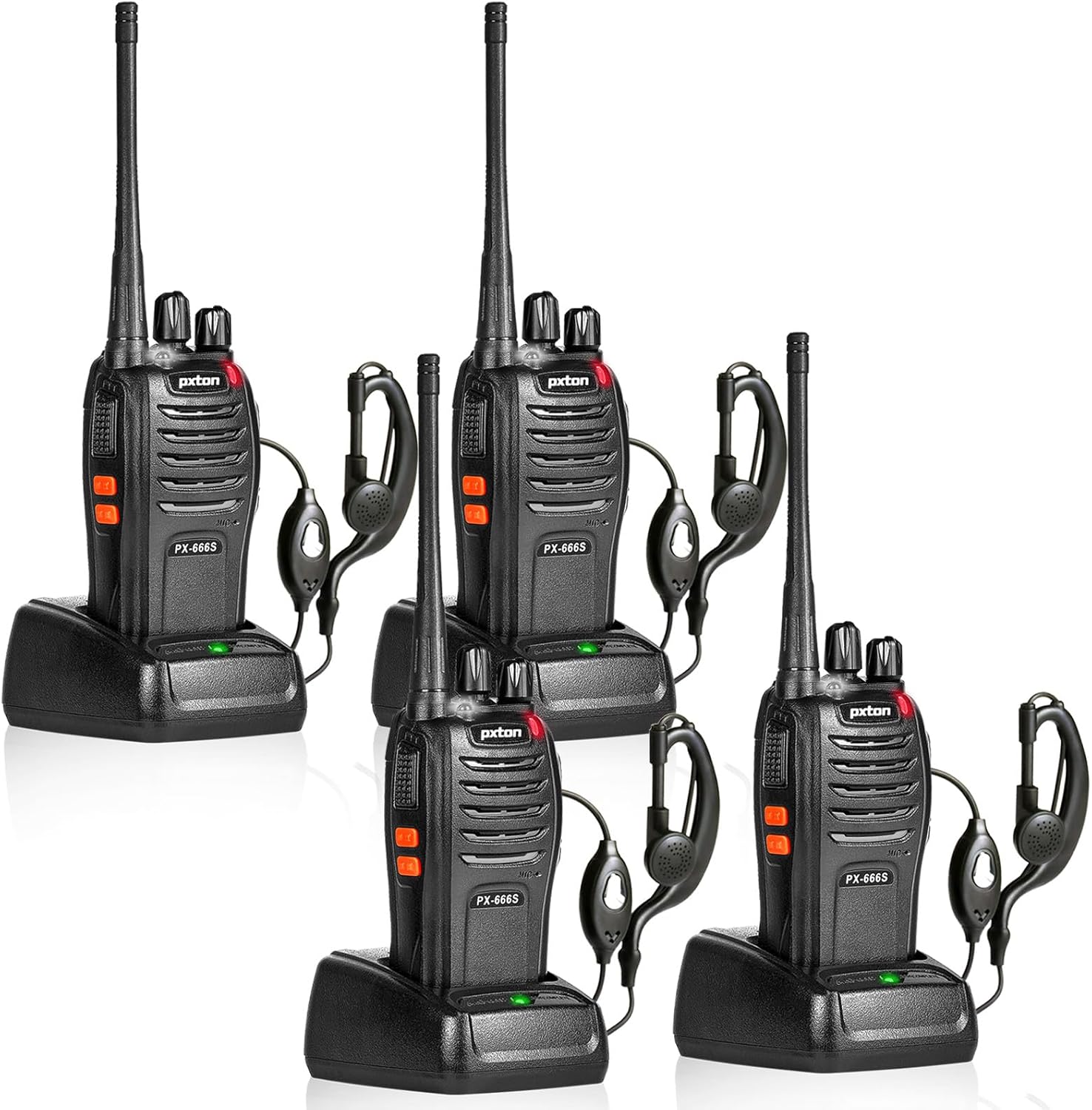
Image 3.1: Detailed diagram of the PX-666S walkie talkie, highlighting the Integrated Sensitive Antenna, Flashlight, LED Indicator, PTT Button, Clear Speaker, Built-in Microphone, Power Switch/Volume Control, Channel Switch, SP/MIC Jacks, MONI Button, and Flashlight Button.
- Integrated Sensitive Antenna: સિગ્નલો ટ્રાન્સમિટ કરવા અને પ્રાપ્ત કરવા માટે.
- ફ્લેશલાઇટ: રોશની માટે બિલ્ટ-ઇન LED લાઇટ.
- એલઇડી સૂચક: Shows status (e.g., transmitting, receiving, low battery).
- PTT બટન (પુશ-ટુ-ટોક): ટ્રાન્સમિટ કરવા માટે દબાવો અને પકડી રાખો, પ્રાપ્ત કરવા માટે છોડો.
- Clear Speaker: ઓડિયો આઉટપુટ માટે.
- બિલ્ટ-ઇન માઇક્રોફોન: વૉઇસ ઇનપુટ માટે.
- પાવર સ્વીચ/વોલ્યુમ કંટ્રોલ: રેડિયો ચાલુ/બંધ કરવા અને વોલ્યુમ સમાયોજિત કરવા માટે રોટરી નોબ.
- ચેનલ સ્વિચ: Rotary knob to select communication channels.
- SP/MIC Jacks: Ports for connecting external headphones or microphones.
- MONI Button (Monitor): Press to temporarily disable squelch and listen for weak signals.
- ફ્લેશલાઇટ બટન: LED ફ્લેશલાઇટ સક્રિય કરે છે.
4. સેટઅપ
૫.૧ બેટરી ઇન્સ્ટોલેશન અને ચાર્જિંગ
Your walkie talkie comes with a 1500mAh Li-ion battery. For optimal performance, fully charge the battery before first use.
- બેટરી ઇન્સ્ટોલ કરો: Align the battery with the grooves on the back of the walkie talkie and slide it into place until it clicks securely.
- બેટરી ચાર્જ કરો: Place the walkie talkie (with battery installed) into the charging base. Ensure the metal contacts on the radio align with those on the charger. The LED indicator on the charger will typically show red during charging and green when fully charged.
- ચાર્જિંગ સમય: સંપૂર્ણ ચાર્જ થવામાં સામાન્ય રીતે 3-4 કલાક લાગે છે.

Image 4.1: The 1500mAh Li-ion battery for pxton walkie talkies, alongside visual indicators for standby time (5-7 days), typical use (1-2 days), continuous use (8-12 hours), and full charging time (3-4 hours).
4.2 એસેસરીઝ જોડવી
- બેલ્ટ ક્લિપ: Attach the belt clip to the designated slot on the back of the radio for easy carrying.
- હેડફોન: Plug the headphone jack into the SP/MIC jacks on the side of the walkie talkie.
5. ઓપરેટિંગ સૂચનાઓ
૬.૧ પાવર ચાલુ/બંધ અને વોલ્યુમ ગોઠવણ
Rotate the Power Switch/Volume Control knob clockwise to turn the radio on. Continue rotating to increase the volume. Rotate counter-clockwise to decrease volume and turn the radio off.
5.2 ચેનલ પસંદગી
Rotate the Channel Switch knob to select one of the 16 available channels. Ensure all radios you wish to communicate with are set to the same channel and privacy code (if applicable).
5.3 પ્રસારણ અને પ્રાપ્ત કરવું
- ટ્રાન્સમિટ કરવા માટે: Press and hold the PTT (Push-to-Talk) button on the side of the radio. Speak clearly into the microphone, holding the radio approximately 2-5 cm from your mouth. The LED indicator will glow red.
- પ્રાપ્ત કરવા માટે: Release the PTT button. The LED indicator will glow green when a signal is being received.
૫.૫ VOX ફંક્શન (વોઇસ ઓપરેટેડ ટ્રાન્સમિશન)
The VOX function allows for hands-free operation. When activated, the radio will automatically transmit when it detects your voice. There are 5 levels of VOX sensitivity adjustment. Refer to advanced programming software (not included) for detailed VOX setup.
૫.૩ ફ્લેશલાઇટ કામગીરી
Press the Flashlight Button to turn the built-in LED flashlight on or off.
5.6 Monitoring Function (MONI)
Press and hold the MONI button to temporarily disable the squelch function. This allows you to listen to very weak signals that might otherwise be blocked by the squelch, or to check if a channel is clear before transmitting.
5.7 સ્કેન કાર્ય
The scan function allows the radio to automatically scan through all programmed channels to find active conversations. When an active channel is found, the radio will stop on that channel until the conversation ends, then resume scanning. Refer to advanced programming software for scan list setup.
5.8 અવાજ ઘટાડો
The walkie talkies feature built-in noise reduction technology to improve audio clarity in noisy environments.
5.9 ઈમરજન્સી એલાર્મ
The emergency alarm function can be activated to send out an alert signal. Refer to advanced programming software for specific activation methods.
5.10 TOT (Time-Out Timer)
The TOT function prevents any single user from occupying a channel for too long. If the PTT button is held down for a preset duration, the radio will automatically stop transmitting and emit a warning tone.
5.11 Low Battery Alert and Power-Saving Mode
When the battery level is low, the radio will emit an audible alert or the LED indicator will flash. The power-saving mode automatically reduces power consumption when no signal is being received or transmitted, extending battery life.
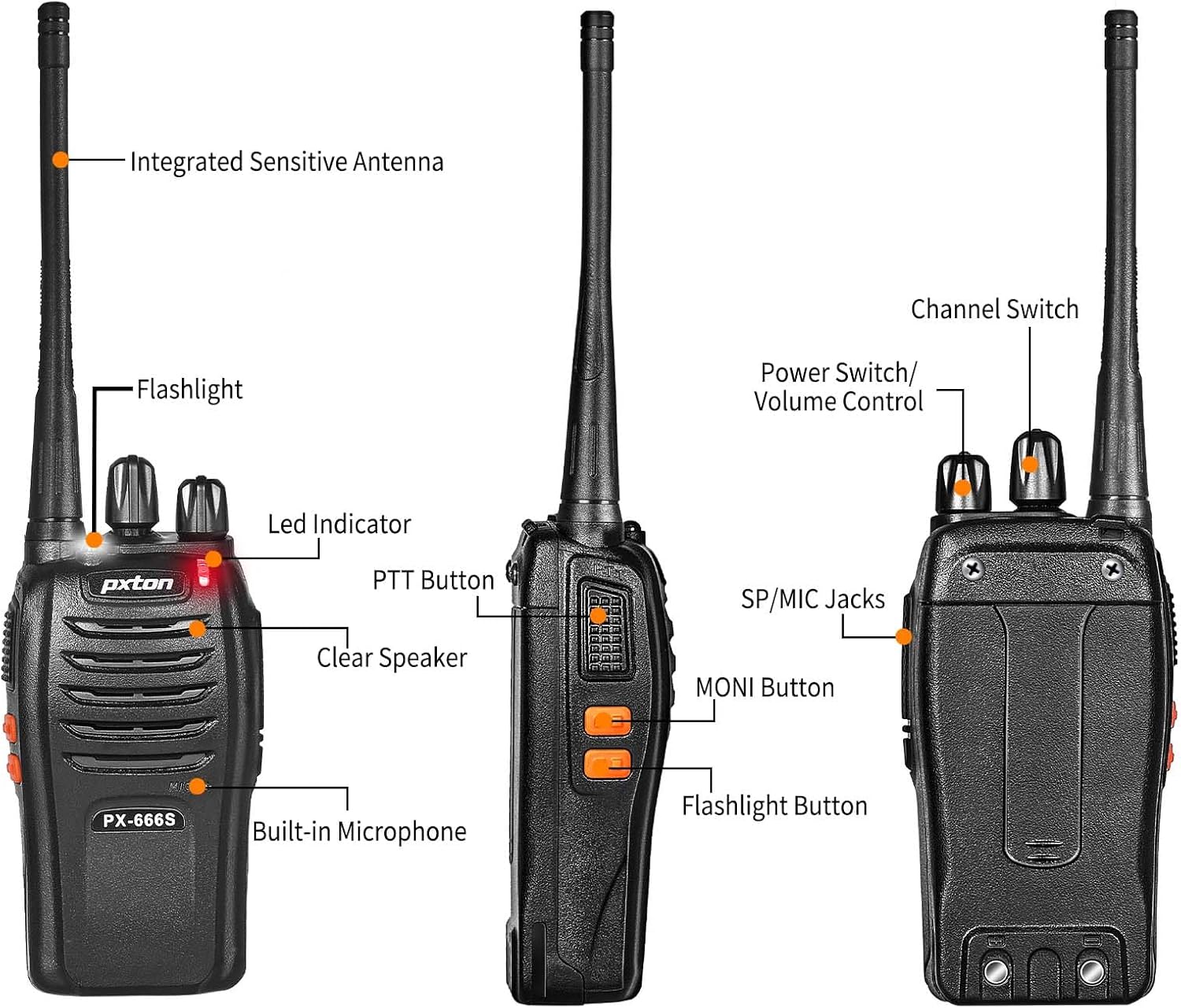
Image 5.1: Pxton 666S walkie talkies shown with icons representing key features: VOX/Hands-Free, Flashlight, 50 CTCSS/210 DCS (privacy codes), Squelch adjustment, SOS (Emergency Alarm), Noise reduction, Battery save, and Channel Scan.
6. જાળવણી
- સફાઈ: સોફ્ટનો ઉપયોગ કરો, ડીamp રેડિયોની સપાટી સાફ કરવા માટે કાપડનો ઉપયોગ કરો. કઠોર રસાયણો અથવા ઘર્ષક ક્લીનર્સનો ઉપયોગ કરશો નહીં.
- બેટરી સંભાળ: To prolong battery life, avoid overcharging or completely draining the battery. Store batteries in a cool, dry place when not in use.
- સંગ્રહ: જો રેડિયો લાંબા સમય સુધી સ્ટોર કરી રહ્યા હોવ, તો બેટરી કાઢી નાખો.
- પાણી પ્રતિકાર: The radios are water resistant, but not waterproof. Avoid submerging them in water.
7. મુશ્કેલીનિવારણ
| સમસ્યા | સંભવિત કારણ | ઉકેલ |
|---|---|---|
| કોઈ શક્તિ નથી | Battery not installed correctly; Battery drained; Power switch off. | Reinstall battery; Charge battery; Turn power switch on. |
| ટ્રાન્સમિટ અથવા પ્રાપ્ત કરી શકાતું નથી | Wrong channel selected; Out of range; Battery low. | Ensure all radios are on the same channel; Move closer to other radios; Charge battery. |
| નબળી ઓડિયો ગુણવત્તા | Volume too low/high; Out of range; Interference. | Adjust volume; Move closer; Change channel or location. |
| Radio continuously transmits (VOX) | VOX sensitivity too high. | Adjust VOX sensitivity (requires programming software) or disable VOX. |
| બેટરી જીવન ટૂંકું છે | Battery not fully charged; Old battery; Frequent transmission. | Ensure full charge; Consider replacing old battery; Use power-saving mode. |
8. સ્પષ્ટીકરણો
| લક્ષણ | સ્પષ્ટીકરણ |
|---|---|
| મોડલ નંબર્સ | 888S, 666S |
| બ્રાન્ડ | pxton |
| ચેનલોની સંખ્યા | 16 |
| આવર્તન શ્રેણી | 462-467 MHz |
| વાત કરવાની રેન્જ મહત્તમ | Up to 3 miles (open areas) |
| બેટરીનો પ્રકાર | 1500mAh લિ-આયન બેટરી |
| બેટરી જીવન (સામાન્ય ઉપયોગ) | Up to 120 hours standby, 12 hours continuous talk |
| ચાર્જિંગ સમય | આશરે. 3-4 કલાક |
| ખાસ લક્ષણો | VOX, Noise Reduction, TOT, Flashlight, Monitoring, Scan Function, Emergency Alarm, Low Battery Alert, Power-Saving Mode |
| પાણી પ્રતિકાર સ્તર | પાણી પ્રતિરોધક |
| સમાવાયેલ ઘટકો | Headphones, Li-ion Battery |
| FCC ID | 2AX68GTR8 |

Image 8.1: Size comparison of the PX-666S walkie talkie (4.5 inches tall, 2.3 inches wide, 1.14 inches deep, 8.3 inches with antenna) next to an iPhone 14 Pro (5.8 inches tall, 2.8 inches wide).
9. વોરંટી અને સપોર્ટ
pxton offers a 30-day no-questions-asked replacement and refund policy for your peace of mind. Additionally, lifelong after-sales service is provided. If you encounter any issues or have questions regarding your pxton walkie talkies, please do not hesitate to reach out to pxton customer support for assistance. We are committed to helping you resolve any concerns.
Ask a question about this manual
Ask about setup, troubleshooting, compatibility, parts, safety, or missing instructions. Manuals+ will review the question and use this page’s manual context to help answer it.