
પરિચય
Thank you for choosing the Tronsmart T7 Lite Portable Bluetooth Speaker. This manual provides essential information for setting up, operating, and maintaining your speaker to ensure optimal performance and longevity. Please read it thoroughly before use.
બૉક્સમાં શું છે
- 1 x T7 લાઇટ પોર્ટેબલ આઉટડોર સ્પીકર
- 1 x Type-C ચાર્જિંગ કેબલ
- 1 x વપરાશકર્તા માર્ગદર્શિકા
- 1 x લેનયાર્ડ
- વોરંટી કાર્ડ
ઉત્પાદન ઓવરview
Familiarize yourself with the Tronsmart T7 Lite speaker's components and controls.
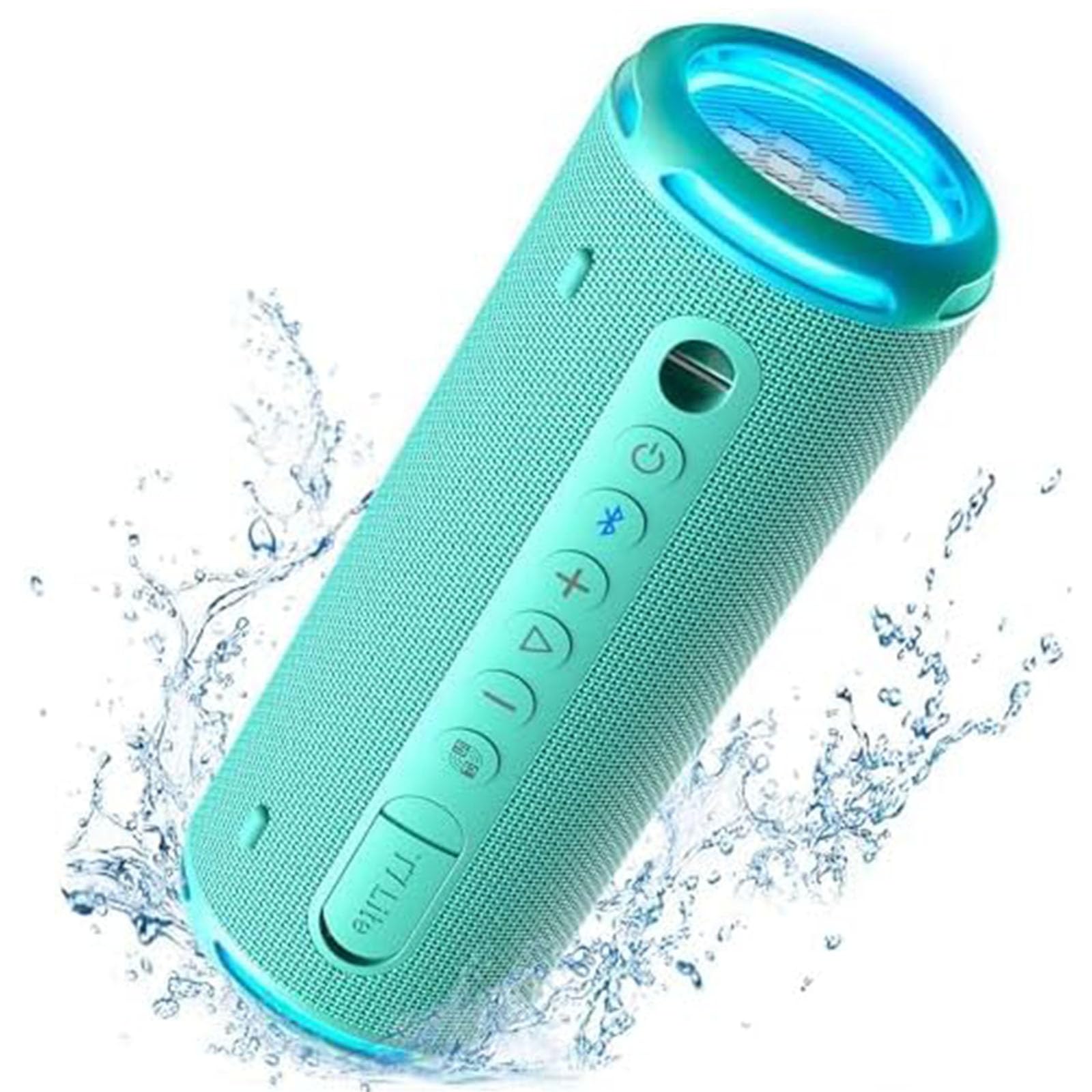
Control Buttons & Ports
- પાવર બટન: પાવર ચાલુ/બંધ કરવા માટે દબાવો અને પકડી રાખો.
- બ્લૂટૂથ બટન: બ્લૂટૂથ પેરિંગ મોડ દાખલ કરવા માટે દબાવો.
- વોલ્યુમ વધારો (+): વોલ્યુમ વધારો.
- અવાજ ધીમો (-): વોલ્યુમ ઘટાડો.
- પ્લે/પોઝ બટન: ઑડિયો ચલાવો અથવા થોભાવો.
- EQ બટન: Cycle through equalizer modes.
- ટાઇપ-સી ચાર્જિંગ પોર્ટ: સ્પીકર ચાર્જ કરવા માટે.
- AUX-ઇન પોર્ટ: વાયર્ડ ઓડિયો કનેક્શન માટે.
- ટીએફ કાર્ડ સ્લોટ: For playing music directly from a TF card.
સેટઅપ
1. સ્પીકરને ચાર્જ કરવો
Before first use, fully charge the speaker using the provided Type-C charging cable and a compatible USB power adapter (not included). The LED indicator will show charging status.
2. પાવર ચાલુ/બંધ
Press and hold the Power button for 2 seconds to turn the speaker on or off. A sound prompt will indicate the power status.
3. બ્લૂટૂથ જોડી
- Turn on the speaker. The Bluetooth indicator will flash blue, indicating it's ready for pairing.
- તમારા ઉપકરણ (સ્માર્ટફોન, ટેબ્લેટ, વગેરે) પર બ્લૂટૂથ સક્ષમ કરો.
- Select "Tronsmart T7 Lite" from the list of available Bluetooth devices.
- Once connected, the Bluetooth indicator will remain solid blue, and you will hear a confirmation sound.
The speaker features Bluetooth 5.3, offering a stable wireless connection up to 49 feet (15 meters).

સ્પીકરનું સંચાલન
મૂળભૂત નિયંત્રણો
- ચલાવો/થોભો: પ્લે/પોઝ બટનને ટૂંકી દબાવો.
- અવાજ વધારો: '+' બટનને ટૂંકું દબાવો.
- અવાજ ધીમો: '-' બટનને ટૂંકું દબાવો.
- આગળનો ટ્રેક: '+' બટનને લાંબા સમય સુધી દબાવી રાખો.
- પાછલો ટ્રેક: '-' બટનને લાંબા સમય સુધી દબાવી રાખો.
- જવાબ/કૉલ સમાપ્ત કરો: પ્લે/પોઝ બટનને ટૂંકી દબાવો.
- કૉલ નકારો: પ્લે/પોઝ બટનને લાંબા સમય સુધી દબાવો.
EQ and App Control
Customize your audio experience using the Tronsmart app. The app allows you to adjust the equalizer settings and control the light show. Download the Tronsmart app from your device's app store.

Rainbow Light Show
The speaker features a dynamic rainbow light show that moves to the beat of your music. Press the EQ button to cycle through different light modes or turn the lights off. You can also control the light show via the Tronsmart app.

ટ્રુ વાયરલેસ સ્ટીરિયો (ટીડબ્લ્યુએસ) જોડી
For an immersive stereo sound experience, you can pair two Tronsmart T7 Lite speakers together.
- ખાતરી કરો કે બંને સ્પીકર્સ ચાલુ છે અને અન્ય કોઈ બ્લૂટૂથ ઉપકરણ સાથે જોડાયેલા નથી.
- On one speaker (this will be the primary speaker), press and hold the Bluetooth button for 3 seconds until you hear a prompt.
- The two speakers will automatically connect to each other. Once connected, the primary speaker's Bluetooth indicator will flash blue, and the secondary speaker's indicator will be solid blue.
- Connect your device to the primary speaker via Bluetooth.

મુખ્ય લક્ષણો
- Enhanced Bass & Versatility: The T7 Lite features a cutout design that reduces obstructions to sound transmission, boosting bass output. It delivers powerful audio with a maximum volume of 90dB.
- 24 કલાક રમવાનો સમય: Equipped with a built-in 4000mAh battery, the speaker can continuously play high-quality audio for up to 24 hours at 50% volume. Playtime may vary based on light display, audio content, and volume levels.
- IPX7 Waterproof & Durable Fabric: This wireless Bluetooth speaker is resistant to rain, splashes, and can be submerged in 3.3 feet of water for up to 30 minutes. Its durable fabric material and sturdy rubber cover provide protection for outdoor use.
- વાઇબ્રન્ટ કલર વિકલ્પો: The T7 Lite is available in various colors, allowing you to choose one that matches your style.


વિશિષ્ટતાઓ
| બ્રાન્ડ | ટ્રોન્સમાર્ટ |
| મોડેલનું નામ | T7 લાઇટ |
| સ્પીકરનો પ્રકાર | આઉટડોર |
| ખાસ લક્ષણો | LED Light, Lightweight, Portable, Stereo Pairing, Waterproof |
| કનેક્ટિવિટી ટેકનોલોજી | બ્લૂટૂથ 5.3 |
| વાયરલેસ રેંજ | 49 ફૂટ (15 મીટર) |
| મહત્તમ આઉટપુટ પાવર | 24 વોટ્સ |
| રમવાનો સમય | 24 કલાક સુધી (50% વોલ્યુમ પર) |
| વોટરપ્રૂફ રેટિંગ | IPX7 |
| નિયંત્રણ પદ્ધતિ | App, Buttons |
| ઉત્પાદન પરિમાણો | ૧૮.૯"ઊંડાઈ x ૫૫.૧"પાઉડ x ૨૯.૮"ઊંડાઈ (૪૮સેમી x ૧૪૦સેમી x ૭૫.૭સેમી) |
| વસ્તુનું વજન | 1.04 પાઉન્ડ (0.47 કિગ્રા) |
| બેટરી | 1 લિથિયમ આયન બેટરી (સમાવેલ) |
જાળવણી
- સફાઈ: સ્પીકરને સોફ્ટથી સાફ કરો, ડીamp કાપડ કઠોર રસાયણો અથવા ઘર્ષક ક્લીનર્સનો ઉપયોગ કરશો નહીં.
- સંગ્રહ: સ્પીકરને સીધા સૂર્યપ્રકાશ અને અતિશય તાપમાનથી દૂર ઠંડી, સૂકી જગ્યાએ સંગ્રહિત કરો.
- બેટરી સંભાળ: To prolong battery life, charge the speaker fully at least once every three months if not in regular use.
- પાણીનો સંપર્ક: While IPX7 rated, ensure the charging port cover is securely closed before exposing the speaker to water. After exposure, dry the speaker thoroughly before charging.
મુશ્કેલીનિવારણ
- સ્પીકર ચાલુ થતું નથી:
- ખાતરી કરો કે સ્પીકર સંપૂર્ણપણે ચાર્જ થયેલ છે. તેને પાવર સ્ત્રોત સાથે કનેક્ટ કરો અને ફરી પ્રયાસ કરો.
- બ્લૂટૂથ ડિવાઇસ સાથે જોડી શકાતી નથી:
- Make sure the speaker is in pairing mode (Bluetooth indicator flashing blue). Ensure your device's Bluetooth is enabled and within range. Forget previous pairings on your device and try reconnecting.
- કોઈ અવાજ નહીં અથવા ઓછો અવાજ નહીં:
- Check the volume levels on both the speaker and your connected device. Ensure the speaker is not muted. If using AUX-in, check the cable connection.
- TWS જોડી નિષ્ફળ ગઈ:
- Ensure both speakers are Tronsmart T7 Lite models and are not connected to any other Bluetooth devices. Try resetting both speakers and repeating the TWS pairing steps.
વોરંટી અને આધાર
The Tronsmart T7 Lite Portable Bluetooth Speaker comes with a limited warranty. Please refer to the included Warranty Card for detailed terms and conditions. For technical support, product inquiries, or warranty claims, please visit the official Tronsmart webસાઇટ પર જાઓ અથવા તેમની ગ્રાહક સેવાનો સીધો સંપર્ક કરો.
Official Tronsmart Store: Tronsmart Store on Amazon


