
1. પરિચય
Thank you for choosing the YESIDO YSP13 Bluetooth Ear Hook Earphones. This manual provides essential information for the proper setup, operation, and maintenance of your device. Please read it carefully before use to ensure optimal performance and longevity.
The YSP13 features an air conduction design, eliminating the need to insert earbuds directly into the ear canal, which can enhance comfort and ear health. It utilizes Bluetooth 5.3 for stable connectivity and delivers HiFi sound quality, making it suitable for music and sports activities.
2. પેકેજ સામગ્રી
કૃપા કરીને નીચેની વસ્તુઓ માટે પેકેજ તપાસો:
- YESIDO YSP13 Bluetooth Ear Hook Earphones (Left and Right)
- ચાર્જિંગ કેસ
- ચાર્જિંગ કેબલ
- વપરાશકર્તા માર્ગદર્શિકા
- સંગ્રહ પાઉચ

Image: Contents of the YESIDO YSP13 package, including the earphones, charging case, charging cable, and a small storage pouch.
3. ઉત્પાદન ઓવરview
The YESIDO YSP13 earphones feature a rotatable ear hook design for a secure and comfortable fit during various activities. The charging case includes a digital display to indicate battery levels.
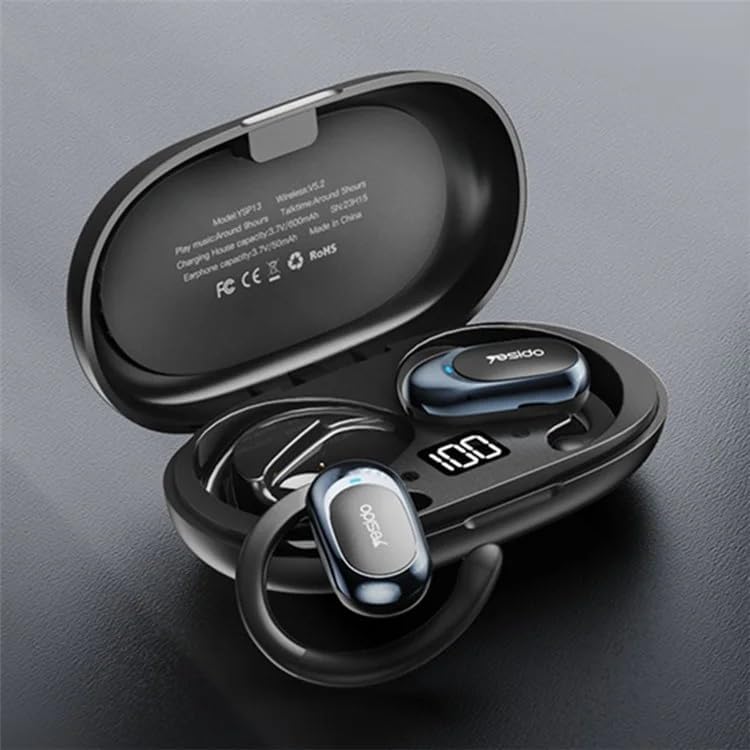
Image: The YESIDO YSP13 earphones resting in their charging case, which features a digital battery level indicator.

Image: A user wearing the YESIDO YSP13 earphone, illustrating how the ear hook design fits securely around the ear.

Image: An exploded diagram of the YESIDO YSP13 earphone, showcasing its internal structure and components responsible for HiFi sound reproduction.
4. સેટઅપ
૪.૧ ઇયરફોન અને કેસ ચાર્જ કરવા
- ઇયરફોનને ચાર્જિંગ કેસમાં મૂકો. ખાતરી કરો કે તે યોગ્ય રીતે બેઠેલા છે.
- Connect the charging cable to the charging port on the case and to a USB power source.
- The digital display on the charging case will show the charging status.
- ઇયરફોન ચાર્જ થવામાં લગભગ 1 કલાક લાગે છે. કેસ ચાર્જ થવામાં લગભગ 2.5 કલાક લાગે છે.
- એકવાર સંપૂર્ણ ચાર્જ થઈ ગયા પછી, ચાર્જિંગ કેબલને ડિસ્કનેક્ટ કરો.
4.2 બ્લૂટૂથ પેરિંગ
- ખાતરી કરો કે ઇયરફોન ચાર્જ થયેલ છે.
- ચાર્જિંગ કેસ ખોલો. ઇયરફોન આપમેળે પેરિંગ મોડમાં પ્રવેશ કરશે.
- તમારા ઉપકરણ (સ્માર્ટફોન, ટેબ્લેટ, વગેરે) પર, બ્લૂટૂથ સક્ષમ કરો.
- માટે શોધો available Bluetooth devices and select "YESIDO YSP13" from the list.
- એકવાર કનેક્ટ થઈ ગયા પછી, તમને પુષ્ટિકરણ સ્વર સંભળાશે, અને ઇયરફોન ઉપયોગ માટે તૈયાર થઈ જશે.
- જો ઉપકરણમાં બ્લૂટૂથ સક્ષમ હોય, તો કેસમાંથી બહાર કાઢવા પર ઇયરફોન આપમેળે છેલ્લા જોડીવાળા ઉપકરણ સાથે ફરીથી કનેક્ટ થઈ જશે.
5. ઓપરેટિંગ સૂચનાઓ
૩.૩ ઇયરફોન પહેરવા
Gently place the ear hook over your ear, positioning the earphone speaker near your ear canal. Adjust the rotatable ear hook for a comfortable and secure fit.
5.2 મૂળભૂત કાર્યો
- પાવર ચાલુ: Open the charging case, earphones power on automatically.
- પાવર બંધ: Place earphones back into the charging case and close the lid, earphones power off automatically.
- ચલાવો/થોભો: Single tap on either earphone's touch control area.
- આગળનો ટ્રેક: Double tap on the right earphone's touch control area.
- પાછલો ટ્રેક: Double tap on the left earphone's touch control area.
- જવાબ/કૉલ સમાપ્ત કરો: Single tap on either earphone's touch control area during an incoming call.
- કૉલ નકારો: Press and hold either earphone's touch control area for 2 seconds during an incoming call.
- વ Voiceઇસ સહાયકને સક્રિય કરો: Triple tap on either earphone's touch control area.
Note: Specific touch control functions may vary slightly. Refer to the quick start guide included in your package for detailed diagrams if available.
6. જાળવણી
- સફાઈ: ઇયરફોન અને ચાર્જિંગ કેસ સાફ કરવા માટે નરમ, સૂકા, લિન્ટ-ફ્રી કાપડનો ઉપયોગ કરો. કઠોર રસાયણો અથવા ઘર્ષક સામગ્રીનો ઉપયોગ કરશો નહીં.
- પાણી પ્રતિકાર: The earphones are designed to be resistant to splashes. However, they are not waterproof. Do not submerge them in water.
- સંગ્રહ: જ્યારે ઉપયોગમાં ન હોય, ત્યારે ઇયરફોનને સુરક્ષિત રાખવા અને ચાર્જ રાખવા માટે તેમને ચાર્જિંગ કેસમાં રાખો.
- તાપમાન: ઉપકરણને અતિશય તાપમાન (ગરમ કે ઠંડા) અથવા ઉચ્ચ ભેજના સંપર્કમાં આવવાનું ટાળો.

Image: The YESIDO YSP13 earphones shown with water splashes, illustrating their resistance to sweat and light rain.
7. મુશ્કેલીનિવારણ
| સમસ્યા | શક્ય ઉકેલ |
|---|---|
| ઇયરફોન જોડી રહ્યા નથી |
|
| કોઈ અવાજ નથી |
|
| ચાર્જિંગ કેસ ચાર્જિંગ નથી |
|
| તૂટક તૂટક જોડાણ |
|
8. સ્પષ્ટીકરણો
| લક્ષણ | વિગત |
|---|---|
| મોડલ નંબર | YSP13 |
| બ્લૂટૂથ સંસ્કરણ | BT8926B2 V5.3 |
| ઇયરફોન બેટરી ક્ષમતા | 50mAh x 2 |
| ચાર્જિંગ કેસ બેટરી ક્ષમતા | 600mAh |
| સંગીત/કોલ સમય | લગભગ 6 કલાક |
| ઇયરફોન ચાર્જિંગ સમય | લગભગ 1 કલાક |
| ચાર્જિંગ કેસ ચાર્જિંગ સમય | લગભગ 2.5 કલાક |
| સામગ્રી | PC+ABS+Electroplating UV |
| કનેક્ટિવિટી | વાયરલેસ (બ્લુટુથ) |
| વધારાની સુવિધાઓ | Microphone Included, Air Conduction Design, Rotatable Ear Hook |
9. વોરંટી અને સપોર્ટ
9.1 વોરંટી માહિતી
આ ઉત્પાદન એ સાથે આવે છે 6-મહિનાની વોરંટી from the date of purchase. The warranty covers manufacturing defects and malfunctions under normal use. It does not cover damage caused by misuse, accidents, unauthorized modifications, or normal wear and tear.
કૃપા કરીને વોરંટી દાવા માટે તમારી ખરીદીનો પુરાવો જાળવી રાખો.
9.2 ગ્રાહક સપોર્ટ
For technical assistance, warranty claims, or any questions regarding your YESIDO YSP13 earphones, please contact your retailer or the manufacturer's customer support. Refer to the packaging or the retailer's webસંપર્ક વિગતો માટે સાઇટ.