
ઉત્પાદન ઓવરview
The TP-Link Archer MR505 is a 4G+ Cat6 AC1200 Wireless Dual Band Gigabit Router designed to provide reliable internet connectivity. This router supports dual-band Wi-Fi (2.4 GHz and 5 GHz) and features Gigabit Ethernet ports for high-speed wired connections. It is compatible with 4G+ Cat6 networks, offering mobile broadband access.

આકૃતિ 1: ફ્રન્ટ view of the Archer MR505 router.
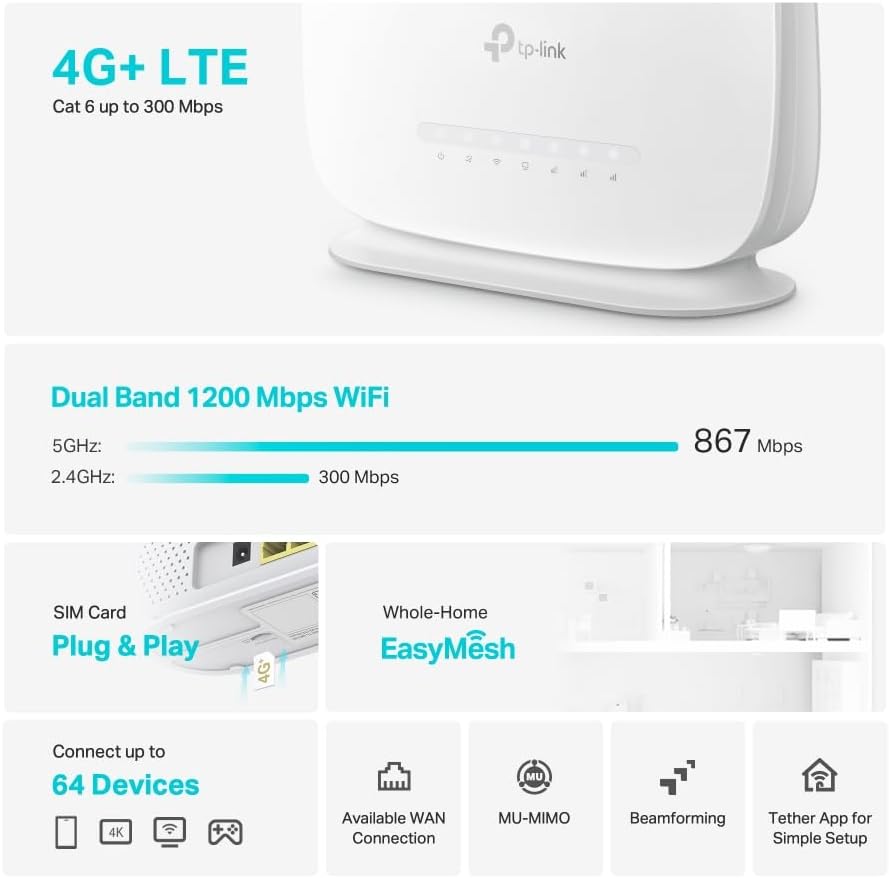
આકૃતિ 2: બાજુ view of the Archer MR505 router.
પેકેજ સામગ્રી
ખાતરી કરો કે બધી વસ્તુઓ તમારા પેકેજમાં હાજર છે:
- TP-Link Archer MR505 Router
- પાવર એડેપ્ટર
- ઝડપી સ્થાપન માર્ગદર્શિકા
- આરજે 45 ઇથરનેટ કેબલ

Figure 3: Key features and components of the Archer MR505.
સેટઅપ સૂચનાઓ
Follow these steps to set up your Archer MR505 router:
- સિમ કાર્ડ દાખલ કરો: Locate the SIM card slot on the router. Insert your 4G/LTE SIM card into the slot until it clicks into place. Ensure the SIM card is a normal data SIM for optimal compatibility. Some data-only SIM cards may require specific configurations or may not be fully compatible.
- પાવર કનેક્ટ કરો: Connect the provided power adapter to the router's power port and then plug it into a power outlet. The router will power on automatically.
- શરૂઆત માટે રાહ જુઓ: Allow a few minutes for the router to boot up and establish a connection to the 4G/LTE network. The LED indicators on the front panel will show the connection status.
- પ્રારંભિક Wi-Fi કનેક્શન:
- Find the default Wi-Fi network name (SSID) and password printed on the label at the bottom of the router.
- Connect your computer or mobile device to this Wi-Fi network.
- Access Router Management:
- ખોલો એ web બ્રાઉઝર અને ડિફોલ્ટ મેનેજમેન્ટ સરનામું દાખલ કરો (દા.ત., http://tplinkwifi.net or http://192.168.1.1).
- ડિફોલ્ટ વપરાશકર્તાનામ અને પાસવર્ડનો ઉપયોગ કરીને લોગ ઇન કરો (સામાન્ય રીતે એડમિન/એડમિન or specified on the label).
- નેટવર્ક સેટિંગ્સ ગોઠવો: Follow the on-screen Quick Setup wizard to configure your internet connection, change the Wi-Fi network name (SSID), and set a strong, unique password for both your Wi-Fi and router management interface.
- Tether App Setup (Optional): Download the TP-Link Tether app from your device's app store. The app provides an intuitive way to manage your router settings from your smartphone or tablet.
- External Antenna (Optional): If using external antennas (not included), connect them to the designated ports on the back of the router. You may need to manually enable external antenna usage through the router's web ઇન્ટરફેસ અથવા ટિથર એપ્લિકેશન.
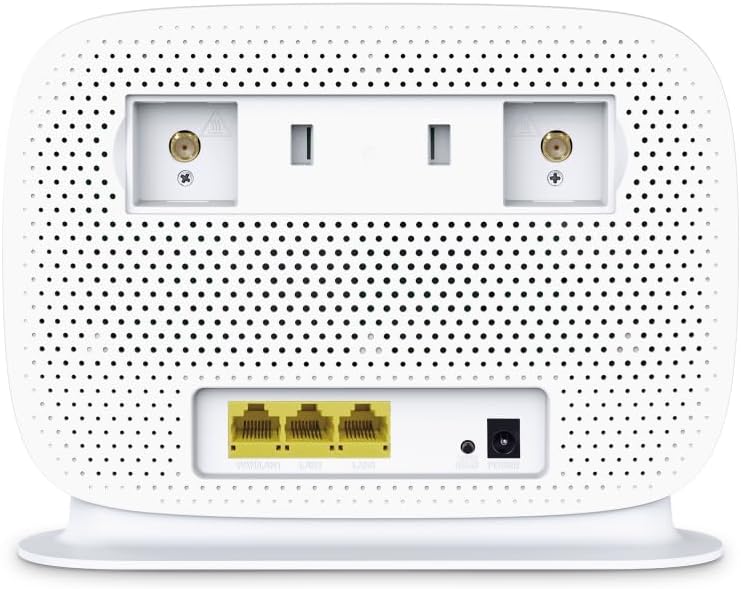
Figure 4: Rear panel of the Archer MR505 with ports and SIM slot.

Figure 5: Archer MR505 in various usage scenarios.
ઓપરેટિંગ સૂચનાઓ
The Archer MR505 provides robust wireless and wired connectivity:
- ડ્યુઅલ-બેન્ડ Wi-Fi: The router operates on both 2.4 GHz and 5 GHz bands, offering speeds up to 300 Mbps and 867 Mbps respectively, for a total of AC1200 Wi-Fi.
- 4G+ Cat6 Connectivity: Enjoy mobile broadband speeds up to 300 Mbps download and 300 Mbps upload (maximum upstream data transfer rate).
- ગીગાબીટ ઈથરનેટ પોર્ટ્સ: Four Gigabit LAN ports (1000 Mbps) are available for high-speed wired connections to devices like computers, gaming consoles, or smart TVs. One port can also function as a WAN port for traditional broadband connections.
- ઉપકરણ ક્ષમતા: The router can support connectivity for up to 64 devices simultaneously.
- સ્માર્ટ કનેક્ટ: This feature automatically assigns devices to the best available Wi-Fi band (2.4 GHz or 5 GHz) for optimized performance.
- ઇઝીમેશ સુસંગતતા: The Archer MR505 is compatible with TP-Link EasyMesh, allowing you to create a seamless whole-home mesh Wi-Fi network by adding compatible range extenders.
- અદ્યતન તકનીકો: Features like MU-MIMO and Beamforming enhance Wi-Fi efficiency and range, especially for multiple connected devices.
- સુરક્ષા: The router supports WPA3 encryption for enhanced network security.

Figure 6: Versatile connectivity and speed capabilities.

Figure 7: Whole-Home EasyMesh integration.
જાળવણી
To ensure optimal performance and security of your router:
- ફર્મવેર અપડેટ્સ: TP-Link અધિકારી પાસેથી નવીનતમ ફર્મવેર અપડેટ્સ નિયમિતપણે તપાસો અને ઇન્સ્ટોલ કરો. website or via the Tether app. Firmware updates often include security patches and performance improvements.
- સુરક્ષિત પાસવર્ડ્સ: Use strong, unique passwords for your Wi-Fi network and router management interface. Change them periodically.
- ભૌતિક સ્થાન: Wi-Fi કવરેજને મહત્તમ બનાવવા માટે, રાઉટરને મધ્ય સ્થાને, અવરોધો અને દખલગીરીના સ્ત્રોતો (દા.ત., માઇક્રોવેવ્સ, કોર્ડલેસ ફોન) થી દૂર રાખો.
- સફાઈ: Keep the router clean and free from dust. Ensure ventilation holes are not blocked.
- સમયાંતરે ફરી શરૂ કરો: Restarting the router occasionally can help resolve minor network issues and improve performance.
મુશ્કેલીનિવારણ
If you encounter issues with your Archer MR505 router, consider the following:
- No Internet Connection via 4G/LTE:
- ખાતરી કરો કે તમારું સિમ કાર્ડ યોગ્ય રીતે દાખલ અને સક્રિય થયેલ છે.
- Verify that your SIM card is a normal data SIM. Some data-only SIM cards may require specific APN settings or might not be fully compatible. Contact your mobile service provider for details.
- Check the 4G/LTE signal strength indicated by the router's LEDs. If the signal is weak, try repositioning the router or consider using external antennas (if supported and configured).
- રાઉટર અને તમારા કનેક્ટેડ ડિવાઇસને રીસ્ટાર્ટ કરો.
- Wi-Fi કનેક્શન સમસ્યાઓ:
- Ensure your device is within the router's Wi-Fi range.
- ખાતરી કરો કે તમે સાચો Wi-Fi પાસવર્ડ વાપરી રહ્યા છો.
- If a device frequently connects and disconnects, try restarting that specific device.
- અન્ય ઇલેક્ટ્રોનિક ઉપકરણોની દખલગીરી માટે તપાસો.
- ધીમી ઇન્ટરનેટ સ્પીડ:
- Check your 4G/LTE signal strength. Weak signal can significantly reduce speed.
- Ensure no other applications or devices are consuming excessive bandwidth.
- If using Wi-Fi, try connecting to the 5 GHz band for faster speeds, if your device supports it.
- Perform a speed test to confirm the actual speed you are receiving.
- રાઉટર મેનેજમેન્ટ પેજ ઍક્સેસ કરી શકાતું નથી:
- ખાતરી કરો કે તમારું ઉપકરણ રાઉટરના નેટવર્ક સાથે જોડાયેલ છે (Wi-Fi અથવા ઇથરનેટ કેબલ દ્વારા).
- Verify you are entering the correct management address (e.g., http://tplinkwifi.net).
- તમારા બ્રાઉઝરની કેશ સાફ કરવાનો અથવા બીજા બ્રાઉઝરનો ઉપયોગ કરવાનો પ્રયાસ કરો.
વિશિષ્ટતાઓ
| બ્રાન્ડ | ટીપી-લિંક |
| મોડેલનું નામ | આર્ચર MR505 |
| વાયરલેસ માનક | ૮૦૨.૧૧ac (વાઇ-ફાઇ ૫) |
| આવર્તન બેન્ડ વર્ગ | ડ્યુઅલ-બેન્ડ (2.4 GHz અને 5 GHz) |
| Wi-Fi ડેટા રેટ | Up to 300 Mbps (2.4 GHz), Up to 867 Mbps (5 GHz) - AC1200 Total |
| 4G+ Cat6 Speed | Up to 300 Mbps Download, Up to 300 Mbps Upload |
| ઇથરનેટ પોર્ટ્સ | 4 x Gigabit LAN Ports (1000 Mbps), 1 x WAN/LAN Port |
| એન્ટેના પ્રકાર | Internal (External antenna support available) |
| સિક્યુરિટી પ્રોટોકોલ | WPA3 |
| નિયંત્રણ પદ્ધતિ | App (TP-Link Tether) |
| સુસંગત ઉપકરણો | લેપટોપ, પર્સનલ કમ્પ્યુટર, સ્માર્ટ ટેલિવિઝન, સ્માર્ટફોન, ટેબ્લેટ |
| પાવર ઇનપુટ | 12 વોલ્ટ |
| વસ્તુનું વજન | 0.93 કિલોગ્રામ |
| સમાવાયેલ ઘટકો | Archer MR505, Power Adapter, Quick Installation Guide, RJ45 Ethernet Cable |
વોરંટી અને આધાર
વોરંટી માહિતી માટે, કૃપા કરીને તમારા ઉત્પાદન સાથે સમાવિષ્ટ વોરંટી કાર્ડનો સંદર્ભ લો અથવા સત્તાવાર TP-લિંકની મુલાકાત લો. website for your region. Support resources, including FAQs, firmware downloads, and contact information, are available on the TP-Link support website and through the TP-Link Tether app.
સત્તાવાર ટીપી-લિંક Webસાઇટ: https://www.tp-link.com
ટીપી-લિંક ટિથર એપ્લિકેશન: Available on iOS App Store and Google Play Store.


