
પરિચય
Thank you for choosing the Cuifati Mini Body Camera. This manual provides detailed instructions for the proper use, setup, and maintenance of your device. Please read this manual thoroughly before operating the camera to ensure optimal performance and longevity.
પેકેજ સામગ્રી
- 1 x Wearable Camera
- 1 x વહન બેગ
- 1 x વપરાશકર્તા માર્ગદર્શિકા
- 1 x લેનયાર્ડ
- 1 x Back Shell Bracket
- 1 x ટ્રીપોડ
- 1 x USB કેબલ
- 1 x સફાઈ કાપડ

Figure 1: Cuifati Mini Body Camera and included accessories.

Figure 2: Multi-scenario application examples for the body camera.
ઉત્પાદન ઓવરview
Familiarize yourself with the components and controls of your Cuifati Mini Body Camera.
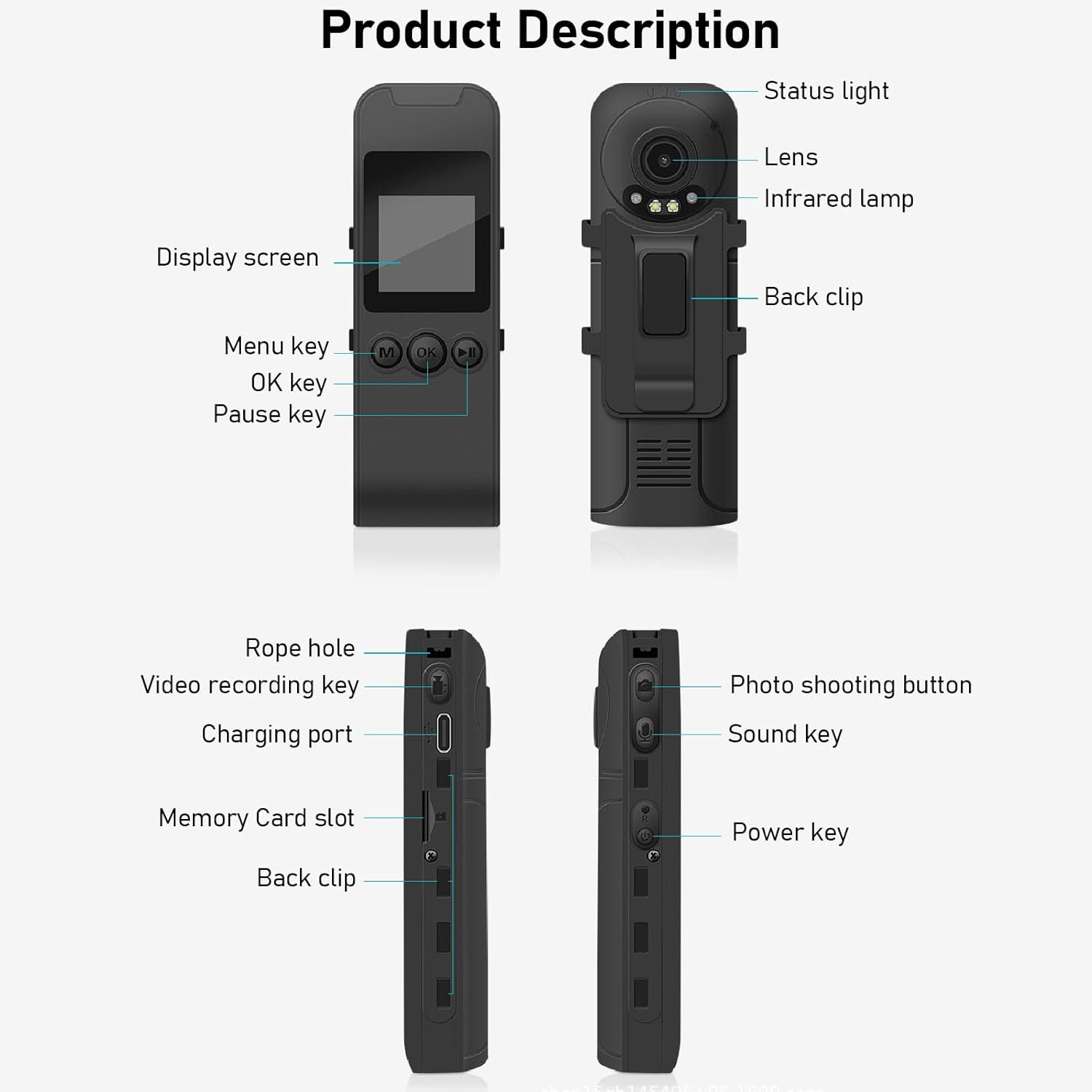
Figure 3: Labeled components of the Cuifati Mini Body Camera.
- સ્થિતિ પ્રકાશ: Indicates device status (e.g., recording, charging).
- લેન્સ: Main camera lens for video and photo capture.
- ઇન્ફ્રારેડ એલamp: રાત્રિ દ્રષ્ટિ માટે પ્રકાશ પૂરો પાડે છે.
- પાછળની ક્લિપ: For attaching the camera to clothing or other surfaces.
- ડિસ્પ્લે સ્ક્રીન: 1.3-inch LCD for live view, પ્લેબેક અને મેનુ નેવિગેશન.
- Menu Key (M): ઉપકરણ સેટિંગ્સ ઍક્સેસ કરે છે.
- ઓકે કી: Confirms selections or starts/stops functions.
- થોભો કી: Pauses playback or recording.
- દોરડાનું કાણું: Attachment point for the lanyard.
- Video Recording Key: Initiates and stops video recording.
- ચાર્જિંગ પોર્ટ (ટાઈપ-સી): ઉપકરણ ચાર્જ કરવા અને કમ્પ્યુટર સાથે કનેક્ટ કરવા માટે.
- મેમરી કાર્ડ સ્લોટ: Insert microSD card for storage.
- Photo Shooting Button: સ્થિર છબીઓ કેપ્ચર કરે છે.
- Sound Key: Controls audio recording.
- પાવર કી: ઉપકરણને ચાલુ અથવા બંધ કરે છે.
સેટઅપ
1. બેટરી ચાર્જ કરી રહી છે
Before first use, fully charge the camera's built-in lithium-ion battery. Connect the camera to a power source using the provided Type-C USB cable. The status light will indicate charging status. A full charge provides approximately 20 hours of work time and 10 hours of video recording.
Figure 4: Built-in 1200mAh battery for extended use.
2. મેમરી કાર્ડ દાખલ કરવું
The camera supports up to a 256GB memory card (not included). Locate the memory card slot on the side of the camera. Gently insert the microSD card with the gold contacts facing down until it clicks into place. To remove, push the card in slightly until it springs out.

Figure 5: Memory card slot for storage expansion.
ઓપરેટિંગ સૂચનાઓ
1. પાવર ચાલુ/બંધ
- પાવર ચાલુ કરવા માટે: Press and hold the Power Key until the display screen illuminates.
- પાવર ઓફ કરવા માટે: Press and hold the Power Key until the device shuts down.
2. વિડિયો રેકોર્ડિંગ
The camera records in 1440P HD at 30 frames per second with a 120° wide-angle lens and infrared night vision.
- રેકોર્ડિંગ શરૂ કરવા માટે: Press the Video Recording Key. The status light will change, and a recording indicator will appear on the screen.
- રેકોર્ડિંગ બંધ કરવા માટે: Press the Video Recording Key again.
- લૂપ રેકોર્ડિંગ: The camera supports loop recording, automatically overwriting the oldest files જ્યારે મેમરી કાર્ડ ભરેલું હોય.
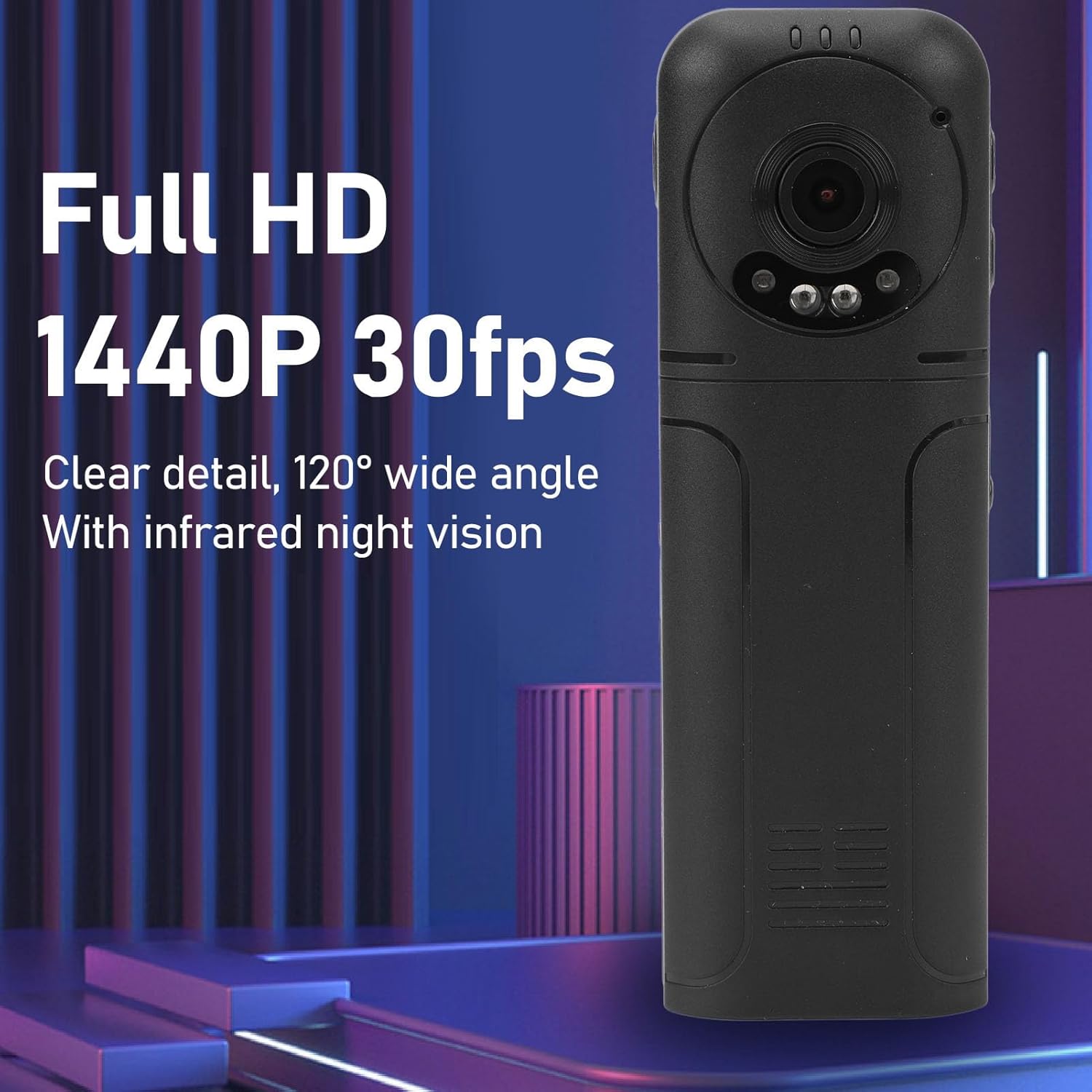
Figure 6: 1440P HD video recording with night vision.
3. Photo Taking
- ફોટો લેવા માટે: In standby mode, press the Photo Shooting Button.
4. ઓડિયો રેકોર્ડિંગ
- To Start Audio Recording: Press the Sound Key.
- To Stop Audio Recording: Press the Sound Key again.

Figure 7: Audio recording functionality.
5. પ્લેબેક અને File મેનેજમેન્ટ
The 1.3-inch LCD screen supports live playback, browsing, and pausing of videos, photos, and recordings directly on the device.

Figure 8: 1.3-inch color screen for on-device playback.
- ઉપકરણ પર પ્લેબેક: Use the Menu, OK, and Pause keys to navigate and play fileસ્ક્રીન પર s.
- કમ્પ્યુટરથી કનેક્ટ થઈ રહ્યું છે: Connect the camera to a computer via the Type-C USB cable to transfer, view, or delete files.
- OTG કાર્ય: If your mobile phone supports OTG, you can connect the camera directly to your phone for playback and file સંચાલન
જાળવણી
1. સફાઈ
- Use the provided cleaning cloth or a soft, dry cloth to wipe the camera body and lens.
- પ્રવાહી ક્લીનર્સ અથવા સોલવન્ટનો ઉપયોગ કરશો નહીં, કારણ કે તે ઉપકરણને નુકસાન પહોંચાડી શકે છે.
2. સંગ્રહ
- કેમેરાને સીધા સૂર્યપ્રકાશ અને અતિશય તાપમાનથી દૂર ઠંડી, સૂકી જગ્યાએ રાખો.
- Remove the memory card if storing for extended periods.
મુશ્કેલીનિવારણ
જો તમને તમારા કેમેરામાં સમસ્યાઓ આવે, તો નીચેની સામાન્ય સમસ્યાઓ અને ઉકેલોનો સંદર્ભ લો:
| સમસ્યા | ઉકેલ |
|---|---|
| કેમેરા ચાલુ થતો નથી. | ખાતરી કરો કે બેટરી ચાર્જ થઈ ગઈ છે. પાવર સ્ત્રોત સાથે કનેક્ટ કરો અને ફરી પ્રયાસ કરો. |
| Cannot record video/photo. | Check if a memory card is inserted correctly and has sufficient free space. Format the memory card if necessary (this will erase all data). |
| મેમરી કાર્ડ ઓળખાયું નથી. | Ensure the memory card is inserted correctly. Try a different compatible memory card. Format the card using the camera's menu or a computer. |
| નબળી વિડિઓ/ઓડિયો ગુણવત્તા. | Ensure the lens is clean. Check lighting conditions. For audio, ensure the microphone is not obstructed. |
| ઉપકરણ થીજી જાય છે અથવા પ્રતિભાવવિહીન બની જાય છે. | Press and hold the Power Key for 10-15 seconds to force a restart. |
વિશિષ્ટતાઓ
Below are the technical specifications for the Cuifati Mini Body Camera (Model CUIFATI2vg0ri8moa):
- આઇટમ પ્રકાર: Wearable Camera
- સામગ્રી: ABS
- નાઇટ વિઝન: 2pcs Night Vision Light Beads
- વિડિઓ રિઝોલ્યુશન: 1440P (Maximum)
- ફ્રેમ રેટ: 30FPS
- બેટરીનો પ્રકાર: લિથિયમ આયન બેટરી
- બેટરી ક્ષમતા: 1200mAh (બિલ્ટ-ઇન)
- સ્ટોરેજ સપોર્ટ: Maximum 256GB Memory Card (Not Included)
- ચાર્જિંગ પોર્ટ: ટાઈપ-સી
- APP નામ: For RoadCam (if applicable for advanced features)
- મોડલ નામ: CUIFATI2vg0ri8moa
- ઉત્પાદક: CUIFATI
વોરંટી અને આધાર
For warranty information or technical support, please refer to the documentation provided at the time of purchase or contact Cuifati customer service directly. Keep your purchase receipt as proof of purchase.