
1. ઉત્પાદન ઓવરview
The VICHTOP A40 is a portable AI-powered language translator device designed for instant two-way communication. It supports a wide range of online and offline languages for voice and photo translation, making it suitable for business, travel, and language learning. Its compact design and multiple translation modes enhance communication efficiency in various scenarios.

છબી ૧.૧: આગળ અને પાછળ view of the VICHTOP A40 translator device, showcasing its compact design and user interface.

Image 1.2: The VICHTOP AI Language Translator highlighting its connectivity options: Bluetooth, WiFi, Mobile Hotspot, and Offline capabilities.
2. બોક્સમાં શું છે
ખાતરી કરો કે બધી વસ્તુઓ પેકેજિંગમાં હાજર છે:
- 1 x VICHTOP A40 Intelligent Translator Device
- 1 x ચાર્જિંગ કેબલ
- 1 x સૂચના માર્ગદર્શિકા
- 1 x પેકેજિંગ બોક્સ
- 1 x Pendant

Image 2.1: Contents of the VICHTOP A40 translator package, including the device, charging cable, manual, box, and pendant.
3. સેટઅપ
3.1 પ્રારંભિક ચાર્જિંગ
Before first use, fully charge the device using the provided charging cable and a compatible USB power adapter. The charging indicator will typically show progress and turn off or change color when fully charged.
3.2 પાવરિંગ ચાલુ/બંધ
- પાવર ચાલુ કરવા માટે: Press and hold the power button (usually located on the side) until the screen illuminates.
- પાવર ઓફ કરવા માટે: Press and hold the power button until a power-off option appears on the screen, then select 'Power Off'.
3.3 નેટવર્ક કનેક્શન
For online translation features, the device requires an internet connection.
- Wi-Fi કનેક્શન: Navigate to 'Settings' > 'Wi-Fi', select your desired network, and enter the password.
- મોબાઇલ હોટસ્પોટ: The device can connect to a mobile hotspot from your smartphone. Ensure your phone's hotspot is active and connect via the Wi-Fi settings on the translator.
3.4 Downloading Offline Language Packs
To use offline translation, download the necessary language packs:
- ખાતરી કરો કે ઉપકરણ Wi-Fi સાથે જોડાયેલ છે.
- Go to 'Offline Package Management' or a similar setting.
- Select the languages you wish to download for offline use.
4. ઓપરેટિંગ મોડ્સ
4.1 Voice Translation (Online & Offline)
The device supports instant two-way voice translation.
- Select 'Online Translation' or 'Offline Translation' from the main menu.
- Choose the source and target languages.
- Press and hold the corresponding language button (e.g., left button for language A, right button for language B) and speak clearly into the microphone.
- Release the button, and the device will translate and speak the output.

Image 4.1: Display of 17 languages supported for offline voice translation, including Traditional Chinese, Simplified Chinese, Arabic, English, Russian, Korean, Japanese, Thai, German, Italian, Portuguese, Dutch, Spanish, Vietnamese, Indonesian, and Hindi.

Image 4.2: The device screen showing a real-time translation in progress, displaying both the spoken input and its translated text.
૬.૨ ફોટો અનુવાદ
Translate text from images using the built-in camera.
- Select 'Photo Translation' from the main menu.
- Point the camera at the text you wish to translate. Ensure good lighting.
- Tap the screen to capture the image.
- The device will process the image and display the translated text.
4.3 Smart Recording
Record audio and convert it to text, with translation options.
- Select 'Smart Recording'.
- રેકોર્ડિંગ શરૂ કરવા માટે રેકોર્ડ બટન પર ટેપ કરો.
- Tap again to stop. The recording can then be transcribed and translated.

Image 4.3: The smart recording feature in use, showing the device placed on a table during a meeting, capturing audio for transcription and translation.
4.4 Group Translation
Facilitate multi-person conversations across different languages.
- Select 'Group Translation'.
- ગ્રુપ બનાવવા અથવા જોડાવા માટે સ્ક્રીન પરની સૂચનાઓને અનુસરો.
- Participants can speak in their native language, and the device will translate for others in the group.

Image 4.4: A group of people engaged in a video conference, illustrating the application of the group translation feature for multi-language communication.
4.5 AI Voice Assistant / ChatGPT
Access an intelligent assistant for various queries and tasks.
- Select the 'ChatGPT' or 'AI Voice Assistant' option.
- Speak your query or command (e.g., "Check weather," "Make travel plans," "Introduce attractions").
- The assistant will provide information or perform the requested task.
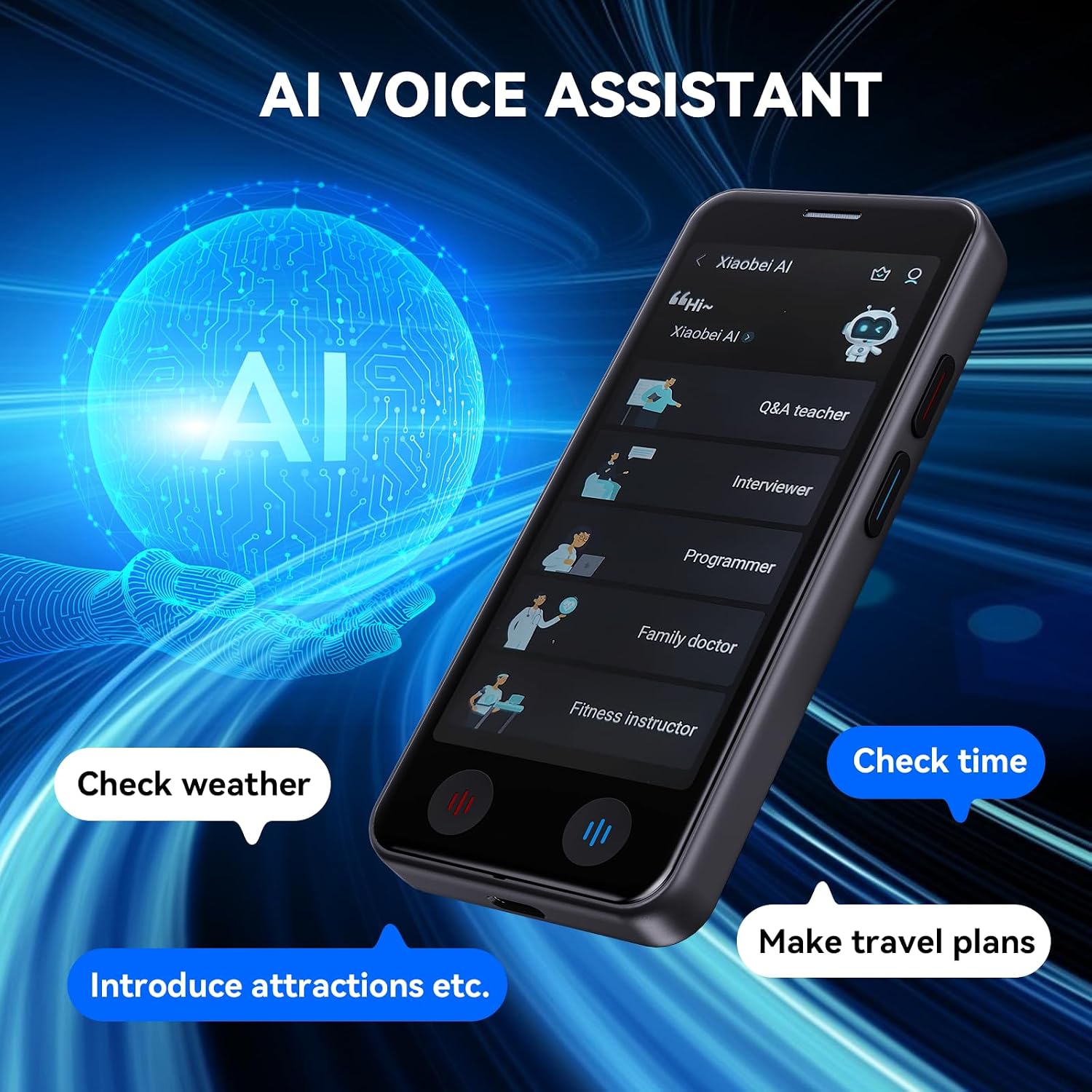
Image 4.5: The AI Voice Assistant interface on the VICHTOP A40, showing options like Q&A teacher, interviewer, programmer, family doctor, and fitness instructor, along with examples of commands like 'Check weather' and 'Make travel plans'.

Image 4.6: A visual representation of the intelligent assistant feature, symbolized by an 'AI' icon within a futuristic digital sphere.
4.6 વધારાના કાર્યો
The device includes utilities such as:
- Exchange Rate: Check current currency exchange rates.
- વિશ્વ ઘડિયાળ: View વિવિધ વૈશ્વિક શહેરોમાં વખત.
- એકમ રૂપાંતર: Convert various units of measurement.
5. મુખ્ય લક્ષણો
- High Accuracy & Speed: The device offers up to 98% real-time translation accuracy with an ultra-fast response time of 0.5 seconds for online translations.
- વ્યાપક ભાષા સપોર્ટ: Supports 139 online languages for instant two-way voice translation and 17 offline languages (with downloaded packs). Photo translation is available for 75 online and 40 offline languages.
- પોર્ટેબલ ડિઝાઇન: Weighing only 100 grams, its compact size (5.0-inch HD touchscreen) and glass back cover make it comfortable to hold and easy to carry in a pocket or backpack.
- લાંબી બેટરી જીવન: Equipped with a 1500mAh rechargeable lithium battery, providing 6-8 hours of continuous work and up to 15 days of standby time on a single charge.
- સ્પષ્ટ ઑડિઓ: Advanced noise reduction technology and a unique speaker ensure accurate speech recognition even in noisy environments.
- બહુમુખી ઉપયોગ: Ideal for business meetings, international travel, language learning, and daily communication, supporting various scenarios like shopping, reading menus, and understanding road signs.

છબી 5.1: ઓવરview of the VICHTOP A40's translation capabilities, including 139 online voice, 17 offline voice, 75 online photo, and 40 offline photo languages.

Image 5.2: Highlighting the 98% accuracy of the VICHTOP A40 for online translation, supporting 139 languages with two-way translation.

Image 5.3: Illustrating the device's offline translation capabilities, supporting 17 languages for voice and 40 for photo translation without Wi-Fi.

Image 5.4: A user interacting with the device for language learning, emphasizing accurate pronunciation simulation and the ability to learn multiple languages.

Image 5.5: Dimensions of the VICHTOP A40, showing its 5.0-inch HD touchscreen and compact size (12.2cm height, 5.5cm width, 1.1cm thickness).

Image 5.6: A person placing the VICHTOP A40 into a pocket, demonstrating its mini and easy-to-carry design.

Image 5.7: A visual representation of the device's long battery life, indicated by a speedometer-like gauge showing extended usage time.

Image 5.8: A collage illustrating various scenarios where the VICHTOP A40 can be used, including shopping, business meetings, travel, learning, reading menus, and understanding road signs.
6. સ્પષ્ટીકરણો
| લક્ષણ | વિગત |
|---|---|
| મોડલ નંબર | A40 |
| પરિમાણો | ૭ x ૪ x ૨ ઇંચ (પેકેજ) |
| વસ્તુનું વજન | 7 ઔંસ |
| બેટરી | ૧૪૫૦mAh લિથિયમ આયન (શામેલ) |
| સતત કામ કરવાનો સમય | 6-8 કલાક |
| સ્ટેન્ડબાય સમય | 15 દિવસ સુધી |
| Online Voice Translation | 139 ભાષાઓ |
| Offline Voice Translation | 17 ભાષાઓ |
| Online Photo Translation | 75 ભાષાઓ |
| Offline Photo Translation | 40 ભાષાઓ |
| ઉત્પાદક | VICHTOP |
7. જાળવણી
7.1 ઉપકરણની સફાઈ
To maintain the device's appearance and functionality:
- Use a soft, dry, lint-free cloth to wipe the screen and body.
- ઘર્ષક ક્લીનર્સ, સોલવન્ટ્સ અથવા એરોસોલ સ્પ્રેનો ઉપયોગ કરવાનું ટાળો.
- ઉપકરણને વધુ પડતા ભેજ માટે ખુલ્લા કરશો નહીં.
7.2 બેટરી કેર
બેટરી જીવન વધારવા માટે:
- અતિશય તાપમાન ટાળો.
- ઉપકરણને લાંબા સમય સુધી સંપૂર્ણપણે ડિસ્ચાર્જ ન રાખો.
- પ્રદાન કરેલ ચાર્જિંગ કેબલનો ઉપયોગ કરો.
7.3 સોફ્ટવેર અપડેટ્સ
Periodically check for software updates in the device settings to ensure optimal performance and access to new features or language packs. Connect to Wi-Fi for updates.
8. મુશ્કેલીનિવારણ
If you encounter issues with your VICHTOP A40 translator, refer to the following common problems and solutions:
- ઉપકરણ ચાલુ નથી: Ensure the battery is charged. Connect the device to the charger for at least 30 minutes before attempting to power on again.
- Translation Not Accurate:
- Check your internet connection for online translation.
- સ્પષ્ટ અને મધ્યમ ગતિએ બોલો.
- ખાતરી કરો કે યોગ્ય સ્રોત અને લક્ષ્ય ભાષાઓ પસંદ કરવામાં આવી છે.
- For photo translation, ensure good lighting and clear text.
- Wi-Fi થી કનેક્ટ કરી શકાતું નથી:
- Wi-Fi પાસવર્ડ ચકાસો.
- Ensure the device is within range of the Wi-Fi router.
- Restart the device and the Wi-Fi router.
- Offline Translation Not Working: Ensure that the required language packs have been successfully downloaded and installed.
- ટૂંકી બેટરી જીવન: Reduce screen brightness, close unused applications, or ensure the device is fully charged before use.
જો સમસ્યા ચાલુ રહે, તો વધુ સહાય માટે કૃપા કરીને ગ્રાહક સપોર્ટનો સંપર્ક કરો.
9. વોરંટી અને સપોર્ટ
૧.૨ પ્રોડક્ટની વોરંટી
The VICHTOP A40 translator device comes with a standard manufacturer's warranty. Please refer to the warranty card included in your packaging or visit the official VICHTOP webવિગતવાર વોરંટી નિયમો અને શરતો માટે સાઇટ.
9.2 ગ્રાહક સપોર્ટ
For technical support, service inquiries, or any questions regarding your device, please contact VICHTOP customer service through the contact information provided on the official website or your purchase platform. Have your model number (A40) and purchase details ready when contacting support.