
1. ઉત્પાદન ઓવરview
The AWEI A996 Pro are over-ear Bluetooth headphones designed to provide an immersive audio experience with Active Noise Cancellation (ANC). Featuring Bluetooth 5.0 for stable connectivity, 40mm drivers for Hi-Res audio, and a comfortable, foldable design, these headphones are suitable for various uses including travel, home, and office environments.

Image: AWEI A996 Pro headphones displaying their sleek design and over-ear form factor.
મુખ્ય લક્ષણો:
- સક્રિય અવાજ રદ (ANC): Effectively minimizes ambient noise for an enhanced listening experience.
- બ્લૂટૂથ 5.0: Provides a fast, stable, and wide-range wireless connection up to 33 feet.
- હાય-રીઝોલ્યુશન ઑડિઓ: Equipped with 40mm drivers for deep, powerful, and immersive sound.
- લાંબી બેટરી જીવન: 300mAh rechargeable battery offers up to 20 hours of playtime on a single charge.
- Comfortable & Adjustable Design: Ultra-soft protein leather earcups and a retractable beam ensure comfort for extended wear.
- Wired/Wireless Options: Can be used wirelessly via Bluetooth or wired via an AUX cable when power is low or for non-Bluetooth devices.
- ફોલ્ડબલ ડિઝાઇન: Enhances portability and reduces storage space.
2. સેટઅપ
2.1 Unboxing Contents
Before use, please ensure all items are present in the package:
- AWEI A996 Pro Over-Ear Headphones
- યુએસબી ચાર્જિંગ કેબલ
- વપરાશકર્તા માર્ગદર્શિકા (આ દસ્તાવેજ)
૨.૧ હેડફોન ચાર્જ કરવા
Before initial use, fully charge the headphones. A full charge takes approximately 2 hours.
- USB ચાર્જિંગ કેબલના નાના છેડાને હેડફોન પરના ચાર્જિંગ પોર્ટ સાથે જોડો.
- USB ચાર્જિંગ કેબલના મોટા છેડાને USB પાવર એડેપ્ટર (શામેલ નથી) અથવા કમ્પ્યુટરના USB પોર્ટ સાથે કનેક્ટ કરો.
- The LED indicator on the headphones will illuminate during charging and change color or turn off once fully charged.

Image: AWEI A996 Pro headphones, highlighting the charging port and indicating long battery life.
2.3 પાવરિંગ ચાલુ/બંધ
- પાવર ચાલુ કરવા માટે: Press and hold the Power button (usually marked with a power symbol) for approximately 3 seconds until the LED indicator lights up and you hear an audible prompt.
- પાવર ઓફ કરવા માટે: Press and hold the Power button for approximately 3-5 seconds until the LED indicator turns off and you hear an audible prompt.
2.4 બ્લૂટૂથ પેરિંગ
To connect your AWEI A996 Pro headphones to a Bluetooth-enabled device:
- ખાતરી કરો કે હેડફોન્સ બંધ છે.
- પાવર બટનને લગભગ 5-7 સેકન્ડ સુધી દબાવી રાખો જ્યાં સુધી LED સૂચક લાલ અને વાદળી વારાફરતી ચમકતો ન થાય, જે પેરિંગ મોડ સૂચવે છે.
- તમારા ઉપકરણ (સ્માર્ટફોન, ટેબ્લેટ, કમ્પ્યુટર) પર, બ્લૂટૂથ સક્ષમ કરો અને ઉપલબ્ધ ઉપકરણો શોધો.
- Select "AWEI A996 Pro" from the list of found devices.
- Once paired, the LED indicator on the headphones will typically flash blue slowly, and you will hear a connection confirmation sound.

Image: AWEI A996 Pro headphones demonstrating stable Bluetooth 5.0 connection with multiple devices.
2.5 વાયર્ડ કનેક્શન (AUX મોડ)
The headphones can be used with an audio cable (AUX cable) for devices without Bluetooth or when the headphone battery is depleted.
- Connect one end of the 3.5mm audio cable (not included) to the AUX port on the headphones.
- Connect the other end of the audio cable to the 3.5mm audio jack on your device.
- The headphones will automatically switch to wired mode. Note that some functions like ANC may require battery power even in wired mode.

Image: AWEI A996 Pro headphones illustrating both wired (AUX) and wireless connectivity options.
3. ઓપરેટિંગ સૂચનાઓ
3.1 બટન કાર્યો
The AWEI A996 Pro headphones feature intuitive controls located on the earcups. Refer to the diagram below for button placement (if available on product) and their functions:
- Power Button (Multi-function Button):
- Press and hold for 3 seconds: Power On/Off.
- Press and hold for 5-7 seconds (from off): Enter Bluetooth pairing mode.
- Short press: Play/Pause music, Answer/End calls.
- Double press: Redial last number.
- વોલ્યુમ વધારો (+) બટન:
- Short press: Increase volume.
- Long press: Next track.
- અવાજ ઘટાડો (-) બટન:
- Short press: Decrease volume.
- Long press: Previous track.
- ANC બટન:
- Short press: Toggle Active Noise Cancellation On/Off.
3.2 સક્રિય અવાજ રદ (ANC)
The ANC feature helps reduce ambient noise, providing a quieter listening environment.
- To activate ANC, press the dedicated ANC button. An indicator light (if present) will illuminate, and you may hear an audible confirmation.
- To deactivate ANC, press the ANC button again.
3.3 કૉલ્સ કરવા અને પ્રાપ્ત કરવા
When connected to a smartphone via Bluetooth:
- કૉલનો જવાબ આપો: પાવર/મલ્ટી-ફંક્શન બટનને ટૂંકું દબાવો.
- કૉલ સમાપ્ત કરો: કોલ દરમિયાન પાવર/મલ્ટી-ફંક્શન બટનને ટૂંકું દબાવો.
- કૉલ નકારો: પાવર/મલ્ટી-ફંક્શન બટનને લગભગ 2 સેકન્ડ માટે દબાવી રાખો.
- છેલ્લો નંબર ફરીથી ડાયલ કરો: Double press the Power/Multi-function button when not on a call.
4. જાળવણી
4.1 સફાઈ
- હેડફોન સાફ કરવા માટે નરમ, સૂકા, લિન્ટ-ફ્રી કાપડનો ઉપયોગ કરો.
- Do not use abrasive cleaners, solvents, or spray cleaners directly on the headphones.
- Gently wipe the earcups and headband.
4.2 સંગ્રહ
- Store the headphones in a cool, dry place, away from extreme temperatures and direct sunlight.
- When not in use for extended periods, store them in their folded position to save space and protect them.
- હેડફોનની ઉપર ભારે વસ્તુઓ રાખવાનું ટાળો.
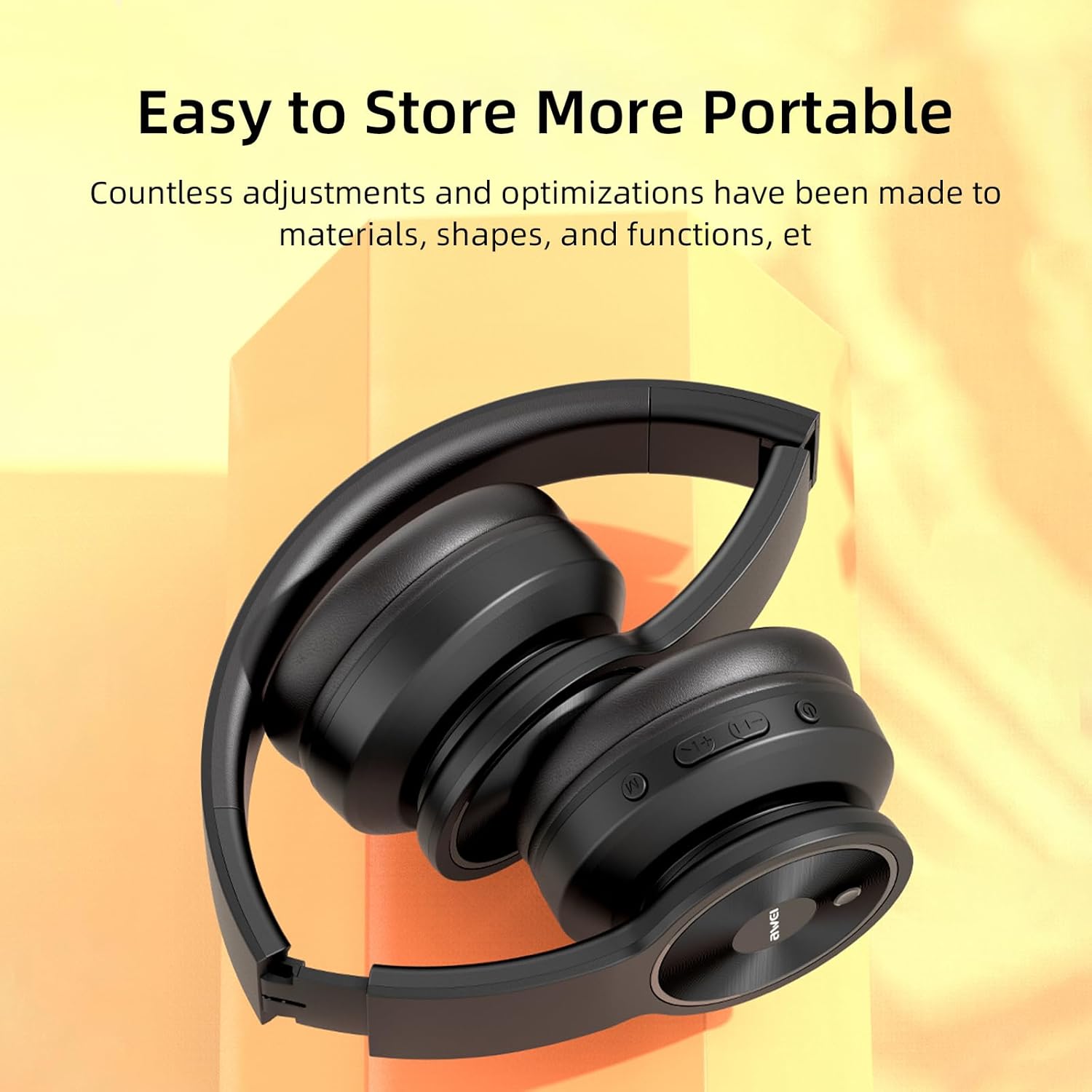
Image: AWEI A996 Pro headphones shown in their folded configuration, emphasizing portability and ease of storage.
4.3 બેટરી કેર
- બેટરી લાઇફ વધારવા માટે, હેડફોનને વારંવાર સંપૂર્ણપણે ડિસ્ચાર્જ કરવાનું ટાળો.
- Charge the headphones regularly, even if not used often.
- બેટરીને ઊંચા તાપમાને ખુલ્લી પાડશો નહીં.
5. મુશ્કેલીનિવારણ
If you encounter issues with your AWEI A996 Pro headphones, refer to the following common problems and solutions:
| સમસ્યા | શક્ય ઉકેલ |
|---|---|
| હેડફોન ચાલુ થતા નથી. | ખાતરી કરો કે હેડફોન ચાર્જ થયેલ છે. પાવર સ્ત્રોત સાથે કનેક્ટ કરો અને ફરી પ્રયાસ કરો. |
| બ્લૂટૂથ દ્વારા જોડી બનાવી શકાતી નથી. | Ensure headphones are in pairing mode (flashing red/blue LED). Turn off and on Bluetooth on your device. Move closer to the device. Forget previous pairings on your device and try again. |
| કોઈ અવાજ નથી કે ઓછો અવાજ નથી. | Check volume levels on both headphones and your connected device. Ensure headphones are properly paired or AUX cable is fully inserted. Try playing different audio sources. |
| ANC is not effective. | Ensure ANC is activated (press the ANC button). Ensure earcups form a good seal around your ears. ANC is most effective against low-frequency, constant noise. |
| તૂટક તૂટક જોડાણ. | હેડફોન અને ઉપકરણ વચ્ચે કોઈ અવરોધો ન આવે તેની ખાતરી કરો. ઉપકરણની નજીક જાઓ. મજબૂત ઇલેક્ટ્રોમેગ્નેટિક હસ્તક્ષેપ ટાળો. |
6. સ્પષ્ટીકરણો
| લક્ષણ | વિગત |
|---|---|
| બ્રાન્ડ | અવેઇ |
| મોડલ નંબર | A996 પ્રો |
| કનેક્ટિવિટી ટેકનોલોજી | Wireless (Bluetooth), Wired (AUX) |
| વાયરલેસ ટેકનોલોજી | બ્લૂટૂથ 5.0 |
| ઇયર પ્લેસમેન્ટ | કાન ઉપર |
| ડ્રાઇવરનું કદ | 40 મીમી |
| બેટરી ક્ષમતા | 300mAh |
| રમવાનો સમય | 20 કલાક સુધી (આશરે) |
| ચાર્જિંગ સમય | આશરે. 2 કલાક |
| વધારાની સુવિધાઓ | Active Noise Cancellation (ANC), Ergonomic, Lightweight, Foldable |
7. વોરંટી અને સપોર્ટ
7.1 વોરંટી માહિતી
The AWEI A996 Pro headphones come with a 12-મહિનાની વોરંટી ખરીદીની તારીખથી, ઉત્પાદન ખામીઓને આવરી લે છે. વધુમાં, એ 30-દિવસની વળતર નીતિ is provided for your peace of mind.
7.2 ગ્રાહક સપોર્ટ
For any questions, technical assistance, or warranty claims, please contact Awei customer support. Lifetime worry-free user support is available to assist you with any product-related inquiries.
Please refer to the contact information provided with your purchase documentation or visit the official Awei webઆધાર વિગતો માટે સાઇટ.