
1. પરિચય
Thank you for choosing the JENABOM Mini Cordless Rotary Tool. This versatile and compact tool is designed for precision tasks such as sanding, polishing, drilling, etching, engraving, and various DIY crafts. Its cordless design and variable speed settings offer convenience and control for a wide range of applications. Please read this manual thoroughly before operating the tool to ensure safe and efficient use.

Figure 1.1: JENABOM Mini Cordless Rotary Tool and included accessories.
2. સલામતી માહિતી
આગ, ઇલેક્ટ્રિક આંચકો અને વ્યક્તિગત ઈજાના જોખમને ઘટાડવા માટે ઇલેક્ટ્રિકલ ટૂલ્સનો ઉપયોગ કરતી વખતે હંમેશા મૂળભૂત સલામતી સાવચેતીઓનું પાલન કરો.
સામાન્ય સુરક્ષા નિયમો:
- બધી સૂચનાઓ વાંચો: સાધનના સંચાલન અને સલામતી માર્ગદર્શિકાથી પોતાને પરિચિત કરો.
- આંખનું રક્ષણ પહેરો: હંમેશા સાઇડ શિલ્ડ સાથે સલામતી ગોગલ્સ અથવા સલામતી ચશ્મા પહેરો.
- સુરક્ષિત વર્કપીસ: હંમેશા clamp or otherwise secure the workpiece. Do not hold it by hand.
- કાર્યક્ષેત્રને સ્વચ્છ રાખો: અવ્યવસ્થિત વિસ્તારો અને બેન્ચ ઇજાઓને આમંત્રણ આપે છે.
- Avoid dangerous environment: ડી માં પાવર ટૂલ્સનો ઉપયોગ કરશો નહીંamp અથવા ભીના સ્થળો, અથવા તેમને વરસાદ માટે ખુલ્લા. કાર્યક્ષેત્રને સારી રીતે પ્રકાશિત રાખો.
- બાળકોને દૂર રાખો: બધા મુલાકાતીઓને કાર્યક્ષેત્રથી સુરક્ષિત અંતરે રાખવા જોઈએ.
- યોગ્ય રીતે પોશાક પહેરો: છૂટક કપડાં કે ઘરેણાં ન પહેરો. તેઓ ફરતા ભાગોમાં પકડી શકાય છે. બહાર કામ કરતી વખતે રબરના મોજા અને નોન-સ્કિડ ફૂટવેરની ભલામણ કરવામાં આવે છે. લાંબા વાળ રાખવા માટે રક્ષણાત્મક વાળ આવરણ પહેરો.
- Use right tool: સાધન અથવા જોડાણને એવું કામ કરવા દબાણ કરશો નહીં કે જેના માટે તે ડિઝાઇન કરવામાં આવ્યું ન હતું.
- કાળજી સાથે સાધનો જાળવો: વધુ સારી અને સુરક્ષિત કામગીરી માટે ટૂલ્સને તીક્ષ્ણ અને સ્વચ્છ રાખો. લુબ્રિકેટિંગ અને એક્સેસરીઝ બદલવા માટેની સૂચનાઓને અનુસરો.
- સાધનો ડિસ્કનેક્ટ કરો: When not in use, before servicing, or when changing accessories, disconnect the tool from its power source.
- અજાણતા શરૂ કરવાનું ટાળો: Ensure the switch is in the OFF position before connecting to power source.
- સતર્ક રહો: તમે શું કરી રહ્યા છો તેનું ધ્યાન રાખો, સામાન્ય સમજનો ઉપયોગ કરો. જ્યારે તમે થાકેલા હોવ ત્યારે સાધનનો ઉપયોગ કરશો નહીં.
3. પેકેજ સામગ્રી
પેકેજ ખોલતી વખતે, કૃપા કરીને ખાતરી કરો કે નીચે સૂચિબદ્ધ બધી વસ્તુઓ હાજર છે અને તેને કોઈ નુકસાન થયું નથી:
- 1 x JENABOM Mini Cordless Rotary Tool
- 1 x યુએસબી ચાર્જિંગ કેબલ
- 5 x ગ્રાઇન્ડીંગ હેડ
- 4 x 12.7mm Sanding Rings
- 4 x 6.3mm Sanding Rings
- 1 x 12.7mm Rubber Wheel
- 1 x 6.3mm Rubber Wheel
- 1 x Plastic Storage Box

Figure 3.1: All components included in the 15-piece set.
4. ઉત્પાદન ઓવરview
Familiarize yourself with the different parts of your JENABOM Mini Cordless Rotary Tool:

Figure 4.1: Labeled diagram of the rotary tool's main components.
- ચક Holds the various accessories securely.
- Main Shaft Lock Switch: Used to lock the shaft for easy accessory changes.
- Cooling Port: Helps dissipate heat during operation.
- Tap Position Indicator Light: Indicates the current speed setting.
- Power Switch / 3-Gear Adjustment: Turns the tool on/off and cycles through speed settings.
- યુએસબી ચાર્જિંગ પોર્ટ: USB ચાર્જિંગ કેબલને કનેક્ટ કરવા માટે.
The tool operates on a 3.6V lithium battery and has a clamping range of 1-3mm. Its net weight is approximately 100g.
5. Setup and Accessory Installation
Follow these steps to properly install accessories into your rotary tool:
- Press down the main shaft lock switch and unscrew the chuck counter-clockwise until it is loose enough to insert an accessory.
- Insert the desired accessory (e.g., grinding head, sanding band) into the chuck. Ensure the accessory shaft is fully seated.
- While still holding the main shaft lock switch, tighten the chuck clockwise until the accessory is firmly secured. Release the lock switch.

આકૃતિ 5.1: સહાયક સ્થાપન માટે પગલું-દર-પગલાની માર્ગદર્શિકા.
The tool features a copper spindle and copper sandwich design for secure accessory holding, ensuring stability and preventing slippage during operation. The collet size is 1-3mm.

Figure 5.2: Detail of the copper spindle and collet for secure accessory attachment.
6. ઓપરેટિંગ સૂચનાઓ
પાવર ઓન/ઓફ અને સ્પીડ એડજસ્ટમેન્ટ:
To turn on the tool, press the Power Switch. The tool has three variable speed settings:
- પહેલું ગિયર: 5000 RPM
- બીજું ગિયર: 10000 RPM
- ત્રીજો ગિયર: 15000 RPM
Press the Power Switch repeatedly to cycle through the speed settings. The tap position indicator lights will illuminate to show the current speed. To turn off the tool, continue pressing the Power Switch until all lights are off.

Figure 6.1: Three-gear power adjustment indicated by lights.
એપ્લિકેશન્સ:
This rotary tool is suitable for a variety of tasks. Always select the appropriate accessory and speed for your specific application.
- પોલિશિંગ: Use polishing accessories for smoothing surfaces.
- રસ્ટ દૂર કરવું: Attach a wire brush or abrasive accessory to remove rust from metal.
- ગ્રાઇન્ડીંગ: Utilize grinding stones for shaping and sharpening.
- કોતરણી: Use carving bits for detailed work on wood, plastic, or soft metals.
- શારકામ: Employ small drill bits for precision drilling.
- કટિંગ: Use cutting discs for light cutting tasks.
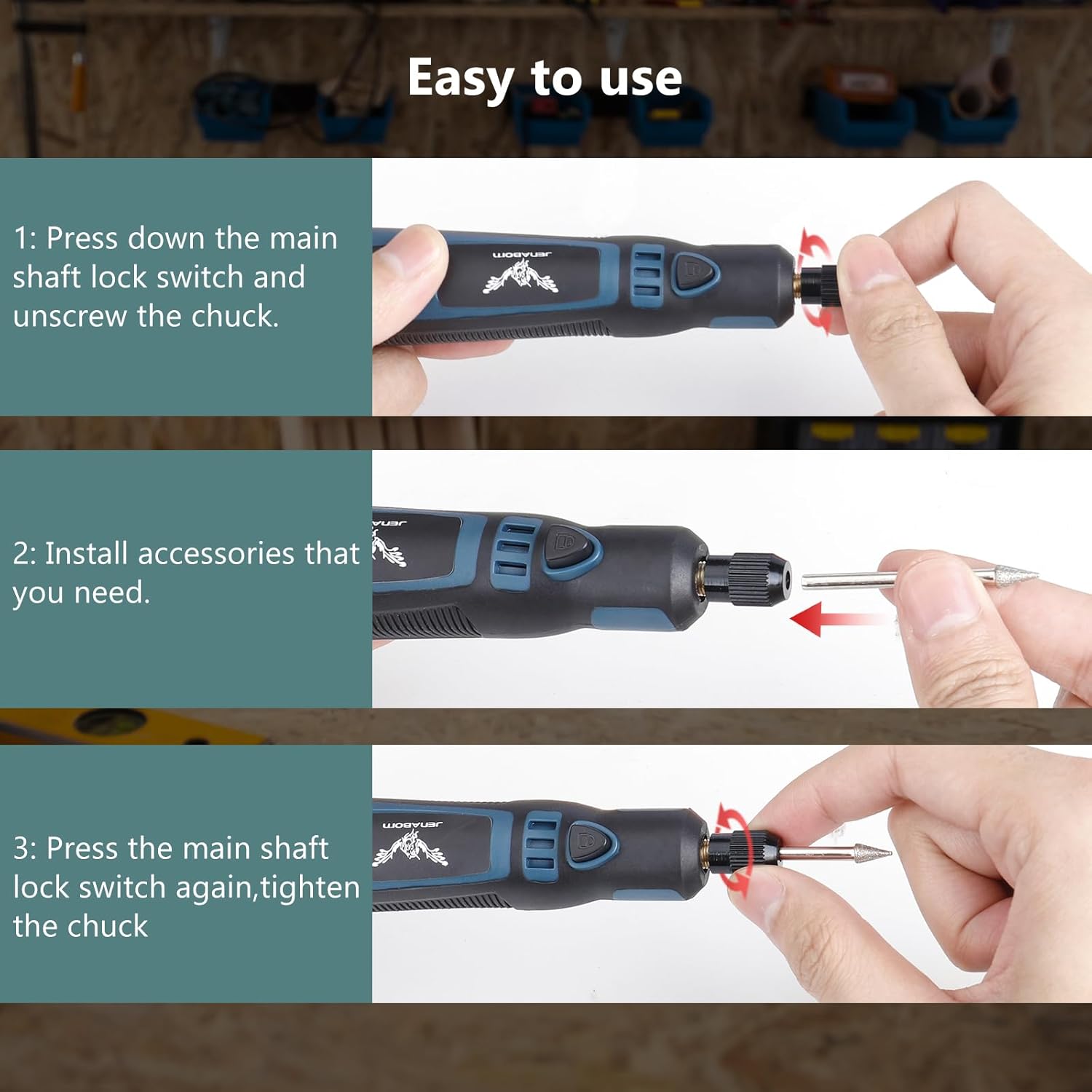
Figure 6.2: Various applications of the JENABOM Mini Cordless Rotary Tool.
For optimal performance and safety, ensure the tool is held firmly without jumping or shaking during operation. The design promotes high concentricity for precise work.

Figure 6.3: Maintaining stability for precise work.
7. બેટરી ચાર્જ કરી રહી છે
The JENABOM Mini Cordless Rotary Tool is equipped with a 3.6V 700mAh rechargeable battery. To charge the tool:
- Connect the small end of the provided USB charging cable to the USB Charging Port on the tool.
- Connect the larger end of the USB cable to a standard USB power adapter (not included), computer USB port, or power bank.
- The indicator lights on the tool will show charging status.
- A full charge typically takes 2 to 3 hours and provides approximately 60 minutes of continuous operation.

Figure 7.1: Charging the rotary tool via USB.
8. જાળવણી
Proper maintenance ensures the longevity and optimal performance of your rotary tool.
- સફાઈ: After each use, wipe down the tool with a clean, dry cloth. Use a soft brush to remove dust and debris from the cooling ports and chuck area. Do not use harsh chemicals or abrasive cleaners.
- સંગ્રહ: Store the tool and its accessories in the provided plastic box in a dry, cool place, away from direct sunlight and moisture.
- બેટરી સંભાળ: For best battery life, avoid completely draining the battery frequently. Charge the tool regularly, even if not in use for extended periods (e.g., every 3-6 months).
- સહાયક નિરીક્ષણ: Regularly inspect accessories for wear or damage. Replace worn or damaged accessories immediately to ensure safe and effective operation.
9. મુશ્કેલીનિવારણ
If you encounter issues with your rotary tool, refer to the following common problems and solutions:
| સમસ્યા | સંભવિત કારણ | ઉકેલ |
|---|---|---|
| સાધન ચાલુ થતું નથી. | બેટરી ખતમ થઈ ગઈ છે. | Charge the tool fully. |
| પાવર સ્વીચ સંપૂર્ણપણે ચાલુ નથી. | Press the power switch firmly. | |
| Accessory wobbles or falls out. | ચક પૂરતો કડક થયો નથી. | Ensure the main shaft lock is engaged and tighten the chuck firmly. |
| Incorrect accessory size for chuck. | Use accessories with a shaft diameter between 1-3mm. | |
| Tool loses power quickly. | બેટરી સંપૂર્ણપણે ચાર્જ થઈ નથી અથવા જૂની થઈ ગઈ છે. | Ensure full charge. If battery life significantly degrades, consider replacement if available or contact support. |
| સાધન વધુ ગરમ થાય છે. | Prolonged heavy use or blocked cooling vents. | Allow tool to cool down. Ensure cooling ports are clear of debris. Avoid excessive pressure during operation. |
જો આ ઉકેલો અજમાવવા પછી પણ સમસ્યા ચાલુ રહે, તો કૃપા કરીને ગ્રાહક સપોર્ટનો સંપર્ક કરો.
10. સ્પષ્ટીકરણો
| લક્ષણ | સ્પષ્ટીકરણ |
|---|---|
| બ્રાન્ડ | જેનાબોમ |
| મોડલ નંબર | TY-CM01 |
| ભાગtage | 3.6 વોલ્ટ |
| પાવર સ્ત્રોત | બેટરી સંચાલિત (USB રિચાર્જેબલ) |
| બેટરી ક્ષમતા | 700mAh |
| ચાર્જિંગ સમય | 2-3 કલાક |
| સતત ઓપરેશન સમય | આશરે. 60 મિનિટ |
| ઝડપ સેટિંગ્સ | 3 (5000 RPM, 10000 RPM, 15000 RPM) |
| ચક Clamping રેન્જ | 1-3 મીમી |
| વસ્તુનું વજન | ૮.૪૭ ઔંસ (આશરે ૨૪૦ ગ્રામ) |
| પરિમાણો (પેકેજ) | 8.5 x 4.5 x 2.4 ઇંચ |
| ખાસ લક્ષણો | Compact, Lightweight, Variable Speed, Spindle Lock |
| ભલામણ કરેલ ઉપયોગો | Engraving, Cutting, Grinding, Polishing, Sanding, Carving |
11. વોરંટી અને સપોર્ટ
JENABOM is committed to providing high-quality products. For information regarding warranty coverage, technical support, or replacement parts, please refer to the warranty card included with your product or visit the official JENABOM webસાઇટ. સહાય માટે તમે તમારા ખરીદી પ્લેટફોર્મ દ્વારા સીધા વેચનારનો પણ સંપર્ક કરી શકો છો.
કોઈપણ વોરંટી દાવા માટે કૃપા કરીને તમારી ખરીદીનો પુરાવો રાખો.