
1. પરિચય
ખરીદી બદલ આભારasing the Generic APAYADO-M70 Wired Mini Low Profile Keyboard. This manual provides essential information for setting up, operating, and maintaining your new keyboard. Please read this manual thoroughly before use to ensure proper function and longevity of your device.
2. ઉત્પાદન ઓવરview
2.1 મુખ્ય લક્ષણો
- કોમ્પેક્ટ કદ: Slim and lightweight design (29×12×3.5cm; 220g) with a 78-key mini layout, saving desk space and enhancing portability.
- લો પ્રોfile ડિઝાઇન: Keys feature a short travel distance for responsive keystrokes and a comfortable typing experience.
- Chocolate Keycaps: Alphanumeric translucent keycaps ensure letters and numbers are clearly visible.
- RGB બેકલાઇટિંગ: Integrated LED backlighting for enhanced visibility and aesthetics.
- શાંત ચાવીઓ: Bass buttons are designed for quiet operation, reducing typing noise.
2.2 પેકેજ સામગ્રી
કૃપા કરીને નીચેની વસ્તુઓ માટે પેકેજ તપાસો:
- APAYADO-M70 Wired Mini Low Profile કીબોર્ડ
- યુએસબી કેબલ (ઇન્ટિગ્રેટેડ)
- વપરાશકર્તા માર્ગદર્શિકા (આ દસ્તાવેજ)
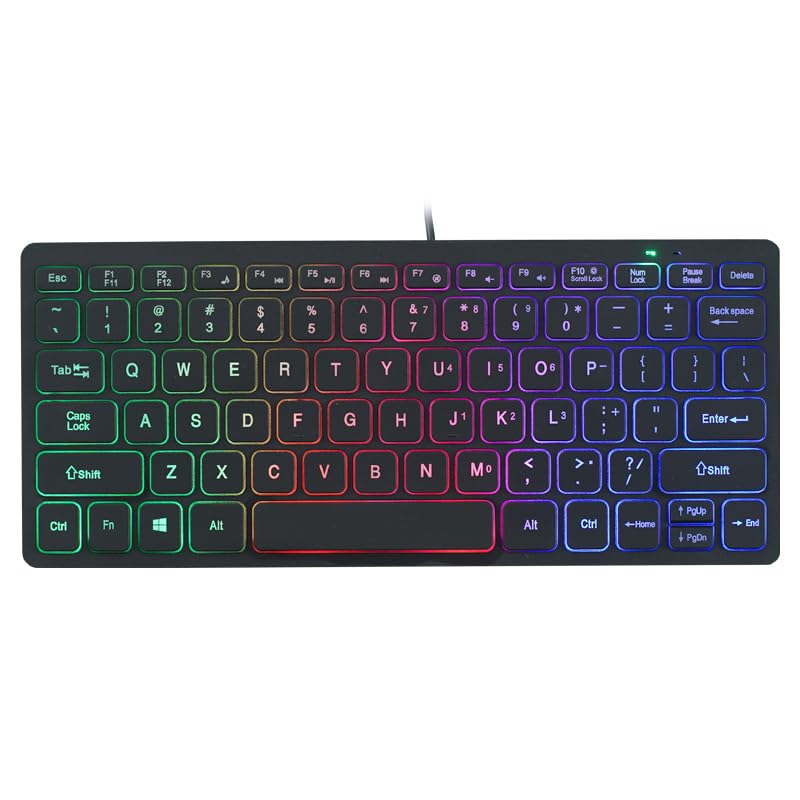
Image: The APAYADO-M70 Wired Mini Low Profile Keyboard, illustrating its compact form factor and illuminated keys.
3. સેટઅપ સૂચનાઓ
- કીબોર્ડ ખોલો: કીબોર્ડને તેના પેકેજિંગમાંથી કાળજીપૂર્વક દૂર કરો.
- કમ્પ્યુટરથી કનેક્ટ કરો: Locate an available USB port on your computer (PC or Laptop). Insert the USB connector of the keyboard into the USB port.
- ડ્રાઇવર ઇન્સ્ટોલેશન: કીબોર્ડ પ્લગ-એન્ડ-પ્લે છે. તમારી ઓપરેટિંગ સિસ્ટમ (Windows, macOS, Linux) આપમેળે જરૂરી ડ્રાઇવરો શોધી કાઢશે અને ઇન્સ્ટોલ કરશે. સામાન્ય રીતે કોઈ વધારાના સોફ્ટવેર ઇન્સ્ટોલેશનની જરૂર હોતી નથી.
- કાર્યક્ષમતા ચકાસો: Open a text editor or word processor and type to ensure the keyboard is functioning correctly.
4. ઓપરેટિંગ સૂચનાઓ
૩.૧ મૂળભૂત ટાઇપિંગ
The APAYADO-M70 functions as a standard US English layout keyboard. Simply press the desired keys to input characters.
૪.૨ RGB બેકલાઇટિંગ નિયંત્રણ
The keyboard features integrated RGB backlighting. To control the backlighting:
- Turn On/Off Backlighting: દબાવો FN કી વારાફરતી F10 કી (FN + F10) to toggle the LED lights on or off.
- Note: Specific RGB modes or brightness adjustments are not detailed in the product information. The FN+F10 combination is for basic on/off functionality.
5. જાળવણી
Proper maintenance ensures the longevity and performance of your keyboard.
- સફાઈ:
- સાફ કરતા પહેલા તમારા કમ્પ્યુટરથી કીબોર્ડ ડિસ્કનેક્ટ કરો.
- નરમ, લિન્ટ-ફ્રી કાપડનો ઉપયોગ કરોampકીકેપ્સ અને સપાટીને સાફ કરવા માટે પાણી અથવા હળવા સફાઈ દ્રાવણથી ભેજયુક્ત.
- કઠોર રસાયણો, ઘર્ષક ક્લીનર્સ અથવા દ્રાવકનો ઉપયોગ કરવાનું ટાળો.
- ચાવીઓ વચ્ચેથી ધૂળ અને કચરો દૂર કરવા માટે સંકુચિત હવાનો ઉપયોગ કરો.
- સંગ્રહ: કીબોર્ડને અતિશય તાપમાન અને સીધા સૂર્યપ્રકાશથી દૂર સ્વચ્છ, સૂકા વાતાવરણમાં સંગ્રહિત કરો.
- હેન્ડલિંગ: Avoid dropping the keyboard or exposing it to liquids. Do not attempt to disassemble the keyboard, as this will void any warranty.
6. મુશ્કેલીનિવારણ
| સમસ્યા | સંભવિત કારણ | ઉકેલ |
|---|---|---|
| કીબોર્ડ પ્રતિસાદ આપતું નથી | ઢીલું USB કનેક્શન, ખામીયુક્ત USB પોર્ટ, ડ્રાઇવરમાં સમસ્યા. |
|
| બેકલાઇટિંગ કામ કરતું નથી | Backlight turned off, power issue. |
|
| કી સ્ટીકી અથવા પ્રતિભાવવિહીન છે | કીકેપ્સ નીચે કાટમાળ, પ્રવાહી ઢોળાયું. |
|
7. સ્પષ્ટીકરણો
| મોડલ | APAYADO-M70 |
| ઉત્પાદક | અપાયડો |
| બ્રાન્ડ | સામાન્ય |
| કનેક્ટિવિટી ટેકનોલોજી | વાયર્ડ યુએસબી |
| કીબોર્ડ વર્ણન | Membrane, Low-Profile |
| ખાસ લક્ષણો | Backlit, Lightweight, Low-Profile કી |
| પરિમાણો (L x W x H) | 29 × 12 × 3.5 cm (approx.) |
| વજન | 220 ગ્રામ (આશરે) |
| સુસંગત ઉપકરણો | લેપટોપ, પીસી |
| Color/Backlight | Mixed Light (RGB) |
8. વોરંટી અને સપોર્ટ
This product is covered by a standard manufacturer's warranty. Please refer to the retailer's return policy or contact the seller for specific warranty terms and conditions. For technical support or inquiries, please contact your point of purchase or the manufacturer directly.
વોરંટી દાવાઓ માટે ખરીદીના પુરાવા તરીકે તમારી ખરીદી રસીદ રાખો.