
1. પરિચય
ખરીદી બદલ આભારasing the Max Power MPD437 Ultra PRO M2 Portable Bluetooth Speaker. This speaker is designed to provide high-quality audio in various environments, featuring water resistance and dust-proof capabilities for outdoor use. Please read this manual carefully before using the product to ensure proper operation and to maximize its lifespan.
સલામતી માહિતી
- સ્પીકરને લાંબા સમય સુધી અતિશય તાપમાન અથવા સીધા સૂર્યપ્રકાશમાં ન રાખો.
- સ્પીકરને મજબૂત અસરમાં મૂકવા અથવા તેને આધીન કરવાનું ટાળો.
- સ્પીકરને ડિસએસેમ્બલ કરવાનો કે સુધારવાનો પ્રયાસ કરશો નહીં. આ વોરંટી રદ કરશે.
- સ્પીકરને તબીબી ઉપકરણોથી દૂર રાખો.
- આપેલ ચાર્જિંગ કેબલનો જ ઉપયોગ કરો.
2. પેકેજ સામગ્રી
ખાતરી કરો કે બધી વસ્તુઓ પેકેજમાં હાજર છે:
- Max Power MPD437 Ultra PRO M2 Portable Bluetooth Speaker
- પાવર કેબલ
- AUX કેબલ
- વપરાશકર્તા માર્ગદર્શિકા (આ દસ્તાવેજ)
3. ઉત્પાદન ઓવરview
Familiarize yourself with the components of your Max Power MPD437 Ultra PRO M2 speaker.
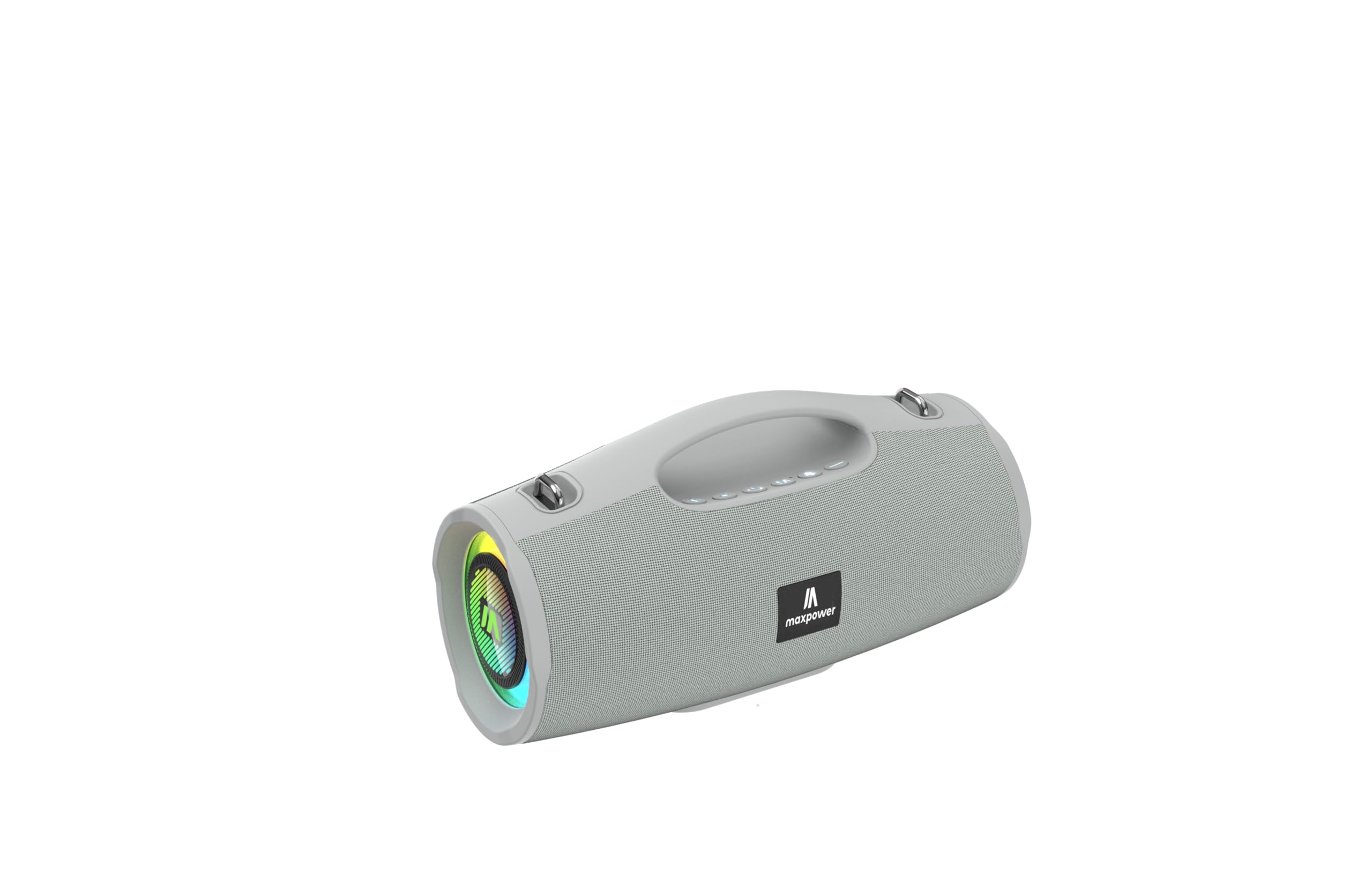
This image displays the Max Power MPD437 Ultra PRO M2 speaker. It features a robust grey casing, an integrated carrying handle at the top, and a series of control buttons. One end of the speaker is equipped with an LED light ring, indicating its operational status and adding visual effects.
મુખ્ય ઘટકો:
- Integrated Carrying Handle: સરળ સુવાહ્યતા માટે.
- નિયંત્રણ બટનો: For power, volume, playback, and mode selection.
- સ્પીકર ગ્રિલ: Protects the speaker drivers.
- એલઇડી લાઇટ રીંગ: Provides visual effects and indicates status.
- ચાર્જિંગ પોર્ટ: પાવર કેબલને કનેક્ટ કરવા માટે.
- AUX ઇનપુટ: વાયર્ડ ઓડિયો કનેક્શન માટે.
4. સેટઅપ
૩.૧ સ્પીકરને ચાર્જ કરવું
- Connect the provided Power Cable to the charging port on the speaker.
- Plug the other end of the Power Cable into a suitable power source.
- LED સૂચક ચાર્જિંગ સ્થિતિ બતાવશે. સંપૂર્ણ ચાર્જ થવામાં લગભગ 3 કલાક લાગે છે.
- એકવાર સંપૂર્ણ ચાર્જ થઈ જાય પછી ચાર્જિંગ કેબલને ડિસ્કનેક્ટ કરો.
4.2 બ્લૂટૂથ પેરિંગ
- સ્પીકર ચાલુ કરવા માટે પાવર બટન દબાવો અને પકડી રાખો. સ્પીકર બ્લૂટૂથ પેરિંગ મોડમાં પ્રવેશ કરશે, જે ફ્લેશિંગ LED લાઇટ દ્વારા સૂચવવામાં આવશે.
- તમારા ઉપકરણ (સ્માર્ટફોન, ટેબ્લેટ, લેપટોપ) પર, બ્લૂટૂથ સક્ષમ કરો અને ઉપલબ્ધ ઉપકરણો શોધો.
- Select "MPD437 Ultra PRO M2" from the list of devices.
- એકવાર જોડી થઈ ગયા પછી, સ્પીકર એક શ્રાવ્ય પુષ્ટિકરણ બહાર કાઢશે, અને LED લાઇટ ફ્લેશ થવાનું બંધ થઈ જશે.
- જ્યારે ચાલુ થશે ત્યારે સ્પીકર આપમેળે છેલ્લા જોડીવાળા ઉપકરણ સાથે ફરીથી કનેક્ટ થવાનો પ્રયાસ કરશે.
.4.3..XNUMX AUક્સ કનેક્શન
- Connect one end of the provided AUX Cable to the AUX input port on the speaker.
- Connect the other end of the AUX Cable to the audio output jack of your device.
- સ્પીકર આપમેળે AUX મોડ પર સ્વિચ થઈ જશે.
5. ઓપરેટિંગ સૂચનાઓ
5.1 પાવર ચાલુ/બંધ
- પાવર ચાલુ: પાવર બટનને 2-3 સેકન્ડ માટે દબાવી રાખો.
- પાવર બંધ: પાવર બટનને 2-3 સેકન્ડ માટે દબાવી રાખો.
5.2 વોલ્યુમ નિયંત્રણ
- વોલ્યુમ વધારો: '+' બટન દબાવો.
- વોલ્યુમ ઘટાડો: '-' બટન દબાવો.
5.3 Playback Control (Bluetooth/AUX Mode)
- ચલાવો/થોભો: પ્લે/પોઝ બટન દબાવો.
- આગળનો ટ્રેક: '+' બટન દબાવો અને પકડી રાખો.
- પાછલો ટ્રેક: '-' બટન દબાવો અને પકડી રાખો.
5.4 મોડ પસંદગી
Press the 'M' (Mode) button to switch between Bluetooth, AUX, and FM Radio modes.
૬.૫ એફએમ રેડિયો ઓપરેશન
- 'M' બટનનો ઉપયોગ કરીને FM રેડિયો મોડ પર સ્વિચ કરો.
- Press the Play/Pause button to automatically scan and save available FM stations.
- Use the '+' and '-' buttons to navigate between saved stations.
5.6 LED લાઇટ મોડ્સ
The speaker features vibrant LED lights. Press the dedicated LED button (if available, or a long press on a specific button) to cycle through different light modes or turn them off.
6. જાળવણી
6.1 સફાઈ
- સ્પીકરને સોફ્ટથી સાફ કરો, ડીamp કાપડ
- ઘર્ષક ક્લીનર્સ, આલ્કોહોલ અથવા રાસાયણિક દ્રાવકોનો ઉપયોગ કરશો નહીં.
- ચાર્જ કરતા પહેલા અથવા કેબલ કનેક્ટ કરતા પહેલા ખાતરી કરો કે બધા પોર્ટ સુકા છે.
6.2 સંગ્રહ
- Store the speaker in a cool, dry place away from direct sunlight.
- જો લાંબા સમય સુધી સ્ટોરેજ કરી રહ્યા હોવ, તો બેટરીની તંદુરસ્તી જાળવવા માટે દર થોડા મહિને બેટરીને લગભગ 50% ચાર્જ કરો.
7. મુશ્કેલીનિવારણ
| સમસ્યા | સંભવિત કારણ | ઉકેલ |
|---|---|---|
| સ્પીકર ચાલુ થતો નથી. | બેટરી ખતમ થઈ ગઈ છે. | આપેલા પાવર કેબલનો ઉપયોગ કરીને સ્પીકરને ચાર્જ કરો. |
| વક્તાનો અવાજ નથી. | વૉલ્યૂમ ખૂબ ઓછું છે અથવા મ્યૂટ છે. ડિવાઇસ યોગ્ય રીતે જોડાયેલ નથી. AUX કેબલ સંપૂર્ણપણે દાખલ થયેલ નથી. | Increase volume on both speaker and connected device. Re-pair Bluetooth. Ensure AUX cable is securely connected. |
| બ્લૂટૂથ દ્વારા જોડી બનાવી શકાતી નથી. | Speaker is not in pairing mode. Device Bluetooth is off. Speaker is too far from device. | Ensure speaker is in pairing mode (flashing LED). Turn on Bluetooth on your device. Move speaker closer to your device (within 35 feet). |
| ખરાબ FM રેડિયો રિસેપ્શન. | વર્તમાન સ્થાન પર નબળું સિગ્નલ. | સ્પીકરને વધુ સારા સિગ્નલ રિસેપ્શનવાળા સ્થાન પર ખસેડો. |
8. સ્પષ્ટીકરણો
| મોડેલનું નામ | Ultra Pro M2 |
| આઇટમ મોડલ નંબર | MPD437 |
| બ્રાન્ડ | મેક્સ પાવર |
| સ્પીકરનો પ્રકાર | પોર્ટેબલ સ્પીકર |
| કનેક્ટિવિટી ટેકનોલોજી | બ્લૂટૂથ, સહાયક |
| વાયરલેસ કોમ્યુનિકેશન ટેકનોલોજી | બ્લૂટૂથ |
| બ્લૂટૂથ રેન્જ | 35 ફીટ |
| ખાસ લક્ષણો | Dustproof, FM Radio, LED Light, Water Resistant |
| પાણી પ્રતિકાર સ્તર | પાણી પ્રતિરોધક |
| પાવર સ્ત્રોત | બેટરી સંચાલિત |
| બેટરી ક્ષમતા | 3000 મિલીamp કલાક |
| ચાર્જિંગ સમય | 3 કલાક |
| ઓડિયો આઉટપુટ મોડ | સ્ટીરિયો |
| સિગ્નલ ટુ-અવાજ ગુણોત્તર | 85 ડીબી |
| નિયંત્રણ પદ્ધતિ | સ્પર્શ |
| ઉત્પાદન પરિમાણો | 4.5"D x 5"W x 9.9"H |
| વસ્તુનું વજન | 2.65 પાઉન્ડ |
| સમાવાયેલ ઘટકો | AUX Cable, Power Cable |
| યુપીસી | 785571466584 |
| GTIN | 785571466584 |
9. વોરંટી અને સપોર્ટ
9.1 મર્યાદિત વોરંટી
The Max Power MPD437 Ultra PRO M2 Portable Bluetooth Speaker comes with a limited warranty. Please refer to the warranty card included in your package or contact Max Power customer support for detailed warranty terms and conditions.
9.2 ગ્રાહક સપોર્ટ
For technical assistance, troubleshooting, or warranty inquiries, please contact Max Power customer support. Contact information can typically be found on the product packaging or the official Max Power webસાઇટ