
Temtop PMD371 & Airing2000 Bundle
ટેમટોપ PMD371 અને એરિંગ2000 પ્રોફેશનલ એર ક્વોલિટી મોનિટરિંગ બંડલ યુઝર મેન્યુઅલ
Model: PMD371 & Airing2000 | Brand: Temtop
1. પરિચય
This user manual provides detailed instructions for the operation and maintenance of the Temtop PMD371 and Airing2000 Professional Air Quality Monitoring Bundle. This bundle offers a comprehensive solution for precise particle and air quality monitoring in various environments, including laboratories, cleanrooms, and field applications. The PMD371 is designed for detailed particle detection and environmental monitoring, while the Airing2000 extends capabilities with advanced particulate and formaldehyde detection. Please read this manual thoroughly before using the devices to ensure proper function and safety.
2. સલામતી માહિતી
- Do not expose the devices to extreme temperatures, humidity, or direct sunlight.
- ઉપકરણોને પડવાથી કે જોરદાર ફટકાથી બચાવવાથી બચો.
- Do not attempt to disassemble or modify the devices. Refer all servicing to qualified personnel.
- Keep the devices away from water and other liquids.
- બંધ જગ્યાઓમાં કામ કરતી વખતે યોગ્ય વેન્ટિલેશનની ખાતરી કરો.
- Use only the specified power adapters and accessories provided by Temtop.
3. પેકેજ સામગ્રી
ખાતરી કરો કે બધી વસ્તુઓ પેકેજમાં હાજર છે:
- Temtop PMD371 Particle Counter
- Temtop Airing2000 Particulate Monitor
- USB Charging Cables (x2)
- પાવર એડેપ્ટર (x2)
- વપરાશકર્તા માર્ગદર્શિકા (આ દસ્તાવેજ)
- Calibration Certificate (if applicable)
4. ઉત્પાદન ઓવરview

Image: The Temtop PMD371 (right) and Airing2000 (left) air quality monitors, showcasing their distinct designs and displays.
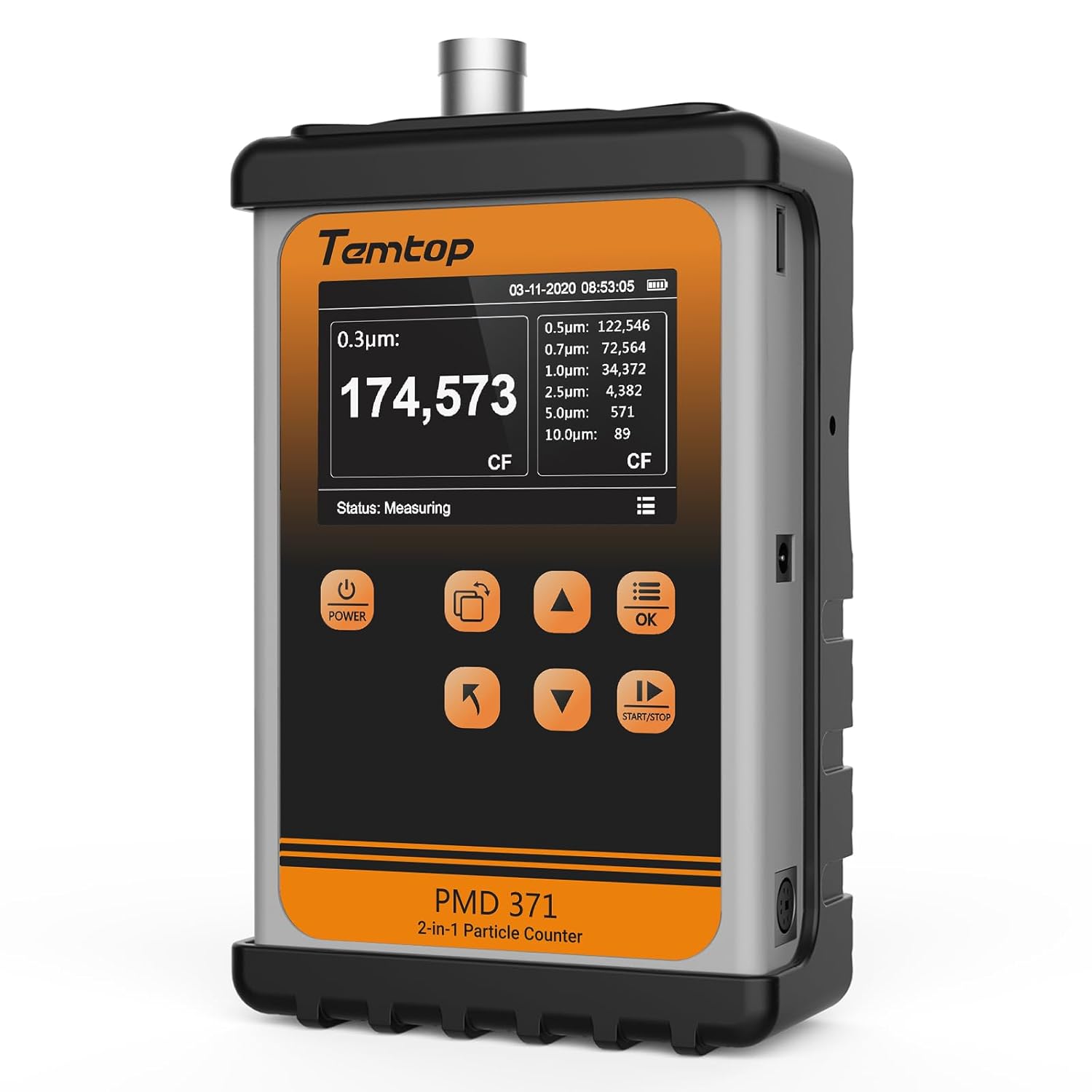
છબી: આગળ view of the Temtop PMD371 Particle Counter, highlighting its display and control buttons.

છબી: આગળ view of the Temtop Airing2000 Particulate Monitor, showing its ergonomic design and display.
4.1 Temtop PMD371 Particle Counter
The PMD371 is a precision instrument designed for multi-size particle detection and environmental monitoring. It features a robust all-metal construction for durability and reliable data collection.
- ડિસ્પ્લે સ્ક્રીન: Shows real-time particle counts (0.3µm, 0.5µm, 1.0µm, 2.5µm, 5.0µm, 10.0µm), PM2.5, PM10, temperature, and humidity.
- પાવર બટન: ઉપકરણ ચાલુ/બંધ કરે છે.
- કાર્ય બટનો: Navigation and selection for various modes and settings.
- ઇનલેટ પોર્ટ: Where air samples are drawn in for analysis.
- યુએસબી પોર્ટ: ચાર્જિંગ અને ડેટા ટ્રાન્સફર માટે.

Image: The Temtop PMD371 highlighting its durable all-metal casing, ensuring robust performance.

Image: The Temtop PMD371 illustrating its compact size (170 x 110 x 48 mm) and lightweight design (1.76 lbs), emphasizing its portability.
4.2 Temtop Airing2000 Particulate Monitor
The Airing2000 is designed for comprehensive field monitoring, providing accurate measurements of PM2.5, PM10, TSP, temperature, humidity, and formaldehyde.
- ડિસ્પ્લે સ્ક્રીન: Shows real-time readings for PM2.5, PM10, TSP, temperature, humidity, and HCHO.
- પાવર બટન: For turning the device on/off.
- નેવિગેશન બટનો: For menu navigation and setting adjustments.
- એર ઇનલેટ/આઉટલેટ: Ports for air sampલિંગ.
- ચાર્જિંગ પોર્ટ: આંતરિક બેટરી રિચાર્જ કરવા માટે.

Image: The Temtop Airing2000 showcasing its enterprise-grade precision, industrial-grade pumping sensor, comprehensive monitoring, instant data access, user-friendly operation, and portable design.

Image: The Temtop Airing2000 demonstrating its comprehensive monitoring capabilities, including particulate concentration (PM2.5, PM10, TSP), particle count (0.3µm, 0.5µm, 1.0µm), and environmental conditions (temperature, humidity).

છબી: વિગતવાર view of the Temtop Airing2000's internal pump-suction sensor, highlighting its advanced optics and wide particle size detection capabilities.
5. સેટઅપ
5.1 પ્રારંભિક ચાર્જિંગ
Before first use, fully charge both the PMD371 and Airing2000 devices. Connect the provided USB charging cables to the respective devices and plug them into the power adapters. A full charge typically takes 3-4 hours. The battery indicator on the screen will show charging status.
5.2 પાવરિંગ ચાલુ/બંધ
- પાવર ચાલુ કરવા માટે: દબાવો અને પકડી રાખો શક્તિ સ્ક્રીન પ્રકાશિત થાય ત્યાં સુધી બટન દબાવો.
- પાવર બંધ કરવા માટે: દબાવો અને પકડી રાખો શક્તિ સ્ક્રીન બંધ ન થાય ત્યાં સુધી બટન દબાવો.
5.3 મૂળભૂત સેટિંગ્સ
Upon first power-on, you may need to set the date, time, and preferred units. Navigate through the menu using the arrow buttons and confirm selections with the OK બટન
- તારીખ અને સમય: Set current date and time for accurate data logging.
- એકમો: Select preferred units for temperature (°C/°F) and particulate matter (µg/m³).
6. ઓપરેટિંગ સૂચનાઓ
6.1 Taking Measurements with PMD371
- પ્લેસમેન્ટ: Position the PMD371 in the area you wish to monitor. Ensure the air inlet is unobstructed.
- માપન શરૂ કરો: દબાવો સ્ટાર્ટ/સ્ટોપ button to begin continuous monitoring. The screen will display real-time particle counts and environmental data.
- વાંચનનું અર્થઘટન:
- Particle Counts: Displays the number of particles per liter for various sizes (0.3µm, 0.5µm, 1.0µm, 2.5µm, 5.0µm, 10.0µm).
- PM2.5/PM10: Shows the concentration of particulate matter in micrograms per cubic meter (µg/m³).
- તાપમાન/ભેજ: Displays ambient temperature and relative humidity.
- Stop Measurement: દબાવો સ્ટાર્ટ/સ્ટોપ button again to pause or stop monitoring.
- ડેટા લોગીંગ: The device automatically logs data. You can access historical data through the menu.

Image: The Temtop PMD371's screen displaying detailed particle count data for various sizes (0.3µm, 0.5µm, 0.7µm, 1.0µm, 2.5µm, 5.0µm, 10.0µm) and PM2.5/PM10 concentrations.
6.2 Taking Measurements with Airing2000
- પ્લેસમેન્ટ: Hold the Airing2000 or place it in the desired monitoring location. Ensure the air inlet is clear.
- માપન શરૂ કરો: The device typically starts measuring automatically upon power-on. Observe the real-time readings on the display.
- વાંચનનું અર્થઘટન:
- PM2.5/PM10/TSP: Displays concentrations of various particulate matters.
- HCHO: Shows formaldehyde concentration.
- તાપમાન/ભેજ: Displays ambient temperature and relative humidity.
- ડેટા મેનેજમેન્ટ: Use the navigation buttons to review historical data or adjust settings.
6.3 Data Transfer and Analysis
Both devices support data export. Connect the devices to a computer using the provided USB cables. The devices will appear as a removable storage device, allowing you to access logged data files (e.g., CSV format) for further analysis using spreadsheet software.
7. જાળવણી
7.1 સફાઈ
- Wipe the exterior of the devices with a soft, dry cloth.
- ઘર્ષક ક્લીનર્સ, સોલવન્ટ્સ અથવા મજબૂત રસાયણોનો ઉપયોગ કરશો નહીં.
- Ensure the air inlet and outlet ports are free from dust and debris. Use a soft brush or compressed air if necessary, but avoid forcing anything into the ports.
7.2 સંગ્રહ
- ઉપકરણોને ઠંડી, સૂકી જગ્યાએ, સીધા સૂર્યપ્રકાશ અને અતિશય તાપમાનથી દૂર રાખો.
- If storing for an extended period, ensure the batteries are partially charged (around 50%) to prolong battery life. Recharge every 3-6 months.
7.3 માપાંકન
The devices are factory calibrated. For professional applications requiring high accuracy, periodic re-calibration by authorized service centers is recommended. Refer to Temtop's official webકેલિબ્રેશન સેવાઓ માટે ગ્રાહક સપોર્ટ સાઇટ પર જાઓ અથવા સંપર્ક કરો.
8. મુશ્કેલીનિવારણ
| સમસ્યા | સંભવિત કારણ | ઉકેલ |
|---|---|---|
| ઉપકરણ પાવર ચાલુ કરતું નથી. | બેટરી ઓછી છે; ઉપકરણમાં ખામી છે. | Charge the device fully. If problem persists, contact support. |
| અચોક્કસ વાંચન. | Sensor obstruction; environmental interference; need for calibration. | Ensure air inlets are clear. Move away from strong air currents or dust sources. Consider professional calibration. |
| સ્ક્રીન ખાલી છે અથવા સ્થિર છે. | Software error; low battery. | Recharge the device. Perform a hard reset (refer to specific device manual for button combination, usually holding power for 10+ seconds). |
| કમ્પ્યુટરથી કનેક્ટ કરી શકાતું નથી. | Faulty USB cable; driver issue; device not in data transfer mode. | Try a different USB cable or port. Ensure the device is powered on and in data transfer mode if applicable. |
9. સ્પષ્ટીકરણો
9.1 Temtop PMD371 Particle Counter
- Particle Size Channels: 0.3µm, 0.5µm, 1.0µm, 2.5µm, 5.0µm, 10.0µm
- Measurement Range (PM2.5/PM10): 0-999 µg/m³
- તાપમાન શ્રેણી: -10°C થી 50°C (14°F થી 122°F)
- ભેજની રેન્જ: 0-99% આરએચ
- બેટરી: રિચાર્જ લિથિયમ આયન
- પરિમાણો: આશરે ૧૬૯ x ૧૩૮ x ૫૩ મીમી (૬.૭ x ૫.૪ x ૨.૧ ઇંચ)
- વજન: આશરે 0.8 કિગ્રા (1.76 lbs)
- ડેટા સ્ટોરેજ: ડેટાના 5000 સેટ સુધી
9.2 Temtop Airing2000 Particulate Monitor
- Particulate Measurement: PM2.5, PM10, TSP
- Formaldehyde (HCHO) Range: 0-1.0 mg/m³
- તાપમાન શ્રેણી: -10°C થી 50°C (14°F થી 122°F)
- ભેજની રેન્જ: 0-99% આરએચ
- બેટરી: Rechargeable Lithium-ion (Extended battery life)
- ડેટા સ્ટોરેજ: Ample storage for continuous logging
- સેન્સર પ્રકાર: Industrial-grade pumping sensor
10. વોરંટી અને સપોર્ટ
10.1 વોરંટી માહિતી
Temtop products typically come with a standard manufacturer's warranty covering defects in materials and workmanship. Please refer to the warranty card included with your product or visit the official Temtop website for specific warranty terms and conditions. Keep your purchase receipt as proof of purchase.
10.2 ગ્રાહક સપોર્ટ
For technical assistance, troubleshooting, or service inquiries, please contact Temtop customer support:
- Webસાઇટ: www.temtop.com
- ઈમેલ: અધિકારીના સંપર્ક વિભાગનો સંદર્ભ લો webસાઇટ
- ફોન: અધિકારીના સંપર્ક વિભાગનો સંદર્ભ લો webસાઇટ
When contacting support, please have your product model number (PMD371 & Airing2000) and purchase date ready.
Ask a question about this manual
Ask about setup, troubleshooting, compatibility, parts, safety, or missing instructions. Manuals+ will review the question and use this page’s manual context to help answer it.