
1. પરિચય
Thank you for choosing the Intenso O400HA Over-Ear Headphones. These headphones are designed to provide a superior audio experience with advanced features such as Hybrid Active Noise Cancelling (ANC), Transparency Mode, and Bluetooth 5.3 connectivity. This manual will guide you through the setup, operation, and maintenance of your new headphones.
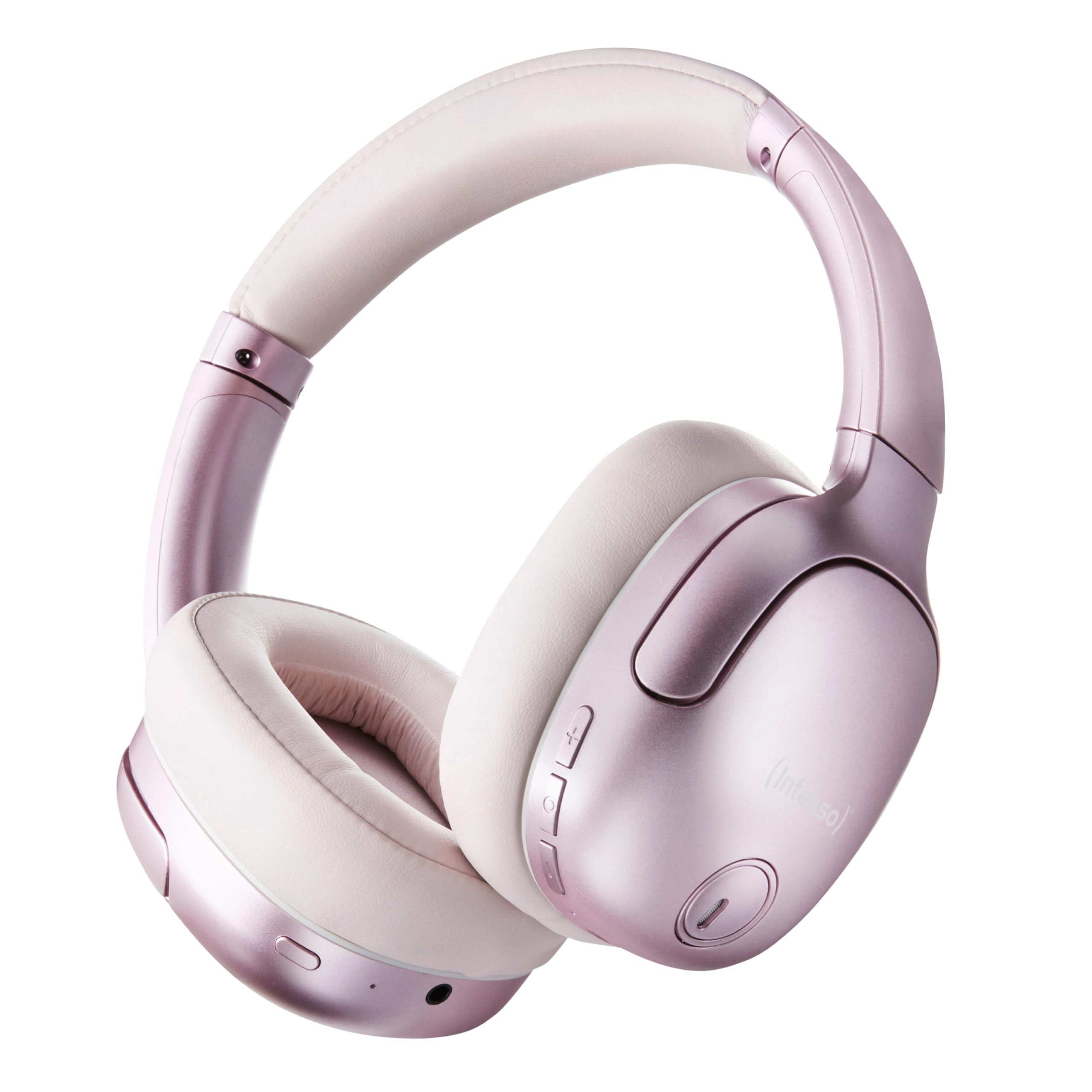
Image 1.1: Intenso O400HA Over-Ear Headphones (Pink)
The Intenso O400HA headphones feature a comfortable over-ear design with soft ear pads, an adjustable headband, and intuitive controls on the earcups.
2. પેકેજ સામગ્રી
કૃપા કરીને નીચેની વસ્તુઓ માટે પેકેજ તપાસો:
- Intenso O400HA Over-Ear Headphones
- યુએસબી-સી થી યુએસબી-સી ચાર્જિંગ કેબલ
- 1.5m Audio Cable (3.5mm jack)
- વપરાશકર્તા માર્ગદર્શિકા
3. ઉત્પાદન ઓવરview
Familiarize yourself with the various parts and controls of your Intenso O400HA headphones.

છબી ૪.૧: બાજુ view of Intenso O400HA headphones with controls
This image displays the right earcup with its control buttons and ports. These typically include power, volume, multi-function buttons, and a charging port.
નિયંત્રણો અને બંદરો:
- પાવર બટન: Used to turn the headphones on/off and initiate Bluetooth pairing.
- વોલ્યુમ વધારો/આગલો ટ્રેક બટન: Increases volume with a short press, skips to the next track with a long press.
- વોલ્યુમ ડાઉન/પાછલું ટ્રેક બટન: Decreases volume with a short press, goes to the previous track with a long press.
- મલ્ટી-ફંક્શન બટન (MFB): Controls playback (play/pause), answers/ends calls, activates voice assistant.
- ANC/Transparency Mode Button: Toggles between Hybrid Active Noise Cancelling, Transparency Mode, and normal mode.
- યુએસબી-સી ચાર્જિંગ પોર્ટ: હેડફોન ચાર્જ કરવા માટે.
- 3.5mm ઓડિયો જેક: વાયર્ડ કનેક્શન માટે.
- માઇક્રોફોન્સ: Internal and external microphones for ANC and calls.
4. સેટઅપ
4.1. હેડફોન ચાર્જ કરવા
પ્રથમ ઉપયોગ કરતા પહેલા, તમારા હેડફોનને સંપૂર્ણપણે ચાર્જ કરો.
- Connect the supplied USB-C charging cable to the USB-C port on the headphones.
- કેબલના બીજા છેડાને USB પાવર એડેપ્ટર (શામેલ નથી) અથવા કમ્પ્યુટરના USB પોર્ટ સાથે કનેક્ટ કરો.
- The LED indicator will show the charging status. It typically turns off or changes color when fully charged.
A full charge takes approximately 2 hours. A quick charge of 15 minutes provides up to 6 hours of playtime.
4.2. બ્લૂટૂથ જોડી
તમારા હેડફોનને બ્લૂટૂથ-સક્ષમ ઉપકરણ સાથે કનેક્ટ કરવા માટે:
- ખાતરી કરો કે હેડફોન બંધ છે.
- પાવર બટનને લગભગ 5-7 સેકન્ડ સુધી દબાવી રાખો જ્યાં સુધી LED સૂચક વાદળી અને લાલ રંગમાં ચમકતો નથી, જે પેરિંગ મોડ સૂચવે છે.
- તમારા ઉપકરણ (સ્માર્ટફોન, ટેબ્લેટ, લેપટોપ) પર, બ્લૂટૂથ સેટિંગ્સ પર જાઓ અને બ્લૂટૂથ સક્ષમ કરો.
- માટે શોધો available devices and select "Intenso O400HA" from the list.
- Once connected, the LED indicator will typically flash blue slowly or remain solid blue.
જ્યારે ચાલુ થશે ત્યારે હેડફોન આપમેળે છેલ્લા જોડીવાળા ઉપકરણ સાથે ફરીથી કનેક્ટ થવાનો પ્રયાસ કરશે.
૫. હેડફોન ચલાવવું
5.1. પાવર ચાલુ/બંધ
- પાવર ચાલુ: પાવર બટનને 2-3 સેકન્ડ માટે દબાવી રાખો.
- પાવર બંધ: પાવર બટનને 3-4 સેકન્ડ માટે દબાવી રાખો.
5.2. Audio Modes: ANC, Transparency, Music
The Intenso O400HA headphones offer three distinct audio modes to suit your environment.

છબી 5.1: ઓવરview of Noise Control Modes
This image illustrates the key noise control technologies: Hybrid Active Noise Cancellation (ANC) for reducing ambient noise, Environmental Noise Cancellation (ENC) for clear calls, and Transparency Mode for hearing your surroundings.

Image 5.2: Hybrid Active Noise Cancelling Explained
This diagram shows how Hybrid ANC works using both external and internal microphones to filter out up to 95% of ambient noise, such as engine sounds.
- હાઇબ્રિડ એક્ટિવ નોઇઝ કેન્સલિંગ (ANC): Press the ANC/Transparency Mode button to activate. This mode significantly reduces ambient noise, ideal for travel or noisy environments.
- પારદર્શિતા મોડ: Press the ANC/Transparency Mode button again to switch to Transparency Mode. This allows external sounds to pass through, enabling you to hear your surroundings without removing the headphones.
- Normal Mode (Music Mode): Press the ANC/Transparency Mode button a third time to return to normal mode, where ANC and Transparency are off. This mode provides balanced sound for a comprehensive listening experience.
૩. સંગીત પ્લેબેક અને કોલ્સ
- ચલાવો/થોભો: Short press the Multi-function Button (MFB).
- આગળનો ટ્રેક: વોલ્યુમ અપ બટનને લાંબા સમય સુધી દબાવી રાખો.
- પાછલો ટ્રેક: વોલ્યુમ ડાઉન બટનને લાંબા સમય સુધી દબાવી રાખો.
- અવાજ વધારો: વોલ્યુમ અપ બટનને ટૂંકું દબાવો.
- અવાજ ધીમો: વોલ્યુમ ડાઉન બટનને ટૂંકું દબાવો.
- જવાબ/કૉલ સમાપ્ત કરો: MFB ને શોર્ટ પ્રેસ કરો.
- કૉલ નકારો: MFB ને લાંબા સમય સુધી દબાવો.
- વ Voiceઇસ સહાયકને સક્રિય કરો: MFB ને બે વાર દબાવો.
5.4. Wired Connection (Passive Mode)
You can use the headphones in passive mode even if the battery is depleted or if you prefer a wired connection.
- ૩.૫ મીમી ઓડિયો કેબલના એક છેડાને હેડફોન પરના ઓડિયો જેક સાથે જોડો.
- બીજા છેડાને તમારા ઉપકરણના 3.5mm ઓડિયો આઉટપુટ સાથે કનેક્ટ કરો.
Note: ANC and Transparency modes may not function or may have reduced performance when using the wired connection without power.
6. જાળવણી
To ensure the longevity and optimal performance of your Intenso O400HA headphones, follow these maintenance guidelines:
- સફાઈ: Use a soft, dry cloth to clean the headphones. Do not use abrasive cleaners, solvents, or harsh chemicals.
- સંગ્રહ: Store the headphones in a cool, dry place away from direct sunlight and extreme temperatures. When not in use, it is recommended to store them in a protective case (if provided or purchased separately).
- પાણીનો સંપર્ક: These headphones are not waterproof. Avoid exposure to water, moisture, or rain.
- બેટરી સંભાળ: For optimal battery life, avoid fully discharging the battery frequently. Charge the headphones regularly, even if not used for extended periods.
- કેબલ કેર: Handle the charging and audio cables gently. Avoid bending or twisting them excessively.
7. મુશ્કેલીનિવારણ
If you encounter any issues with your headphones, refer to the following common problems and solutions:
| સમસ્યા | સંભવિત કારણ | ઉકેલ |
|---|---|---|
| હેડફોન ચાલુ થતા નથી | ઓછી બેટરી | હેડફોનને સંપૂર્ણ રીતે ચાર્જ કરો. |
| બ્લૂટૂથ દ્વારા જોડી બનાવી શકાતી નથી | Headphones not in pairing mode; Device Bluetooth off; Interference | Ensure headphones are in pairing mode (flashing blue/red). Turn Bluetooth on your device. Move closer to the device. Forget previous pairings and try again. |
| અવાજ અથવા નીચો અવાજ નથી | Volume too low; Incorrect audio source; Loose cable (wired mode) | Increase volume on headphones and device. Check if the correct audio output is selected on your device. Ensure 3.5mm cable is securely connected. |
| ANC અસરકારક નથી | ANC not activated; Improper fit | સક્રિય કરવા માટે ANC બટન દબાવો. તમારા કાન પર આરામદાયક ફિટ માટે હેડફોન ગોઠવો. |
| ધ્વનિ વિકૃતિ | Distance from device; Interference; Low battery | Move closer to your device. Avoid strong electromagnetic fields. Charge the headphones. |
8. સ્પષ્ટીકરણો
| લક્ષણ | વિગત |
|---|---|
| મોડેલનું નામ | Over-Ear O400HA |
| કનેક્ટિવિટી ટેકનોલોજી | Wireless (Bluetooth 5.3) / Wired (3.5mm jack) |
| અવાજ નિયંત્રણ | હાઇબ્રિડ અવાજ રદ |
| બેટરી જીવન | 75 કલાક સુધી |
| ચાર્જિંગ સમય | Approximately 2 Hours (15 min for 6 hours playtime) |
| વાયરલેસ રેંજ | 15 મીટર સુધી |
| આવર્તન પ્રતિભાવ | 20 Hz થી 20 KHz |
| અવબાધ | 32 ઓહ્મ |
| નિયંત્રણ પદ્ધતિ | Touch/Buttons |
| વજન | 0.25 કિલોગ્રામ |
| સામગ્રી | થર્મોપ્લાસ્ટિક ઇલાસ્ટોમર (TPE) |
| સુસંગત ઉપકરણો | Mobile phones, Laptops, Tablets, Gaming Consoles, Car Audio Systems |
9. વોરંટી અને સપોર્ટ
Intenso products are designed for reliability and performance. For warranty information and customer support, please refer to the warranty card included with your purchase or visit the official Intenso webસાઇટ. કોઈપણ વોરંટી દાવા માટે તમારી ખરીદીનો પુરાવો રાખો.
For further assistance, you may contact Intenso customer service through their official channels.


