
1. પરિચય
This manual provides essential instructions for the safe and efficient operation of your Jectse 5G Portable Wi-Fi Hotspot, Model Jectsekwnbat6q37. Please read this manual thoroughly before using the device and retain it for future reference.
2. પેકેજ સામગ્રી
ખાતરી કરો કે બધી વસ્તુઓ તમારા પેકેજમાં હાજર છે:
- Jectse 5G Portable Wi-Fi Hotspot (Model Jectsekwnbat6q37)
- USB-C ચાર્જિંગ કેબલ
- વપરાશકર્તા માર્ગદર્શિકા (આ દસ્તાવેજ)
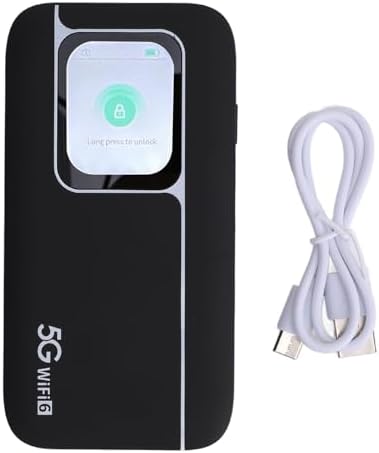
Image: The Jectse 5G Portable Wi-Fi Hotspot shown next to its included USB-C charging cable.
3. ઉપકરણ ઓવરview
Familiarize yourself with the physical components of your hotspot.
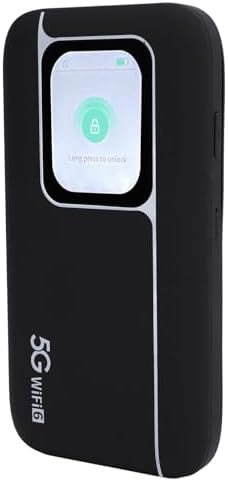
છબી: આગળ view of the Jectse 5G Portable Wi-Fi Hotspot, showcasing its display screen with a lock icon and "Long press to unlock" message.
- ડિસ્પ્લે સ્ક્રીન: Shows network status, signal strength, battery level, and data usage.
- પાવર બટન: Used to turn the device on/off and wake/sleep the screen.
- યુએસબી-સી પોર્ટ: ઉપકરણ ચાર્જ કરવા માટે.
- સિમ કાર્ડ સ્લોટ: Located on the side or back, for inserting your 5G/4G/3G SIM card.
- એલઇડી સૂચકાંકો: Provide quick visual cues for device status (e.g., signal, battery).
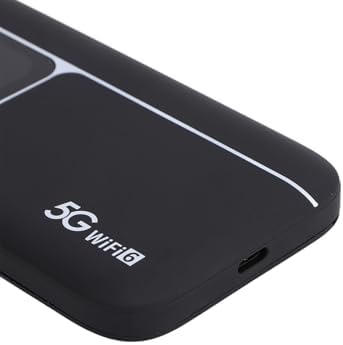
છબી: ક્લોઝ-અપ view of the USB-C charging port located on the side of the Jectse 5G Portable Wi-Fi Hotspot.
4. સેટઅપ
- સિમ કાર્ડ દાખલ કરો:
Locate the SIM card slot. Carefully insert your activated 5G/4G/3G SIM card into the slot until it clicks into place. Ensure the SIM card is correctly oriented.
- ઉપકરણ ચાર્જ કરો:
Connect the provided USB-C cable to the hotspot's charging port and the other end to a compatible USB power adapter (not included) or a computer's USB port. The device features a 7100mAh polymer battery. Allow the device to fully charge before first use.
- પાવર ચાલુ:
Press and hold the Power Button for a few seconds until the display screen illuminates. The device will begin to boot up and connect to the cellular network.
- પ્રારંભિક Wi-Fi કનેક્શન:
Once powered on, the device's display will show the default Wi-Fi Network Name (SSID) and Password (Wi-Fi Key). You can also find this information on the back of the device.
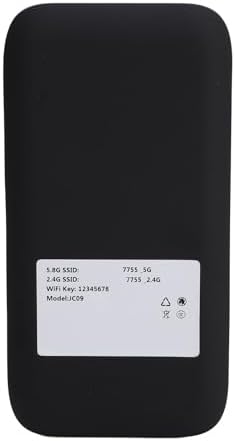
Image: The back panel of the Jectse 5G Portable Wi-Fi Hotspot, displaying the default 5.8G SSID, 2.4G SSID, and Wi-Fi Key.
On your computer, smartphone, or other Wi-Fi enabled device, search for available Wi-Fi networks. Select the SSID matching your hotspot and enter the Wi-Fi Key to connect.
5. ઓપરેટિંગ સૂચનાઓ
- બહુવિધ ઉપકરણોને કનેક્ટ કરી રહ્યાં છે:
The hotspot supports connecting up to 16 devices simultaneously. It operates on dual bands (2.4GHz and 5.8GHz) with WiFi6 (802.11 a/b/g/n/ac/ax) for optimized performance across various devices.

Image: An illustration depicting the Jectse 5G Portable Wi-Fi Hotspot providing high-speed internet to several users with laptops, tablets, and smartphones.
- ઉપકરણ સ્થિતિનું નિરીક્ષણ:
The display screen and LED lights provide real-time information on signal strength, battery level, and data usage. Refer to the screen for detailed status updates.
- Network Frequency Support:
The device supports a broad range of network frequencies, including 5G NR, 4G, and 3G, ensuring connectivity in various locations. The built-in 1T4R 5G antenna enhances signal reception.
- Hot Swappable SIM:
The device supports hot-swapping of SIM cards, allowing you to change SIM cards without powering down the device, though a brief network re-connection period may occur.
6. જાળવણી
- બેટરી સંભાળ: To prolong battery life, avoid exposing the device to extreme temperatures. Charge the 7100mAh battery regularly and avoid complete discharge.
- સફાઈ: The device features an IP67 reinforced design, offering protection against dust and water. To clean, gently wipe the exterior with a soft, dry cloth. Do not use harsh chemicals or abrasive materials.
- સંગ્રહ: જ્યારે લાંબા સમય સુધી ઉપયોગમાં ન હોય, ત્યારે ઉપકરણને ઠંડી, સૂકી જગ્યાએ સંગ્રહિત કરો.
7. મુશ્કેલીનિવારણ
If you encounter issues with your Jectse 5G Portable Wi-Fi Hotspot, refer to the following common solutions:
| સમસ્યા | સંભવિત કારણ | ઉકેલ |
|---|---|---|
| નેટવર્ક સિગ્નલ નથી | SIM card not inserted correctly, no cellular coverage, or SIM not activated. | Reinsert SIM card, move to an area with better coverage, or contact your service provider to activate SIM. |
| Wi-Fi થી કનેક્ટ કરી શકાતું નથી | Incorrect Wi-Fi password, device too far from hotspot, or hotspot is off. | Verify password, move closer to the hotspot, ensure hotspot is powered on. |
| ધીમી ઇન્ટરનેટ ગતિ | નબળું સિગ્નલ, ઘણા બધા કનેક્ટેડ ડિવાઇસ, અથવા નેટવર્ક ભીડ. | Check signal strength on the display, reduce number of connected devices, or try connecting in a less congested area. |
| ઉપકરણ પાવર ચાલુ નથી | ઓછી બેટરી અથવા ઉપકરણમાં ખામી. | Charge the device for at least 30 minutes. If issue persists, contact support. |
જો આ ઉકેલો અજમાવવા પછી પણ સમસ્યા ચાલુ રહે, તો કૃપા કરીને ગ્રાહક સપોર્ટનો સંપર્ક કરો.
8. સ્પષ્ટીકરણો
| લક્ષણ | વિગત |
|---|---|
| મોડેલનું નામ | Jectsekwnbat6q37 |
| બ્રાન્ડ | જેક્ટ્સે |
| કનેક્ટિવિટી ટેકનોલોજી | 5G |
| વાયરલેસ કમ્યુનિકેશન માનક | ૮૦૨.૧૧ax (વાઇફાઇ૭) |
| આવર્તન બેન્ડ વર્ગ | ડ્યુઅલ-બેન્ડ (2.4GHz અને 5.8GHz) |
| Data Transfer Rate (Download) | 2.77 Gbps સુધી |
| Data Transfer Rate (Upload) | 1.25 Gbps સુધી |
| બેટરી ક્ષમતા | 7100mAh પોલિમર બેટરી |
| એન્ટેના | 1T4R 5G Antenna |
| કઠોર ડિઝાઇન | IP67 (Protection against drops, dust, and water) |
| મહત્તમ કનેક્ટેડ ડિવાઇસ | 16 |
| ઓપરેટિંગ સિસ્ટમ | ઝાયનોસ |
| પેકેજ પરિમાણો | 17 x 10 x 4 સેમી |
| વસ્તુનું વજન | 280 ગ્રામ |
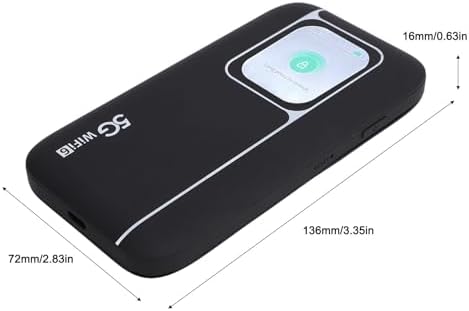
Image: A visual representation of the Jectse 5G Portable Wi-Fi Hotspot's dimensions, showing its length (136mm/3.35in), width (72mm/2.83in), and thickness (16mm/0.63in).
9. વોરંટી અને સપોર્ટ
Jectse products are designed for reliability and performance. For warranty information, please refer to the warranty card included with your purchase or visit the official Jectse webસાઇટ
For technical support, troubleshooting assistance, or service inquiries, please contact Jectse customer support through the contact information provided on the official webસાઇટ અથવા તમારા ખરીદી દસ્તાવેજો.
Please have your model number (Jectsekwnbat6q37) and purchase details ready when contacting support.