
1. પરિચય
Welcome to the user manual for your new XIAOMI Redmi Note 14 Pro+ 5G Smartphone. This guide provides essential information on setting up, operating, and maintaining your device. Please read it carefully to ensure optimal performance and longevity of your smartphone.
2. પેકેજ સામગ્રી
ચકાસો કે તમારા પેકેજમાં નીચેની વસ્તુઓ છે:
- XIAOMI Redmi Note 14 Pro+ 5G Smartphone
- યુએસબી કેબલ
- ઝડપી શરૂઆત માર્ગદર્શિકા (પ્રદેશ પ્રમાણે બદલાઈ શકે છે)
- SIM Eject Tool (may vary by region)
Note: A charger is not included in the package. Please use a compatible 120W HyperCharge adapter for optimal charging.
3. ઉપકરણ ઓવરview
Familiarize yourself with the physical components of your Redmi Note 14 Pro+ 5G.
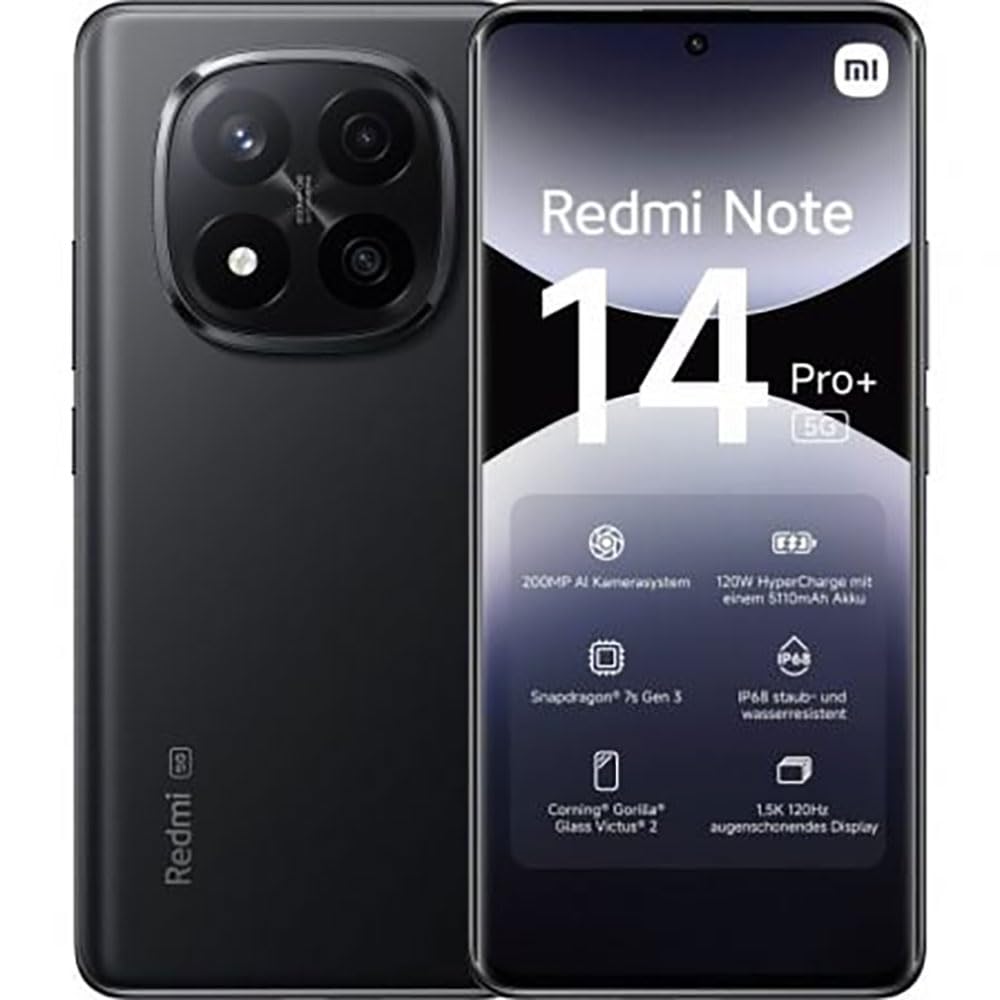
The image displays the front and back of the XIAOMI Redmi Note 14 Pro+ 5G smartphone. The front shows the display with 'Redmi Note 14 Pro+ 5G', '200 Megapixels', and '256 GB' text. The back features a prominent camera module with multiple lenses and the 'Redmi 5G' branding.
મુખ્ય ઘટકો:
- ફ્રન્ટ ડિસ્પ્લે: 6.67-inch 1.5K 120Hz AMOLED display with Corning Gorilla Glass Victus 2.
- રીઅર કેમેરા મોડ્યુલ: Houses the 200MP Pro-Grade AI Camera system.
- પાવર બટન: Located on the side, used to power on/off and wake/sleep the device.
- વોલ્યુમ બટનો: બાજુ પર સ્થિત, મીડિયા અને કૉલ વોલ્યુમને સમાયોજિત કરવા માટે વપરાય છે.
- યુએસબી ટાઇપ-સી પોર્ટ: ચાર્જિંગ અને ડેટા ટ્રાન્સફર માટે.
- સિમ કાર્ડ સ્લોટ: Supports Dual SIM Nano SIM cards.
- સ્પીકર્સ: ઓડિયો આઉટપુટ માટે સ્ટીરિયો સ્પીકર્સ.
4. સેટઅપ
4.1. સિમ કાર્ડ દાખલ કરવું
- તમારા ઉપકરણની બાજુમાં સિમ કાર્ડ ટ્રે શોધો.
- ટ્રેની બાજુમાં આવેલા નાના છિદ્રમાં સિમ ઇજેક્ટ ટૂલ દાખલ કરો અને ટ્રે બહાર ન આવે ત્યાં સુધી મજબૂત રીતે દબાવો.
- Place your Nano SIM card(s) into the tray with the gold contacts facing down. Ensure proper orientation.
- ટ્રેને ધીમેથી સ્લોટમાં પાછી ધકેલી દો જ્યાં સુધી તે જગ્યાએ ક્લિક ન થાય.
4.2. તમારા ઉપકરણને ચાલુ કરો
દબાવો અને પકડી રાખો પાવર બટન on the side of the phone until the XIAOMI logo appears on the screen. Follow the on-screen instructions to complete the initial setup, including connecting to Wi-Fi, setting up your Google account, and configuring security features like fingerprint recognition.
૪. પ્રારંભિક ચાર્જ
It is recommended to fully charge your device before first use. Connect the USB Type-C cable to the phone and a compatible 120W HyperCharge adapter (not included) to a power outlet.
5. તમારા સ્માર્ટફોનનું સંચાલન
5.1. મૂળભૂત નેવિગેશન
- ટચ સ્ક્રીન: પસંદ કરવા માટે ટેપ કરો, સ્ક્રોલ કરવા માટે સ્વાઇપ કરો, ઝૂમ કરવા માટે પિંચ કરો.
- હોમ સ્ક્રીન: એપ્લિકેશનો અને વિજેટ્સ માટે તમારું કેન્દ્રિય કેન્દ્ર.
- સૂચના પેનલ: સૂચનાઓ અને ઝડપી સેટિંગ્સને ઍક્સેસ કરવા માટે સ્ક્રીનની ટોચ પરથી નીચે સ્વાઇપ કરો.
- એપ ડ્રોઅર: સ્ક્રીનની નીચેથી ઉપર સ્વાઇપ કરો (અથવા એપ્લિકેશન ડ્રોઅર આઇકન પર ટેપ કરો) view બધી ઇન્સ્ટોલ કરેલી એપ્લિકેશનો.
5.2. પાવર ચાલુ/બંધ કરો અને પુનઃપ્રારંભ કરો
- થી પાવર બંધ: Press and hold the Power Button until the power menu appears, then select "Power off."
- થી પુનઃપ્રારંભ કરો: Press and hold the Power Button until the power menu appears, then select "Restart."
5.3. સુરક્ષા સુવિધાઓ
Your device supports various security options:
- ફિંગરપ્રિન્ટ ઓળખ: ઝડપી અને સુરક્ષિત અનલોકિંગ માટે તમારા ફિંગરપ્રિન્ટ્સ રજીસ્ટર કરો.
- ફેસ અનલોક: Use your face to unlock the device.
- પિન/પેટર્ન/પાસવર્ડ: Standard security methods.
Access these settings via સેટિંગ્સ > સુરક્ષા અને ગોપનીયતા.
6. કેમેરા સુવિધાઓ
The Redmi Note 14 Pro+ 5G features a powerful 200MP Pro-Grade AI Camera system designed to enhance your photography experience.
- ૫૦ મેગાપિક્સલ મુખ્ય કેમેરા: Capture highly detailed images with optical image stabilization (OIS).
- Multiple Camera Modes: Includes automatic, scene, portrait, and manual modes for versatile shooting.
- Dual LED Flash: Provides enhanced lighting in low-light conditions.
- ફ્રન્ટ કેમેરા: A 20MP front sensor for high-quality selfies and video calls.
- વિડિઓ રેકોર્ડિંગ: Supports up to 8K video capture at 120 fps.
૪.૩. AI સુવિધાઓ
Leverage the integrated AI functionalities for a smarter user experience:
- AI Erase Pro: Intelligently remove unwanted objects or people from your photos.
- AI Image Expansion: Expand the boundaries of your images using AI.
- AI Notes: Smart note-taking capabilities.
- AI સબટાઈટલ: Generate subtitles for videos or audio in real-time.
- AI Recorder: Enhanced voice recording with AI features.
- AI ઇન્ટરપ્રીટર: Real-time language translation.
- Gemini: Integrated AI assistant.
- Circle to Search by Google: તમારી સ્ક્રીન પરની વસ્તુઓને વર્તુળ કરીને માહિતી માટે ઝડપથી શોધ કરો.
8. ચાર્જિંગ
Your Redmi Note 14 Pro+ 5G supports 120W HyperCharge technology for rapid charging.
- બેટરી ક્ષમતા: 5110mAh Lithium-polymer battery.
- ચાર્જિંગ: Use the provided USB Type-C cable with a compatible 120W power adapter (sold separately) for optimal charging speeds.
- બેટરી જીવન: Expect up to 20 hours of talk time. Actual battery life may vary based on usage.
Always use certified charging accessories to prevent damage to your device.
9. જાળવણી
૪.૩. પાણી અને ધૂળ પ્રતિકાર
આ ઉપકરણમાં એક IP68 રેટિંગ for dust and water resistance. This means it is protected against dust ingress and can withstand immersion in water up to 1.5 meters for 30 minutes. However, this resistance is not permanent and may decrease over time with normal wear. Avoid exposing the device to hot water, saltwater, or other liquids.
9.2. તમારા ઉપકરણને સાફ કરવું
- સ્ક્રીન અને બોડી સાફ કરવા માટે નરમ, લિન્ટ-ફ્રી કાપડનો ઉપયોગ કરો.
- ઘર્ષક ક્લીનર્સ, સોલવન્ટ્સ અથવા એરોસોલ સ્પ્રેનો ઉપયોગ કરવાનું ટાળો.
- If the device gets wet, wipe it thoroughly with a clean, dry cloth before charging or using ports.
9.3. સોફ્ટવેર અપડેટ્સ
તમારા ઉપકરણમાં નવીનતમ સુવિધાઓ, સુરક્ષા પેચ અને પ્રદર્શન સુધારણા છે તેની ખાતરી કરવા માટે નિયમિતપણે સોફ્ટવેર અપડેટ્સ તપાસો અને ઇન્સ્ટોલ કરો. પર જાઓ સેટિંગ્સ > ફોન વિશે > MIUI વર્ઝન અપડેટ્સ તપાસવા માટે.
10. મુશ્કેલીનિવારણ
જો તમને તમારા ઉપકરણમાં સમસ્યાઓ આવે, તો નીચેના સામાન્ય ઉકેલો અજમાવી જુઓ:
- ઉપકરણ ચાલુ નથી: ખાતરી કરો કે બેટરી ચાર્જ થઈ ગઈ છે. ઓછામાં ઓછા 15 મિનિટ માટે ચાર્જર સાથે કનેક્ટ કરો, પછી પાવર ચાલુ કરવાનો પ્રયાસ કરો.
- એપ્સ ક્રેશ થઈ રહી છે અથવા ફ્રીઝ થઈ રહી છે: સમસ્યારૂપ એપ્લિકેશન બંધ કરો અને તેને ફરીથી ખોલો. જો સમસ્યા ચાલુ રહે, તો તમારા ફોનને ફરીથી શરૂ કરો.
- નબળું નેટવર્ક કનેક્શન: Check your SIM card is correctly inserted. Try toggling Airplane Mode on and off. If the issue persists, contact your network provider.
- બેટરી ઝડપથી નીકળી જાય છે: સ્ક્રીનની બ્રાઇટનેસ ઓછી કરો, ન વપરાયેલી એપ્સ બંધ કરો અને ઉપયોગમાં ન હોય ત્યારે GPS અથવા બ્લૂટૂથ જેવી બિનજરૂરી સુવિધાઓને અક્ષમ કરો.
- સ્ક્રીન પ્રતિભાવવિહીન: Force restart your device by holding the Power Button for approximately 10-15 seconds.
વધુ જટિલ સમસ્યાઓ માટે, સત્તાવાર XIAOMI સપોર્ટનો સંદર્ભ લો. webસાઇટ અથવા ગ્રાહક સેવાનો સંપર્ક કરો.
11. સ્પષ્ટીકરણો
| લક્ષણ | સ્પષ્ટીકરણ |
|---|---|
| બ્રાન્ડ | XIAOMI |
| મોડેલનું નામ | Redmi Note 14 Pro+ 5G |
| ઓપરેટિંગ સિસ્ટમ | એન્ડ્રોઇડ 14 |
| CPU મોડલ | સ્નેપડ્રેગન 7 જનરલ 3 |
| રેમ | 8 જીબી |
| સંગ્રહ ક્ષમતા | 256 જીબી |
| સ્ક્રીન માપ | 6.67 ઇંચ |
| ડિસ્પ્લે રિઝોલ્યુશન | 2712 x 1220 પિક્સેલ્સ |
| તાજું દર | 120 હર્ટ્ઝ |
| રીઅર કેમેરા રિઝોલ્યુશન | 200 Megapixels (with OIS) |
| ફ્રન્ટ કેમેરા રિઝોલ્યુશન | 20 મેગાપિક્સેલ |
| બેટરી ક્ષમતા | 5110 એમએએચ |
| ચાર્જિંગ ટેકનોલોજી | ૧૨૦ વોટ હાઇપરચાર્જ |
| પાણી પ્રતિકાર | IP68 |
| સેલ્યુલર ટેકનોલોજી | 5G |
| સિમ કાર્ડનો પ્રકાર | Nano SIM (Dual SIM) |
| કનેક્ટિવિટી | યુએસબી ટાઇપ-સી |
12. વોરંટી અને સપોર્ટ
૯.૧. ઉત્પાદકની વોરંટી
Your XIAOMI Redmi Note 14 Pro+ 5G Smartphone comes with a ૧ વર્ષની ઉત્પાદકની વોરંટી. આ વોરંટી સામાન્ય ઉપયોગ હેઠળ સામગ્રી અને કારીગરીમાં ખામીઓને આવરી લે છે. વોરંટી દાવાઓ માટે કૃપા કરીને ખરીદીનો પુરાવો રાખો.
The warranty does not cover damage caused by accidents, misuse, unauthorized modifications, or normal wear and tear.
12.2. ગ્રાહક આધાર
For technical assistance, warranty claims, or further information, please visit the official XIAOMI support website or contact their customer service department. Contact details can typically be found on the XIAOMI webસાઇટ પર અથવા તમારા ઉત્પાદન સાથે સમાવિષ્ટ વોરંટી કાર્ડમાં.