
1. પરિચય
This manual provides essential information for the safe and effective operation of your Twotrees 800W 30000RPM Wood Router. Please read all instructions carefully before use to ensure proper setup, operation, and maintenance. Retain this manual for future reference.
2. સલામતી સૂચનાઓ
Always prioritize safety when operating power tools. Failure to follow these instructions may result in electric shock, fire, or serious injury.
- કાર્ય ક્ષેત્રની સલામતી: તમારા કાર્યક્ષેત્રને સ્વચ્છ અને સારી રીતે પ્રકાશિત રાખો. અવ્યવસ્થિત અથવા અંધારાવાળા વિસ્તારો અકસ્માતોને આમંત્રણ આપે છે. વિસ્ફોટક વાતાવરણમાં, જેમ કે જ્વલનશીલ પ્રવાહી, વાયુઓ અથવા ધૂળની હાજરીમાં, પાવર ટૂલ્સનો ઉપયોગ કરશો નહીં.
- ઇલેક્ટ્રિકલ સલામતી: પાવર ટૂલ પ્લગ આઉટલેટ સાથે મેળ ખાતા હોવા જોઈએ. પ્લગમાં ક્યારેય કોઈ ફેરફાર કરશો નહીં. માટીવાળી અથવા જમીનવાળી સપાટીઓ સાથે શરીરના સંપર્કને ટાળો.
- વ્યક્તિગત સલામતી: હંમેશા આંખનું રક્ષણ, શ્રવણ રક્ષણ અને ધૂળનું માસ્ક પહેરો. યોગ્ય રીતે પોશાક પહેરો; છૂટા કપડાં કે ઘરેણાં ટાળો. લાંબા વાળ રાખો.
- સાધનનો ઉપયોગ અને સંભાળ: પાવર ટૂલને દબાણ કરશો નહીં. તમારા ઉપયોગ માટે યોગ્ય પાવર ટૂલનો ઉપયોગ કરો. કોઈપણ ગોઠવણ કરતા પહેલા, એસેસરીઝ બદલતા પહેલા અથવા પાવર ટૂલ્સ સ્ટોર કરતા પહેલા પાવર સ્રોતથી પ્લગને ડિસ્કનેક્ટ કરો.
- જાળવણી: પાવર સાધનો જાળવો. ફરતા ભાગોનું ખોટું ગોઠવણી અથવા બંધન, ભાગોનું તૂટવું અને પાવર ટૂલના સંચાલનને અસર કરી શકે તેવી અન્ય કોઈ સ્થિતિ તપાસો.
3. પેકેજ સામગ્રી
ખાતરી કરો કે નીચે સૂચિબદ્ધ બધી વસ્તુઓ તમારા પેકેજમાં શામેલ છે. જો કોઈ વસ્તુ ખૂટે છે અથવા ક્ષતિગ્રસ્ત છે, તો કૃપા કરીને ગ્રાહક સપોર્ટનો સંપર્ક કરો.

Image: The Twotrees Wood Router along with its accessories, including a product manual, wrenches, zip ties, and power supply, laid out on a surface.
- Twotrees 800W Wood Router
- ઉત્પાદન માર્ગદર્શિકા
- પાવર સપ્લાય યુનિટ
- Wrenches (various sizes)
- કેબલ મેનેજમેન્ટ માટે ઝિપ ટાઈઝ
- Mounting Brackets (for CNC integration)
- કનેક્શન કેબલ્સ
4. ઉત્પાદન સુવિધાઓ
The Twotrees Wood Router is designed for precision and durability in various woodworking and CNC applications.

Image: The wood router showing its thoughtful design, including an accurate depth scale and a multi-gear speed adjustment dial.
- હાઇ-પાવર મોટર: Equipped with an 800W motor, providing robust performance for various cutting tasks.
- એડજસ્ટેબલ સ્પીડ: Features a speed range of 10,000 to 30,000 RPM, allowing for precise control over different materials and applications.
- ટકાઉ બાંધકામ: Built with a heavy-duty aluminum motor housing for increased durability and resistance to drops.
- કાર્યક્ષમ ગરમીનું વિસર્જન: Designed with features for faster heat dissipation, contributing to greater tool longevity.
- બહુમુખી એપ્લિકેશન: Suitable for various professional engraving and woodworking tasks, especially when integrated with a CNC machine.

Image: An internal diagram illustrating the high-power motor, highlighting its 800W (±10%) output and speed range of 10,000-30,000 r/min.

છબી: વિગતવાર view of the router's spindle, emphasizing its operational speed range of 10,000-30,000 RPM for enhanced performance.
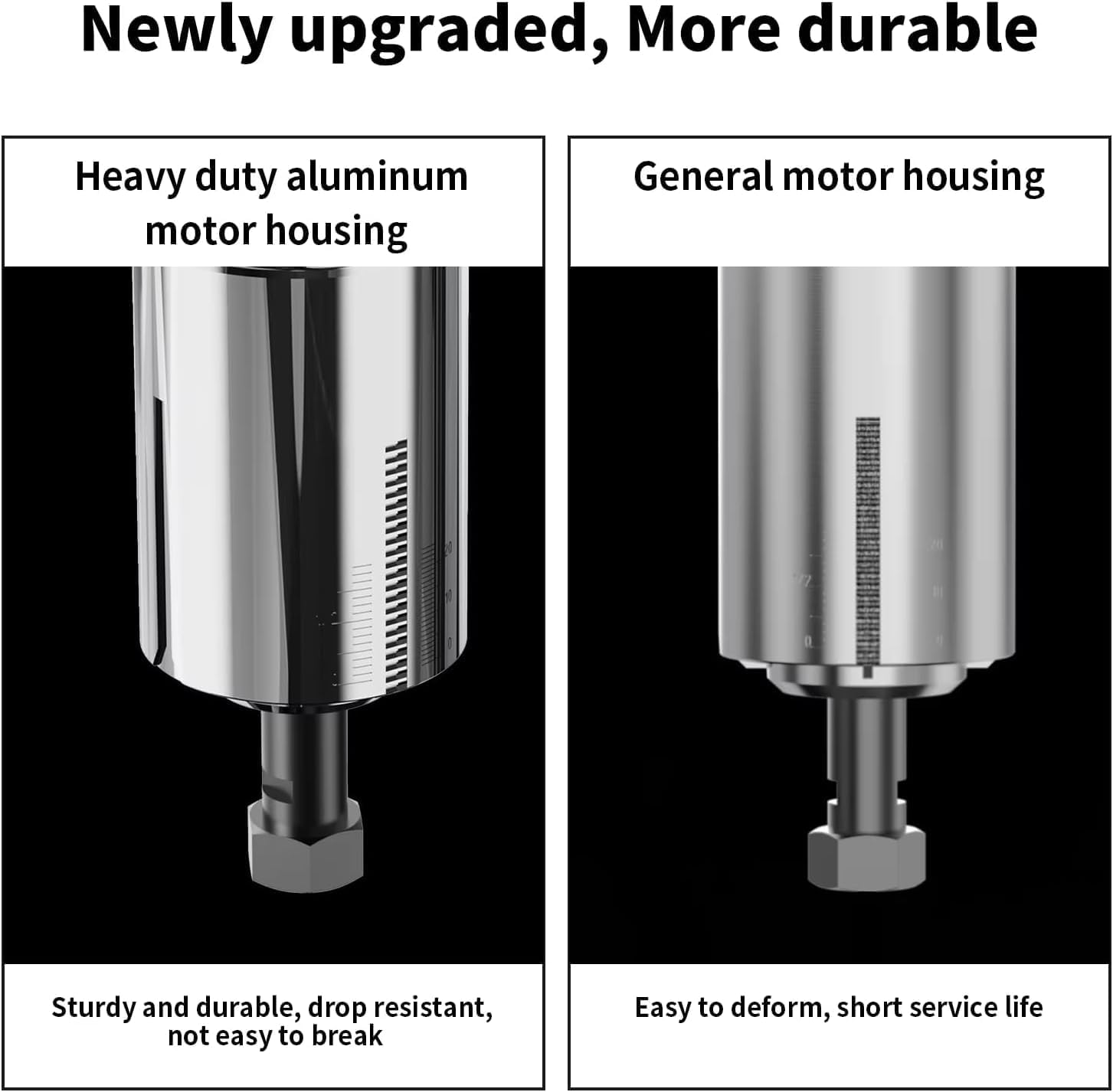
Image: A side-by-side comparison showing the robust heavy-duty aluminum motor housing on the left, contrasted with a general motor housing on the right, highlighting the improved durability.

Image: The wood router with an inset showing its ventilation design, indicating features for faster heat dissipation to enhance durability.

Image: The wood router actively mounted on a CNC machine, demonstrating its capability for professional engraving on a wooden workpiece.
5. સેટઅપ
This section details the steps for setting up your Twotrees Wood Router, particularly for integration with a CNC machine. Ensure the power is disconnected before beginning installation.
5.1 Mounting the Router to a CNC Machine
Follow these steps to securely mount the wood router onto your CNC machine's spindle holder.
- Remove any existing spindle or laser module from the CNC machine's Z-axis carriage. This typically involves unscrewing the mounting screws that secure the current tool.
- Attach the provided mounting plate to the Z-axis carriage using the appropriate screws and Allen wrench. Ensure it is firmly secured.
- Assemble the two halves of the router mounting bracket. Insert the screws into the designated holes and partially tighten them to allow for adjustment.
- Attach the assembled router mounting bracket to the mounting plate on the Z-axis carriage. Secure it with screws, but do not fully tighten yet.
- Carefully insert the Twotrees Wood Router into the opening of the mounting bracket. Ensure it slides in smoothly and is seated correctly.
- Adjust the router's position as needed, then fully tighten all screws on the mounting bracket to secure the router in place.
5.2 વિદ્યુત જોડાણો
Connect the router to its power supply and the CNC machine's control system.
- Connect the router's power cable to the power supply unit.
- Connect the power supply unit to a suitable electrical outlet.
- For CNC integration, connect the control cable from the router's power supply to the designated 'Rotary' port on your CNC machine's control board. Ensure the 24V ON/OFF switch on the CNC board is set correctly for rotary tool operation.
- Use the provided zip ties to manage and secure all cables, preventing them from interfering with the CNC machine's movement.
6. ઓપરેટિંગ સૂચનાઓ
Once the router is properly installed, follow these guidelines for operation.
૩.૨ રાઉટર બિટ્સ ઇન્સ્ટોલ કરવા
- ખાતરી કરો કે રાઉટર પાવર સ્ત્રોતમાંથી અનપ્લગ થયેલ છે.
- Use the provided wrenches to loosen the collet nut.
- Insert the desired 1/4'' router bit into the collet, ensuring it is fully seated but not bottomed out.
- Tighten the collet nut firmly with the wrenches. Do not overtighten.
૫.૨ ગતિ ગોઠવણ
The router features a multi-gear speed adjustment dial.
- Locate the speed adjustment dial on the top of the router.
- Turn the dial to select the appropriate speed setting (1-6) for your material and router bit. Lower speeds are generally for harder materials or larger bits, while higher speeds are for softer materials or smaller bits.
6.3 Operating the Router
- ખાતરી કરો કે વર્કપીસ સુરક્ષિત રીતે cl છેamped to the CNC bed.
- રાઉટરને પાવર સ્ત્રોત સાથે કનેક્ટ કરો.
- Turn on the router using the power switch.
- Initiate the CNC program or manually control the router for your desired operation.
- Always observe the cutting process and adjust parameters as needed.
- After use, turn off the router and disconnect it from the power source.
7. જાળવણી
નિયમિત જાળવણી તમારા રાઉટરની ટકાઉપણું અને શ્રેષ્ઠ કામગીરી સુનિશ્ચિત કરે છે.
- સફાઈ: After each use, disconnect the power and clean the router body and collet area with a soft brush or compressed air to remove dust and debris. Do not use solvents that could damage plastic parts.
- બીટ નિરીક્ષણ: Regularly inspect router bits for sharpness and damage. Dull or damaged bits can cause poor cuts and put undue strain on the motor. Replace bits as necessary.
- કોલેટ કેર: Keep the collet and collet nut clean and free of debris to ensure proper bit gripping.
- સંગ્રહ: Store the router in a dry, clean place, away from direct sunlight and extreme temperatures.
8. મુશ્કેલીનિવારણ
સામાન્ય સમસ્યાઓ અને તેમના ઉકેલો માટે આ વિભાગનો સંદર્ભ લો.
| સમસ્યા | સંભવિત કારણ | ઉકેલ |
|---|---|---|
| Router does not turn on | No power supply; Power switch off; Loose connection | Check power outlet and connections; Ensure power switch is ON. |
| નબળી કટીંગ કામગીરી | Dull or damaged bit; Incorrect speed setting; Too fast feed rate | Replace bit; Adjust speed; Reduce feed rate. |
| અતિશય કંપન અથવા અવાજ | Loose bit; Damaged bit; Motor issue | Ensure bit is securely tightened; Replace bit; Contact support if motor issue persists. |
| Router overheating | Prolonged heavy use; Blocked ventilation | Allow router to cool down; Clear any obstructions from ventilation ports. |
9. સ્પષ્ટીકરણો
Key technical specifications for the Twotrees Wood Router.
| લક્ષણ | વિગત |
|---|---|
| બ્રાન્ડ | Twotrees |
| મોડલ | Twotrees Roteador |
| શક્તિ | 800W |
| નો-લોડ સ્પીડ | 10,000-30,000 RPM |
| કોલેટનું કદ | 1/4 ઇંચ (6.35 એમએમ) |
| ઇનપુટ વોલ્યુમtage | 110V (as per product title) |
| પરિમાણો (પેકેજિંગ) | 31 x 27 x 14 સેમી |
| વજન (પેકેજિંગ) | 3 કિલોગ્રામ |
| ASIN | B0DRK251TX |
10. વોરંટી અને સપોર્ટ
Specific warranty details are not provided in the available product data. For warranty information, technical support, or replacement parts, please contact Twotrees customer service directly through their official website or the retailer where the product was purchased. Always provide your product model and ASIN (B0DRK251TX) when seeking support.