
પરિચય
This manual provides essential information for the safe and effective use of your Minolta MNB5Z 56MP Dual Lens Point & Shoot Digital Camera. Please read this manual thoroughly before using the camera and keep it for future reference. The Minolta MNB5Z is designed to capture high-quality photos at 56MP and record videos in 5K Ultra HD, featuring a 5x optical zoom and a user-friendly 2.8-inch IPS touchscreen.
સલામતી માહિતી
- Do not expose the camera to water or moisture. This camera is not water resistant.
- કેમેરા પડતો મૂકવાનું કે તેને જોરદાર ફટકો મારવાનું ટાળો.
- Keep the camera away from direct sunlight, high temperatures, and dusty environments.
- ફક્ત ઉલ્લેખિત બેટરી અને એસેસરીઝનો ઉપયોગ કરો.
- કેમેરાને ડિસએસેમ્બલ કરવાનો કે તેમાં ફેરફાર કરવાનો પ્રયાસ કરશો નહીં. બધી સર્વિસિંગ લાયક કર્મચારીઓને સોંપો.
- બાળકોની પહોંચથી દૂર રાખો.
પેકેજ સામગ્રી
ખાતરી કરો કે બધી વસ્તુઓ તમારા પેકેજમાં હાજર છે:
- Minolta MNB5Z 56MP Digital Camera
- યુએસબી ચાર્જિંગ કેબલ
- રિચાર્જેબલ લિથિયમ-આયન બેટરી
- MicroSDHC Ultra 64GB Memory Card
- Flexible Vlogging Tripod
- મેમરી કાર્ડ વોલેટ
- USB Card Reader (SD/microSD)
- કેમેરા બેગ
- સફાઈ કીટ
- Corel Photo, Video, & Art Suite Deluxe Software (Download information may be included)
સેટઅપ
1. બેટરી ઇન્સ્ટોલેશન
- કેમેરાના તળિયે બેટરી કમ્પાર્ટમેન્ટ કવર શોધો.
- કમ્પાર્ટમેન્ટ ખોલવા માટે કવર લેચ સ્લાઇડ કરો.
- Insert the Lithium-Ion battery according to the polarity indicators (+/-).
- બેટરી કમ્પાર્ટમેન્ટ કવરને સુરક્ષિત રીતે બંધ કરો જ્યાં સુધી તે જગ્યાએ ક્લિક ન થાય.
2. મેમરી કાર્ડ ઇન્સ્ટોલેશન
The Minolta MNB5Z supports microSD and microSDHC cards up to 256GB.
- Open the battery compartment cover. The microSD card slot is usually located near the battery.
- Insert the microSD card with the gold contacts facing down, gently pushing until it clicks into place.
- કાઢવા માટે, કાર્ડ બહાર ન આવે ત્યાં સુધી તેને ફરીથી અંદર ધકેલી દો.
- બેટરી કમ્પાર્ટમેન્ટ કવર બંધ કરો.
3. બેટરી ચાર્જ કરી રહી છે
- Connect the small end of the USB charging cable to the camera's USB port.
- USB કેબલના બીજા છેડાને USB પાવર એડેપ્ટર (શામેલ નથી) અથવા કમ્પ્યુટરના USB પોર્ટ સાથે કનેક્ટ કરો.
- The charging indicator light (CHG) will illuminate during charging and turn off when fully charged.
4. પ્રારંભિક પાવર ચાલુ
- દબાવો અને પકડી રાખો ચાલુ/બંધ કેમેરાની ટોચ પર સ્થિત બટન.
- The camera will power on, and the display screen will activate.
- પ્રારંભિક સેટઅપ માટે કોઈપણ ઓન-સ્ક્રીન પ્રોમ્પ્ટ્સને અનુસરો, જેમ કે તારીખ અને સમય સેટ કરવો.
કેમેરાનું સંચાલન
1. Camera Layout and Controls
Familiarize yourself with the camera's buttons and touchscreen interface.

છબી: પાછળનો ભાગ view of the Minolta MNB5Z camera, highlighting the touchscreen display and physical control buttons for navigation and function selection.
- ચાલુ/બંધ બટન: કેમેરાને ચાલુ અથવા બંધ કરે છે.
- શટર બટન: ફોકસ કરવા માટે અડધું દબાવો અને ફોટો લેવા માટે સંપૂર્ણપણે દબાવો.
- ઝૂમ લીવર: Controls the 5x optical zoom.
- મોડ બટન: Switches between different shooting modes (Photo, Video, Playback, etc.).
- Directional Pad (DISP/OK): મેનુઓ નેવિગેટ કરે છે અને પસંદગીઓની પુષ્ટિ કરે છે.
- પ્લેબેક બટન: પ્લેબેક મોડમાં પ્રવેશ કરે છે view ફોટા અને વિડિયો.
- મેનુ બટન: કેમેરા સેટિંગ્સ અને વિકલ્પો ઍક્સેસ કરે છે.
- ૭-ઇંચ IPS ટચસ્ક્રીન: For intuitive navigation and reviewસામગ્રી
2. ફોટા લેવા
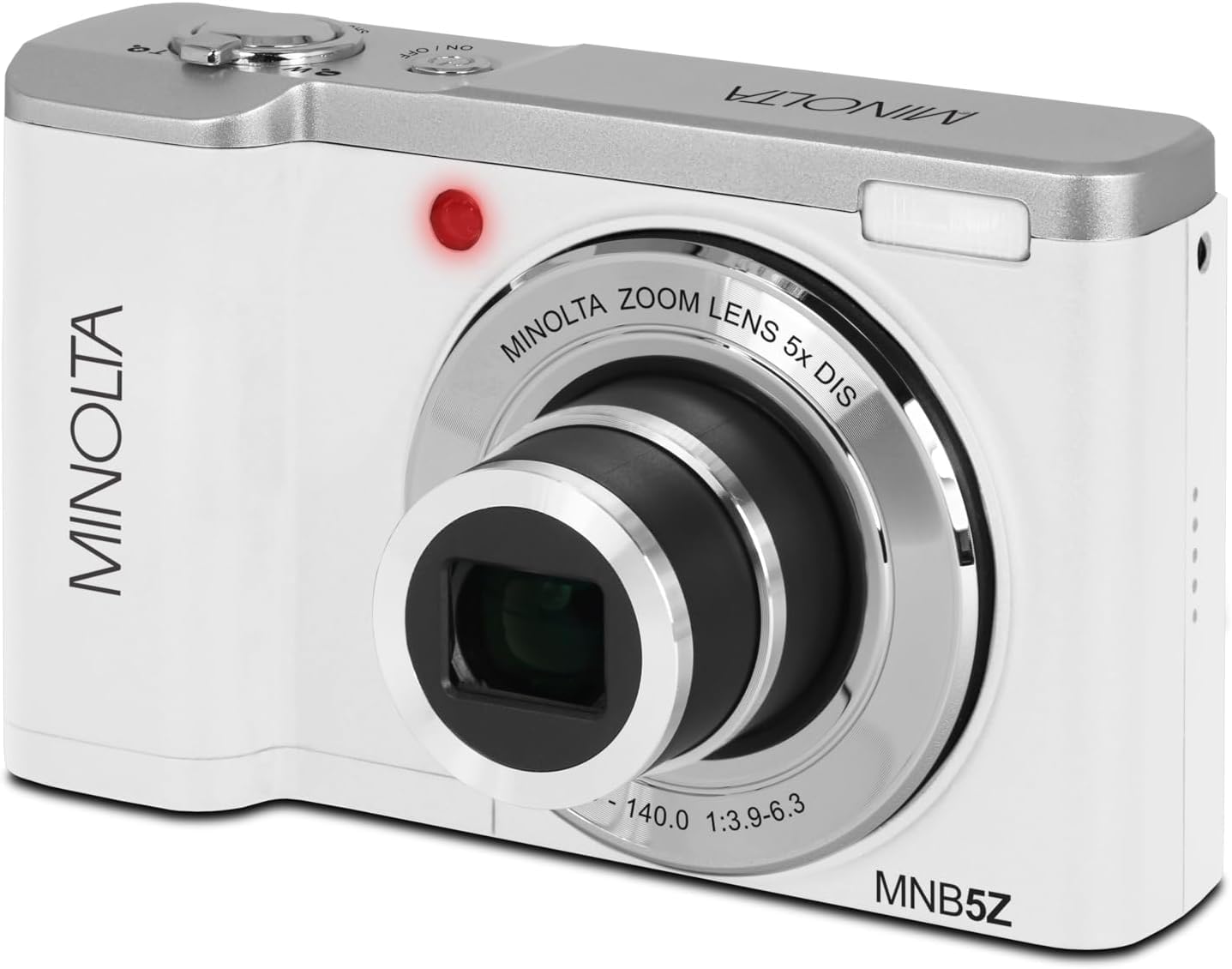
છબી: આગળ view of the Minolta MNB5Z camera, showing the lens extended for capturing images, with the Minolta branding visible.
- Turn on the camera and ensure it is in Photo mode.
- Frame your shot using the 2.8-inch IPS touchscreen.
- 5x ઓપ્ટિકલ ઝૂમને સમાયોજિત કરવા માટે ઝૂમ લીવરનો ઉપયોગ કરો.
- Press the shutter button halfway down to allow the camera to focus. The focus indicator will confirm focus.
- Press the shutter button fully to capture the photo.
- ફ્લેશ: The built-in flash can be set to Auto, On/Fill, or Off via the menu.
- શૂટિંગ મોડ્સ: Access various modes like Photo Burst, Time-Lapse, and Slow Motion via the Mode button or touchscreen menu.
3. રેકોર્ડિંગ વિડિઓઝ
- Turn on the camera and switch to Video mode using the Mode button.
- Frame your subject on the touchscreen.
- Press the shutter button to start recording. A recording indicator will appear on the screen.
- રેકોર્ડિંગ બંધ કરવા માટે ફરીથી શટર બટન દબાવો.
- The camera records in 5K Ultra HD resolution and includes a built-in microphone for audio capture.
4. પ્લેબેક
- Press the Playback button to enter playback mode.
- Use the directional pad or swipe on the touchscreen to browse through your photos and videos.
- માટે OK બટન દબાવો view વિડિઓ જુઓ અથવા ફોટામાં ઝૂમ કરો.
- Press the Playback button again to exit playback mode.
5. કેમેરા સેટિંગ્સ
- Press the Menu button to access camera settings.
- Use the directional pad or touchscreen to navigate through options such as resolution, white balance, ISO, exposure compensation, and color filters.
- Select an option and press OK to confirm or adjust.
- મેનુમાંથી બહાર નીકળવા માટે ફરીથી મેનુ બટન દબાવો.
૩. કમ્પ્યુટર (USB) સાથે કનેક્ટ કરવું
- ખાતરી કરો કે કેમેરા બંધ છે.
- પ્રદાન કરેલ USB કેબલનો ઉપયોગ કરીને કેમેરાને તમારા કમ્પ્યુટર સાથે કનેક્ટ કરો.
- Turn on the camera. It should be recognized as a removable disk or media device.
- You can now transfer photos and videos to your computer.
7. Wi-Fi કનેક્ટિવિટી
The Minolta MNB5Z features Wi-Fi connectivity for wireless transfer of images and remote control via a compatible smartphone application (if available). Refer to the camera's on-screen menu for Wi-Fi setup instructions and pairing with your device.
જાળવણી
1. કેમેરા સાફ કરવો
- કેમેરા બોડી સાફ કરવા માટે નરમ, લિન્ટ-ફ્રી કાપડનો ઉપયોગ કરો.
- For the lens and screen, use a specialized lens cleaning cloth and solution. Avoid harsh chemicals.
- Gently blow away dust from the lens surface before wiping.
2. સંગ્રહ

છબી: આગળ view of the Minolta MNB5Z camera with its lens retracted, demonstrating its compact form factor for easy storage in the included camera bag.
- When not in use, store the camera in the provided camera bag to protect it from dust and scratches.
- જો કેમેરા લાંબા સમય સુધી ઉપયોગમાં ન આવે તો બેટરી કાઢી નાખો.
- Store in a cool, dry place, away from extreme temperatures and humidity.
મુશ્કેલીનિવારણ
| સમસ્યા | ઉકેલ |
|---|---|
| કેમેરા ચાલુ થતો નથી. | Ensure the battery is correctly inserted and fully charged. Try charging the battery for at least 2 hours. |
| ફોટા/વિડિયો લઈ શકાતા નથી. | Check if the memory card is inserted correctly and has sufficient free space. Ensure the camera is in the correct mode (Photo/Video). |
| છબીઓ ઝાંખી છે. | Ensure the lens is clean. Press the shutter button halfway to allow the camera to focus before fully pressing. Use digital image stabilization in shaky conditions. |
| Flash is not working. | Check flash settings in the menu to ensure it is not set to 'Off'. |
| કેમેરા થીજી જાય છે અથવા પ્રતિભાવવિહીન થઈ જાય છે. | Remove the battery, wait a few seconds, and reinsert it to reset the camera. |
વિશિષ્ટતાઓ
| લક્ષણ | વિગત |
|---|---|
| મોડેલનું નામ | MNB5Z |
| ફોટો રિઝોલ્યુશન | 56 મેગાપિક્સેલ |
| વિડિઓ રિઝોલ્યુશન | 5K Ultra HD (30 FPS) |
| ઓપ્ટિકલ ઝૂમ | 5x |
| છબી સ્થિરીકરણ | ડિજિટલ |
| સ્ક્રીન માપ | ૩.૦ ઇંચ IPS ટચસ્ક્રીન |
| મેમરી કાર્ડ સપોર્ટ | microSD, microSDHC (up to 256GB) |
| કનેક્ટિવિટી | USB, Wi-Fi |
| બેટરીનો પ્રકાર | લિથિયમ આયન |
| ફ્લેશ | Built-In (Auto, On/Fill) |
| સેન્સર પ્રકાર | CMOS |
| ન્યૂનતમ શટર ઝડપ | 1/4000 સે |
| આધારભૂત File ફોર્મેટ્સ | JPEG (Photos), MP4 (Videos) |
| વસ્તુનું વજન | 2.37 પાઉન્ડ |
વોરંટી અને આધાર
Minolta products are manufactured to the highest quality standards. For information regarding your product's warranty, please refer to the warranty card included in your package or visit the official Minolta support website. For technical assistance, troubleshooting, or service inquiries, please contact Minolta customer support.
Supportનલાઇન સપોર્ટ: Visit the official Minolta webવારંવાર પૂછાતા પ્રશ્નો, ડ્રાઇવર ડાઉનલોડ્સ અને સંપર્ક માહિતી માટેની સાઇટ.
ગ્રાહક સેવા: Refer to your product packaging or the Minolta webગ્રાહક સેવા સંપર્ક વિગતો માટે સાઇટ.