
1. પરિચય
Thank you for choosing the NOENNULL LED Digital Timer. This device is designed to assist with various timing needs, offering both countdown and count-up functions with multiple reminder modes. Please read this manual carefully to ensure proper use and to maximize the timer's functionality.
2. સલામતી માહિતી
- Keep the device away from water and high humidity to prevent damage.
- Do not expose the timer to extreme temperatures or direct sunlight for extended periods.
- ફક્ત ઉલ્લેખિત બેટરી પ્રકાર (2 x AAA બેટરી) નો ઉપયોગ કરો.
- જૂની અને નવી બેટરીઓ અથવા વિવિધ પ્રકારની બેટરીઓનું મિશ્રણ કરશો નહીં.
- સ્થાનિક નિયમો અનુસાર વપરાયેલી બેટરીનો નિકાલ કરો.
- બાળકોની પહોંચથી દૂર રાખો.
3. પેકેજ સામગ્રી
અનપેક કરતી વખતે, કૃપા કરીને ખાતરી કરો કે બધી વસ્તુઓ હાજર છે:
- 1 x NOENNULL LED Digital Timer
- ૧ x વપરાશકર્તા માર્ગદર્શિકા (આ દસ્તાવેજ)
Note: 2 x AAA batteries are required for operation and are not included in the package.
4. ઉત્પાદન ઓવરview
Familiarize yourself with the timer's components and controls.

આકૃતિ 4.1: આગળ view of the NOENNULL LED Digital Timer, showing the large LED display and control buttons (M, S, CLEAR, SP/ST) at the bottom.

આકૃતિ 4.2: બાજુ view of the timer, highlighting the reminder mode switch with icons for high volume, low volume, silent/flash, and vibration modes.

આકૃતિ 4.3: વિરુદ્ધ બાજુ view of the timer, showing the brightness adjustment switch and the ECO (power-saving) mode switch.
નિયંત્રણો અને સુવિધાઓ:
- એલઇડી ડિસ્પ્લે: Large, clear digital display for time.
- M બટન: Used to set minutes.
- એસ બટન: Used to set seconds.
- સાફ કરો બટન: Resets the timer to 00:00.
- SP/ST Button: Starts and stops the timer. Also used to return to the last set time after a countdown.
- Reminder Mode Switch: Located on the side, allows selection between high volume (80-90dB), low volume (60-75dB), silent with flash, and vibration modes.
- બ્રાઇટનેસ સ્વિચ: Located on the side, adjusts display brightness between two levels.
- ECO મોડ સ્વિચ: Located on the side, enables power-saving mode where the screen turns off after 10 seconds of inactivity.
- મેગ્નેટિક બેક: Two circular magnets for attachment to metal surfaces.
- રિટ્રેક્ટેબલ સ્ટેન્ડ: ટેબલટોપ પ્લેસમેન્ટ માટે.
- ફોલ્ડેબલ હૂક: For hanging the timer.
5. સેટઅપ
5.1 બેટરી ઇન્સ્ટોલેશન
The timer requires 2 x AAA batteries (not included).
- Locate the battery compartment cover on the back of the timer.
- કવર ખોલીને સ્લાઇડ કરો.
- કમ્પાર્ટમેન્ટની અંદર દર્શાવેલ યોગ્ય ધ્રુવીયતા (+ અને -) સુનિશ્ચિત કરીને, બે AAA બેટરી દાખલ કરો.
- બેટરી કમ્પાર્ટમેન્ટ કવર સુરક્ષિત રીતે બંધ કરો.
The timer display should illuminate upon successful battery installation.
6. ઓપરેટિંગ સૂચનાઓ
6.1 Setting the Timer (Countdown)
The timer supports countdowns from 1 second up to 9 hours, 59 minutes, and 59 seconds.
- Ensure the timer is stopped (display shows 00:00 or a paused time). If it's counting, press the SP/ST button to pause it.
- દબાવો M button repeatedly to set the desired minutes. Hold the M ઝડપી ગોઠવણ માટે બટન.
- દબાવો S button repeatedly to set the desired seconds. Hold the S ઝડપી ગોઠવણ માટે બટન.
- ઇચ્છિત સમય સેટ થઈ જાય પછી, દબાવો SP/ST કાઉન્ટડાઉન શરૂ કરવા માટે બટન.
- To pause the countdown, press SP/ST ફરી. દબાવો SP/ST ફરી શરૂ કરવા માટે.
- When the countdown reaches 00:00, the alarm will sound/vibrate/flash according to the selected reminder mode.
- એલાર્મ બંધ કરવા માટે, કોઈપણ બટન દબાવો.
૪.૪ કાઉન્ટ-અપ ફંક્શન
The timer can also function as a stopwatch, counting up from 00:00.
- Ensure the timer display is at 00:00. If not, press the સાફ કરો બટન
- દબાવો SP/ST button to start counting up.
- To pause the count-up, press SP/ST ફરી. દબાવો SP/ST ફરી શરૂ કરવા માટે.
- To reset the count-up timer to 00:00, press the સાફ કરો button while the timer is paused or stopped.
6.3 મેમરી કાર્ય
After a countdown ends and the alarm sounds, pressing the SP/ST button will return the display to the last set countdown time. This is useful for repetitive tasks.
6.4 Adjusting Reminder Modes
Use the Reminder Mode Switch on the side of the timer to select your preferred alert method:
- ઉચ્ચ વોલ્યુમ: 80-90dB audible alarm.
- ઓછું વોલ્યુમ: 60-75dB audible alarm.
- Silent & Flash: The display will flash when the timer reaches zero, with no sound.
- કંપન: The timer will vibrate when the timer reaches zero, with no sound.
૫.૨ ડિસ્પ્લે બ્રાઇટનેસ એડજસ્ટ કરવી
Use the Brightness Switch on the side of the timer to toggle between two brightness levels for the LED display, suitable for different lighting conditions.
6.6 ECO (Power Saving) Mode
To conserve battery life, activate the ECO Mode Switch. When enabled, the display will automatically turn off after 10 seconds of inactivity (after setting a countdown or if the timer is paused/stopped). Press any button to reactivate the display.
7. માઉન્ટિંગ વિકલ્પો
The NOENNULL LED Digital Timer offers versatile placement options:
- ચુંબકીય જોડાણ: The two circular magnets on the back allow you to securely attach the timer to metal surfaces such as refrigerator doors, whiteboards, or metal cabinets.
- ટેબલટોપ સ્ટેન્ડ: Pull out the retractable bracket on the back to stand the timer upright on any flat surface, like a desk or kitchen counter.
- હેંગિંગ હૂક: Utilize the foldable hook on the back to hang the timer on a nail, hook, or pegboard.
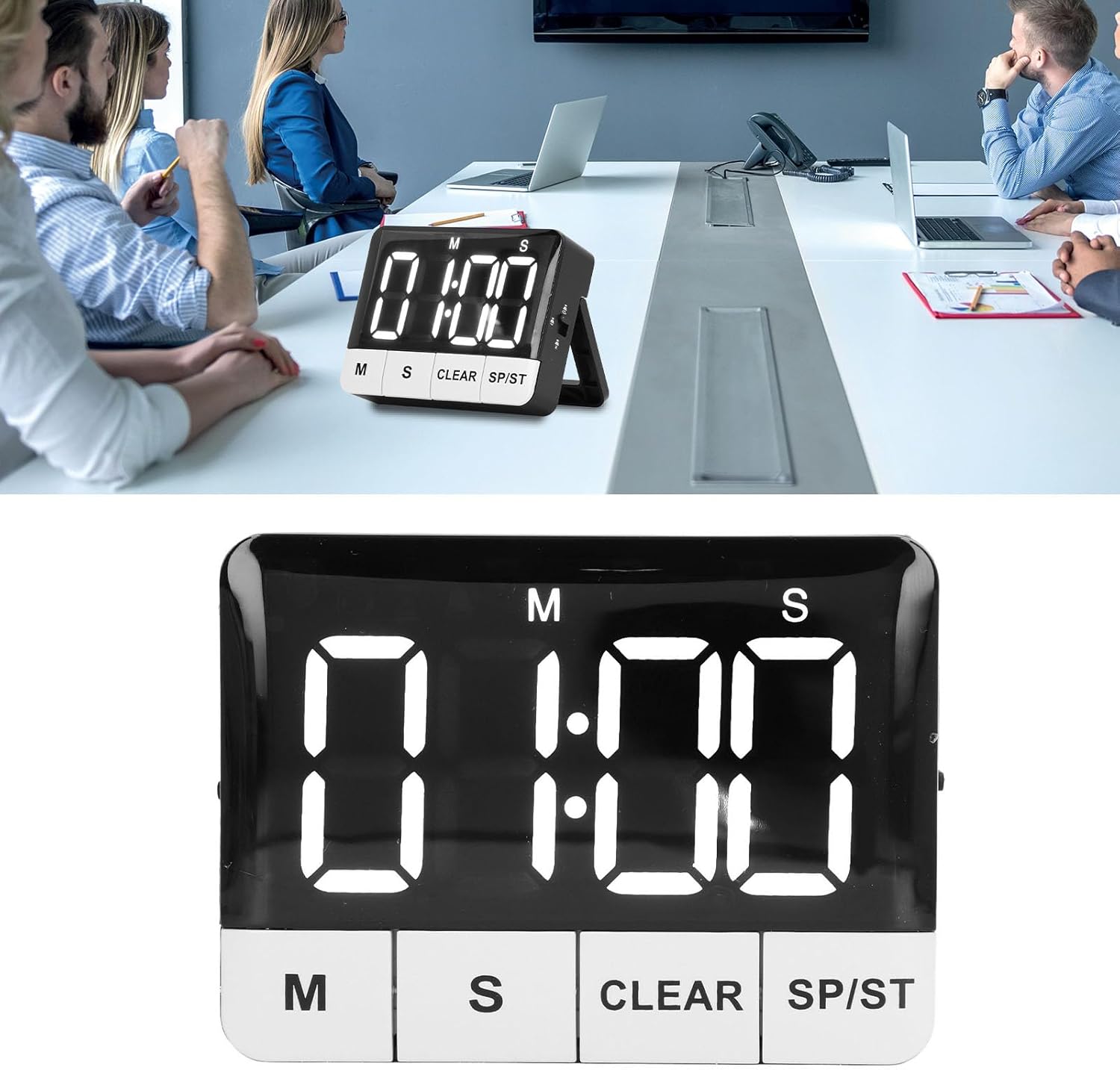
આકૃતિ 7.1: The timer displayed on a table, demonstrating its use in a professional setting.

આકૃતિ 7.2: The timer positioned on a kitchen counter, illustrating its versatility for home use.
8. જાળવણી
8.1 સફાઈ
To clean the timer, wipe it with a soft, dry, or slightly damp કાપડ. ઘર્ષક ક્લીનર્સ, સોલવન્ટ્સનો ઉપયોગ કરશો નહીં, અથવા ઉપકરણને પાણીમાં બોળશો નહીં.
8.2 બેટરી રિપ્લેસમેન્ટ
When the display becomes dim or the timer functions erratically, it's time to replace the batteries. Follow the steps in Section 5.1 Battery Installation to replace the 2 x AAA batteries.
9. મુશ્કેલીનિવારણ
| સમસ્યા | સંભવિત કારણ | ઉકેલ |
|---|---|---|
| Timer does not turn on or display is blank. | બેટરીઓ મૃત અથવા ખોટી રીતે ઇન્સ્ટોલ કરેલી છે. | બેટરીની પોલેરિટી તપાસો. નવી AAA બેટરીથી બદલો. |
| પ્રદર્શન મંદ છે. | Low batteries or brightness setting is on low. | Replace batteries. Adjust the Brightness Switch to a higher setting. |
| Alarm is not sounding. | Reminder mode is set to Silent & Flash or Vibration. | Adjust the Reminder Mode Switch to High Volume or Low Volume. |
| Timer automatically turns off. | ECO (Power Saving) Mode is enabled. | This is normal behavior. Press any button to reactivate. If you prefer the display to stay on, disable ECO Mode. |
| Timer does not reset to last set time. | Memory function only works after a countdown completes and alarm sounds. | Ensure the countdown completes fully before pressing SP/ST to recall the last time. |
10. સ્પષ્ટીકરણો
| લક્ષણ | વિગત |
|---|---|
| આઇટમ પ્રકાર | ડિજિટલ ટાઈમર |
| સામગ્રી | ABS |
| બેટરીનો પ્રકાર | 2 x AAA બેટરી (શામેલ નથી) |
| Countdown/Count-up Range | 1 સેકન્ડથી 9 કલાક, 59 મિનિટ, 59 સેકંડ |
| રીમાઇન્ડર મોડ્સ | High Volume (80-90dB), Low Volume (60-75dB), Silent & Flash, Vibration |
| તેજ દર્શાવો | 2 સ્તર એડજસ્ટેબલ |
| પાવર સેવિંગ મોડ | ECO mode (screen off after 10 seconds) |
| માઉન્ટિંગ વિકલ્પો | Magnetic back, Retractable stand, Foldable hook |
| ઉત્પાદન પરિમાણો | 3.94 x 3.15 x 1.57 ઇંચ |
| વસ્તુનું વજન | 3.21 ઔંસ |
| મોડલ નંબર | NOENNULL0ugtgdayqx |
| ASIN | B0DSJCLCS1 |
11. વોરંટી અને સપોર્ટ
For warranty information or technical support, please refer to the retailer's return policy or contact the seller directly through your purchase platform. Keep your purchase receipt as proof of purchase.