
1. પરિચય
Thank you for choosing the LIVALL MC1 Pro Full Face Motorcycle Helmet. This advanced helmet combines superior protection with smart technology, including integrated LED lighting, Bluetooth intercom, and a 1080P HD camera. Designed for safety and connectivity, the MC1 Pro is certified by DOT and ECE06 safety standards, ensuring a secure and informed riding experience.
This manual provides essential information for the proper use, maintenance, and care of your helmet. Please read it thoroughly before first use and retain it for future reference.

Image: The LIVALL MC1 Pro helmet, showcasing its sleek design and integrated lighting elements.
2. સલામતી માહિતી
Your safety is paramount. Always adhere to local traffic laws and regulations. This helmet is designed to provide protection but cannot guarantee absolute safety in all situations.
- DOT and ECE06 Standards: The MC1 Pro helmet meets and exceeds DOT and ECE06 safety standards. Ensure the helmet fits correctly and the chin strap is securely fastened before every ride.
- યોગ્ય ફિટ: A helmet that is too loose or too tight can compromise safety. Refer to the 'Fit Guide' section for proper sizing.
- Visor Care: Keep the visor clean and free from scratches to maintain clear visibility. Replace a damaged visor immediately.
- ઇલેક્ટ્રોનિક સુવિધાઓ: While the electronic features enhance your ride, avoid excessive distraction. Focus on the road and your surroundings at all times. Do not operate complex functions while riding.
- બેટરી સલામતી: Do not expose the helmet to extreme temperatures or puncture the battery. Use only the provided charging cable.
- અસરથી નુકસાન: If the helmet sustains a significant impact, even if no visible damage is present, it should be replaced. The protective capabilities may be compromised.
3. ઉત્પાદન ઘટકો
The LIVALL MC1 Pro helmet package includes the following items:
- 1 x LIVALL MC1 Pro Motorcycle Helmet
- ૧ x સૂચના માર્ગદર્શિકા (આ દસ્તાવેજ)
- 1 x USB-C to 4P Cable (for charging and data transfer)
- 1 x BR60 Remote Control (for audio and video system control)
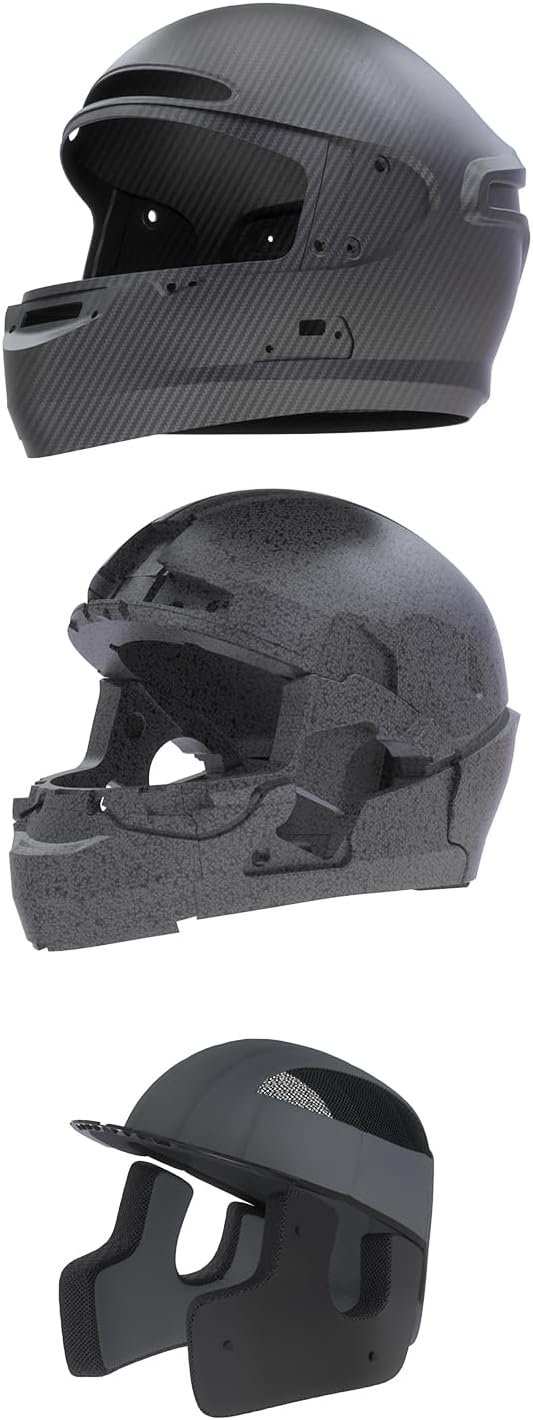
છબી: વિસ્ફોટ થયો view of the helmet's internal structure, highlighting the carbon fiber shell, EPS foam, and removable liner.

Image: Close-up of the helmet showing the integrated camera, double D-ring buckle, and ventilation system.
4. સેટઅપ
૧.૧ અનબોક્સિંગ અને પ્રારંભિક નિરીક્ષણ
Carefully remove the helmet and all accessories from the packaging. Inspect all components for any signs of damage. If any items are missing or damaged, contact LIVALL customer support immediately.
૩.૨ હેલ્મેટ ચાર્જ કરવું
Before first use, fully charge the helmet's internal battery. Connect the provided USB-C to 4P cable to the helmet's charging port and a compatible USB power adapter (not included). The charging indicator light will show the charging status. A full charge typically takes approximately 3 hours.
૪.૩ ફિટ માર્ગદર્શિકા
A proper fit is crucial for safety and comfort. Follow these steps to ensure your helmet fits correctly:
- Measure Your Head: Use a flexible measuring tape or a piece of string and a ruler. Wrap the cord around your head just above your eyebrows, ensuring it's level.
- Consult the Size Chart: Compare your measurement to the chart below to find the recommended size.
- Try On the Helmet: The helmet should feel snug all around your head, without uncomfortable pressure points. It should not move freely when you shake your head.
- ચિન સ્ટ્રેપ: Fasten the double D-ring buckle securely. The strap should be tight enough that you cannot pull the helmet off your head by rolling it forward or backward.
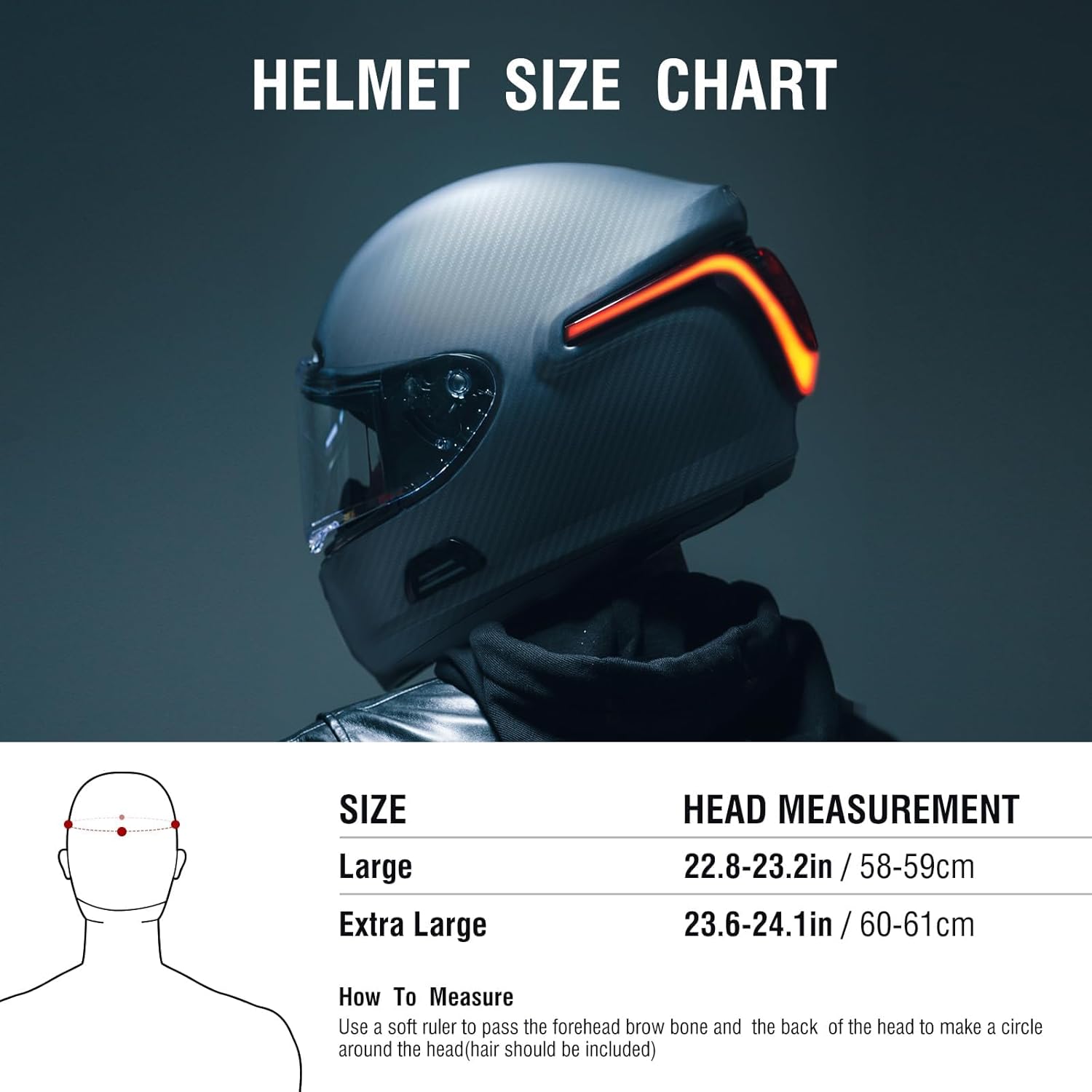
Image: A size chart indicating head measurements for Large (22.83-23.22 in / 58-59 cm) and Extra Large (23.62-24.01 in / 60-61 cm) helmet sizes, along with instructions on how to measure your head.
Note: If your head circumference falls between sizes, it is generally recommended to choose the larger size for comfort.
4.4 LIVALL Riding App Download
To unlock the full features of your MC1 Pro helmet, download the LIVALL Riding App from your smartphone's app store (iOS App Store or Google Play Store). The app is essential for SOS alerts, advanced settings, and firmware updates.
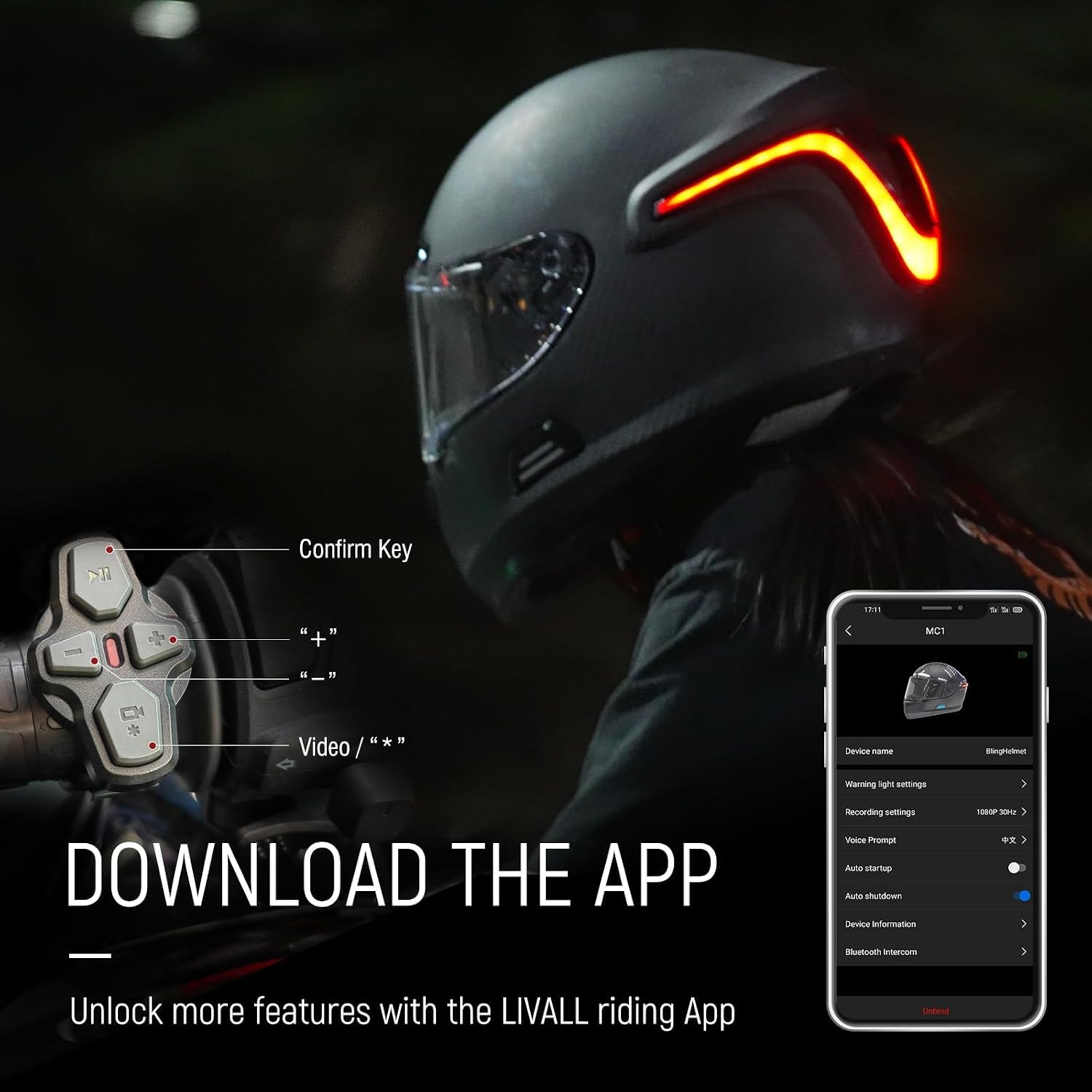
Image: A rider wearing the helmet, with an overlay showing the BR60 remote control and a smartphone displaying the LIVALL Riding App interface, prompting to download the app.
૩.૩ પ્રારંભિક બ્લૂટૂથ જોડી
After downloading the app and fully charging the helmet:
- Turn on your helmet (refer to Section 5.1).
- તમારા સ્માર્ટફોન પર બ્લૂટૂથ સક્ષમ કરો.
- Open the LIVALL Riding App and follow the on-screen instructions to pair your helmet.
- The app will guide you through connecting the helmet's Bluetooth for intercom, audio, and data features.
5. ઓપરેટિંગ સૂચનાઓ
5.1 પાવર ચાલુ/બંધ
To power on the helmet, press and hold the main power button (location specified in quick start guide) for approximately 3 seconds until you hear an audible prompt and the LED lights illuminate. To power off, press and hold the same button for 3 seconds until you hear a power-off prompt.
The MC1 Pro also features Auto-Standby and Auto-Wakeup for efficient power use, which can be configured via the LIVALL Riding App.
5.2 બ્લૂટૂથ ઇન્ટરકોમ
The integrated Bluetooth intercom allows communication with up to 5 users at a distance of up to 0.75 miles (1.2 km). Ensure all helmets are paired via the LIVALL Riding App for group intercom functionality. Refer to the app's instructions for setting up and managing intercom groups.
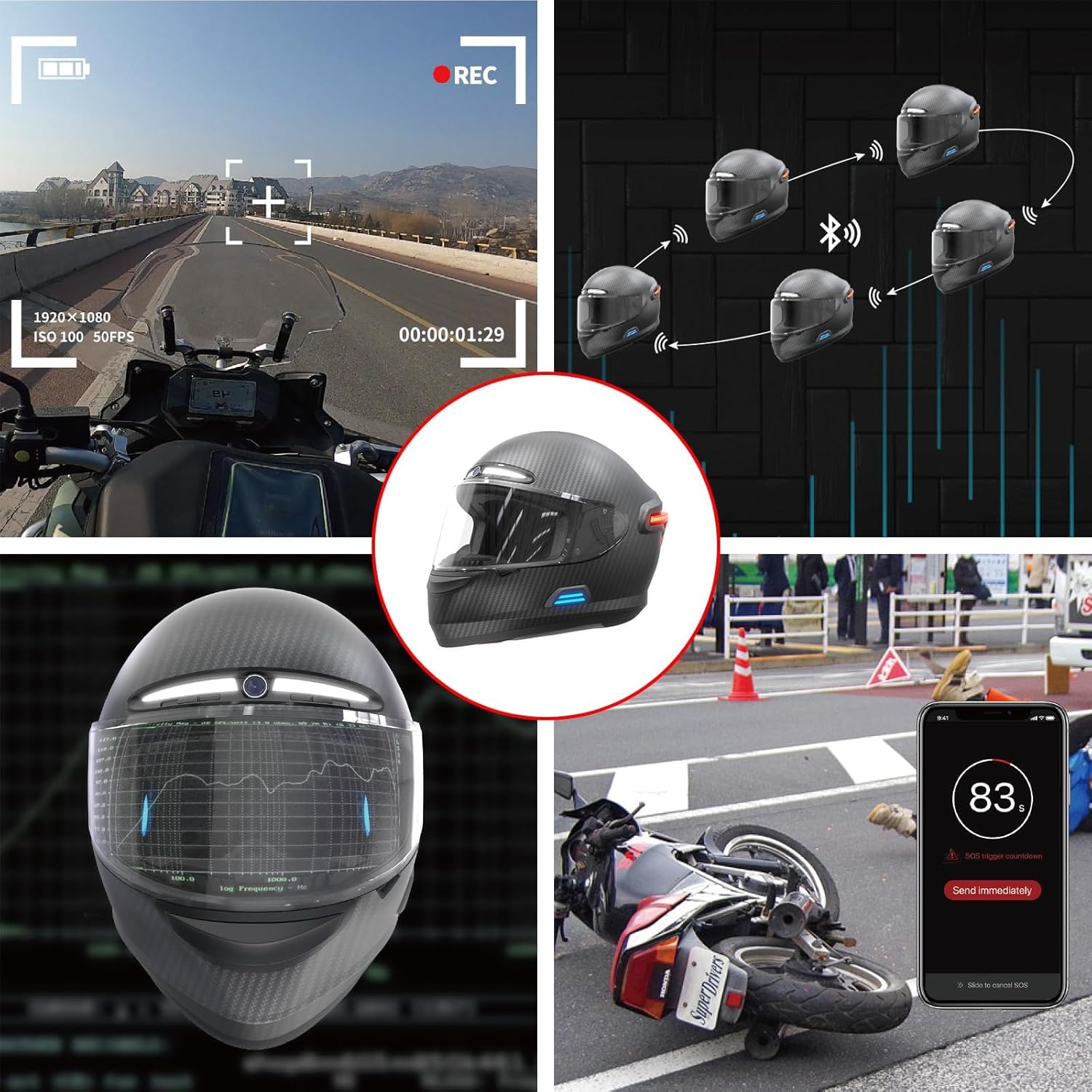
Image: Depicts multiple helmets connected via Bluetooth for intercom communication, alongside an illustration of the SOS alert system.
5.3 Audio Playback and Phone Calls
Once paired with your smartphone, you can stream music, listen to navigation voice commands, and manage phone calls directly through the helmet's high-fidelity speakers. The noise-cancelling microphone ensures clear communication.
- સંગીત પ્લેબેક: Control playback (play/pause, skip tracks) using the BR60 remote control or your smartphone.
- ફોન કોલ્સ: Answer incoming calls with a single press of the designated button on the BR60 remote or helmet. Reject calls by pressing and holding.
- વૉઇસ આદેશો: Utilize your phone's voice assistant (e.g., Siri, Google Assistant) through the helmet for hands-free operation.

Image: Shows a smartphone connected to the helmet via Bluetooth, illustrating capabilities like streaming music on-the-go and receiving navigation voice commands.
5.4 1080P HD Camera
The MC1 Pro features an integrated 1080P HD camera with a 120° viewing angle to capture your rides. Video recording can be initiated and stopped via the BR60 remote control or the LIVALL Riding App. Recorded footage is stored internally and can be transferred to your computer using the provided USB cable.
- રેકોર્ડિંગ: Press the video button on the BR60 remote to start/stop recording.
- સંગ્રહ: The helmet supports up to 10 hours of recording storage. Regularly transfer important footage to an external device.
- Viewing: Access recorded videos through the LIVALL Riding App or by connecting the helmet to a computer.

Image: A rider on a motorcycle, with an overlay highlighting the 1080P camera and its recording capabilities, including icons for video recording and a remote control.
5.5 એલઇડી લાઇટિંગ
The helmet features integrated LED lighting for enhanced visibility and safety:
- બ્રેક વોર્નિંગ લાઈટ્સ: Automatically illuminate when braking, signaling to traffic behind you.
- Adaptive Warning Lights: Default setting is on, these lights provide additional visibility. They can be turned off via the LIVALL Riding App if desired.
5.6 Patented Fall Detection & SOS Alert
The MC1 Pro is equipped with a patented fall detection function and real-time GPS positioning. In the event of an impact or fall, the helmet automatically activates an emergency signal. An SOS alert, including your current GPS location, is sent to your pre-set emergency contacts through the LIVALL Riding App.
- કટોકટી સંપર્કો: Ensure your emergency contacts are correctly set up in the LIVALL Riding App.
- રદ્દીકરણ: In case of an accidental trigger, you typically have a short countdown period to cancel the SOS alert via the app.

Image: A smartphone displaying an SOS countdown and a map with GPS location, illustrating how the app sends an alert to emergency contacts in the event of a fall.
5.7 BR60 Remote Control
The BR60 remote control provides convenient access to the helmet's audio and video functions without needing to reach for your phone. Familiarize yourself with the button layout and functions as detailed in the quick start guide or app instructions.
6. જાળવણી
Regular maintenance will prolong the life and performance of your LIVALL MC1 Pro helmet.
- શેલની સફાઈ: સોફ્ટનો ઉપયોગ કરો, ડીamp cloth and mild soap to clean the helmet's exterior. Avoid abrasive cleaners or solvents, as they can damage the finish and materials.
- વિઝરની સફાઈ: Clean the visor with a soft cloth and warm water. For stubborn dirt, use a specialized helmet visor cleaner. Do not use harsh chemicals.
- Removable Liner: The helmet features a removable liner for easy cleaning. Follow the instructions in the quick start guide for removal and reinstallation. Hand wash the liner with mild soap and water, then air dry completely before reinserting.
- બેટરી સંભાળ: To maintain battery health, avoid fully discharging the helmet frequently. If storing for an extended period, charge the battery to approximately 50-70% and store in a cool, dry place. Recharge every few months to prevent deep discharge.
- સંગ્રહ: હેલ્મેટને સીધા સૂર્યપ્રકાશ અને અતિશય તાપમાનથી દૂર ઠંડી, સૂકી જગ્યાએ રાખો. તેને ધૂળ અને સ્ક્રેચથી બચાવવા માટે હેલ્મેટ બેગનો ઉપયોગ કરો.
7. મુશ્કેલીનિવારણ
If you encounter issues with your LIVALL MC1 Pro helmet, refer to the following common problems and solutions:
| સમસ્યા | સંભવિત કારણ | ઉકેલ |
|---|---|---|
| Helmet won't power on. | બેટરી ઓછી છે; પાવર બટન લાંબા સમય સુધી દબાવ્યું નથી. | Charge the helmet fully. Press and hold the power button for 3 seconds. |
| બ્લૂટૂથ કનેક્ટ થઈ રહ્યું નથી. | Helmet not in pairing mode; Bluetooth off on phone; interference. | Ensure helmet is on and in pairing mode. Turn phone's Bluetooth off/on. Restart both devices. Try pairing via LIVALL Riding App. |
| ઇન્ટરકોમ કામ કરતું નથી. | Not all helmets paired; out of range; app settings. | Verify all helmets are paired in the app. Ensure riders are within 0.75 miles (1.2 km). Check intercom settings in the LIVALL Riding App. |
| કેમેરા રેકોર્ડિંગ કરતો નથી. | Insufficient storage; camera error. | Transfer existing footage to free up space. Restart the helmet. Check app for camera status. |
| SOS alert triggered accidentally. | ખોટી શોધ. | Quickly cancel the alert within the countdown period via the LIVALL Riding App. |
If the problem persists after trying these solutions, please contact LIVALL customer support for further assistance.
8. સ્પષ્ટીકરણો
| લક્ષણ | વિગત |
|---|---|
| મોડેલનું નામ | MC1 પ્રો |
| શેલ સામગ્રી | High-strength Carbon Fiber |
| સલામતી ધોરણો | DOT, ECE06 Approved |
| Bluetooth Intercom Range | Up to 0.75 miles (1.2 km) for 5 users |
| કેમેરા રીઝોલ્યુશન | 1080P HD with 120° viewઆઈએન એન્ગલ |
| રેકોર્ડિંગ સ્ટોરેજ | 10 કલાક સુધી |
| બેટરી જીવન | Extended battery life mode up to 10 hours (usage dependent) |
| ચાર્જિંગ સમય | Approx. 3 hours (fast charging) |
| વજન | આશરે. 1650 ગ્રામ (3.6 પાઉન્ડ) |
| બંધનો પ્રકાર | Double D-ring Buckle |
| સમાવાયેલ ઘટકો | Helmet, Instruction Manual, USB-C to 4P Cable, BR60 Remote Control |
9. વોરંટી અને સપોર્ટ
9.1 વોરંટી માહિતી
The LIVALL MC1 Pro Full Face Motorcycle Helmet comes with a 1 વર્ષની મર્યાદિત વોરંટી from the date of purchase. This warranty covers manufacturing defects in materials and workmanship under normal use. It does not cover damage resulting from misuse, accidents, unauthorized modifications, or normal wear and tear.
કૃપા કરીને વોરંટી દાવા માટે તમારી ખરીદીનો પુરાવો જાળવી રાખો.
9.2 ગ્રાહક સપોર્ટ
For technical support, warranty claims, or any questions regarding your LIVALL MC1 Pro helmet, please visit the official LIVALL webસાઇટ અથવા તેમના ગ્રાહક સેવા વિભાગનો સંપર્ક કરો. તમે પણ મુલાકાત લઈ શકો છો એમેઝોન પર LIVALL સ્ટોર વધુ માહિતી માટે.