
1. પરિચય
This manual provides instructions for the safe and efficient use of your Generic 300W 6-Pin Power Supply Unit. Please read this manual thoroughly before installation and operation to ensure proper functionality and safety.
સુરક્ષા સાવચેતીઓ:
- Always disconnect power from the wall outlet before installing, removing, or performing any maintenance on the power supply unit.
- પાવર સપ્લાય ખોલશો નહીં casing. There are no user-serviceable parts inside, and opening it may expose you to dangerous voltages
- લાયકાત ધરાવતા કર્મચારીઓને તમામ સેવાનો સંદર્ભ લો.
- Ensure proper ventilation around the power supply unit to prevent overheating.
- Avoid exposing the unit to moisture, extreme temperatures, or corrosive environments.
2. ઉત્પાદન ઓવરview
The Generic 300W 6-Pin Power Supply Unit is designed to provide stable and reliable power for desktop and server computer systems. It features an efficient design suitable for various computing needs.
મુખ્ય લક્ષણો:
- આઉટપુટ વોટtage: 300W
- PFC Type: Active Power Factor Correction for improved efficiency.
- ઠંડક: Equipped with a single fan for effective air cooling.
- ડિઝાઇન: Non-modular cable design.
- કાર્યક્ષમતા: 80 PLUS BRONZE certified for energy efficiency.
- ઇનપુટ વોલ્યુમtage: વિશાળ ઇનપુટ વોલ્યુમને સપોર્ટ કરે છેtag100V-240V AC ની શ્રેણી.
- કનેક્ટર્સ: Includes a 4-pin CPU power connector and a 6-pin connector.
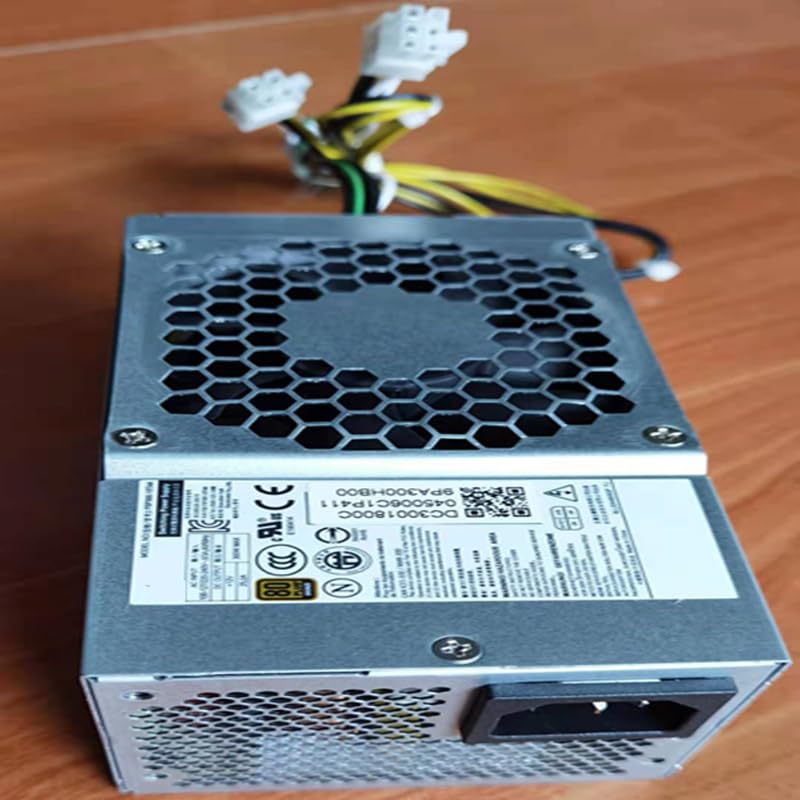
આ છબી ટોચ દર્શાવે છે view of the power supply unit, highlighting the cooling fan and the product's model identification labels.
3. સેટઅપ અને ઇન્સ્ટોલેશન
Follow these steps to properly install the power supply unit into your computer system:
- તૈયારી: Ensure your computer system is completely powered off and disconnected from the main power outlet. Open your computer case.
- જૂનું PSU દૂર કરો (જો લાગુ હોય તો): If replacing an existing power supply, disconnect all cables from the motherboard and components, then unmount and remove the old unit.
- નવું PSU ઇન્સ્ટોલ કરો: Carefully slide the new power supply unit into the designated power supply bay in your computer case.
- સુરક્ષિત PSU: Secure the power supply unit to the computer case using the provided screws.
- કેબલ્સ કનેક્ટ કરો: Connect the necessary power cables to your motherboard and other components. Ensure the 24-pin main power connector is securely attached to the motherboard. Connect the 4-pin CPU power connector to the appropriate socket on your motherboard. Connect any other required cables (e.g., SATA for drives, PCIe for graphics cards if applicable) to your components.
- અંતિમ તપાસ: Double-check all connections to ensure they are firm and correctly seated. Ensure no cables are obstructing fans or airflow.
- કેસ બંધ કરો: Close your computer case and secure it.

This image shows the various power cables extending from the unit, including the 6-pin and 4-pin connectors, which are essential for connecting to the motherboard and other components.
4. ઓપરેટિંગ સૂચનાઓ
After successful installation, follow these steps to operate your power supply unit:
- પાવરથી કનેક્ટ કરો: Connect the power supply to a wall outlet using a compatible AC power cord.
- પાવર ચાલુ: Locate the power switch on the back of the power supply unit and flip it to the 'ON' position (usually indicated by 'I').
- સિસ્ટમ સ્ટાર્ટ-અપ: You can now power on your computer system using its main power button.
આ યુનિટ ઇનપુટ વોલ્યુમને સપોર્ટ કરે છેtage range of 100V to 240V AC, automatically adjusting to the local power grid within this range.

This image displays the rear of the power supply unit, showing the AC power input socket and the exhaust fan grille, which is crucial for heat dissipation.
5. જાળવણી
યોગ્ય જાળવણી તમારા પાવર સપ્લાય યુનિટની આયુષ્ય અને શ્રેષ્ઠ કામગીરીની ખાતરી આપે છે.
સફાઈ:
- Periodically inspect the power supply's fan and ventilation grilles for dust accumulation.
- With the computer powered off and unplugged, use compressed air to gently clear dust from the fan blades and grilles. Do not use liquid cleaners.
- Avoid inserting any objects into the fan or ventilation openings.
પર્યાવરણીય પરિસ્થિતિઓ:
- Operate the power supply in a well-ventilated area to prevent heat buildup.
- Keep the unit away from direct sunlight, excessive heat sources, high humidity, and corrosive chemicals.
6. મુશ્કેલીનિવારણ
If you encounter issues with your power supply unit, refer to the following troubleshooting guide:
સિસ્ટમમાં પાવર નથી:
- પાવર કોર્ડ તપાસ: Ensure the AC power cord is securely connected to both the power supply unit and a functional wall outlet.
- વીજળીનું બટન: Verify that the power switch on the back of the power supply is in the 'ON' (I) position.
- Internal Connections: Confirm all internal power connections (24-pin motherboard, 4-pin CPU, etc.) are firmly seated.
- વોલ આઉટલેટ: Test the wall outlet with another device to ensure it is providing power.
સિસ્ટમ અસ્થિરતા અથવા રેન્ડમ શટડાઉન:
- વાટtage Sufficiency: Ensure the 300W output of the power supply is sufficient for all connected components. An underpowered system can lead to instability.
- વેન્ટિલેશન: Check for proper airflow within your computer case to prevent the power supply or other components from overheating.
- ઘટક તપાસ: Temporarily disconnect non-essential components to see if the issue persists, which might indicate a faulty component drawing too much power.
If issues persist after performing these checks, it is recommended to consult a qualified computer technician.
7. સ્પષ્ટીકરણો
Below are the detailed technical specifications for the Generic 300W 6-Pin Power Supply Unit:
| લક્ષણ | સ્પષ્ટીકરણ |
|---|---|
| ઉત્પાદનના પરિમાણો (L x W x H) | 15 x 8.2 x 6.5 સેમી |
| વસ્તુનું વજન | 1 કિગ્રા |
| બ્રાન્ડ | સામાન્ય |
| સુસંગત ઉપકરણો | ATX form factor desktop and server systems |
| કનેક્ટર પ્રકાર | ATX, 24 Pin System Bus, 4 Pin CPU, 6 Pin |
| આઉટપુટ વોટtage | 300W |
| ફોર્મ ફેક્ટર | એટીએક્સ |
| ઠંડક પદ્ધતિ | Air (1 Fan) |
| ઇનપુટ વોલ્યુમtage રેન્જ | 100V - 240V AC |
| PFC પ્રકાર | સક્રિય |
| 80 પ્લસ પ્રમાણપત્ર | 80 PLUS BRONZE |
| પ્રમાણપત્રો | CE, DOT, EAC, EPA, FCC, GMP, RoHS, TGA, UL, KC, pse, WEEE |
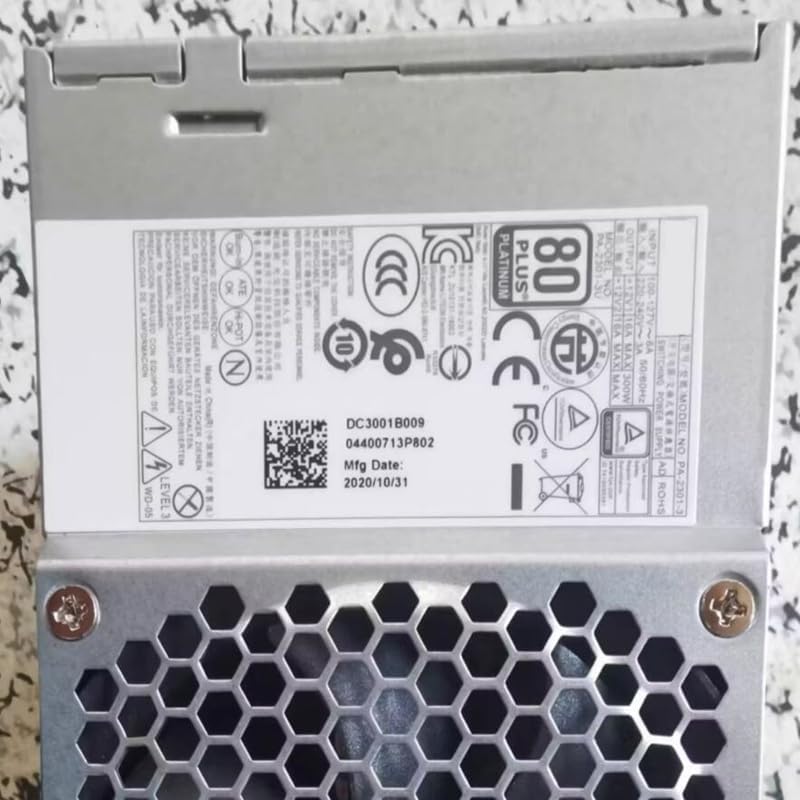
This image displays the product label, which includes important regulatory certifications, electrical specifications, and manufacturing details.
8. વોરંટી અને સપોર્ટ
For specific warranty information regarding your Generic 300W 6-Pin Power Supply Unit, please refer to the retailer from whom you purchased the product or consult your purchase documentation.
For technical support or further assistance, please contact the vendor or a qualified computer technician. Do not attempt to repair the unit yourself.